- Capabilities
- Getting started
- Architecture center
- Platform updates
Application scopes
Every Developer Console application corresponds to an OAuth client that is responsible for handling Foundry authorization. During OAuth authorization, third-party applications are granted tokens that are restricted by scopes to only permit certain operations and resources. The scopes applied to a given token are the intersection of the following:
- The permissions of the specific application user (for authorization code grants) or service user (for client credentials grants) in Foundry. Review the authentication grant types documentation for further details.
- The maximum scope set for the given Developer Console application or standalone OAuth client. An application can also be left unscoped.
- The scope requested by the third-party application as part of a token request, also known as "authorization time". Token requests that do not request a scope will default to allowing all of the user’s permissions that are allowed by the OAuth client’s maximum scope. No additional restrictions will be applied at authorization time.
All tokens must have scopes restricted either at the OAuth client level (through the maximum scope) or at authorization time (through the token request). Attempting to request a token with no scope restrictions will generate a token with no permissions.
Configure an application's maximum scope
An application can be set as scoped or unscoped.
- Scoped applications are created by default. This means that the Developer Console controls the resources and operations an application may use in Foundry.
- Unscoped applications have no maximum allowed resource or operation controls. Only the user permissions and the operations requested at authorization time are used to determine access.
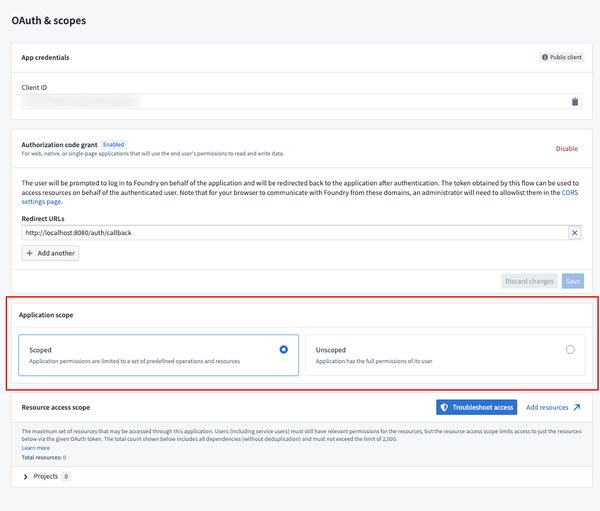
You can switch between a scoped and unscoped application from the OAuth & scopes page under Application scope. Note that switching to an unscoped application removes your current project access and operation scope configuration.
When switching from an unscoped to to a scoped application, you will need to configure project access and platform API operations. Your application may break if it uses resources not added during this configuration.
Scoped applications
Scoped applications control the maximum resources and operations that an application's OAuth client is allowed to request. For example, consider a user who has permission to read a certain Foundry dataset and is querying that dataset via a scoped, third-party application that requests api:use-datasets-read. The user will not have access until two things are added to the application scope:
- The project containing that dataset is added to the application's resource scope
- api` is added to the application's operation scope.
Scoped applications provide increased legibility up front by defining, at build time, everything an application may do on behalf of its user. This minimizes cases of privilege escalation where application code uses the access of its user to take an action that the application builder did not have access to. Scopes also serve as a guaranteed limit on the data Foundry can send to a specific device or system. For example, scopes can guarantee that an application displayed in a control room will never show sensitive content, regardless of the user logged into the application.
Resource scope
The resource scope defines which Foundry resources an application can access. Configure the resource scope in the following locations in Developer Console, accessible from the left navigation panel.
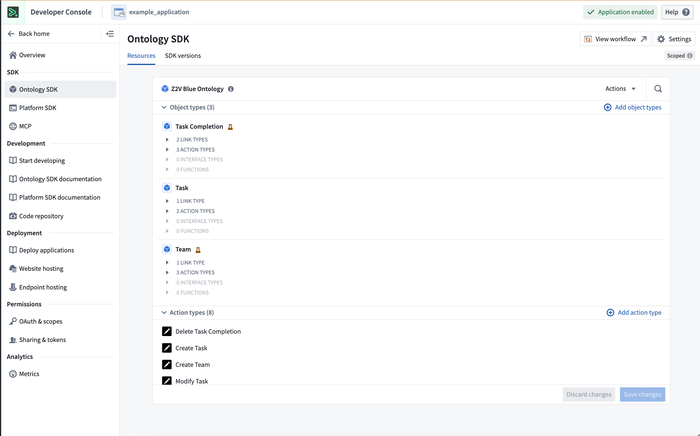
- Ontology SDK tab: If your application interacts with the Ontology (typically using the OSDK), use this tab to add object types, interfaces, actions, and functions to the list of application resources. Adding Ontology resources will change a Developer Console application in two ways:
- The maximum scope will allow access to the listed resources.
- Any new SDKs generated for the application will include the listed resources.
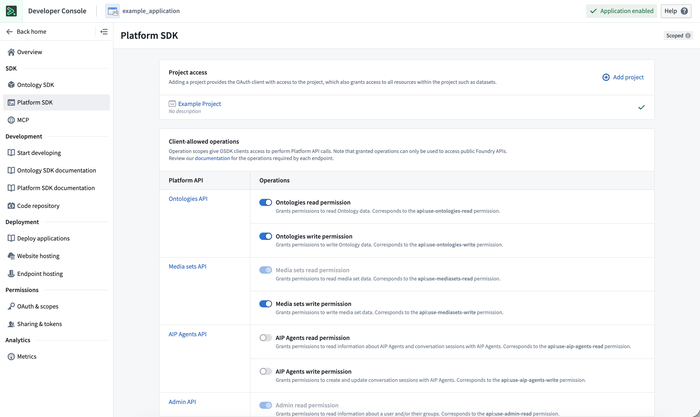
- Platform SDK tab: If your application interacts with platform APIs (typically using platform SDKs), use this tab to add Foundry projects to the resource scope. Scoped applications may only read or write to resources inside these projects. If an application must interact with a Foundry resource that is not inside a project, consider using an unscoped application.
Operation scope
The operation scope defines which API operations an application can perform. Unlike the resource scope, you can only configure the operation scope in the Platform SDK tab.
From here, add allowed operations via API namespaces. Choose the methods an application may use to interact with the selected project resources. Operations are grouped by API namespace, which corresponds to the path of the endpoint; for example, the /admin/ API namespace includes all endpoints with the path /api/{version}/admin/. More details on API namespaces can be found in the API documentation.
API-level security for client-allowed operations
Developer Console applications enforce API-level security for scoped applications, ensuring that every endpoint called by these applications must be explicitly added to the client-allowed operations list in the Platform SDK panel. Unscoped applications are not affected by these changes and will continue to be able to call endpoints that the user has the necessary permissions to access. Note that unscoped applications should generally only be used for programmatic, platform-wide workflows.
Unscoped applications
Unscoped applications only consider the application user's permissions when determining access, rather than restricting access to a predefined set of resources.
By default, custom applications are scoped to encourage stricter security guarantees. Use unscoped applications in the following situations:
- Resources cannot be defined at deployment time (for example, projects that do not yet exist).
- Your application must access administrative primitives outside of projects (for example, spaces, organizations, or enrollments).
- You need to work with endpoints not yet released in the platform API.
Unscoped applications can interact with any resource the application user has access to. Only use unscoped applications with trusted code.
Request a scope at authorization time
In addition to the maximum scope configured in Developer Console, a third-party application can also request an operation scope as part of authentication. As described above, the requested scope is intersected with the maximum allowed scope and the user's underlying permissions when determining access. Note that a Foundry third-party application can only request operations at authorization time. Resource access is determined only by the maximum scope and user permissions and does not require a request.
Foundry endpoints document their required scopes in the API documentation. The following example shows a TypeScript OAuth client scope request to read ontology data and Foundry datasets:
Copied!1 2 3 4 5 6 7 8 9 10 11 12 13const scopes = ["api:use-ontologies-read", "api:use-datasets-read"]; export const auth: PublicOauthClient = createPublicOauthClient( clientId, foundryUrl, redirectUrl, { scopes }, ); /** * Initialize the client to interact with the Ontology and Platform SDKs */ export const client: Client = createClient(foundryUrl, ontologyRid, auth);
An empty ([]) requested operations scope will default to the maximum allowed scope. Unscoped applications have no maximum allowed scope and behave differently depending on the type of authentication grant requested:
- Client Credentials grant: A scope request is not required. An application with no requested scope will be granted all operations that the service user has access to.
- Authorization Code grant: Applications must request a scope. During Authorization Code flow, a human user consents to a set of requested operations. Application builders must therefore define what operations the application needs. This helps minimize attack vectors related to privilege escalation.
Migrate to API security
As explained above, Developer Console applications created after June 1, 2025 enforce API-level security to ensure that every endpoint called by a scoped third-party application must be individually added to the list of client-allowed operations. Follow the migration steps below for applications created prior to June 1, 2025.
Any new or migrated applications will now restrict two types of application access that were previously allowed: underlying service endpoints and implicit operation grants.
No access to underlying service endpoints
Scoped applications are not allowed to call underlying service APIs, which are endpoints that are not explicitly documented or exposed to users.
The scopes used by Developer Console application clients now contain the prefix use-; for example: api:use-ontologies-read instead of api:ontologies-read. These new permissions only allow you to call Foundry platform APIs and are blocked from calling underlying service endpoints.
An important exception to API security is a set of administrative endpoints designed to always be accessible to users for the purpose of identification, authorization, or access debugging. These endpoints are not designed for broad public usage and are therefore not included in the public Foundry API documentation or the Platform SDK resources panel. Such endpoints include the following:
- OAuth2:
/multipass/api/oauth2/... - User information:
/multipass/api/me/... - Resource access information:
/multipass/api/authz/... - Token TTL:
/multipass/api/token/... - Organizations:
/multipass/api/organizations/...
These endpoints may always be called by scoped applications.
No implicit operation grants
With the addition of advanced API-level security, each API namespace is strictly isolated. Prior to these changes, granting an API namespace scope gave an application access to endpoints in that namespace as well as any dependent endpoints within other namespaces. The new, more secure API scopes (with the prefix use-) provide access only to the directly granted API namespaces. This ensures that application administrators can firmly control the actions applications may take within their organization.
For example, a legacy application that is granted /ontologies/ API namespace permissions (api:use-ontologies-read) may query the basic user identity information with the /api/v2/admin/users/getCurrent endpoint in the /admin/ namespace, since several Ontology endpoints require these operations for authentication purposes. Once migrated to the improved security protocols, if an application is only granted the api:use-ontologies-read and api:use-ontologies-write scopes, the application will be prevented from accessing this user information and will receive an ApiUsageDenied error.
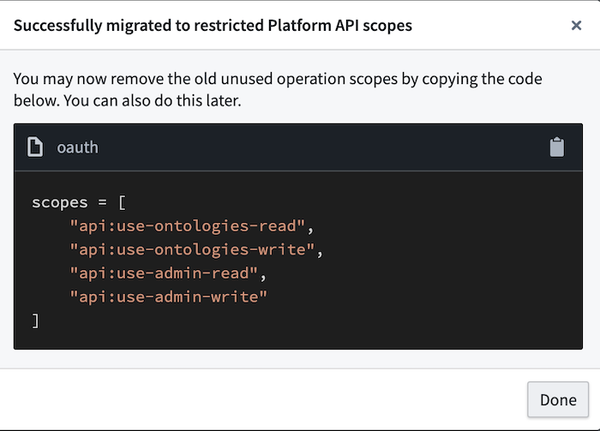
By default, all Developer Console applications created after the security update or migrated to use the advanced API-level protection will be configured with the api:use-ontologies-read and api:use-ontologies-write scopes.
Migration steps
Follow the steps below to migrate your Developer Console application to use advanced API security:
- Navigate to the Platform SDK resources tab and select Migrate.
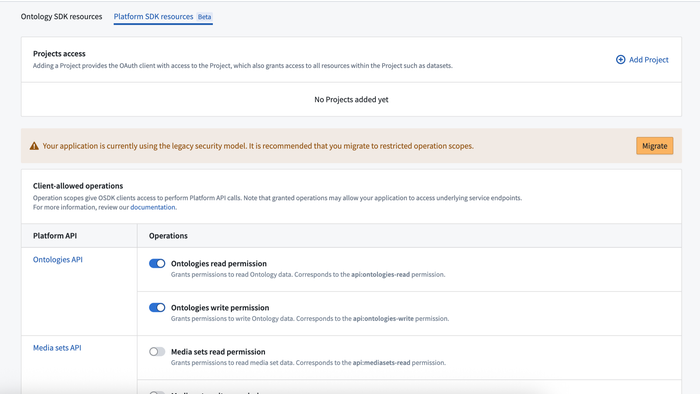
- Follow the instructions in the dialog to update your application code. If you are using the TypeScript SDK, change the requested operation scopes to use new scopes that respect the upgraded security model. To prevent temporary breaks, do not remove any of the original operation scopes while adding the new scopes.
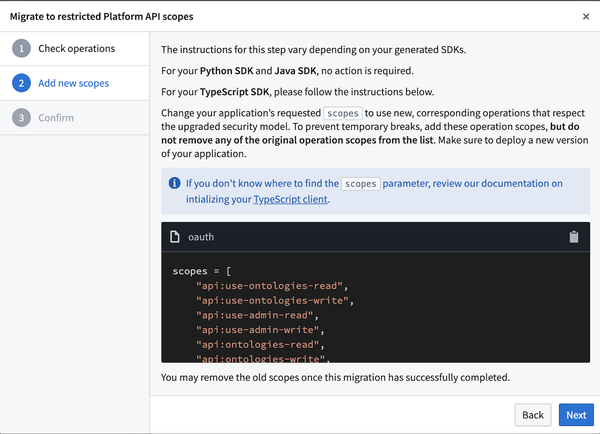
- Once the application is successfully migrated, you can remove the original, outdated scopes from your application code.
Scope prefixes
Foundry uses two scope prefixes for API permissions:
| Scope pattern | Example | Use case |
|---|---|---|
api:use-*-read/write | api:use-ontologies-read | New scoped Developer Console applications. Allows public API calls only. |
api:*-read/write | api:ontologies-read | Standalone OAuth client and certain unscoped applications. Allows public API calls and internal service endpoints. |
When choosing which scope to use:
- Scoped applications should use
api:use-*scopes (for example,api:use-ontologies-read). - Standalone OAuth clients should use
api:*scopes (for example,api:ontologies-read) since they call Foundry directly, as described above. Note: standalone OAuth clients are a legacy primitive being replaced by unscoped applications. - Unscoped applications should use
api:use-*scopes unless they are querying underlying Foundry service endpoints.
This pattern applies across all API namespaces, including admin, ontologies, datasets, streams, and others.
Standalone OAuth clients [Legacy]
Standalone OAuth clients can no longer be created from Developer Console. Instead, we recommend creating unscoped Developer Console applications.
Standalone OAuth clients are a legacy, lightweight alternative to custom applications. Beyond the auth client itself, standalone OAuth clients do not provide application building capabilities such as scopes, metrics, or SDK generation.
Unscoped applications replace standalone OAuth clients by providing equivalent access flexibility inside a fully featured custom application.
Migration steps to convert standalone OAuth clients into unscoped custom applications will be available in a future release.
See also
- Permissions: Learn more about user and application permission types as well as resource access scope.
- OAuth clients: Learn how to create and manage OAuth clients.