- Capabilities
- Getting started
- Architecture center
- Platform updates
Audit logs
Audit logs provide a comprehensive record of every action taken in Foundry, enabling security teams to detect threats, investigate incidents, ensure compliance, and maintain accountability across the platform. Audit logs can be thought of as a distilled record of all actions taken by users in the platform. This is often a compromise between verbosity and precision, where overly verbose logs may contain more information but be more difficult to reason about.
What audit logs capture
Audit logs in Foundry contain enough information to answer the critical questions for any security investigation or compliance review:
- Who performed an action (user identity, session, or service account).
- What the action was (categorized by type and intent).
- When the action happened (precise timestamps for temporal analysis).
- Where the action occurred (which resources and systems were involved).
Sometimes, audit logs will contain contextual information about users including Personal Identifiable Information (PII), such as names and email addresses, as well as other potentially sensitive usage data. As such, audit log contents should be considered sensitive and viewed only by persons with the necessary security qualifications.
Audit logs (and associated detail) should generally be consumed and analyzed in a separate purpose-built system for security monitoring (a "security information and event management", or SIEM solution) owned by the customer if one is available. If no such system has been provisioned, Foundry itself is flexible enough for some light SIEM-native workflows to be performed directly in the platform instead.
This documentation explains how to access, consume, and analyze Foundry audit logs:
- Audit delivery: How to ingest logs into your SIEM or export them to Foundry for analysis.
- Audit schema: The structure and contents of audit logs, including field definitions and guarantees.
- Migrating from
audit.2toaudit.3: Guidance for transitioning existingaudit.2analyses to the newaudit.3schema.
Other documentation available includes:
- The audit log categories documentation about category-based query patterns.
- Documentation on monitoring security audit logs with analysis best practices.
- The
list-log-filesandget-log-file-contentaudit API documentation for SIEM integrations.
Customers are strongly encouraged to consume and monitor their own audit logs via the mechanisms presented below. All audit log analyses should use the new and improved audit.3 schema logs to maintain continuity as we are in the process of fully migrating audit log archival from audit.2 to audit.3 for new audit logs. Audit.3 logs are available via API for use in a SIEM or exportable to Foundry for in-platform analysis. Review our documentation on monitoring audit logs for additional guidance.
Audit delivery
Foundry provides flexible mechanisms for delivering audit logs to meet diverse security infrastructure and SIEM requirements. The delivery method you choose depends on your organization's existing security tooling and analysis workflows.
Compare delivery methods
Audit.3 logs (recommended for all new implementations):
Audit.3 schema logs offer significant advantages for security operations:
- Low latency: Available within ~15 minutes of event occurrence, enabling timely threat detection.
- Direct API access: Ingest directly into external SIEMs through public API without requiring Foundry as an intermediary.
- Structured categories: Enforced, standardized categories provide predictable structure for automated analysis.
- Future-proof: New Foundry features automatically use existing categories, so monitoring queries do not need updates.
Audit.3 logs can be consumed through API into a SIEM or through an audit export to a Foundry dataset if necessary.
Audit.2 logs (legacy, for historical analysis only):
The historical audit.2 schema logs are compiled, compressed, and moved to log archival storage within about 24 hours to environment-dependent storage (for example, an S3 bucket). These logs:
- Must be exported to a Foundry dataset before analysis.
- Do not support direct API ingestion to external SIEMs.
- Have optional category usage with inconsistent structure.
- Should only be used for analyzing historical periods before the
audit.3migration.
From archival storage, Foundry can deliver audit.2 logs to customers through an audit export to Foundry.
Audit ingest directly to SIEM
External SIEMs can ingest audit.3 logs directly from storage using Palantir's list-log-files and get-log-file-content audit API endpoints. This approach is preferred for organizations with dedicated security operations centers and established SIEM platforms, as it provides the following:
- Minimal latency: Logs available in your SIEM within 15 minutes for rapid threat detection and response.
- Native integration: Logs flow directly into your existing security tooling and alerting workflows.
- No intermediary: Eliminates the need to route logs through Foundry first, simplifying architecture and saving any potential costs spent on storage/compute of audit logs if not exported to and analyzed in Foundry itself.
- Standard protocols: Uses familiar API patterns that integrate with most major SIEM platforms.
SIEM ingestion is an advantage of audit.3 logs over the historical audit.2 logs, which do not have public APIs that allow direct ingestion by external SIEMs (audit.2 logs must first be exported to a Foundry dataset, then exported from there to a SIEM).
Pagination and polling for SIEM ingestion
The list-log-files endpoint uses token-based pagination. The nextPageToken field is always present in the response, even when the data field is empty or omitted, meaning no new log files are available.
To continuously poll for new audit logs, follow the steps below:
- Make an initial request with a
startDateand optionalendDate. - Store the
nextPageTokenfrom the response. - On subsequent requests, provide the stored
nextPageTokento resume from where you left off. New log files produced since your last request will be returned. - When the
datafield is empty, there are no new logs yet, but thenextPageTokenis still valid and should be saved for the next polling cycle.
This design allows SIEM integrations to poll on any cadence without missing logs or receiving duplicates. If you omit the endDate parameter, the endpoint will always return the latest available logs, making it suitable for open-ended continuous polling.
Authentication for API access
To access the audit API endpoints, you must authenticate your SIEM requests. We recommend the following approaches, in order of general preference. However, the option best for you depends on your desired security model.
Note that your API requests must include an auth header with audit-export:view on the organization for which you are requesting logs. audit-export:view is a gatekeeper operation that must be granted to the client/user whose token is used in the auth header for the organization whose audit logs are being requested. Under Organization permissions in Control Panel, grant the generated client/user a role that includes the Create datasets with audit logs for the organization workflow for the organization you want to have logs for. Review the permissions documentation for more information.
Third-party application through Developer Console (recommended):
The most secure and maintainable approach is to create a third-party application in the Developer Console application with the appropriate audit log permissions. The Developer Console allows you to create and manage applications that talk to public APIs using the Ontology SDK and OAuth.
This method provides:
- Scoped permissions specific to audit log access.
- Better security through the OAuth2 client credentials flow.
- Easier credential rotation and management.
- Clear audit trails of which application is accessing logs.
Review the Developer Console documentation and third-party applications documentation for setup instructions.
OAuth2 client credentials:
If you cannot use a Developer Console application, OAuth2 client credentials provide a secure programmatic authentication method suitable for automated SIEM ingestion.
User tokens (not recommended):
Administrator user tokens should be avoided for production SIEM integrations as they come with the following limitations:
- Are tied to individual user accounts, creating operational dependencies.
- May have broader permissions than necessary.
- Are harder to rotate without disrupting service.
- Create unclear audit trails when used by automated systems.
Audit export to Foundry
Both audit.2 and audit.3 logs can be exported, per-organization, directly into a Foundry dataset through the audit logs tooling in Control Panel. This approach is suitable for organizations that do not currently have SIEM tooling and still need to analyze their audit logs.
Once audit log data has landed in a Foundry dataset, it can be analyzed directly in Foundry. Pipeline Builder can be used for prototyping or basic quick analyses, while Code Repositories can perform long-term analysis due to the immense data scale. Audit log datasets may be too large to effectively analyze in Contour without filtering them first. You may choose to export from Foundry to an external SIEM through Data Connection (audit.3 logs should be consumed directly through public APIs if a SIEM is the ultimate destination for audit log analysis).
Export permissions
To export audit logs, you will need the audit-export:orchestrate-v3 operation (for audit.3) on the target organization(s). This can be granted with the Organization administrator role in Control Panel, configurable from the Organization permissions tab. Review the organization permissions documentation for more details.
Export setup
To set up audit log exports to a Foundry dataset, follow the steps below:
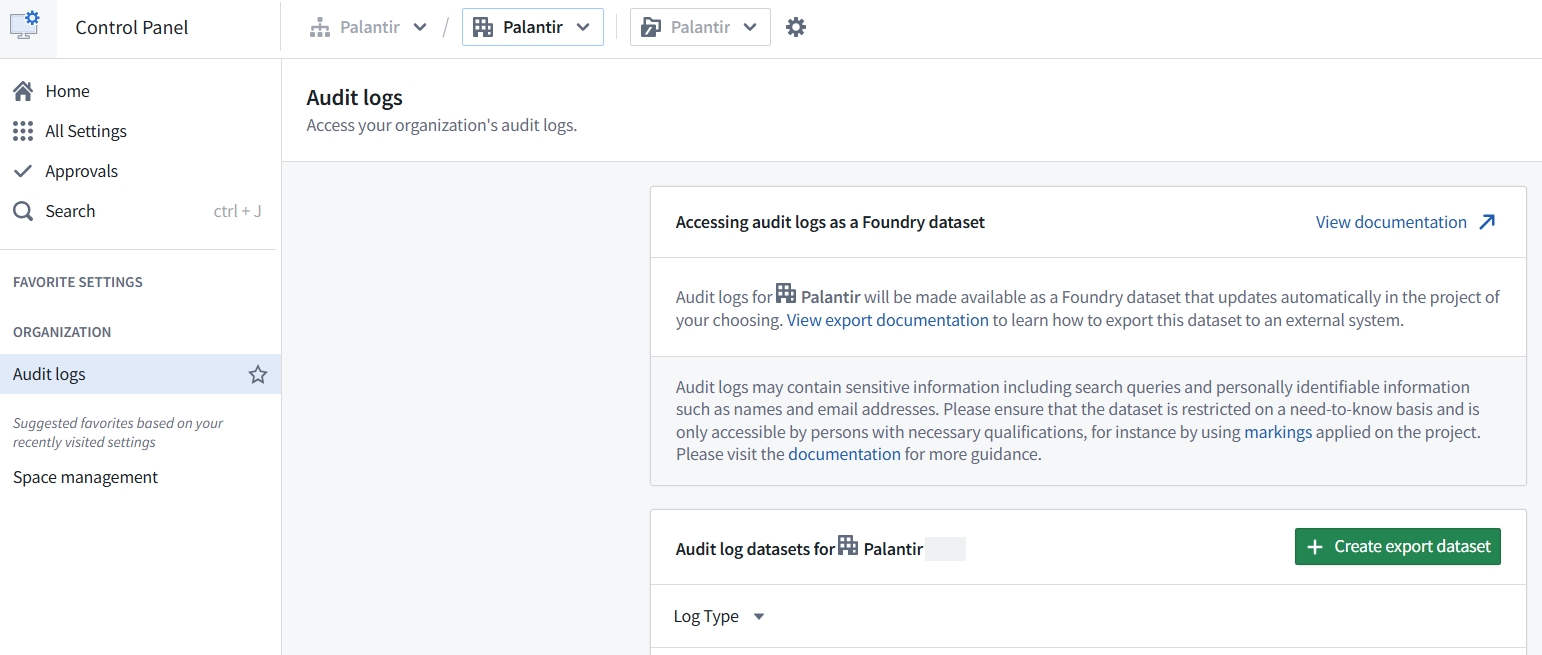
- Navigate to Control Panel.
- In the top toolbar, confirm the relevant Organization is selected from the dropdown menu.
- In the left sidebar, select Search, then search for and select Audit logs.
- Choose Create export dataset.
- Select a log type: Choose audit.3 for the new schema of current audit logs, or audit.2 if you require analyzing historical audit logs from before the upgrade to the
audit.3schema. Review important limitations when migrating fromaudit.2toaudit.3. - Select an export location and name for this audit log dataset to live in Foundry.
- Use markings to restrict your highly sensitive audit log dataset and specify the set of qualified platform administrators with need-to-know access who can view potentially sensitive usage details like PII and search queries. By default, audit log datasets will be marked with the organization selected above. Review our organization markings documentation for more information.
- Optionally, enable a start date filter to limit this dataset to events that occur on or after a given date.
- Optionally, enable a dataset-specific retention policy to limit the number of days logs are preserved in this particular export dataset (max 730 days). Note that retention policies are based on the transaction timestamp when logs were added to the export dataset, not the timestamp of the log entries themselves. Deleting the relevant transactions may take up to seven days after they are marked for deletion. The following are two examples to illustrate how this works in practice:
- Example one:
- Start date: 2025-01-01
- Retention policy: 90 days
- In this case, the export dataset will initially contain logs since January 1st, 2025. At 90 days after the creation of the dataset, the retention policy will take effect; only logs added in the last 90 days will be retained, rather than all logs since the start of January 2025 that were initially in the dataset. In practice, this means that the size of the dataset decreases significantly after 90 days when older logs are removed.
- Example two:
- Start date: 30 days ago
- Retention policy: 90 days
- In this scenario, the export dataset will begin with logs from the past 30 days. As new logs are added, the dataset will grow until it holds a rolling window of the most recent 90 days of data. Logs added in transactions older than 90 days will be removed according to the retention policy.
- Example one:
- Acknowledge you understand the security implications of creating the dataset and the configuration settings you are applying to the audit log export dataset, then select Create export.
Update or disable export datasets
Export dataset updates:
- For larger environments, builds of
audit.2datasets may produce empty append transactions in the first several hours (or longer). This is expected behavior as the pipeline processes the full backlog of audit logs. This delay is not present for new exports ofaudit.3datasets. - New logs are appended to the export dataset on a regular cadence. Each append pulls, at most, 100 GiB of log data (and 10k files) for
audit.3datasets, and 10 GiB foraudit.2datasets. Such large appends are generally only needed when an audit log dataset is first created. - The runtime of each audit log append is directly proportional to how many new logs are being appended to an audit log dataset.
- Schedules controlling the builds of the export dataset are controlled by the audit-export service and are hidden from view of the user.
Audit.3export datasets use thedatecolumn as a Hive Partition column in their schema. This means thedatecolumn functions as a partition key rather than a regular data column, which affects how the data appears when queried. For example,datevalues will be formatted as date types rather than datetime. The primary advantage of Hive Partitioning is that for ad-hoc analyses, filtering bydatefirst rather than by timestamp will provide much faster lookup in Spark or general builds.
Export dataset disablement: To disable an export, open the audit log dataset and select File > Move to Trash, or manually move the dataset to another project.
- Moving an audit log dataset will stop any further builds of that dataset after roughly one hour has elapsed in the Trash or different project.
- Note that there is no way to restart these builds once halted, even if the dataset is subsequently restored from the Trash or moved back to the original project.
Audit schema
All logs that Palantir products produce are structured logs. This means that they have a specific schema that they follow, which can be relied on by downstream systems for automated analysis and alerting.
Palantir audit logs are currently delivered in both the historical audit.2 schema and in the new and improved schema, audit.3. Audit.2 logs of new events will soon cease to be available for export, and only historical logs will be available in that schema; all new events will be available for export in only the audit.3 schema.
Within both the audit.2 and audit.3 schemas, audit logs will vary depending on the product that produces the log. This is because each product is reasoning about a different domain, and thus will have different concerns that it needs to describe. This variance is more noticeable in audit.2, as will be explained below.
Product-specific information is primarily captured within the requestFields and resultFields for audit.3 logs (or request_params and result_params for audit.2 logs). The contents of these fields will change shape depending on both the product doing the logging and the event being logged.
Audit log categories
Palantir logs use a concept called audit log categories to make logs easier to understand with little product-specific knowledge. Rather than needing to track hundreds of service-specific event names, categories let security analysts focus on high-level actions like data loading, permission changes, or authentication attempts, regardless of which product or feature generated the log. This abstraction enables analysts to build monitoring queries that work across all Foundry services without needing to understand implementation details. For example, filtering for dataExport captures all data export events regardless of what product was used to export the data.
With audit log categories, audit logs are described as a union of auditable events. Audit log categories are based on a set of core concepts and divided into categories that describe actions on those concepts, such as the following:
| Category | Description | Example use case |
|---|---|---|
authenticationCheck | Checks authentication status via a programmatic or manual authentication event, such as token validation. | Detect token validation patterns that suggest credential stuffing. |
dataCreate | Indicates the addition of some new entry of data into the platform where it did not exist prior. This event may be reflected as a dataPromote in a separate service if it is logged in the landing service. | Track data creation patterns and enforce governance policies. |
dataDelete | Related to the deletion of data, independent of the granularity of that deletion. | Alert on deletion of critical or protected resources. |
dataExport | Export of data from the platform. Use for instances like downloading data from the platform, such as a system external to Palantir, CSV file, and more. If data was exported to another Palantir system, use the dataPromote category. | Alert on large exports, exports of sensitive data, or exports outside business hours. |
dataImport | Imports to the platform. Unlike dataPromote, dataImport refers only to data being ingested from outside the platform. This means that a dataImport in one service could show up as a dataPromote in a separate service. | Monitor for malicious file uploads or policy violations. |
dataLoad | Refers to the loading of data to be returned to a user. For purely back-end loads, use internal. | Establish baseline normal access patterns and detect anomalous bulk data access. |
tokenGeneration | Action that leads to generation of a new token. | Detect unusual token creation that could indicate preparation for bulk data access. |
userLogin | Login events of users. | Monitor for failed login attempts, unusual login times, or geographic anomalies. |
userLogout | Logout events of users. | Track session durations and identify abnormally long sessions. |
Audit log categories have also gone through a versioning change, from a looser form within audit.2 logs to a stricter and richer form within audit.3 logs. In audit.3, each log must specify at least one category, and each category defines exactly which request and result fields will be present, making automated analysis far more reliable.
Refer to our documented audit log categories for a detailed list of available categories with field specifications. Also, review the monitoring security audit logs documentation for additional guidance on using categories.
Audit log attribution
Audit logs are written to a single log archive per environment. When audit logs are processed through the delivery pipeline, the User ID fields (uid and otherUids in the schema below) are extracted, and the users are mapped to their corresponding organizations.
An audit export orchestrated for a given organization is limited to audit logs attributed to that organization. Actions taken solely by service (non-human) users will not typically be attributed to any organization as these users are not organization members. The special case of service users for third-party applications using client credentials grants and used only by the registering organization do generate audit logs attributed to that organization.
Audit.3 logs
Any new log exports or analyses should use audit.3 logs rather than audit.2 logs.
Audit.3 logs are built upon a new log schema that provides a number of advantages over audit.2 logs. The key benefits to audit log consumers of the new schema and associated delivery pipeline are the following:
- Faster delivery: Latency is reduced from potentially more than 24 hours to 15 minutes or less, enabling near-real-time threat detection.
- Structured categories: Enforced, documented categories provide predictable structure for analysis. This helps to reduce the need to understand individual products when reasoning about log contents, especially if analytical needs encompass entire workflows (for example,
dataExport). - Enhanced top-level fields: New fields like
productallow easier filtering by product name instead of requiring complex event name mapping filters to focus analysis on a single product's usage. - Direct API access: Public APIs are now available for ingesting audit logs into external SIEMs without requiring Foundry as an intermediary.
- Enriched context: Additional contextualized information about users, resources, and relationships extracted during delivery is available for easier downstream analysis.
Schema guarantees
Audit.3 logs are produced with the following guarantees in mind:
- Explicit category definitions: Each audit category explicitly defines the values/items on which it applies; for example,
dataLoaddescribes the precise resources that are loaded. - Union of categories: Each log is produced strictly as a union of audit categories. This means that logs will not contain free-form data, ensuring predictable structure.
- Promoted key information: Certain important information within an audit log is promoted to the top level of the
audit.3schema. For example, all named resources are present at the top level, as well as within the request and result fields.
These guarantees mean that for any particular log it is possible to tell (1) what auditable event created it, and (2) exactly what fields it contains. These guarantees are product-agnostic, enabling security analysts to build monitoring queries that work across all Foundry services.
Audit.3 schema reference
The audit.3 log schema is provided below:
| Field | Type | Description |
|---|---|---|
categories | set<string> | All audit categories produced by this audit event. |
entities | list<any> | All entities (for example, resources) present in the request and result fields of this log. |
environment | optional<string> | The environment that produced this log. |
eventId | uuid | The unique identifier for an auditable event. This can be used to group log lines that are part of the same event. For example, the same eventId will be logged in lines emitted at the start and end of a large binary response streamed to the consumer. |
host | string | The host that produced this log. |
logEntryId | uuid | The unique identifier for this audit log line, not repeated across any other log line in the system. Note that some log lines may be duplicated during ingestion into Foundry, and there may be several rows with the same logEntryId. Rows with the same logEntryId are duplicates and can be ignored. |
name | string | The name of the audit event, generally following a (product name)_(endpoint name) structure in ALL CAPS, snake-cased. For example: DATA_PROXY_SERVICE_GENERATED_GET_DATASET_AS_CSV2. |
orgId | optional<string> | The organization to which the uid belongs, if available. |
origin | optional<string> | The best-effort identifier of the originating machine. For example, an IP address, a Kubernetes node identifier, or similar. This value can be spoofed. |
origins | list<string> | The origins of the network request, determined by request headers. This value can be spoofed. To identify audit logs for user-initiated requests, filter to audit logs that have non-empty origins. Audit logs with empty origins correspond to service-initiated requests made by the Palantir backend while fulfilling user-initiated requests.If an audit log with non-empty origins has categories including apiGatewayRequest, then the associated request was fulfilled by an API gateway. To find audit logs for the requests made by the API gateway to fulfill the user-initiated request, filter to logs with the same traceId that have a userAgent starting with the service in this audit log. |
product | string | The product that produced this log. |
producerType | AuditProducer | How this audit log was produced; for example, from a backend (SERVER) or frontend (CLIENT). |
productVersion | string | The version of the product that produced this log. |
requestFields | map<string, any> | The parameters known at method invocation time. Entries in the request and result fields will be dependent on the categories field defined above. |
result | AuditResult | Indicates whether the request was successful or the type of failure; for example, ERROR or UNAUTHORIZED. |
resultFields | map<string, any> | Information derived within a method, commonly parts of the return value. |
sequenceId | uuid | A best-effort ordering field for events that share the same eventId. |
service | optional<string> | The service that produced this log. |
sid | optional<SessionId> | The session ID, if available. |
sourceOrigin | optional<string> | The origin of the network request, determined by the TCP stack. |
stack | optional<string> | The stack on which this log was generated. |
time | datetime | The RFC3339Nano UTC datetime string, for example 2025-11-13T23:20:24.180Z. |
tokenId | optional<TokenId> | The API token ID, if available. |
traceId | optional<TraceId> | The Zipkin trace ID, if available. |
uid | optional<UserId> | The user ID, if available. This is the most downstream caller. |
userAgent | optional<string> | The user agent of the user that originated this log. |
users | set<ContextualizedUser> | All users present in this audit log.ContextualizedUser: fields:
|
In the current audit.3 pipeline, only the uid field is populated. The userName, firstName, lastName, and realm fields are not set, and groups is always empty. Populating these fields would require real-time lookups against the identity provider, which is incompatible with the low-latency design of the audit.3 pipeline. To enrich audit logs with user profile information, perform downstream lookups against user directory data in a Foundry pipeline.
We generally recommend use of the immutable product schema field to filter audit logs when working to analyze particular applications. The service field may sometimes be useful for consumers as it allows the filtering between different instances of the same product, potentially helpful for understanding a specific incident more granularly.
Audit.2 logs
Only analyses of historical periods before the logging of new audit.3 logs should use audit.2 logs. Refer to important limitations when migrating from audit.2 to audit.3, as the archiving of new events as logs in the audit.2 schema will be deprecated soon. Audit.2 logs have no inter-product guarantees about the shape of the request or result parameters. As such, reasoning about audit logs must typically be performed on a product-by-product basis.
Audit.2 logs may present an audit category within them that can be useful for narrowing a search. However, this category does not contain further information or prescribe the rest of the contents of the audit log. Additionally, audit.2 logs are not guaranteed to contain an audit category. If present, categories will be included in either the _category or _categories field within request_params.
The schema of audit.2 log export datasets is provided below.
| Field | Type | Description |
|---|---|---|
filename | .log.gz | Name of the compressed file from the log archive. |
ip | string | Best-effort identifier of the originating IP address. |
name | string | Name of the audit event, such as PUT_FILE. |
request_params | map<string, any> | The parameters known at method invocation time. |
result | AuditResult | The result of the event (success, failure, and so on). |
result_params | map<string, any> | Information derived within a method, commonly parts of the return value. |
sid | optional<SessionId> | Session ID (if available). |
time | datetime | RFC3339Nano UTC datetime string, for example: 2025-11-13T23:20:24.180Z. |
token_id | optional<TokenId> | API token ID (if available). |
trace_id | optional<TraceId> | Zipkin trace ID (if available). |
type | string | Specifies the audit schema version: "audit.2" |
uid | optional<UserId> | User ID (if available); this is the most downstream caller. |
Migrate from audit.2 to audit.3
Organizations currently using audit.2 logs for security monitoring or compliance must migrate their analyses to the audit.3 schema. This section provides guidance for transitioning your audit log workflows to take advantage of the improvements contained in audit.3.
Differences between audit.2 and audit.3
The audit.3 schema represents a fundamental architectural change from audit.2, not just a version update. Key differences that affect migration are described in the sections below.
Field name and structure changes
request_paramsandresult_paramsinaudit.2are now namedrequestFieldsandresultFieldsinaudit.3.- The contents of
requestFieldsandresultFieldsare generally completely different from theiraudit.2equivalents (request_paramsandresult_params). - Information found in
request_paramsinaudit.2may now be inresultFieldsinaudit.3, or vice versa. - Always check both
requestFieldsandresultFieldswhen looking for specific information inaudit.3. - The
typetop level field identifies which schema produced the log:"audit.2"or"audit.3".
Event name changes
- Event names (in the
namefield) can be different between the schemas, which can lead to mismatches when parsing depends specifically on event names. - Event names in audit.3 are much more standardized, generally following a (product name)_(endpoint name) structure in ALL CAPS, snake-cased. For example:
DATA_PROXY_SERVICE_GENERATED_GET_DATASET_AS_CSV2. - While there is not a direct 1:1 mapping from all
audit.2toaudit.3event names, mostaudit.2log event names can be straightforwardly mapped toaudit.3. - Recommended approach: Use audit categories instead of specific event names for queries going forward, as categories provide consistent abstraction across both schemas (though
audit.2has optional category usage).
New capabilities
- In
audit.3, there is a top levelcategoriesfield with enforced, standardized values. - New fields like
product,service,entities, andusersare available inaudit.3for easier filtering. - The
usersfield is available inaudit.3and contains user IDs for all users associated with a log entry. Additional user profile fields (userName,firstName,lastName,groups,realm) are defined in the schema but are not currently populated; enrich these downstream if needed.
Important limitations
- No historical backfill:
Audit.3only captures events that occur after it was enabled. Historical events will remain in theaudit.2log schema only.
Due to infrastructure updates that occurred between the 24th and 25th of November 2025 in preparation for general availability, some enrollments may have experienced potential gaps of approximately three hours in audit.3 log availability. We recommend using audit.2 logs as a fallback to cover analytical needs during this period, and full migration to audit.3 for analyses after December 4, 2025.
- Concurrent logging period: Both schemas will emit logs during the transition period, allowing validation before full cutover.
Migration path
If you have existing analyses built on audit.2 logs, your migration approach depends on where you currently perform analysis. Follow the steps in the section below that matches your analysis approach.
If you use an external SIEM
We strongly recommend migrating to direct API ingestion rather than continuing to use Foundry export datasets. This approach provides:
- Significantly lower latency: Approximately 15 minutes or less, versus 24 or more hours for
audit.2. - Simpler architecture: Eliminates Foundry as an intermediary, reducing additional points of latency or failure.
- Native SIEM integration: Full logs flow directly into your existing security tooling.
Migration steps:
- Configure your SIEM to ingest from the
list-log-filesandget-log-file-contentaudit API endpoints. - Update parsing rules to handle the new
audit.3schema structure (see the section below). - Update detection rules to use categories instead of event names where possible.
- Run in parallel with your existing
audit.2ingestion during a validation period. - Test alerting and detection workflows thoroughly.
- Once validated, deprecate your
audit.2Foundry export and SIEM ingestion.
If you analyze logs in Foundry
- Create a new
audit.3export dataset in Control Panel following the export setup instructions. - Keep your existing
audit.2export dataset running during the transition period. - Create a new Global Branch to perform the migration by bundling together PRs (in potentially multiple code repositories, if necessary).
- Use the Data Lineage application to view your downstream consumption of
audit.2data in Foundry to understand what analyses are deprecated and which need to be migrated. - Follow the refactoring steps below to update your analyses.
Identify category-based analysis patterns
Rather than migrating analyses by every event name, refactor your analyses to use the standardized audit categories instead of individual product event names:
Old approach (audit.2):
Copied!1 2 3 4# Fragile: Depends on specific event names that may change export_events = audit_logs.filter( col("name").isin(["EXPORT_DATASET", "DOWNLOAD_FILE", "CREATE_EXTERNAL_CONNECTION"]) )
New approach (audit.3):
Copied!1 2 3 4# Robust: Uses standardized categories export_events = audit_logs.filter( col("categories").contains("dataExport") )
This category-based approach provides several advantages:
- Future-proof: New export features released will use the
dataExportcategory. - Comprehensive: Captures all export mechanisms without needing to enumerate every event name.
- Cross-product: Works consistently across all Foundry services.
Validate during transition period
During the concurrent logging period:
- Run analyses on both
audit.2andaudit.3data sources in parallel. - Compare outputs to ensure
audit.3analyses capture expected events. - Verify that category-based filters provide equivalent or better coverage than event name filters.
- For SIEM users: Validate that alerts fire correctly on
audit.3data.
Complete the cutover
Once you have validated that your audit.3 analyses provide equivalent or better coverage:
- Switch all downstream consumers to use the
audit.3API or dataset. - Disable your
audit.2export dataset (if using Foundry exports) by moving to the Trash or a different project. - Remove
audit.2ingestion from your SIEM (if using external SIEM). - Note that historical
audit.2logs will remain accessible even after you stop generating newaudit.2logs. Analyses or investigations looking back in time will require querying bothaudit.2(historical) andaudit.3(current) logs separately. Refer to important limitations for more information.
Common migration challenges
Challenge: Missing event names
Some event names from audit.2 may not have direct equivalents in audit.3. This typically occurs when:
- The event was deprecated or replaced by a new endpoint.
- The event was low-signal and deliberately not ported to
audit.3.
Solution
- Verify the event is still actively being emitted in your current
audit.2logs. - If it is, use the
traceIdfield from theaudit.2log to find related audit logs in theaudit.3dataset that may be relevant. - If you cannot find an equivalent, contact your Palantir Support team for assistance.
Challenge: Unpacking nested request/result fields
The structure of requestFields and resultFields can be complex and product-specific, differing between audit.2 and audit.3.
Solution
- If your analyses unpack
request_paramsorresult_paramsinaudit.2and this level of granular detail is important in your analysis, you must refactor this logic due to the new field structures inaudit.3. Always check bothrequestFieldsandresultFieldsinaudit.3, as information may have moved between the request and result fields compared toaudit.2. - Use the audit categories documentation to understand which fields are guaranteed for each category.
- Favor top level fields (
entities,users,categories, and so on) over parsing request/result fields when possible. - Build defensive parsing logic that handles missing or unexpected fields gracefully.
Challenge: Continuity across cutover date
You need to analyze a period that spans both historical audit.2 and current audit.3 data. Refer to important limitations for more information.
Solution
- For SIEM analysis: Maintain parallel ingestion during transition, then rely on SIEM's historical data retention for
audit.2logs. - For Foundry analysis: Create a unified view that unions
audit.2andaudit.3datasets. - Use the
typefield to apply schema-specific parsing logic when needed (for example, categories for filtering inaudit.3, and name/result_params inaudit.2). - Perfect continuity may not be possible for all metrics due to schema differences.
Additional resources
- Review the audit log categories documentation for category-based query patterns.
- Review the monitoring security audit logs documentation for analysis best practices.
- Consult the
list-log-filesandget-log-file-contentaudit API documentation for SIEM integration details. - Contact your Palantir Support team if you have any product-specific migration questions.