- Capabilities
- Getting started
- Architecture center
- Platform updates
Announcements
REMINDER: Sign up for the Foundry Newsletter to receive a summary of new products, features, and improvements across the platform directly to your inbox. For more information on how to subscribe, see the Foundry Newsletter and Product Feedback channels announcement.
Share your thoughts about these announcements in our Developer Community Forum ↗.
Control transform preview inputs with code-defined input filtering
Date published: 2025-12-18
You can now use code-defined input filtering to control preview inputs for your Python transforms with greater precision. Previously, when using the Palantir extension for Visual Studio Code, you were limited to sampled or full dataset previews. With code-defined filtering, you can write custom filtering logic, chain multiple filters together, and combine custom code with built-in filter options for more flexibility. This feature supports Spark, Polars, Lazy Polars, and pandas.
New custom code filters
Write filter functions in your transform code to apply custom logic to your preview inputs:
- Parameterized filter functions: Filter functions accept parameters including
boolean,int,float, andstringtypes. - Automatic template generation: The interface automatically generates template code filters with type inference based on your input dataset.
- Drag-and-drop reordering: Add multiple filters and reorder them with drag-and-drop to adjust how they are applied.
- Persistent configuration: Filter configurations are saved locally and restored when you reopen the workspace.
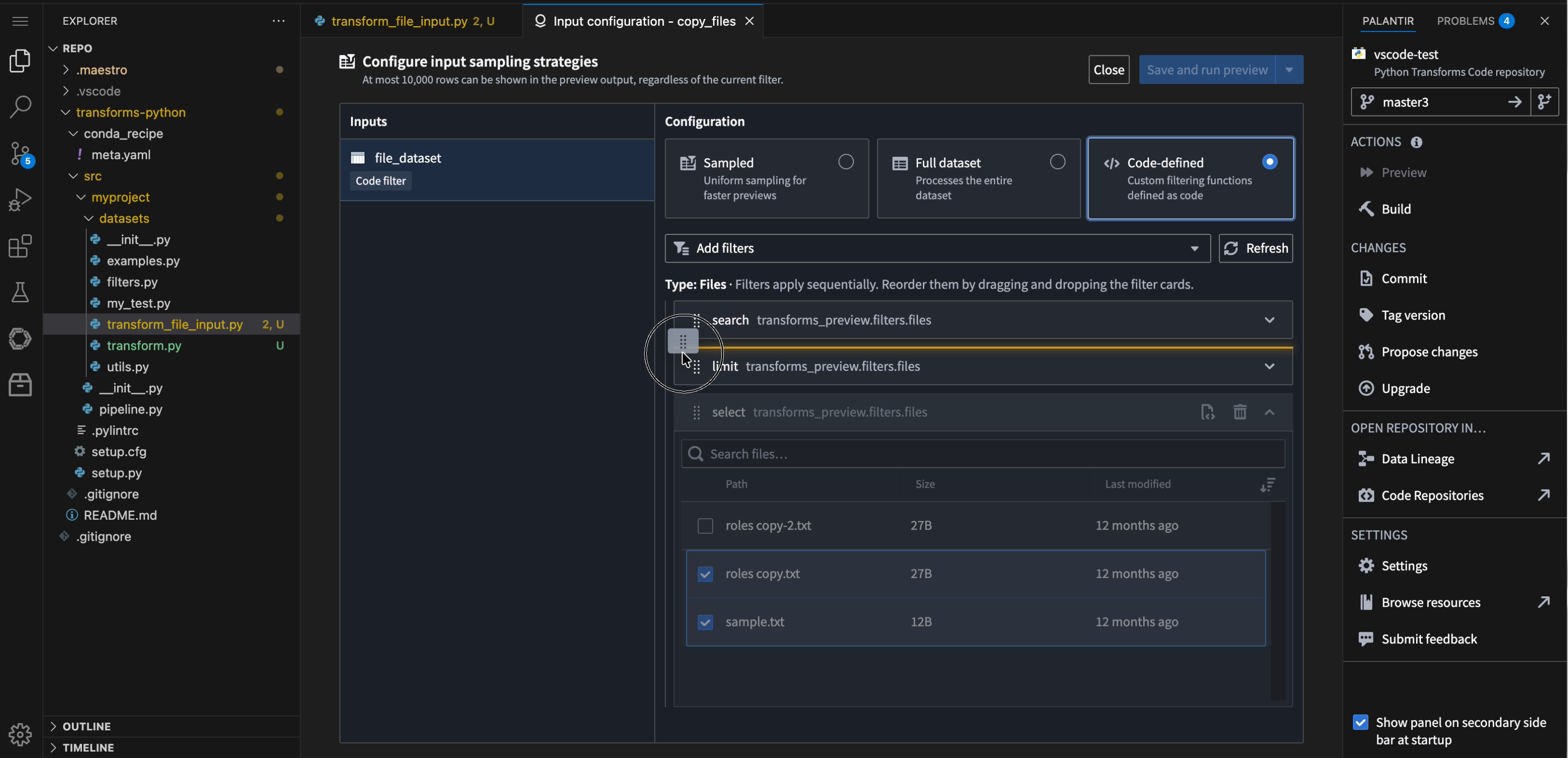
The filter configuration panel, demonstrating the new drag and drop feature for filter reordering.
New built-in file filters
When you stack multiple filters together, each filter displays its intermediate results, allowing you to trace the filtering flow at every stage.
New built-in filters simplify working with unstructured datasets:
- Search: Filter files using regex or glob patterns to preview only matching files in your unstructured datasets.
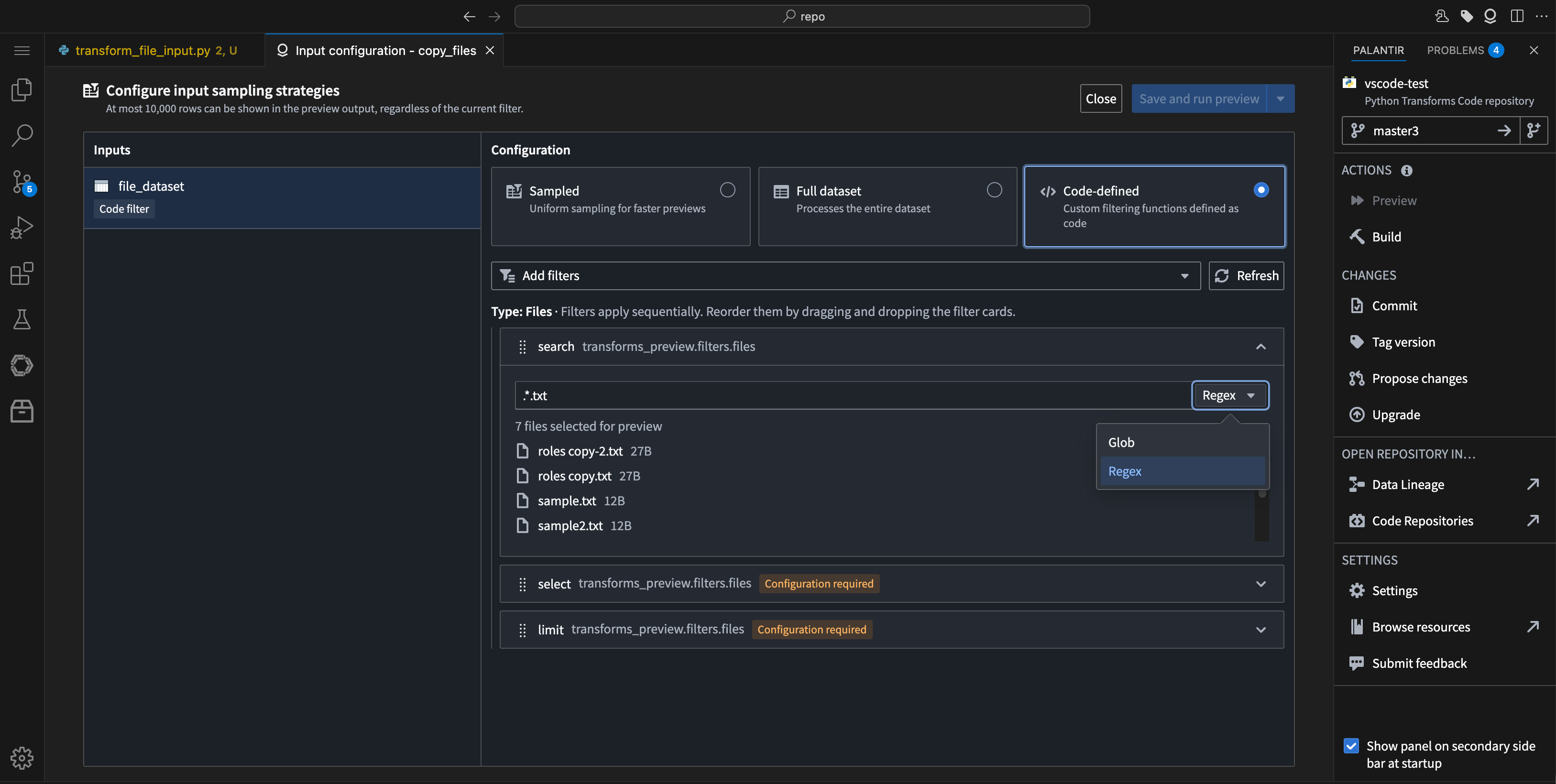
The option to choose between Regex or Glob patterns in the filter search.
- Limit: Constrain the number of results returned. This is especially useful for datasets with many files.
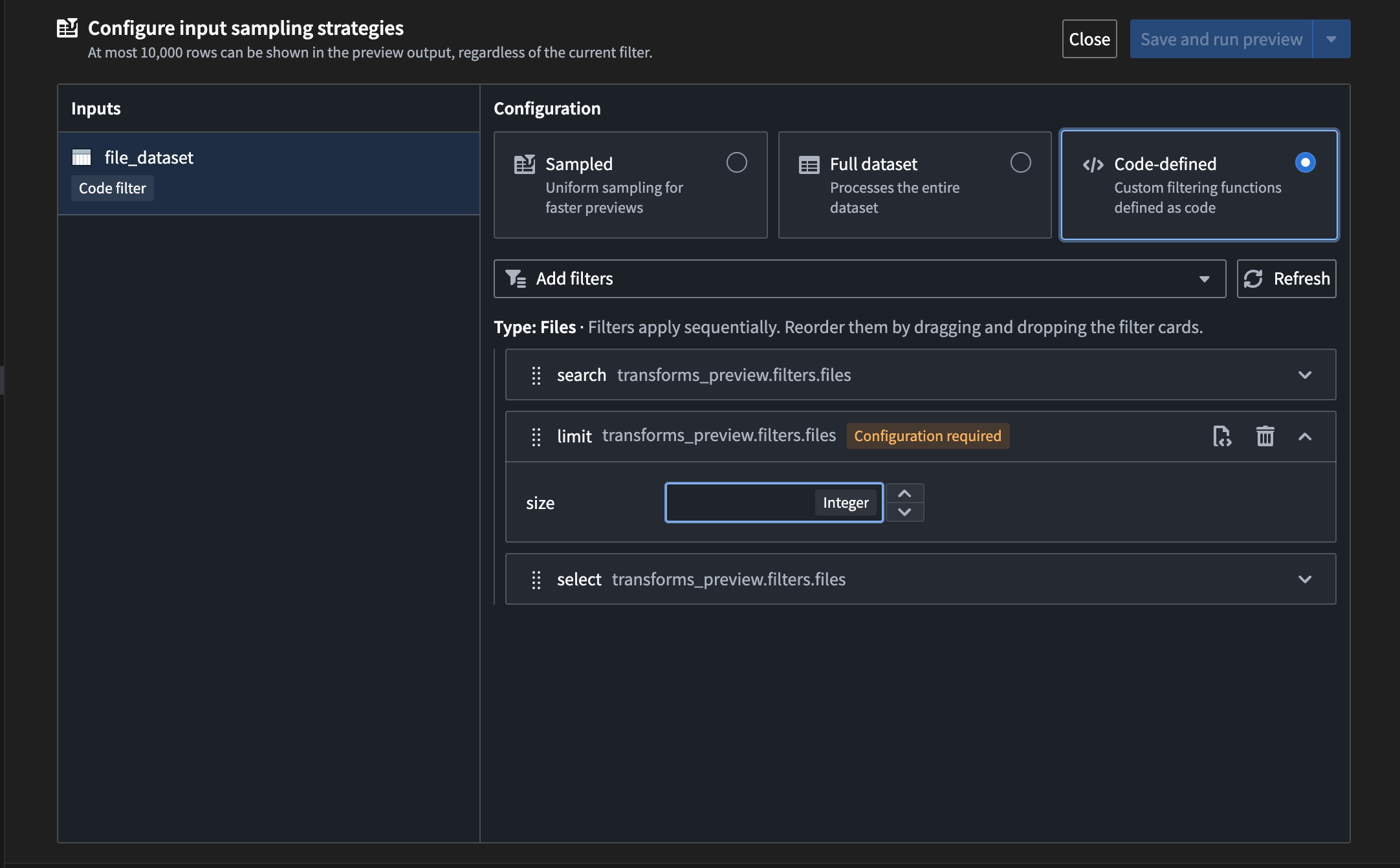
The option to set a size limit filter for file searches.
- Select: Manually choose specific files from your unstructured dataset to focus on during preview, especially when working with transforms.
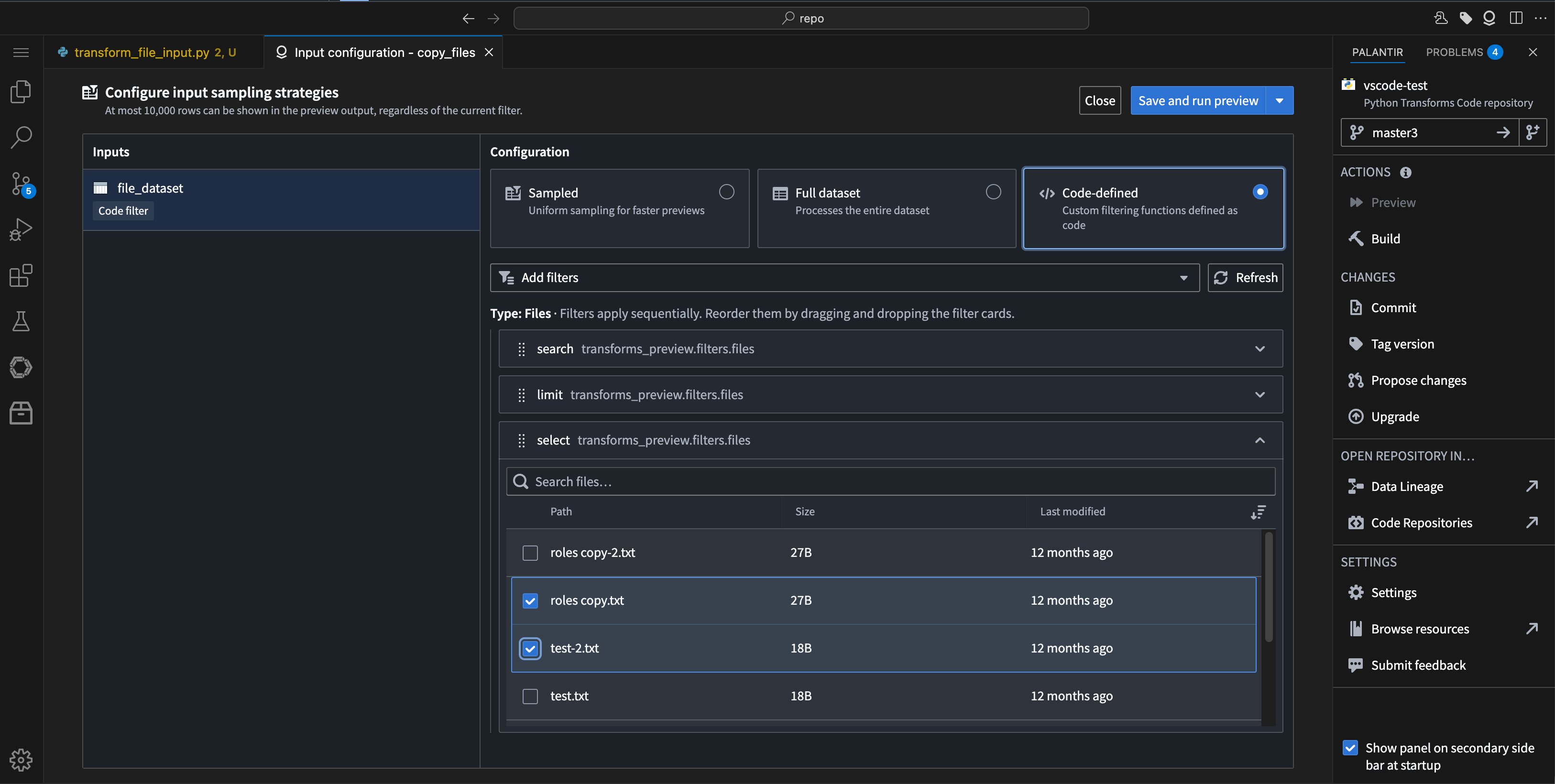
The option to select certain files from an unstructured dataset to preview.
Tell us what you think
Let us know about your experience working with code-defined input filtering in the Palantir extension for Visual Studio Code. Leave feedback with our Palantir Support channels or in our Developer Community ↗ using the vscode tag ↗.
New VS Code Workspaces landing page: Discover Palantir extensions and libraries directly
Date published: 2025-12-09
A new custom landing page in VS Code Workspaces is now available in your enrollment, designed to deliver a smoother, more intuitive onboarding experience for both new and existing users. When you open a repository, you will see a welcome page that guides you through interactive walkthroughs for Palantir's key libraries and extensions.

New VS Code Landing Page with tabs for Palantir Extension VS Code, Python transforms, and Continue walkthroughs.
What’s new?
- Palantir Extension for VS Code: Learn how to seamlessly integrate features from Code Repositories directly into your development workflow, whether you are working within the Palantir platform or local VS Code.
- Python transforms: Explore the core Python library for building robust data processing pipelines, with step-by-step guidance to help you get started quickly.
- Continue: Get up to speed with Continue, an AI-powered development tool, preconfigured with relevant Foundry tools to accelerate your coding and data workflows.
The new landing page replaces the default VS Code walkthrough, offering a tailored experience that makes it easier to discover and use features such as AI-assisted coding, dataset previews, and side panel shortcuts. For teams, this means faster onboarding, clearer best practices, and greater productivity.
Existing users will also benefit from streamlined navigation and quick access to new features and documentation. This upgrade helps you take full advantage of Palantir's development tools, whether you are new or experienced.
Your feedback matters
We want to hear about your experiences with the VS Code extension and welcome your feedback. Share your thoughts with Palantir Support channels or our Developer Community ↗ using the vscode↗ tag.
Monitor action and function metrics in near real-time in Ontology Manager
Date published: 2025-12-09
With the introduction of near real-time metrics on the actions and functions overview page in Ontology Manager, you can now monitor success rates, failure rates, and the newly added P95 duration chart. Metrics update continuously instead of waiting up to a day, giving you faster, more current insights into your action and function performance.
What’s new?
- Near real-time success/failure metrics: View the current status of your actions and functions instantly, enabling you to quickly identify and address issues as they occur.
- P95 duration metrics: Track the 95th percentile execution time for your actions and functions to identify performance bottlenecks and optimize workflows.
- Continuous data updates: Metrics are now continuously updated, providing current insights for debugging and observability.
- Link to run history: Access a complete view of action or function executions over the past seven days.

The new action metrics dashboard in Ontology Manager, indicating degrading performance of an action.
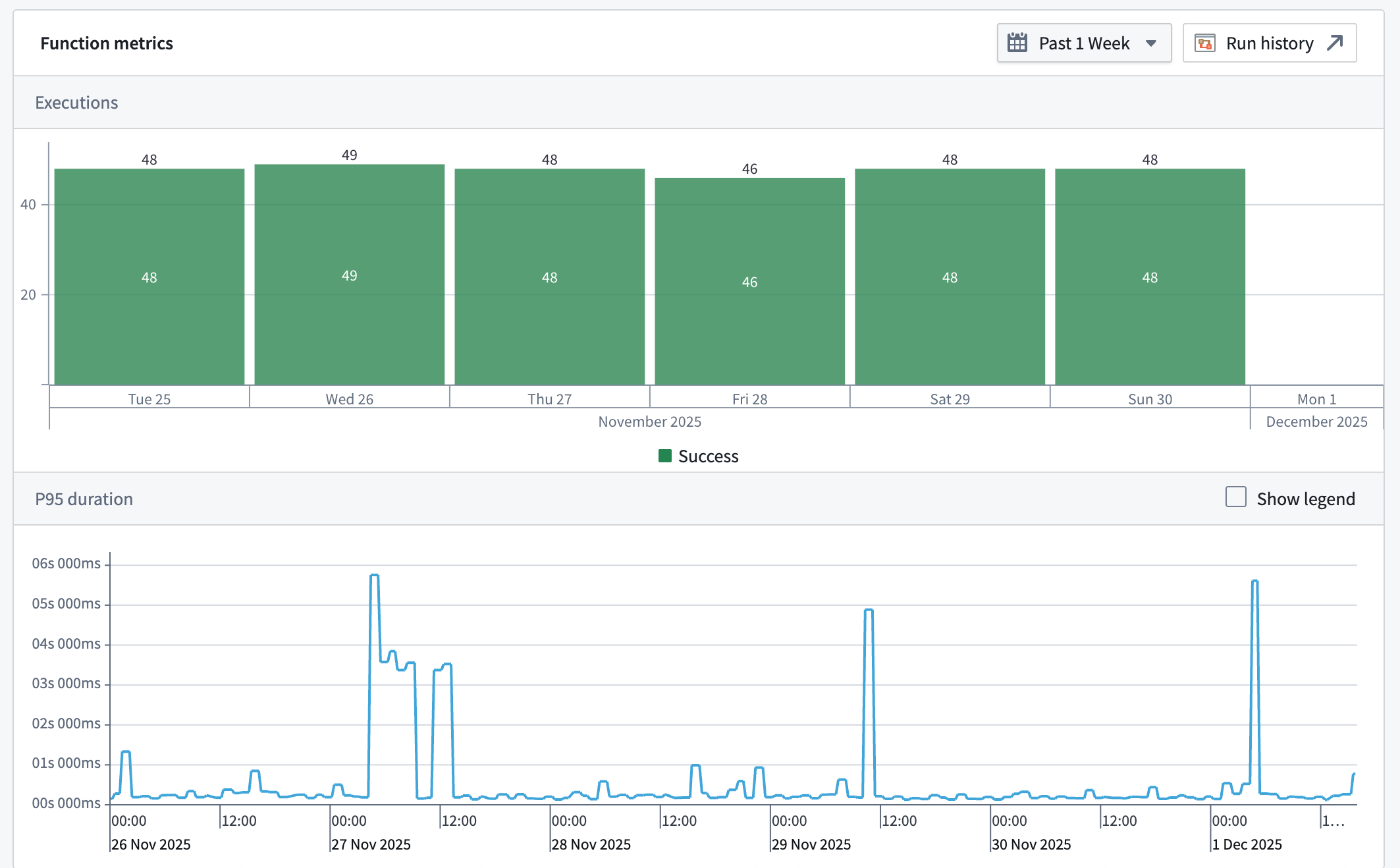
The new function metrics dashboard in Ontology Manager, showing P95 spikes.
Why it matters
Previously, action and function metrics could take up to a day to update, delaying troubleshooting and monitoring. With near real-time metrics, you can debug, monitor, and optimize your actions and functions as events happen, ensuring faster response times and improved reliability.
We want to hear from you
We hope these enhancements improve your debugging and observability experience. Share your thoughts with Palantir Support channels or on our Developer Community ↗.
Learn more about monitoring views and available monitoring capabilities for actions and functions.
Review checkpoint records with new filtering capabilities
Date published: 2025-12-09
Checkpoints enable administrators to review and ensure proper justification for sensitive actions taken in the platform. To simplify this workflow, we are introducing a redesigned interface for Checkpoints with enhanced filtering capabilities that support complex search combinations. Filtered views can be shared and bookmarked via URL, enabling teams to collaborate more efficiently on auditing workflows and quickly access specific records. This interface will be enabled by default the week of December 8.

The refreshed Checkpoints interface provides enhanced filtering capabilities to support complex search combinations.
What's new?
Filtering:
- Filter sidebar: Checkpoint record filters are now in a collapsible sidebar.
- Multi-select: All filter types except for time support multi-select (multiple values in a given filter type).
- More combinations: All filter types can be used in combination with each other.
- Sharing: Filter combinations are stored in the URL allowing users to share their current filter view or to bookmark commonly used filter combinations.
Table and details panel:
- New interface: A new modern interface for improved readability.
- Improved rendering: Some checkpointed resources now include more descriptive rendering in the table and details panel.
- Improved performance: Records and their details now load faster.
What's next?
We are currently developing the ability to retrieve checkpoint records through the platform SDK.
We want to hear from you!
Use the checkpoints tag ↗ in Palantir's Developer Community ↗ forum or contact Palantir Support to share your experience with and feedback on the new Checkpoints review page.
Grok-4.1 Fast (Reasoning), Grok-4.1 Fast (Non-Reasoning) available via xAI
Date published: 2025-12-04
Grok-4.1 Fast series of models is now available from xAI on non-georestricted and US georestricted enrollments.
Model overviews
Grok-4.1 Fast (Reasoning) ↗ is xAI's newest multimodal model optimized for maximal intelligence, specifically for high-performance agentic tool calling.
Grok-4.1 Fast (Non-Reasoning) ↗ is a faster version of the model prioritizing fast responses and a high bar for intelligence.
Both models share the following specifications:
- Context Window: 2,000,000 tokens
- Modalities: Text, image
- Capabilities: Tool use, Structured outputs
Getting started
To use these models:
- Confirm your enrollment administrator has enabled relevant model family
- Review token costs and pricing
- See the complete list of all the models available in AIP
Your feedback matters
We want to hear about your experiences using language models in the Palantir platform and welcome your feedback. Share your thoughts with Palantir Support channels or on our Developer Community ↗ using the language-model-service tag ↗.
Claude Opus 4.5 available via Direct Anthropic, Google Vertex, AWS Bedrock
Date published: 2025-12-04
Claude Opus 4.5 is now available from Anthropic, Google Vertex and AWS Bedrock on non-georestricted enrollments.
Model overview
Anthropic’s newest model, Claude Opus 4.5, is among the best in class LLMs for workflows involving coding, agents, and computer use. Opus 4.5 is available at a price point that is 3x cheaper than previous Opus models, and runs more efficiently with less interventions required. For more information, review Anthropic's documentation on the model ↗.
- Context Window: 200,000 tokens
- Modalities: Text, image
- Capabilities: Extended thinking, function calling
Getting started
To use these models:
- Confirm your enrollment administrator has enabled relevant model family or families
- Review token costs and pricing
- See the complete list of all the models available in AIP
Your feedback matters
We want to hear about your experiences using language models in the Palantir platform and welcome your feedback. Share your thoughts with Palantir Support channels or on our Developer Community ↗ using the language-model-service tag ↗.
Codex models available in AIP via Azure OpenAI and Direct OpenAI
Date published: 2025-12-04
GPT-5.1 Codex, GPT-5.1 Codex mini, GPT-5 Codex are now available on non-georestricted enrollments with Azure OpenAI and/or Direct OpenAI enabled.
Model overviews
Three advanced OpenAI models are now available for use: GPT-5-Codex, GPT-5.1-Codex, and GPT-5.1-Codex mini. These models are designed to support a wide range of coding, reasoning, and automation tasks, with the 5.1 series offering the latest advancements in capability and efficiency.
GPT-5.1-Codex ↗ is the latest and most capable agentic coding model from OpenAI, optimized for complex reasoning, code generation, and advanced automation tasks. It is ideal for users seeking the best performance and up-to-date features for demanding applications.
GPT-5.1-Codex mini ↗ is a smaller, more cost-effective variant of GPT-5.1-Codex. It is designed for users who need efficient, scalable solutions for less complex coding and automation tasks.
GPT-5-Codex ↗ is a model optimized for agentic coding tasks and automation.
All three of these models share the following specifications:
- Context Window: 400,000 tokens
- Max Output Tokens: 128,000 tokens
- Knowledge Cutoff: Sep 30, 2024
- Modalities: Text, Image inputs; Text outputs
- Features: Structured outputs, streaming, function calling
Getting started
To use these models:
- Confirm your enrollment administrator has enabled relevant model family or families
- Review token costs and pricing
- See the complete list of all the models available in AIP
Your feedback matters
We want to hear about your experiences using language models in the Palantir platform and welcome your feedback. Share your thoughts with Palantir Support channels or on our Developer Community ↗ using the language-model-service tag ↗.
Source terminal now available in Data Connection
Date published: 2025-12-02
Source terminal is a new tool to help debug connectivity issues of sources using network egress policies. You can run commands in a terminal that has the same networking access as the source, allowing you to test connectivity to external systems with commands like dig, curl, netcat and openssl.
How to use
To access the terminal from Data Connection, select Debug in the Network Connectivity panel under Connection details.
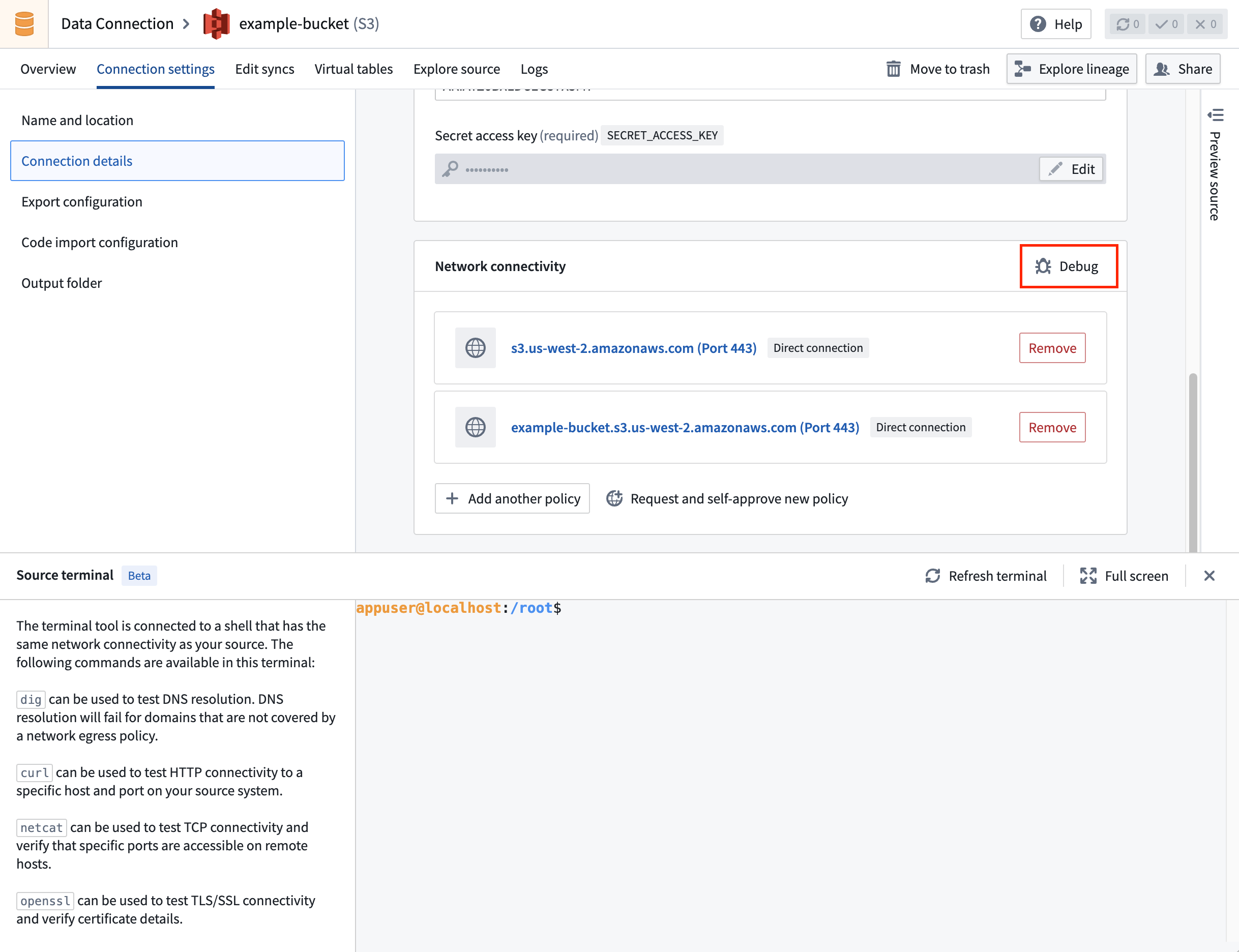
Source terminal is accessible via the Connection settings tab.
Use this feature to significantly improve debugging speed and experience for common network issues: failed DNS resolution, SSL handshake failures due to missing certificates, and firewall-blocked traffic.
Find more details about this feature in the documentation.
Your feedback matters
As we continue to add Data Connection features, we want to hear about your experiences and welcome your feedback. Share your thoughts with Palantir Support channels or our Developer Community ↗ or post using the our data-connection tag ↗.
Faster pipelines in Pipeline Builder are now generally available
Date published: 2025-12-02
Previously known as lightweight pipelines during their beta phase, faster pipelines created in Pipeline Builder significantly improve execution speed for both batch and incremental pipelines built on datasets of varying sizes. This faster pipeline option is now generally available across Foundry enrollments.
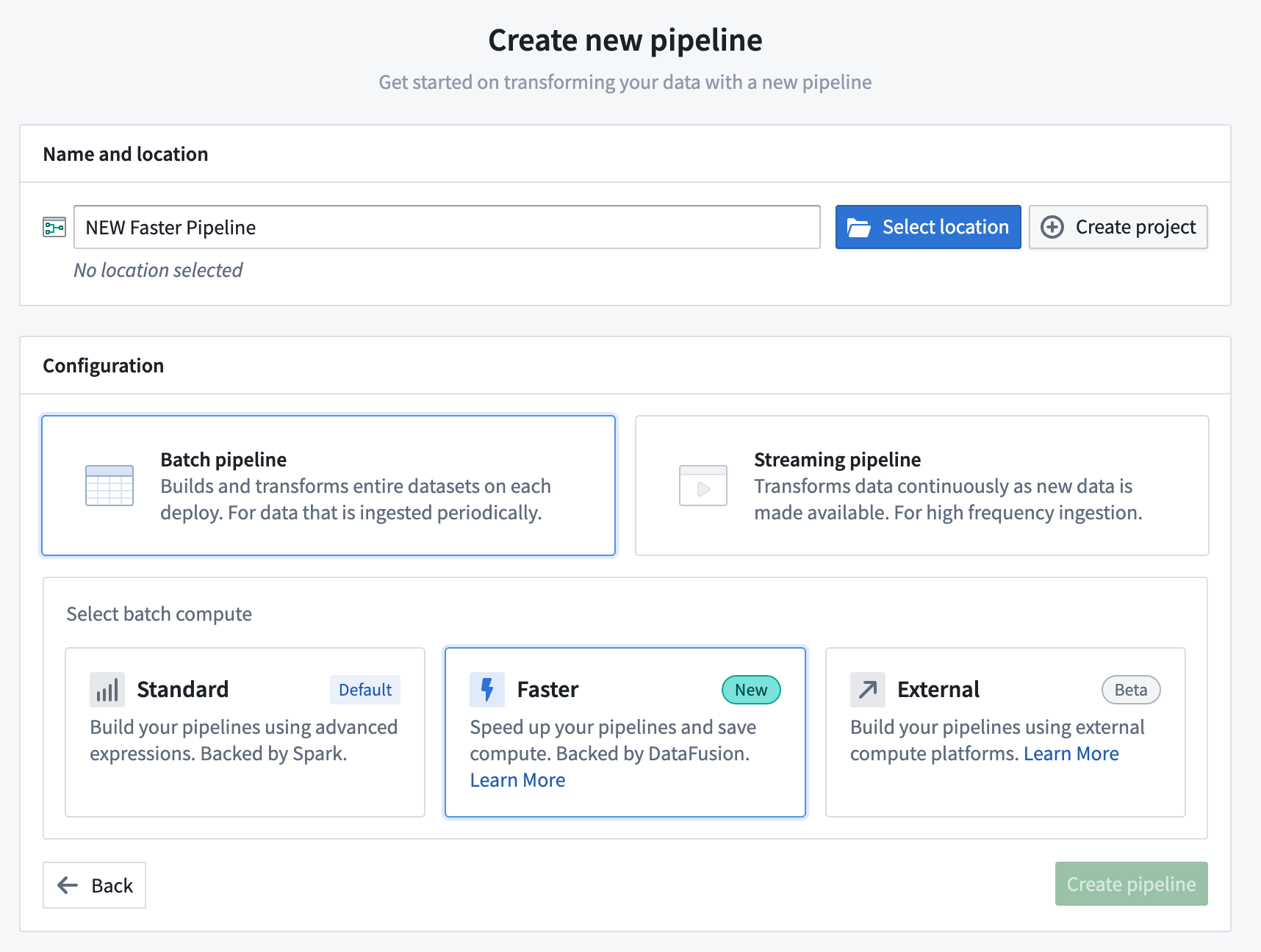
You can configure a Faster pipeline when creating a new pipeline in Pipeline Builder.
What are faster batch pipelines?
Powered by DataFusion ↗, an open-source query engine written in Rust ↗, faster pipelines can substantially accelerate compute processes compared to traditional Spark-based pipelines while supporting rapid, low-latency execution.
When to use faster pipelines
Pipelines that typically run in under 15 minutes will benefit most from their conversion to a faster pipeline, though builds which take longer or run on large-scale datasets may also experience reduced execution time and compute resource usage. Pipeline Builder enables you to seamlessly convert between standard batch pipelines and faster pipelines at any time through the Settings menu, so you can experiment with different pipeline types to optimize performance for your workflows.
When converting an existing standard batch pipeline to a faster pipeline, Pipeline Builder will warn you if the pipeline contains incompatible transforms or expressions.
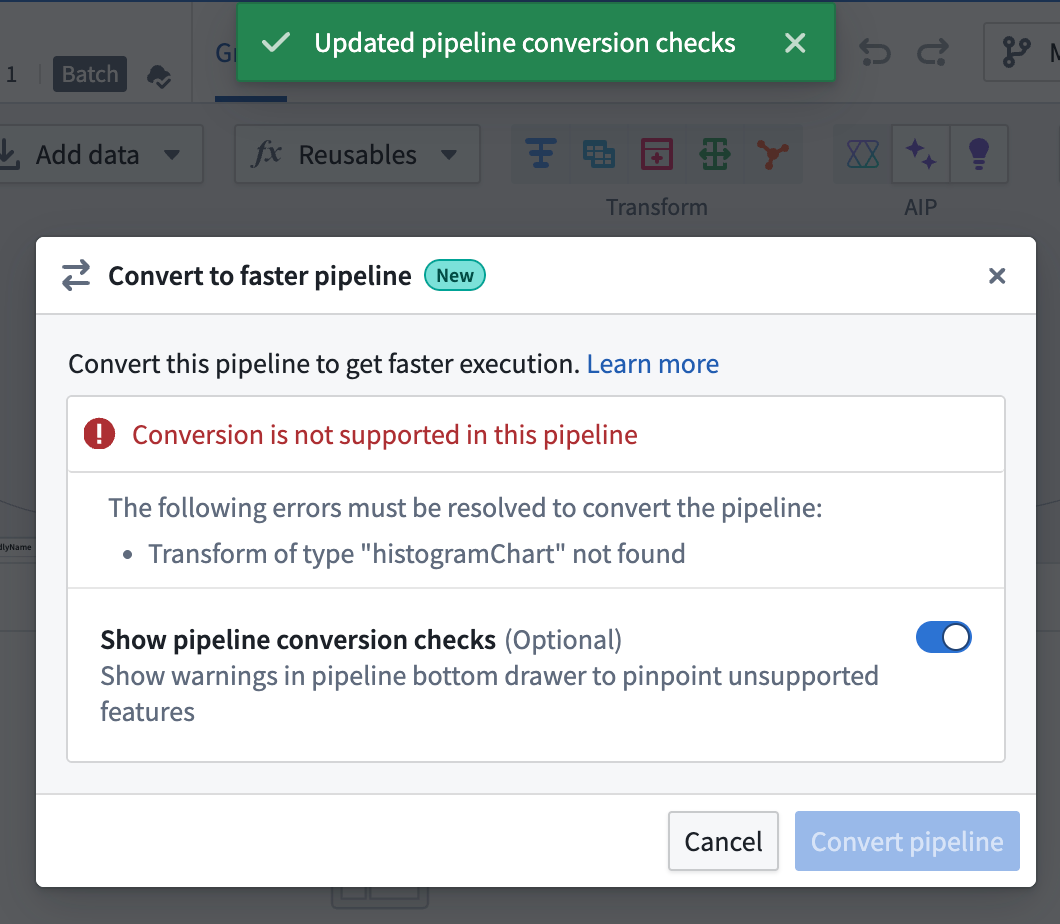
Use the Settings menu to convert an existing pipeline and view incompatible transforms or expressions to resolve.
After you toggle on Show pipeline conversion checks, a Faster conversion compatibility checks section appears in the Pipeline warnings panel at the bottom of the screen.
This section lists any transforms and expressions that are not supported with faster pipelines. You can quickly locate the node with an unsupported transform by selecting the Go to node icon.
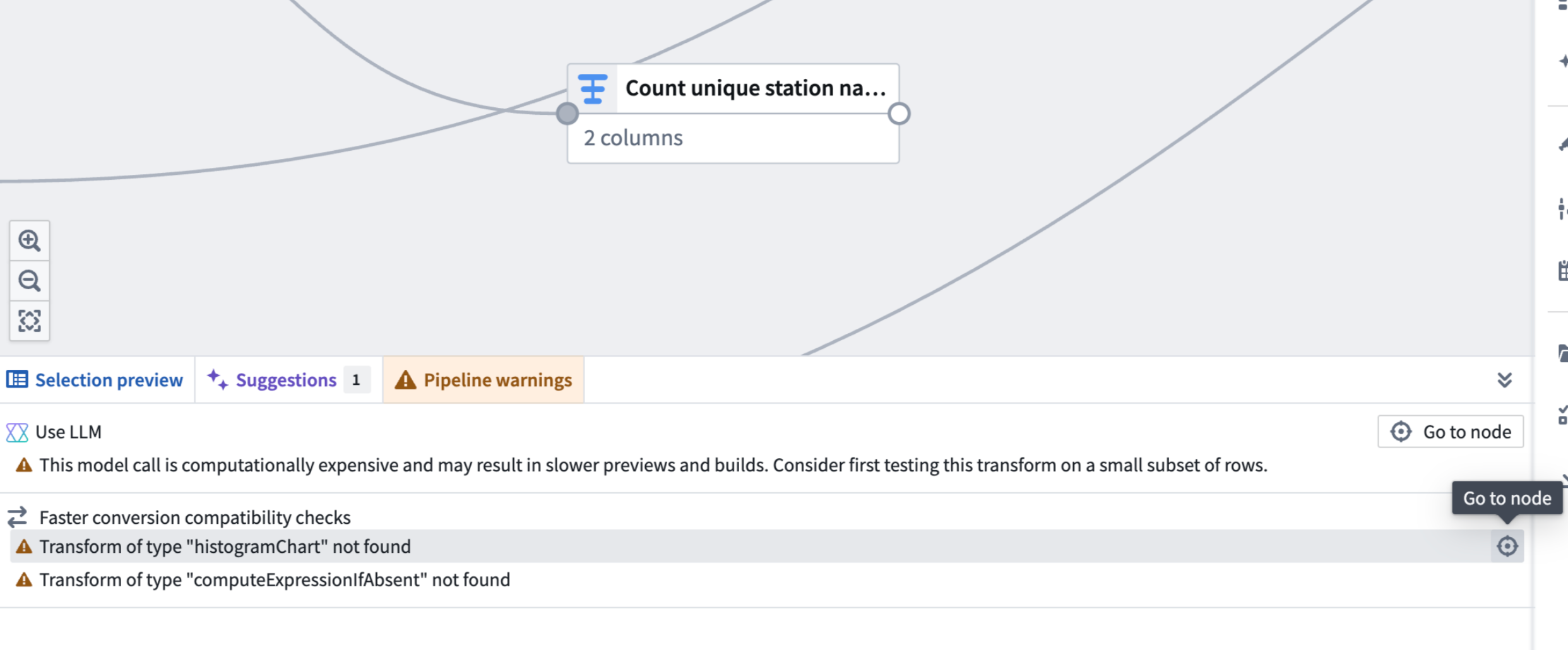
The Pipeline warnings panel displays an incompatible transform.
How to build and use faster pipelines
Review the existing documentation to build a faster pipeline or convert an existing standard pipeline.
Manage ontology resource permissions through projects in the Compass filesystem
Date published: 2025-12-02
Ontology resources (object types, link types, action types, shared properties, and interfaces) can now be integrated with the Compass filesystem on supported enrollments, with the resources appearing as files within projects alongside other resources like Workshop applications and datasets. You can organize ontology resources into folders, apply tags, add them to the project catalog, and permission them using the same familiar Compass project roles. This unified approach, currently in beta, replaces the previous ontology permission models: ontology roles and datasource-derived permissions. To use, ontology owners must first enable this feature in Ontology Manager — review the How to enable section below for details.
Read more about project-based ontology permissions in our documentation.
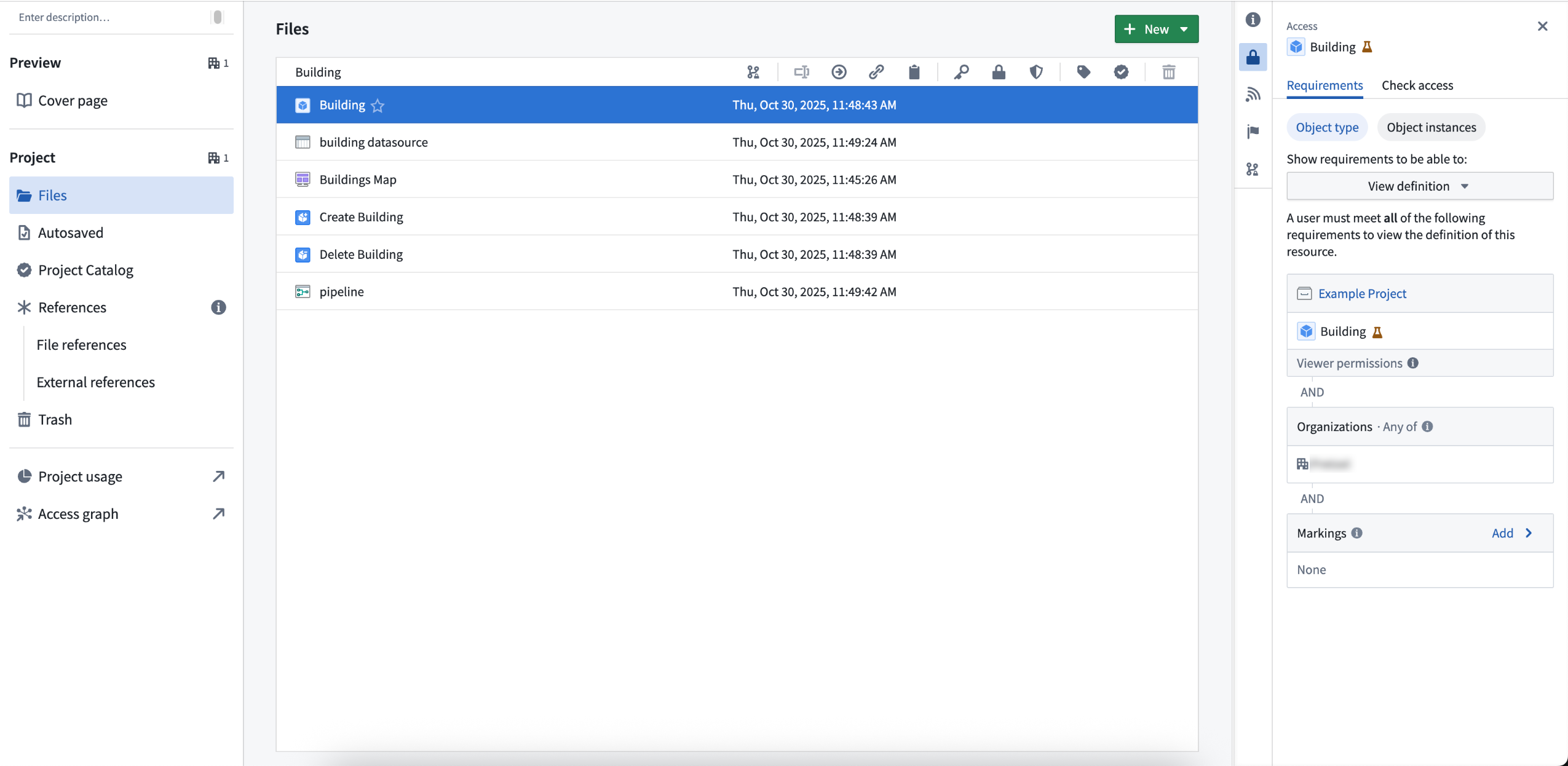
When this feature is turned on, new ontology resources will be permissioned through projects in the Compass filesystem.
Example of how the new permission model works
For example, consider an object type called Building, now saved as a file in project A. Your ability to view, edit, or manage Building depends on your role in project A. If you are an editor in project A, you can edit the Building object type.
To view specific Building objects (like Empire State Building), you need the Viewer role on both the object type and its datasource. If you only have viewing rights for the object type, you can only see information such as schema and contact information, not the actual data. If you need help understanding the permissions required, review the Compass project side-panel for more details.
This approach makes managing permissions in the Palantir platform easier by allowing all resource types to be managed as project resources, enabling you to permission entire workflows in the filesystem.
How to enable
To save new ontology resources into projects by default, ontology owners can navigate to the Ontology configuration tab in Ontology Manager and toggle on Require new ontology resources be saved in project. Once enabled, you will be prompted to choose a save location when creating new ontology resources. Turning this feature on does not affect existing ontology resources.
To migrate existing ontology resources, use the migration assistant in the Ontology configuration tab of Ontology Manager, which will suggest filesystem locations for each resource. You can migrate a resource if you are an Owner on it and at least an Editor on the chosen project. Learn more about migrating existing ontology resources using migration assistant.
Limitations
This feature is not available for default ontologies or with classification-based access controls.
We want to hear from you
As we continue developing new features for the ontology, we welcome your feedback. Share your thoughts with Palantir Support channels or our Developer Community ↗ and use the ontology-management ↗ tag.
Use Workflow Lineage to visualize and manage workflows
Date published: 2025-12-02
Easily track and update workflow resources and relationships with Workflow Lineage (previously known as Workflow Builder). Now generally available, Workflow Lineage enables better management of the resources that power your applications, with features spanning AI model visibility, bulk updating resources and user permissions, and Marketplace packaging assistance.
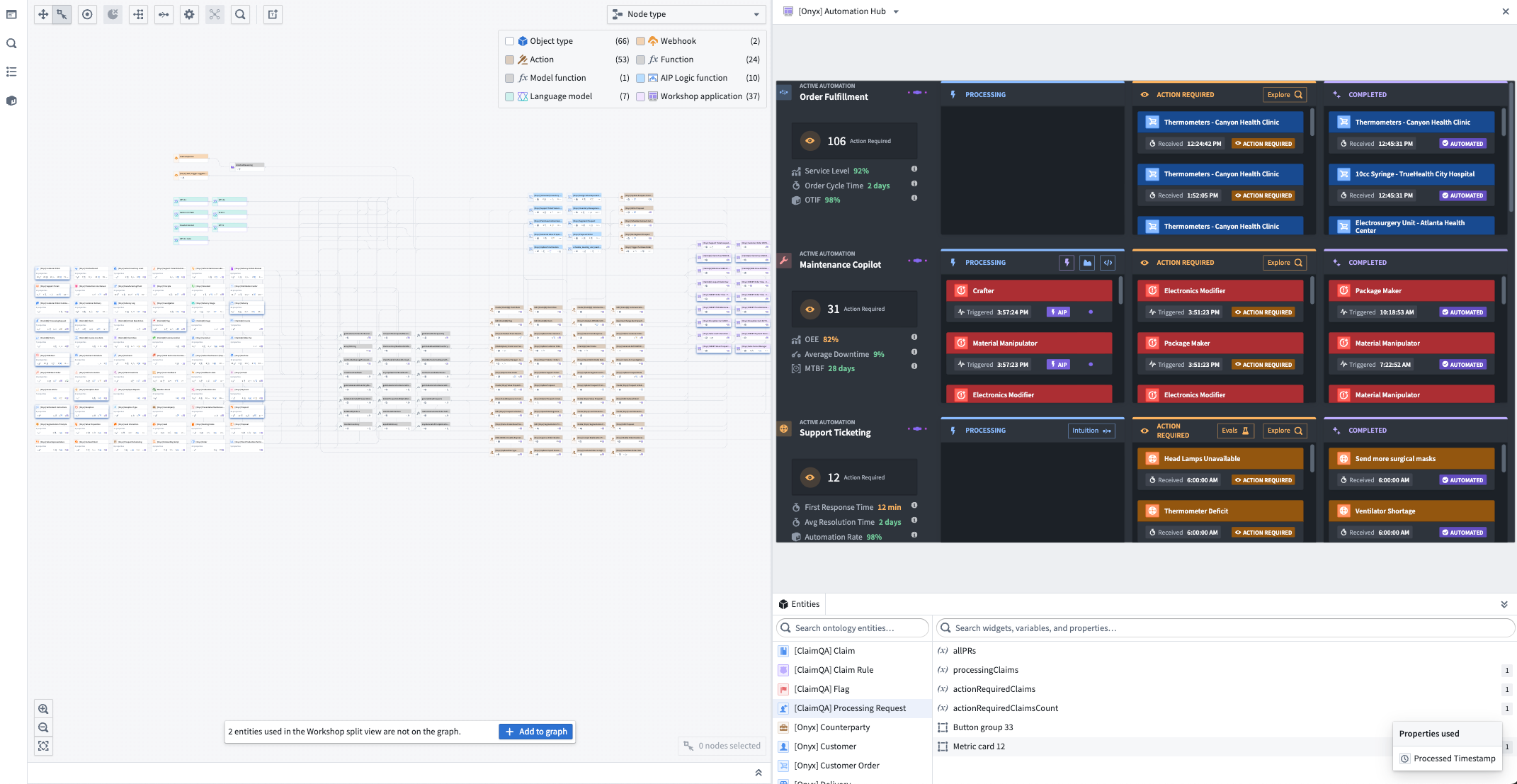
The graph and application views of Workflow Lineage.
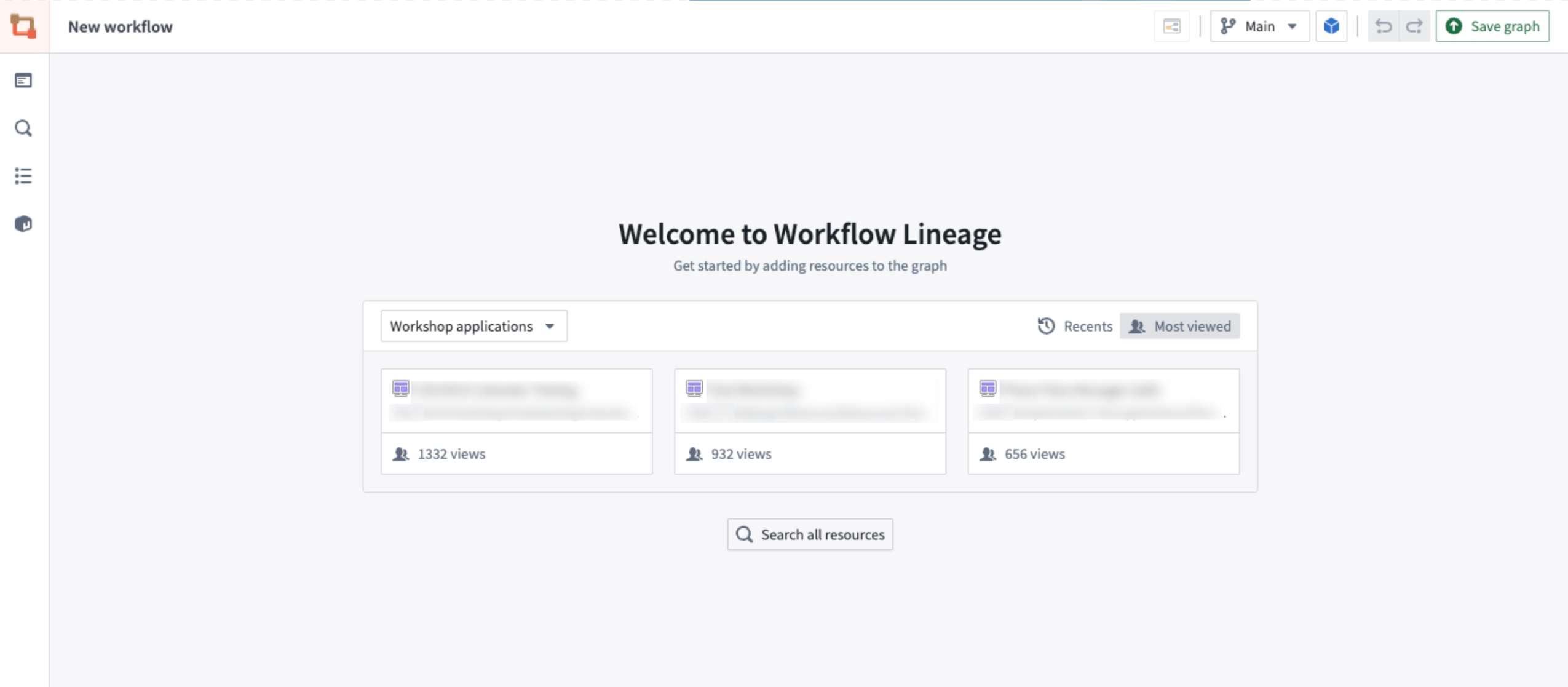
The Workflow Lineage landing pages displays Workshop modules to quick-start a lineage graph.
Getting started
Use Cmd + I (macOS) or Ctrl + I (Windows) to automatically generate a Workflow Lineage graph depicting the relevant objects, actions, and functions. Alternatively, open an existing Data Lineage graph and select Workflow Lineage in the top right corner to open the corresponding graph.

The option to create a Workflow Lineage graph from the Data Lineage application header.
Streamline your workflow management
You can use Workflow Lineage to bulk change and update versions and criteria across your resources:
- Keep workflows up-to-date with bulk update features for function-backed actions, functions in Workshop modules, and logic. Use the Out-of-date dependencies color mode to select the nodes you wish to update, then choose to bulk update from the bottom panel.
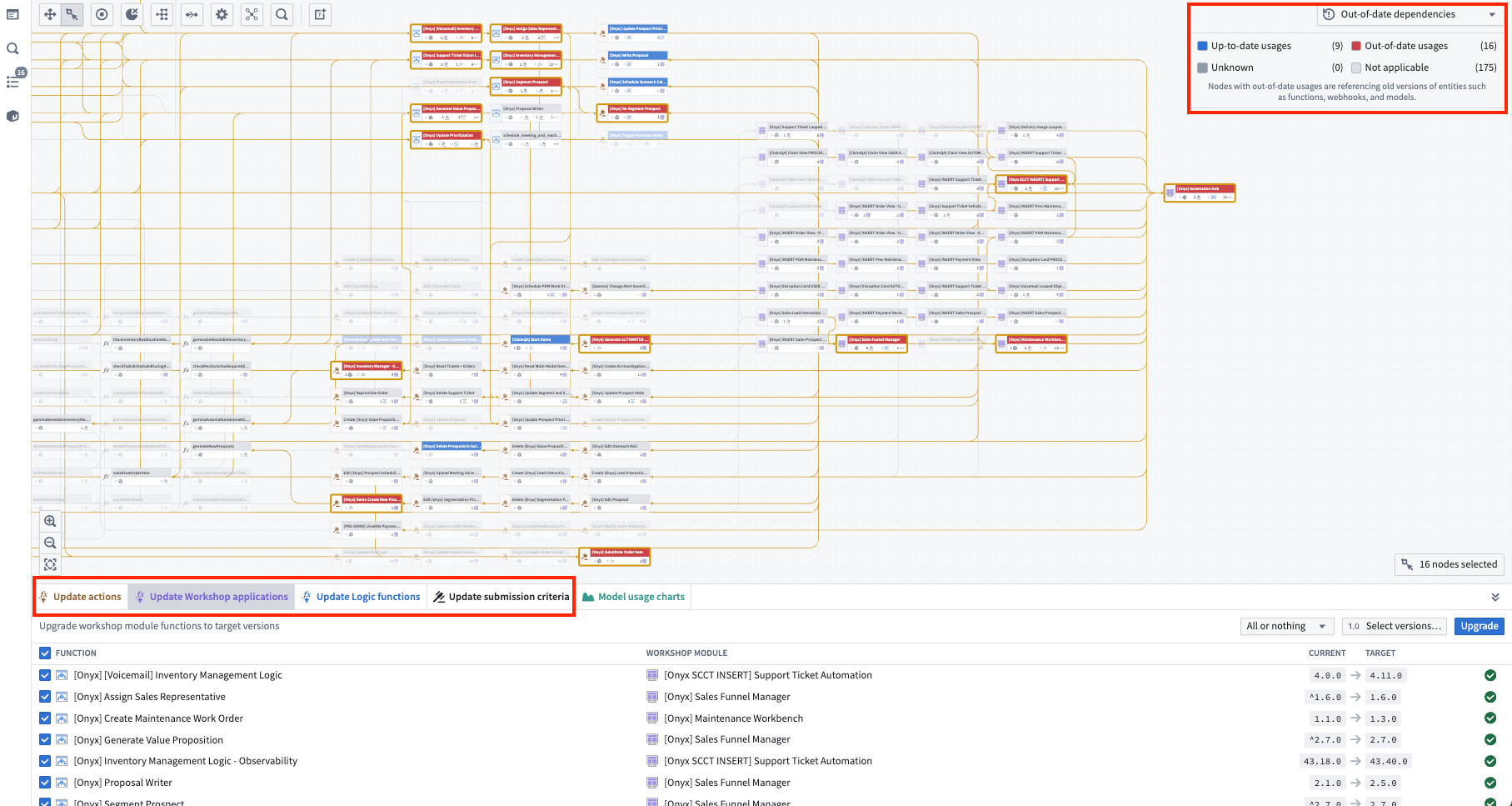
The bottom upgrade panel allows you to upgrade all function versions at once.
- Manage resources with tools to bulk delete object types and bulk publish Workshop modules. Right-click on selected nodes to perform bulk actions.
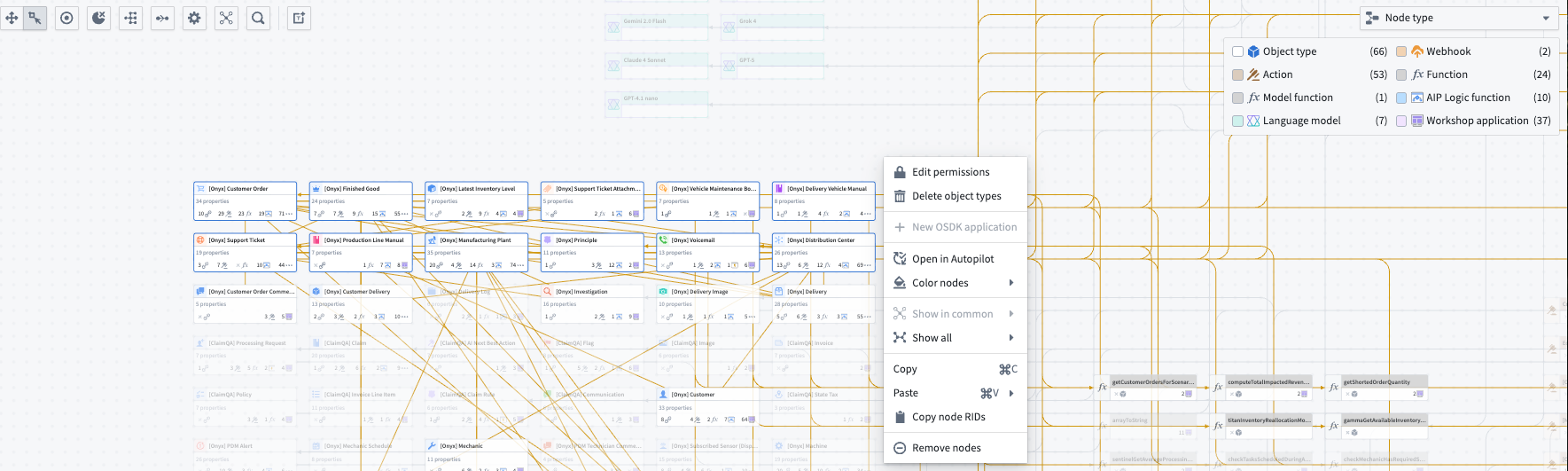
The right-click menu on selected nodes to apply bulk actions.
- Track property usage across all downstream usages of properties and resources including object types, automations, functions, Workshop modules, and actions. Select an object and use the Selection details panel on the left to view the properties and their usages.
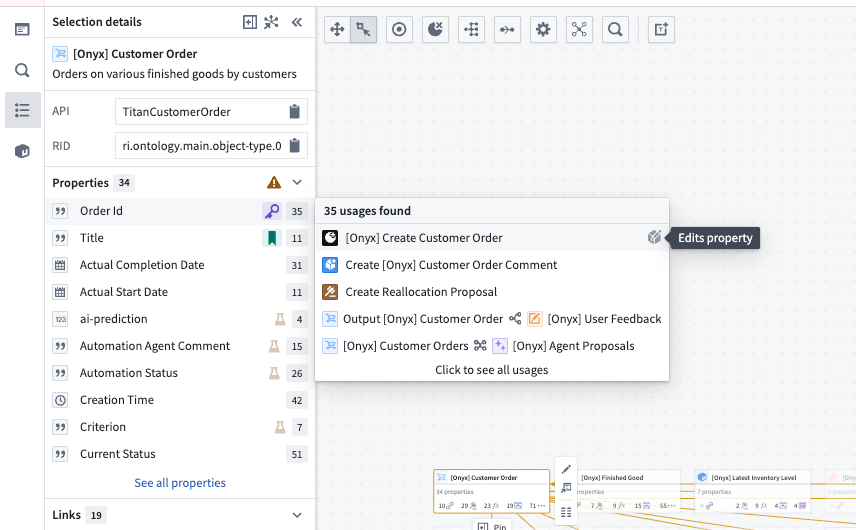
The Selection details side panel reveals downstream property usages in one easy view.
Track AI usage and performance
Visualize and monitor token and model usage with detailed success vs. rate-limit breakdowns, plus comprehensive charts showing usage trends over time.
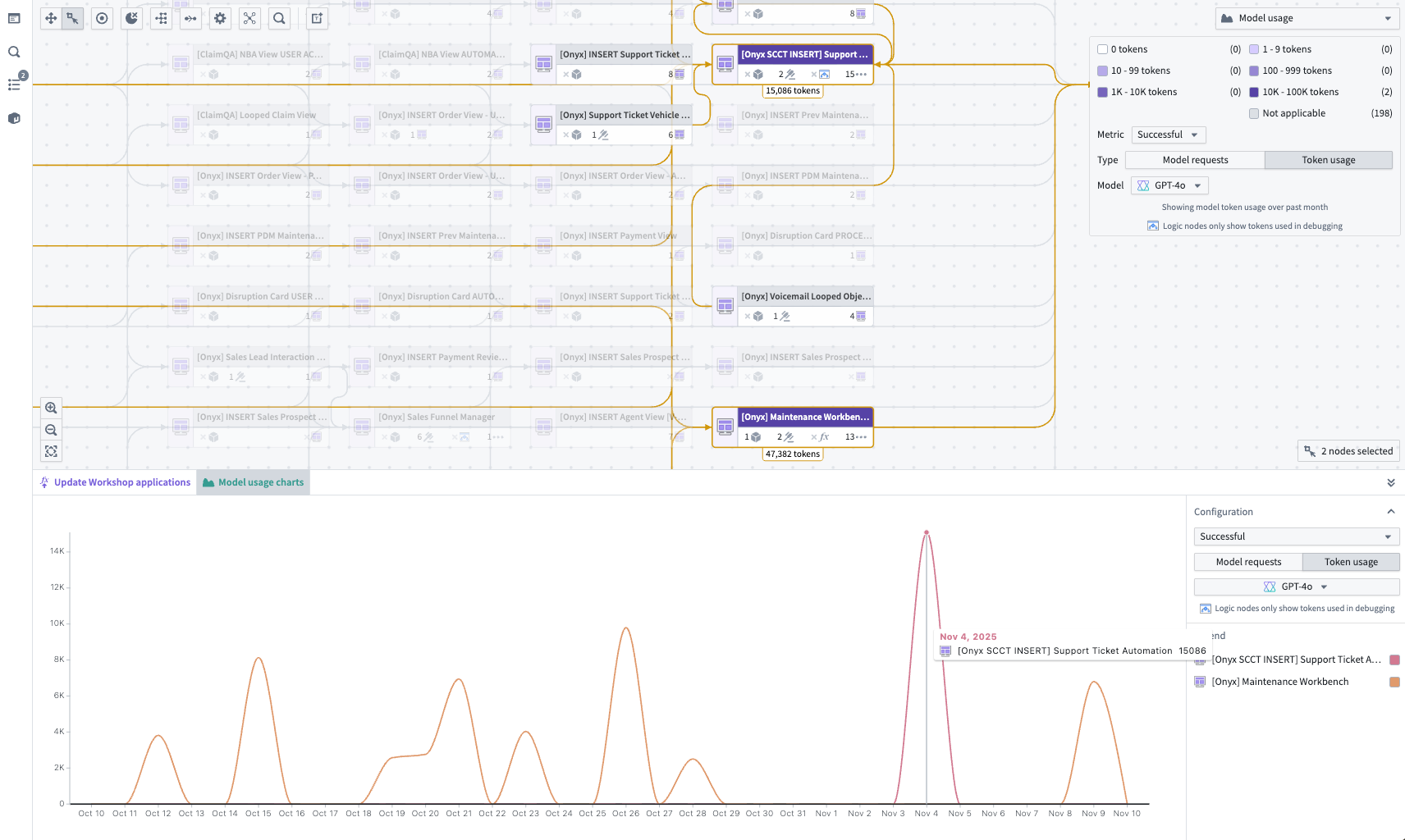
The Model usage color legend in the top right and Model usage charts in the bottom panel offer different views to understand trends of token and model utilization over time
Observe user permissions
Bulk update submission criteria across multiple actions and easily find actions with matching criteria for faster permission management. Manage and align submission criteria using color modes and bulk upgrade functionality.
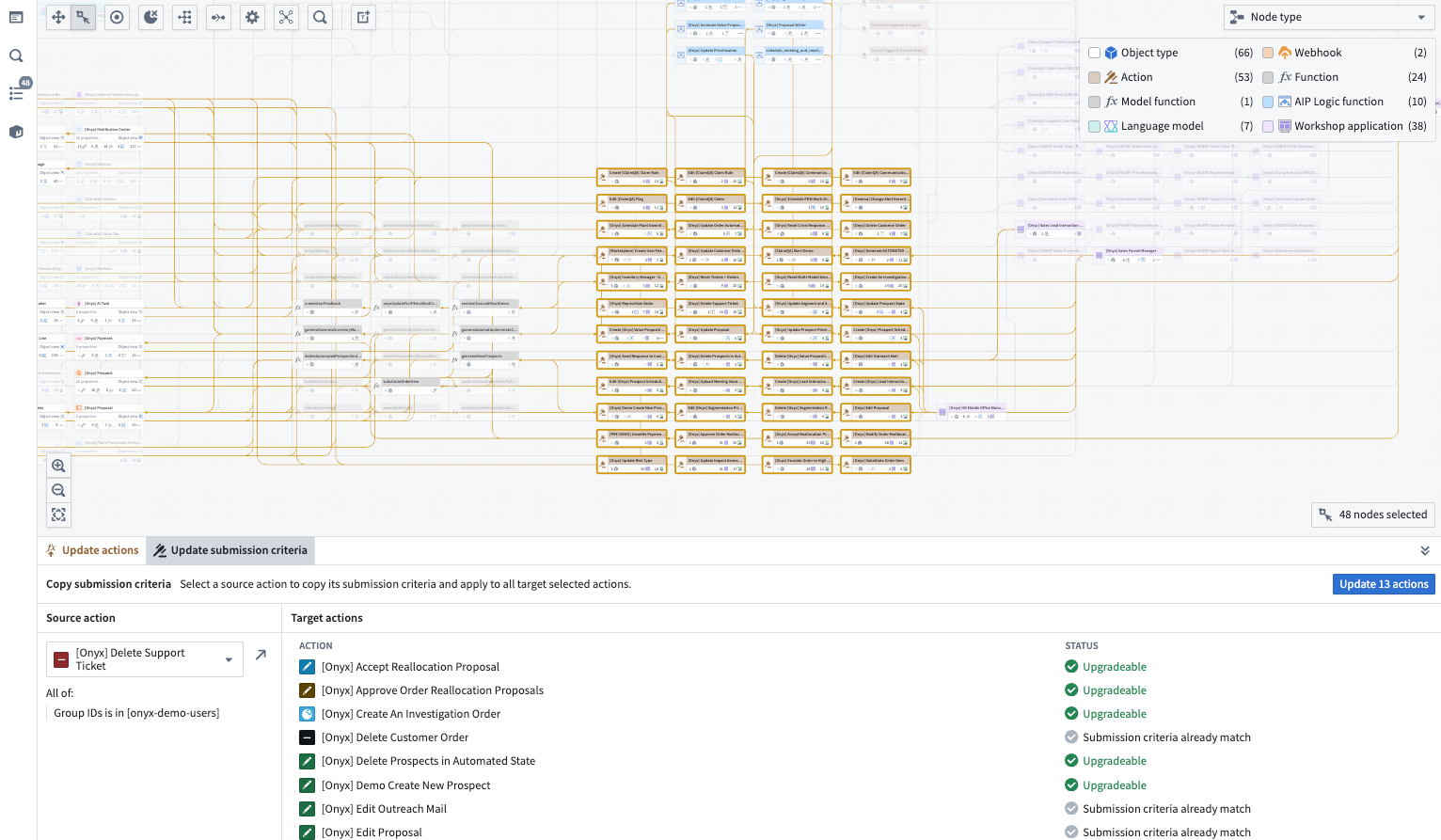
A view of action submission criteria available to bulk update in a Workflow Lineage graph.
Monitor run history and action logs
View run history and action metrics in the bottom panel to help debug and pinpoint changes.
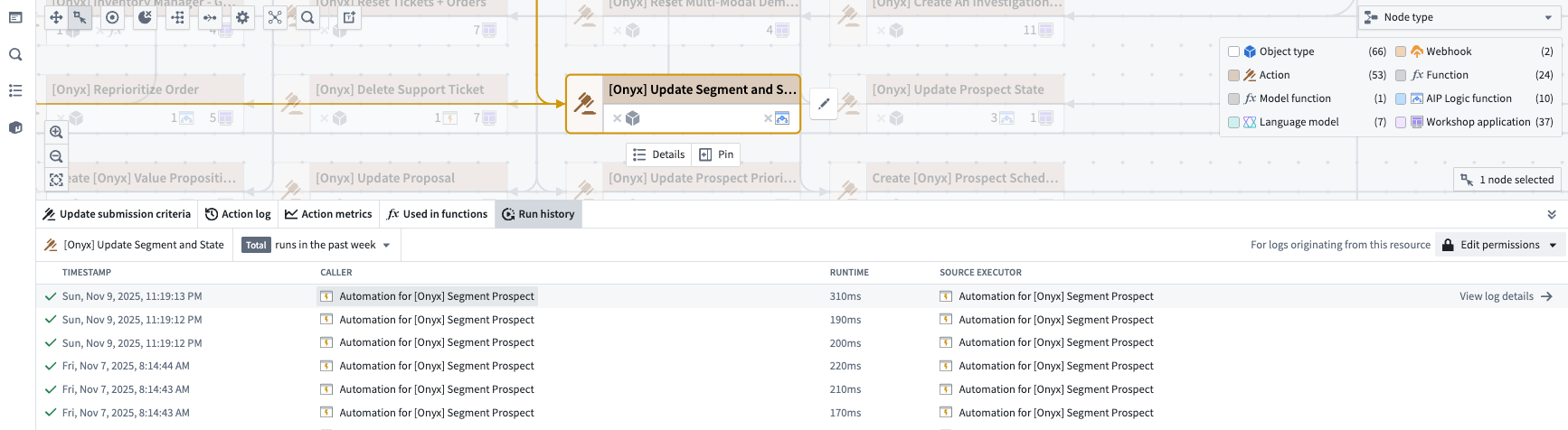
The run history of a selected action node.
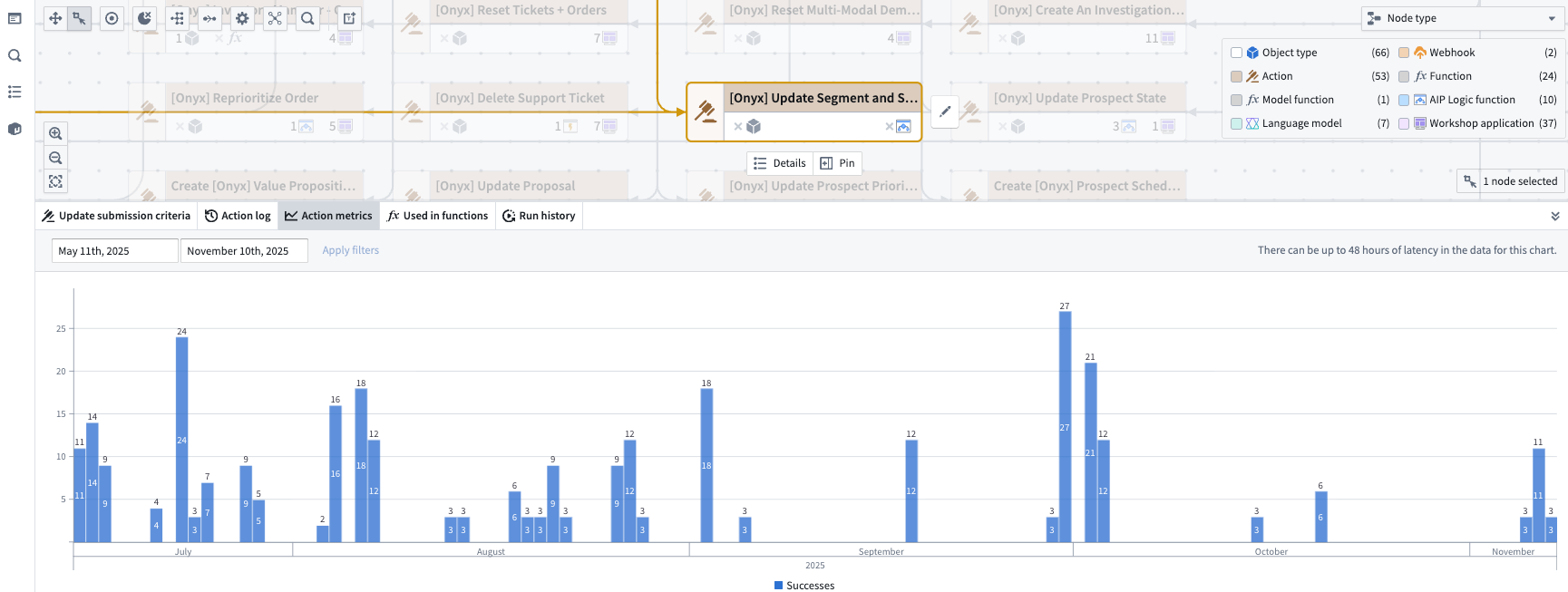
The metrics of a selected action node.
Package for Marketplace
Inspect the resources used in your products and view overlaps and dependencies. You can package your workflow graph together and visualize your Marketplace-packaged resources and their connections in the graph.
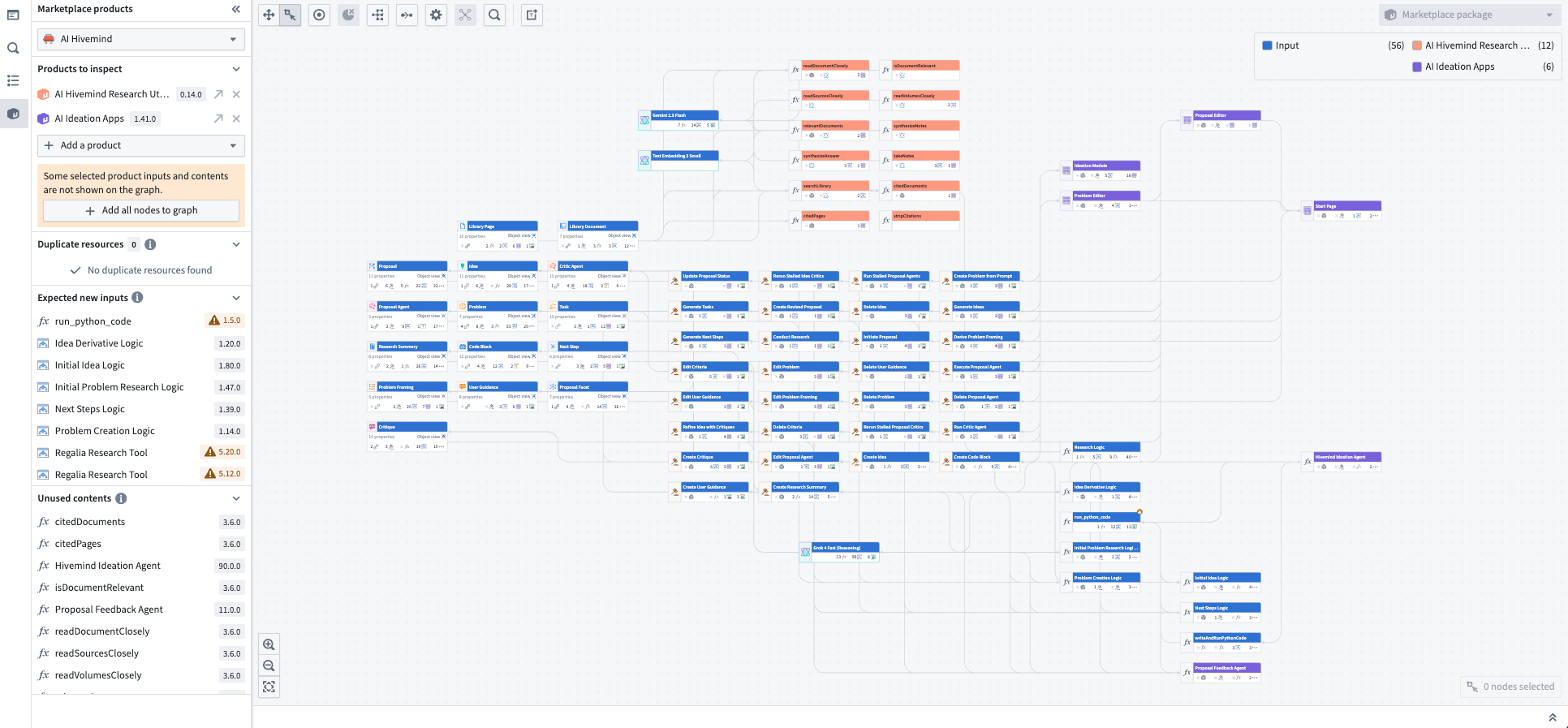
The graph of a packaged Marketplace product showing all connected resources.
Share your thoughts, and join our AMA!
We are holding an AMA session with the Workflow Lineage team to share what's happening behind the scenes and hear about your experiences. This AMA will run asynchronously in our Developer Community forum ↗ from Monday, December 1 through Tuesday, December 16, with Workflow Lineage team members monitoring this thread daily and responding to your questions and comments.
We also welcome your feedback in our Palantir Support channels, and you can post in our Developer Community ↗ using the workflow-lineage tag ↗.
GPT-5.1 available via Azure OpenAI, Direct OpenAI on non-georestricted enrollments
Date published: 2025-12-01
GPT-5.1 is now available from Azure OpenAI and Direct OpenAI on non-georestricted enrollments.
Model overview
GPT-5.1 balances intelligence and speed by dynamically adapting how much time the model spends thinking based on the complexity of the task. It also features a “no reasoning” mode to respond faster on tasks that don’t require deep thinking. For more information, review OpenAI’s documentation on the model ↗, and their GPT-5.1 prompting guide ↗.
- Context Window: 400,000 tokens
- Modalities: Text, Image
- Capabilities: Structured outputs, function calling, reasoning effort
Getting started
To use these models:
- Confirm your enrollment administrator has enabled relevant model family or families
- Review token costs and pricing
- See the complete list of all the models available in AIP
Your feedback matters
We want to hear about your experiences using language models in the Palantir platform and welcome your feedback. Share your thoughts with Palantir Support channels or on our Developer Community ↗ using the language-model-service tag ↗.