- Capabilities
- Getting started
- Architecture center
- Platform updates
Announcements
REMINDER: Sign up for the Foundry Newsletter to receive a summary of new products, features, and improvements across the platform directly to your inbox. For more information on how to subscribe, see the Foundry Newsletter and Product Feedback channels announcement.
Share your thoughts about these announcements in our Developer Community Forum ↗.
AIP token usage data now available as an internal dataset export
Date published: 2026-05-28
Enrollment administrators can now export a new AIP Token Usage dataset to analyze LLM cost drivers across their enrollment. The dataset provides daily breakdowns of token consumption by model and resource, with corresponding compute and currency usage.
Input tokens, output tokens, and cache reads and writes are reported as separate metrics, so administrators can attribute costs to specific consumption patterns. After export, the dataset works with Foundry tools such as Contour to perform in-depth investigations and Workshop to build custom dashboards.
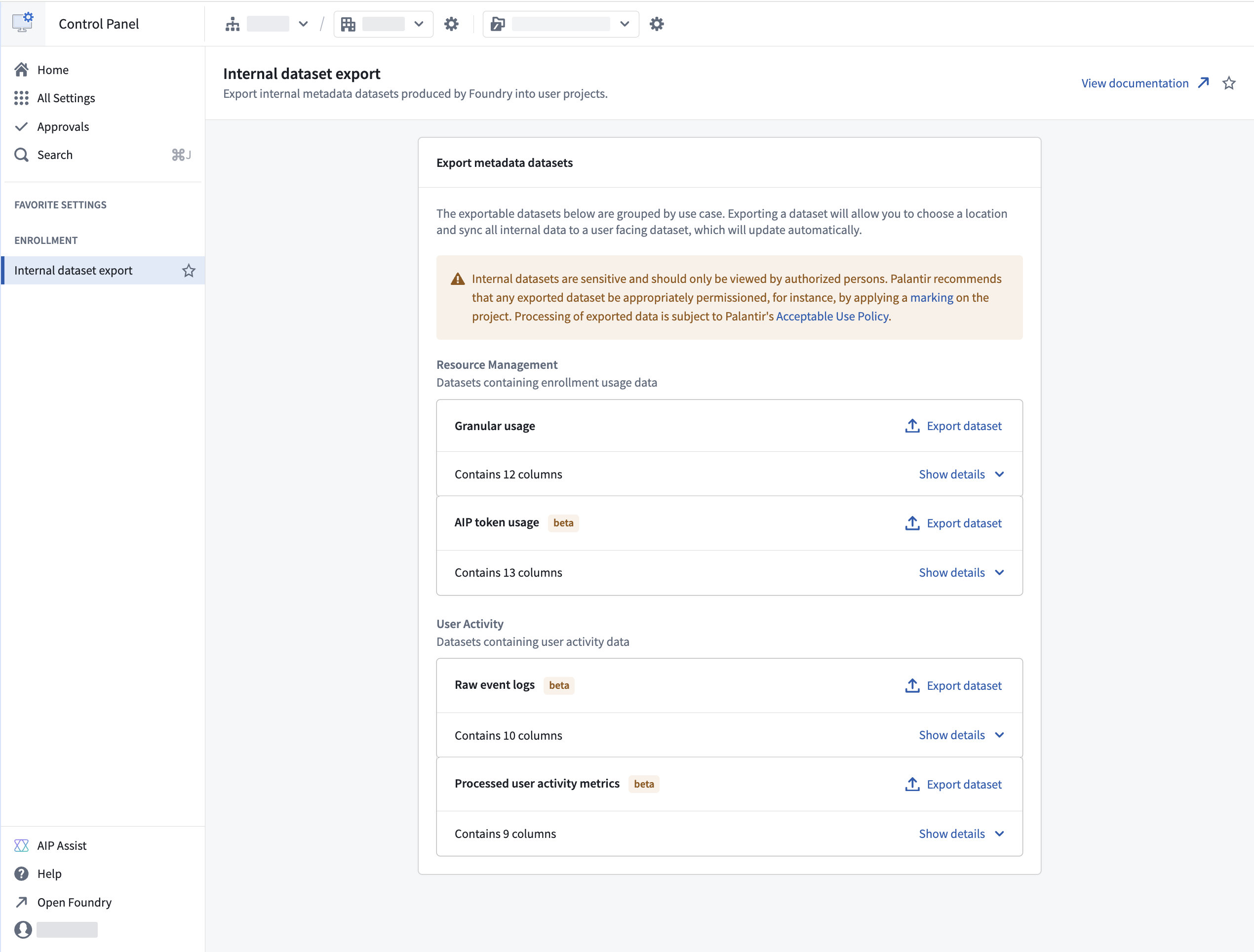
The AIP Token Usage dataset in the Internal dataset export section of Control Panel.
To export the dataset, navigate to Control Panel > Internal dataset export and select AIP Token Usage under the Resource Management group. The exported dataset updates automatically with new data for your enrollment.
Users with the Resource Management Administrator role can export this dataset. As with other internal dataset exports, permission the exported dataset appropriately after export.
For more information, see the Internal dataset export and Compute usage with AIP documentation.
Work with global branches from within Data Lineage
Date published: 2026-05-26
You can now view and interact with your entities on a global branch directly from Data Lineage. Select a branch from the new Global branches tab in the branch selector to see branch-specific details on graph nodes including datasets and ontology entities, and the links between them. Data from the branch will be reflected in the graph, search, node details, and colorings.
Key features
- Branch selector in both the page header and taskbar: Use the dropdown menu to switch between global branches or dataset branches for the nodes on the graph.
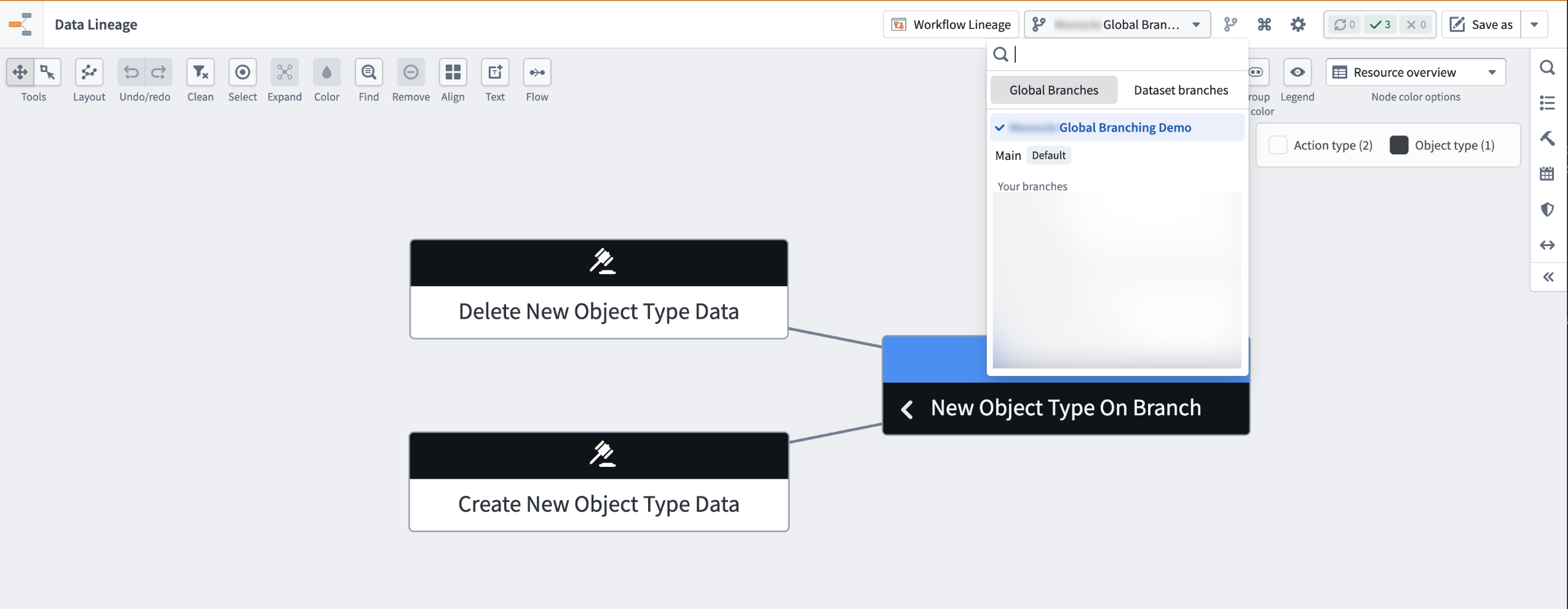
The Global branches tab in the branch selector, with Global Branching Demo selected.
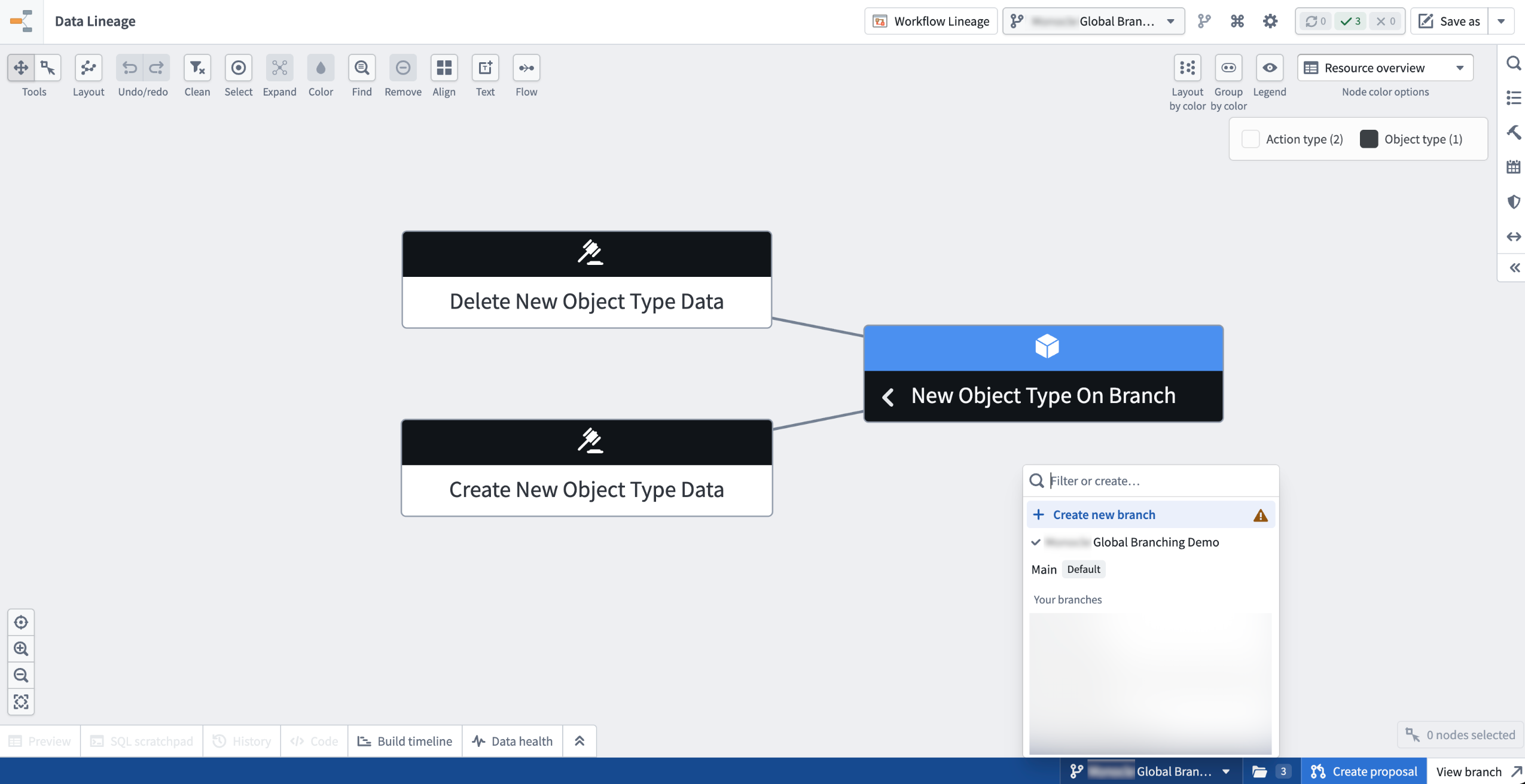
The branch taskbar at the bottom of Data Lineage also features a branch selector. The selector shows the active branch and the taskbar itself provides quick access to Create proposal and View branch actions.
- Branch-aware search surfaces entities that exist only on your branch
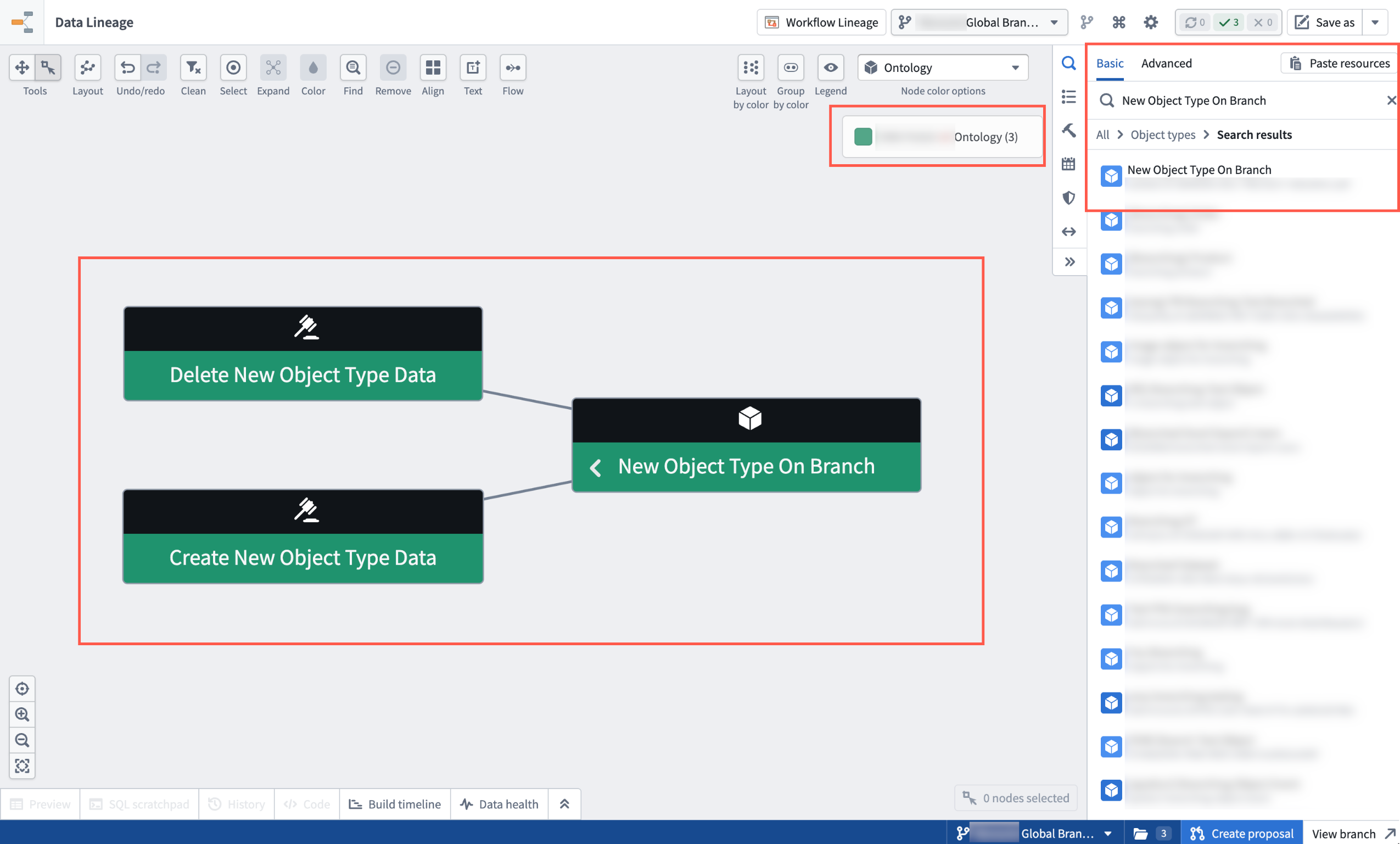
The graph, search results, node details, and colorings reflect data from the selected branch for easy reference.
- One-click add to graph. A message in the search panel allows you to add every modified entity on your branch to the graph in a single action.
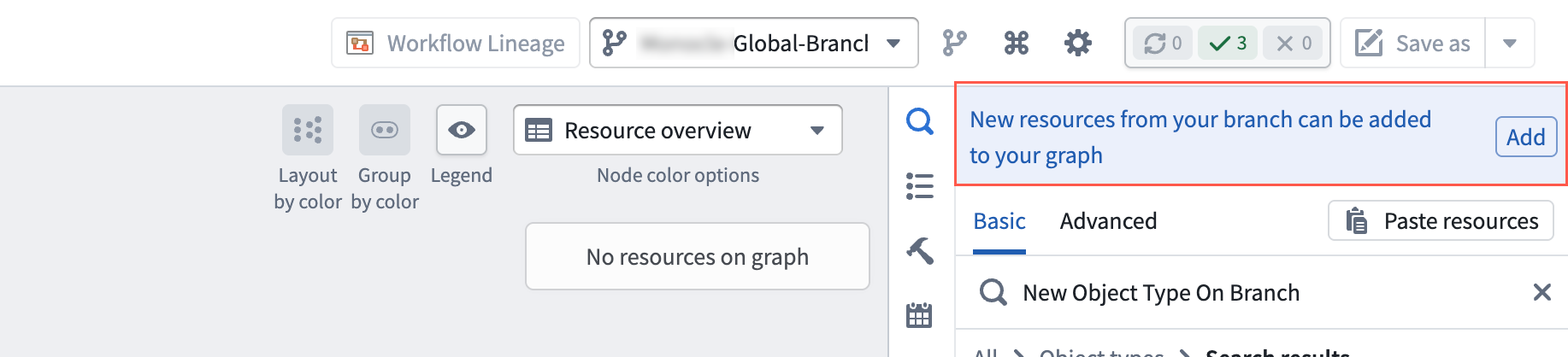
Use the Add option in the search panel to add every modified entity on your branch to the graph.
- Preserved branch context in saved graphs. Saved graphs retain the branch context for you and collaborators who open them. Note that while Data Lineage shows data from branches, the graph is not a branched resource, and therefore cannot be merged back to
main.
Your feedback matters
We welcome your feedback about Data Lineage. Share your thoughts with Palantir Support channels or on our Developer Community ↗ using the data-lineage tag ↗.
Migrate standalone OAuth clients into full Developer Console applications
Date published: 2026-05-26
In January 2026, the ability to create standalone OAuth clients in Developer Console was removed. Existing standalone OAuth clients can now be migrated to Developer Console applications, which include the following features:
- Ontology and Platform SDKs
- Website hosting
- Application restrictions
- DevOps support
- Metrics
How to migrate standalone OAuth clients
- Open your existing standalone OAuth client.
- Select Migrate to Developer Console application.
- Select a location and maximum classification, if applicable, in the migration wizard.
- Review user permissions for the Developer Console application.
- Submit migration.
After migration, the newly created application will appear in the selected location. You can now perform actions on the application like those on any other Developer Console application. Existing workflows using your client remain unaffected and will not break.
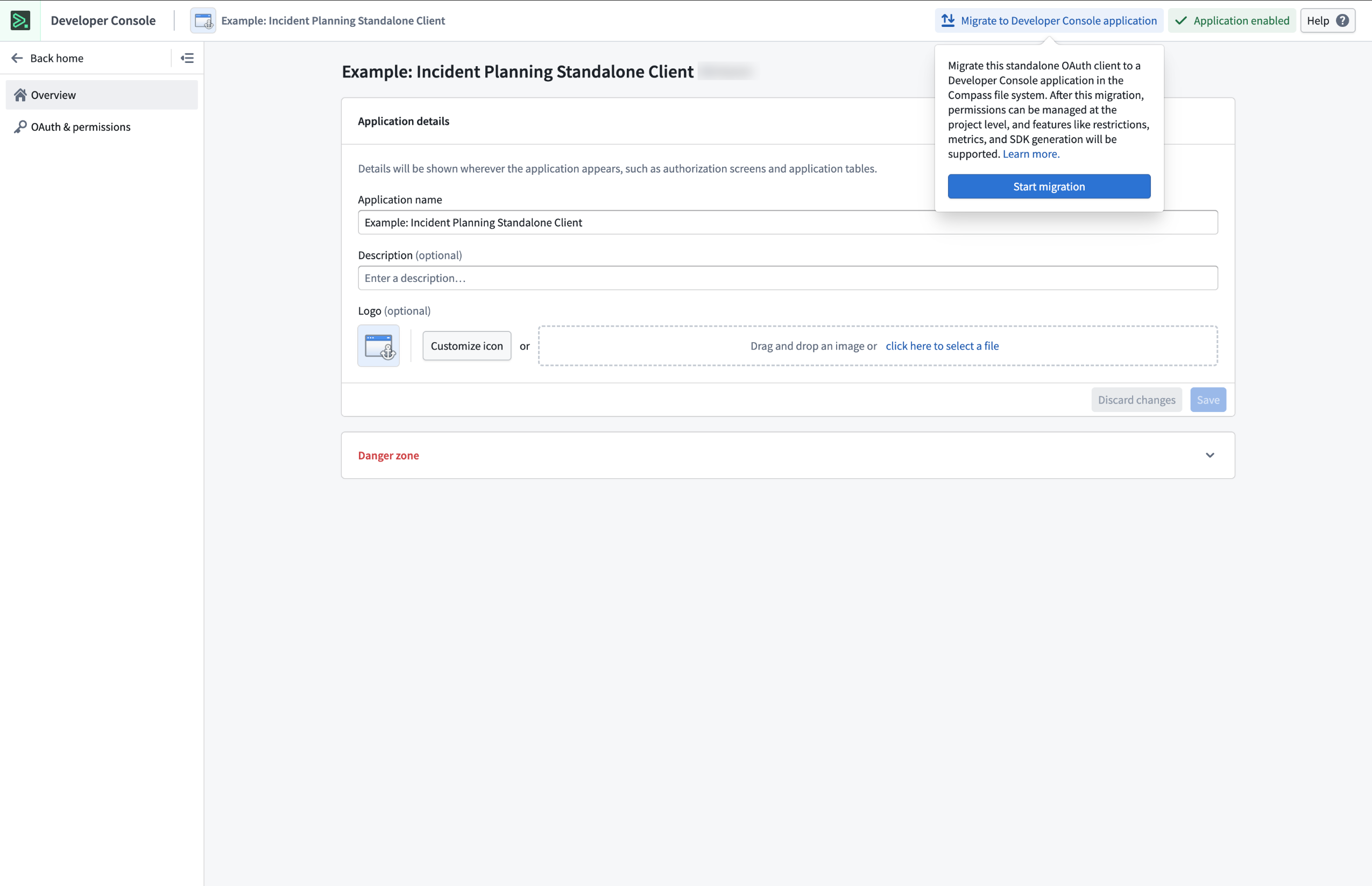
The migration prompt for legacy standalone OAuth clients located in the top right of the screen.
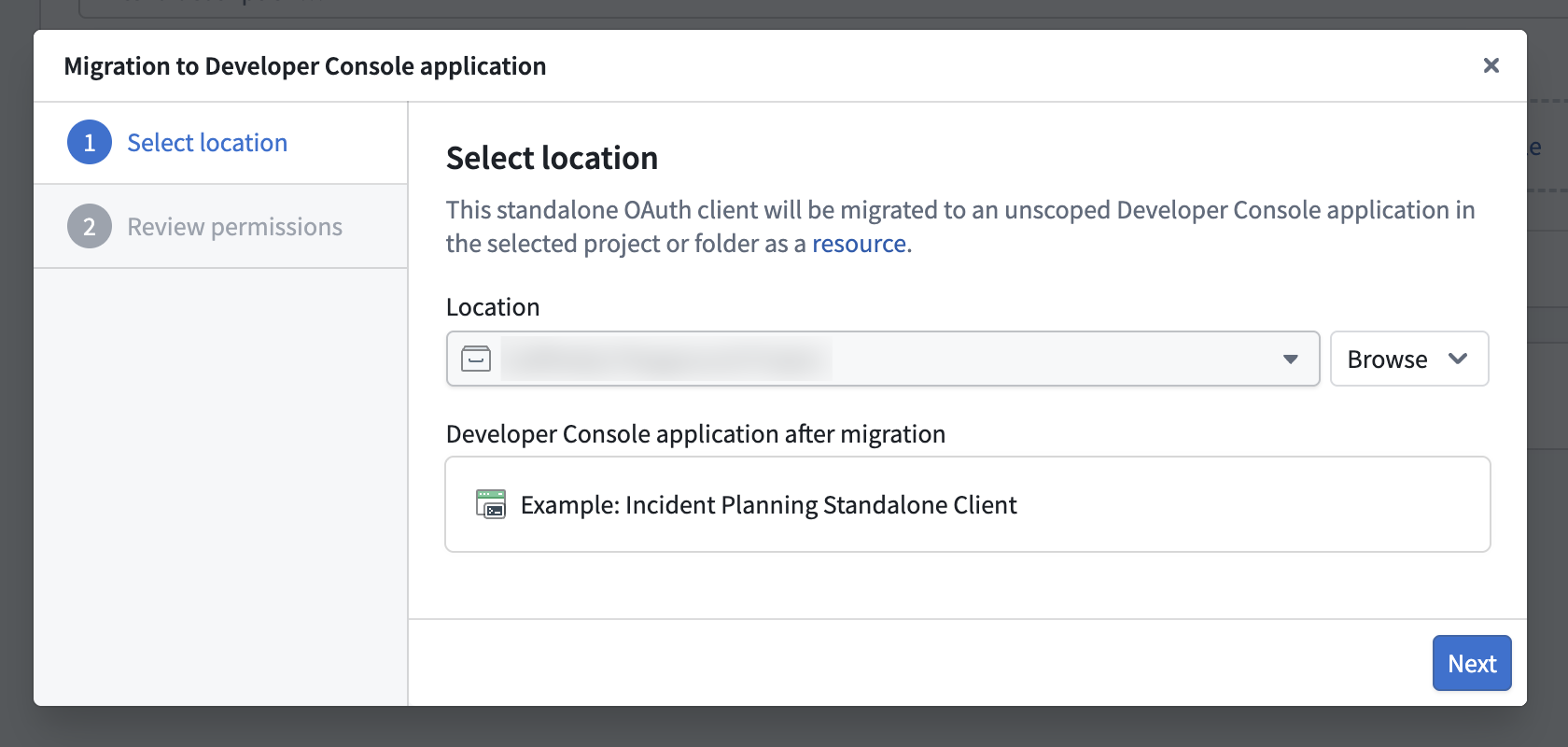
Step 1: Select a location for your Developer Console application.
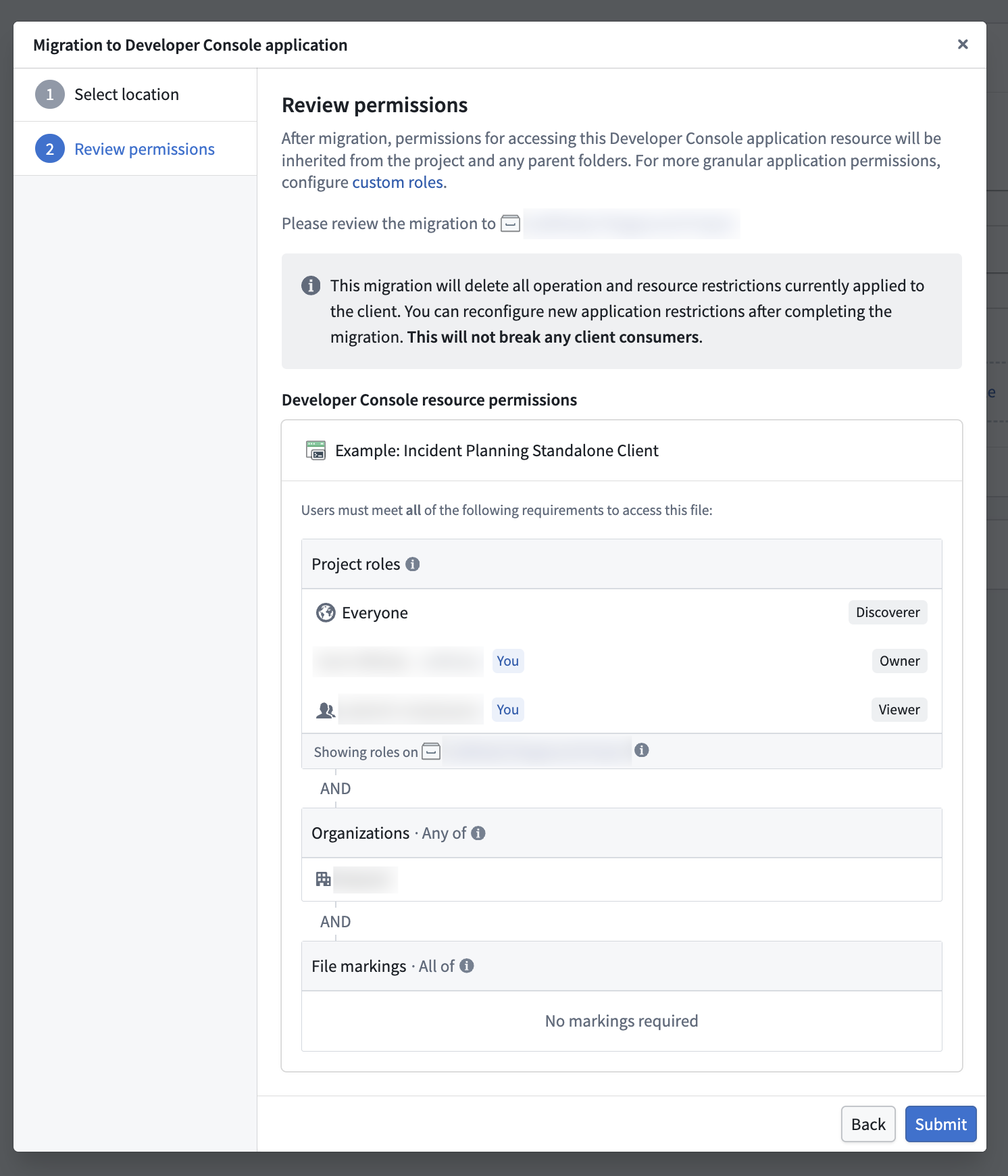
Step 2: Review permissions for accessing the Developer Console application resource.
Your feedback matters
We want to hear about your experiences using Developer Console and welcome your feedback. Share your thoughts through Palantir Support channels or on our Developer Community ↗.
Use the new bring your own model implementation instead of function interfaces to register models in AIP
Date published: 2026-05-21
A new implementation of bring-your-own-model (BYOM), also known as registered models, is now generally available, providing a streamlined integration optimized for the most common and standard model provider APIs. Through registered models, you can connect your own LLMs or accounts to AIP across Palantir developer products, such as AI FDE, AIP Analyst, AIP Chatbot Studio, AIP Logic, Workshop, and more. Instead of using function interfaces, you register a model once in Control Panel for it to flow natively through AIP. Once registered, the model appears in the model selector across applications and respects the same rate limits, permissions, and observability as Palantir-provided models.
What's new?
The new implementation replaces the previous function interface method of registering a large language model (LLM). Compared to the legacy function interface approach, registered models are:
- Easier to set up: Enrollment administrators register a model once in Control Panel, with no TypeScript function or webhook to author and maintain.
- Supported across more AIP applications: The new registered models BYOM implementation supports multiple AIP and Foundry applications and provides infrastructure tooling in Control Panel and Resource Management.
- Supported across more model capabilities: Registered models provide support for tool calling, reasoning, structured outputs, vision input, and streaming.
- Integrated with AIP infrastructure: View LLM rate limits at the enrollment, project, and user levels; usage observability in the Resource Management application; permissions and enablement in Control Panel; and access your model through the shared model selector across AIP applications.
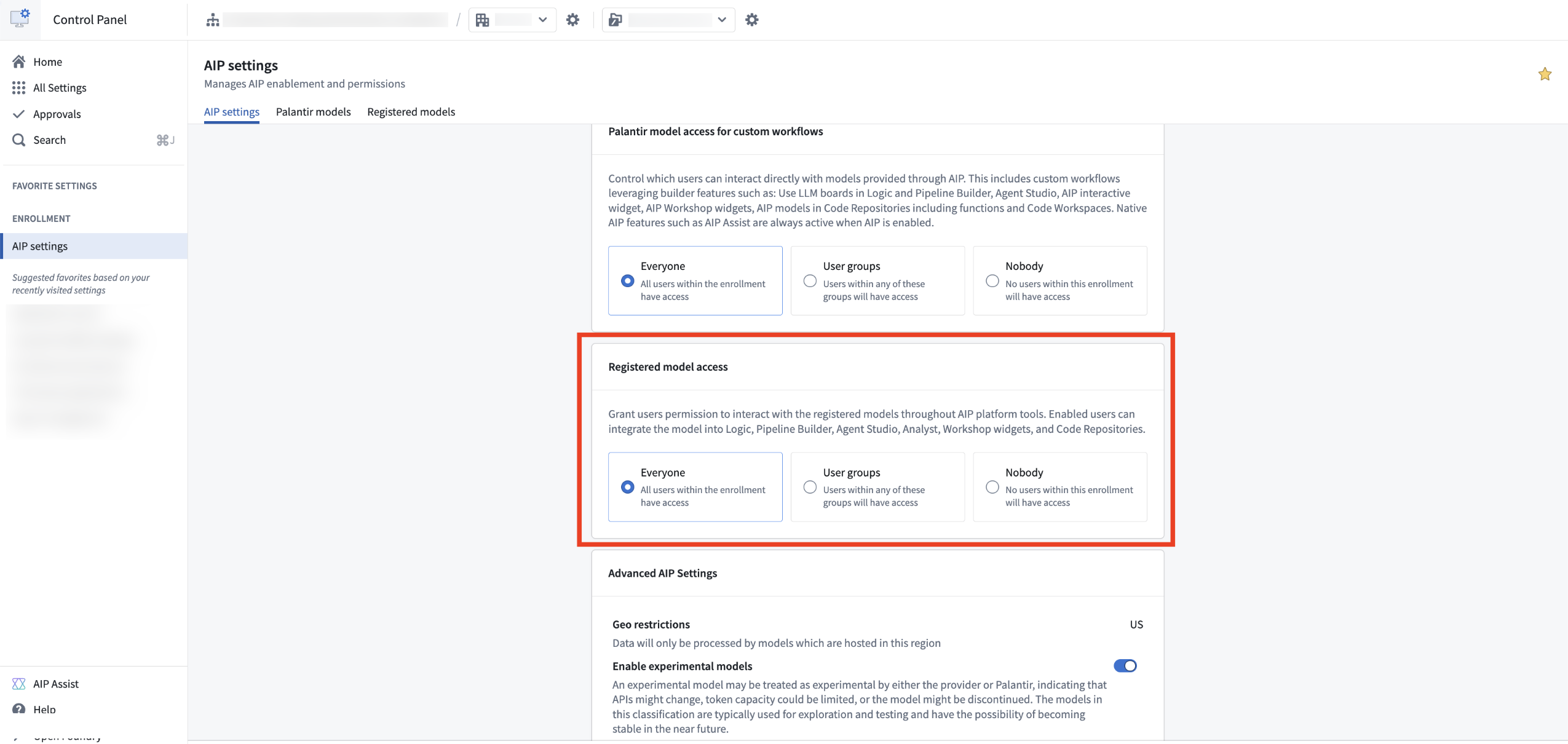
Provision access to your registered models in the AIP settings extension in Control Panel.
When should I use registered models?
Based on LLM support and viability, we generally recommend using Palantir-provided models from model providers (such as Anthropic or OpenAI) or self-hosted open-source models by Palantir (such as Llama models). However, you may prefer to bring your own models or accounts to AIP. We recommend using registered models only when you cannot use Palantir-provided models for legal and compliance reasons, or when you have your own fine-tuned or otherwise unique LLM that you would like to leverage in AIP.
The legacy function interface method remains available for existing integrations but is no longer recommended for new use cases. Contact Palantir Support if you have a use case that is not well addressed by registered models.
Learn more
Review the registered models documentation to get started.
Gemini 3.5 Flash from VertexAI is now available in AIP for commercial, IL2, and IL4 enrollments
Date published: 2026-05-21
Gemini 3.5 Flash is now available for commercial enrollments with VertexAI enabled in the US and EU for non-georestricted regions and for IL2 and IL4 enrollments.
Model overview
Gemini 3.5 Flash is Google's strongest agentic and coding model yet, outperforming Gemini 3.1 Pro on various coding and agentic benchmarks with improved speed and efficiency.
For more information, review Google's model documentation ↗.
Getting started
To use these models:
- Confirm your enrollment administrator has enabled the relevant model family.
- Review token costs and pricing.
- See the complete list of all the models available in AIP.
Your feedback matters
We want to hear about your experiences using language models in the Palantir platform and welcome your feedback. Share your thoughts with Palantir Support channels or on our Developer Community ↗ using the language-model-service tag ↗.
Discover and manage Ontology MCP servers in MCP Hub
Date published: 2026-05-21
Ontology MCP (OMCP) servers are now discoverable through MCP Hub, giving you a central place to view and manage the MCP servers configured across your enrollment.
Ontology MCP turns your Developer Console application into an MCP server. External AI agents connect as MCP clients and can read object types, execute predefined action types, and run query functions, scoped to the permissions you configure. It uses the Model Context Protocol ↗, an open standard for connecting AI systems to external tools and data sources.
Explore your servers in MCP Hub
Open MCP Hub and navigate to the Ontology MCP tab to view a list of all MCP servers configured on your enrollment. Select any row to view the full configuration details for that server, including the tools and ontology resources it exposes. From there, you can jump directly into the corresponding Developer Console application to add or modify resources.
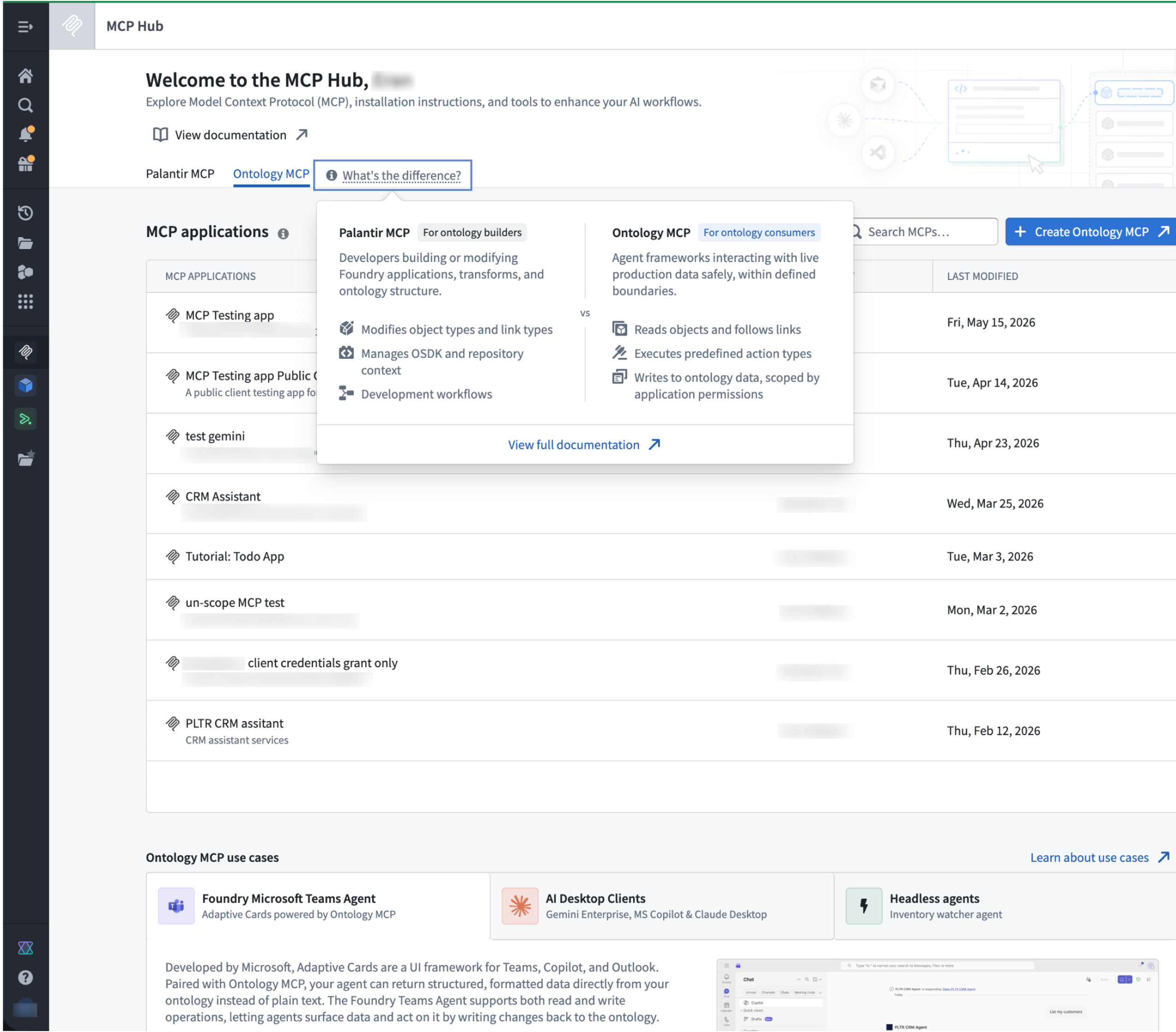
The MCP Hub application in Foundry, displaying a list of MCP servers.
Data governance
Enabling Ontology MCP makes your ontology resources available to an external MCP client. Before enabling it, verify that this is compliant with your organization's data governance and security policies. Use application scopes and permissions to restrict which resources are exposed.
What's next
- Detailed tools view: a per-server breakdown of every tool exposed, directly in MCP Hub.
- Tool configuration: enable or disable individual tools, and customize tool descriptions and annotations without touching application code.
- Pro-code agent support: Ontology MCP without the need for a Developer Console application, bringing MCP server capabilities directly to code-first agent workflows.
Get started
To enable Ontology MCP and connect your first agent, review the Ontology MCP documentation.
We want to hear from you
How was your experience using Ontology MCP in Foundry? Share your thoughts with Palantir Support or the Developer Community ↗.
CBAC enrollments can now store ontology resources in Compass projects
Date published: 2026-05-21
Classification-based access controls (CBAC)now apply to ontology resources, letting you configure who can view, edit, and manage them through Compass, the Palantir platform's filesystem. To use, this capability must first be enabled by an ontology owner.
When the capability is enabled, users must save ontology resources into a project. The selected location determines view, edit, and manage permissions. This project-based permissions approach replaces the previous ontology permission models: ontology roles and datasource-derived permissions. Key benefits include the following:
- Unified permission model: Ontology resources now use the same permission system as other resource types.
- Bulk management: Set permissions at the project or folder level to control access across multiple resources at once.
- Permissions explainability: The Security tab displays the required permissions to view and edit an object type, and the required permissions to see instances or run actions.
- Additional privacy controls: Hide sensitive ontology resources by applying a marking or by placing them in a project where the user lacks a role grant.
- Compass curation primitives: Users can use portfolios, tags to organize Ontology resources, and role grants or markings to hide irrelevant resources from users.
Permissions to see objects continue to require permissions on the object type and the datasource. Migrating to projects does not change who has access to the datasource.
When using ontology in projects with CBAC, users must specify a file classification at file creation. The classification must be equal to or lower than the maximum allowed classification. Object type materializations fail if no classification is specified.
This capability is enabled for new ontologies. For existing ontologies, it must be enabled manually, and existing ontology resources will require migration.
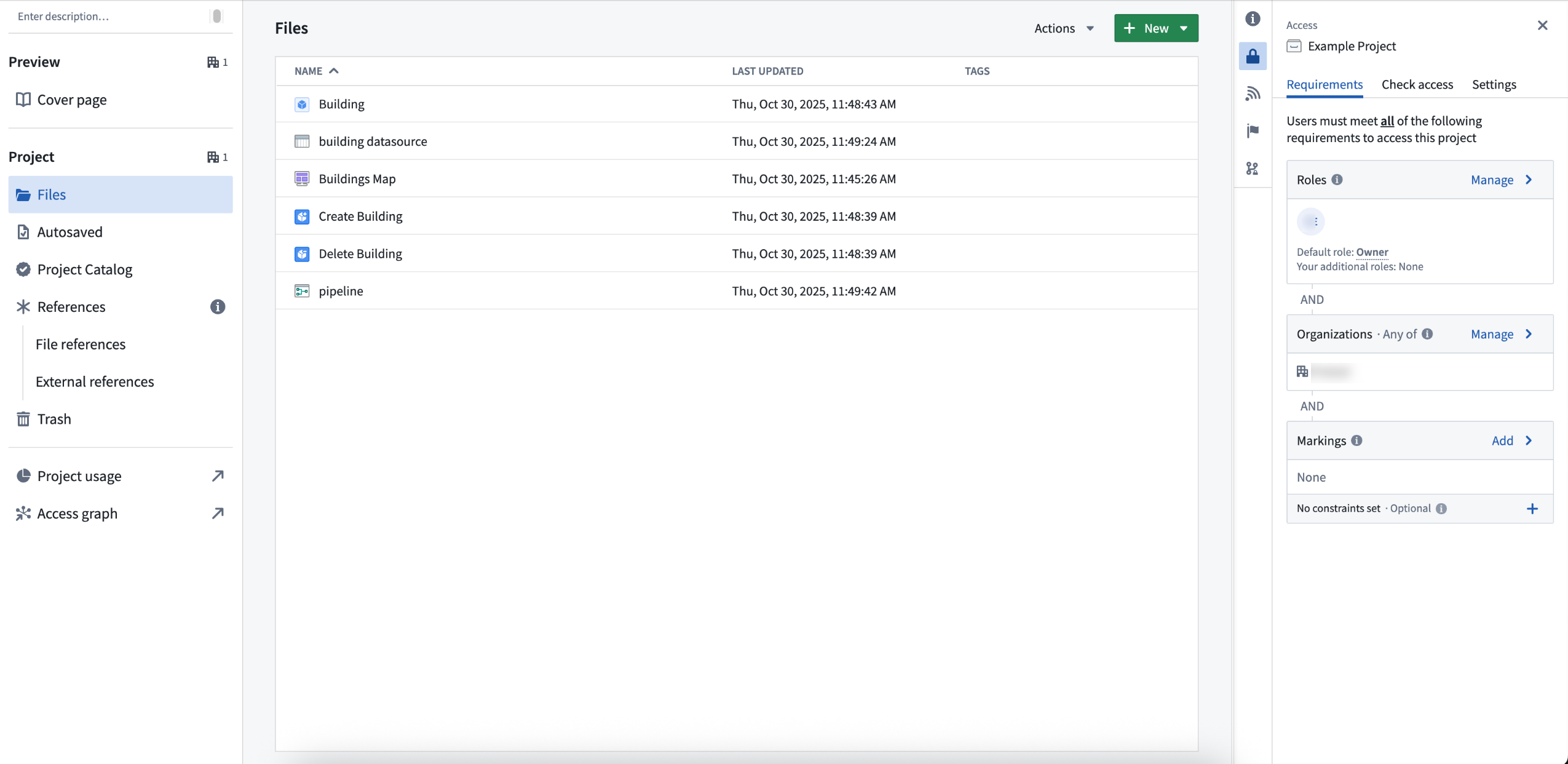
Ontology resources in a Compass project, with access requirements managed at the project level.
We want to hear from you
As we continue to develop Compass, we want to hear about your experiences and welcome your feedback. Share your thoughts with Palantir Support channels or our Developer Community ↗ using the compass ↗ tag.
Apply inherited role grants to all projects in a space
Date published: 2026-05-21
Space administrators can now configure role grants that are inherited by every project in a space. This ensures that critical roles, like an admin group's Owner permissions or all users' Discover access, are always present on every project in the space.
Project templates help you set up projects consistently, but project settings can be changed after creation. This can leave projects orphaned if the original owner leaves the company or misconfigured when standard access is accidentally removed. Inherited role grants prevent these gaps by guaranteeing certain role grants are always present.
Inherited role grants are configured per space in Control Panel for regular projects and locked Marketplace projects, which use different role sets. Each project type has its own picker so administrators can grant the appropriate role.
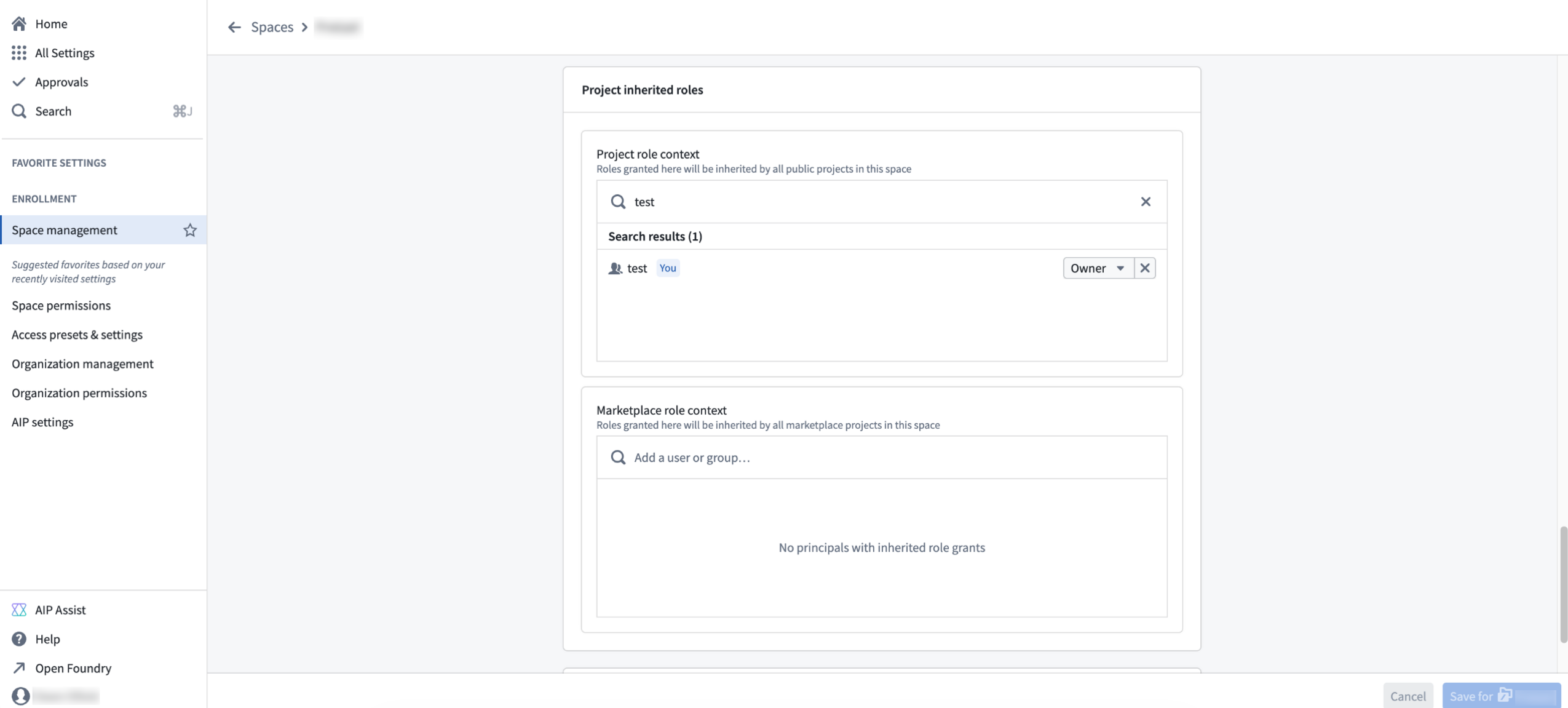
The Space management page in Control Panel where you can view the roles granted to a space.
Accessing a project or its resources requires both a role grant and the appropriate markings. Inherited role grants do not bypass marking requirements.
Inherited role grants appear in the Compass side panel under a new Inherited role grants section.
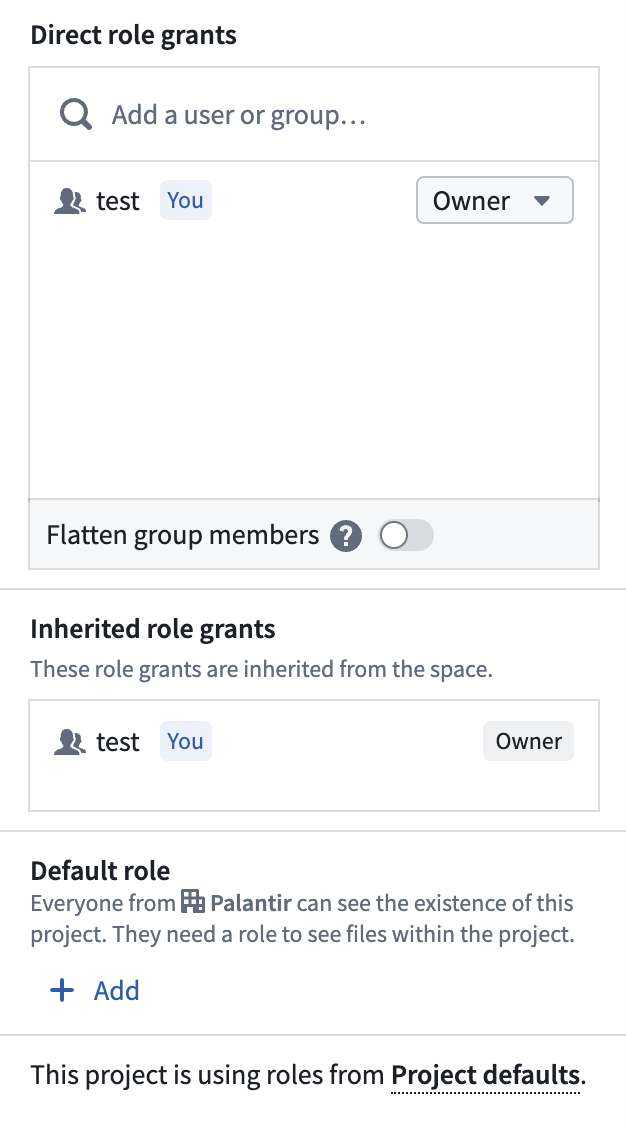
The Inherited role grants panel in Compass.
To get started with inherited role grants, review the space management documentation.
Upgrade Extract Text from PDF boards in Pipeline Builder for improved performance
Date published: 2026-05-19
Pipeline Builder now includes a v2 version of the Extract Text from PDF board, built on PyMuPDF. The v2 board replaces the v1 board's Tesseract and Docling backends with a single PyMuPDF-based extraction path. In internal benchmarks against the v1 Tesseract and Docling pipeline, PyMuPDF produced higher extraction accuracy on electronic (embedded-text) PDFs and processed documents approximately 10x faster. The v2 board also handles larger batch sizes than v1, which was constrained by the Docling-backed layout model.
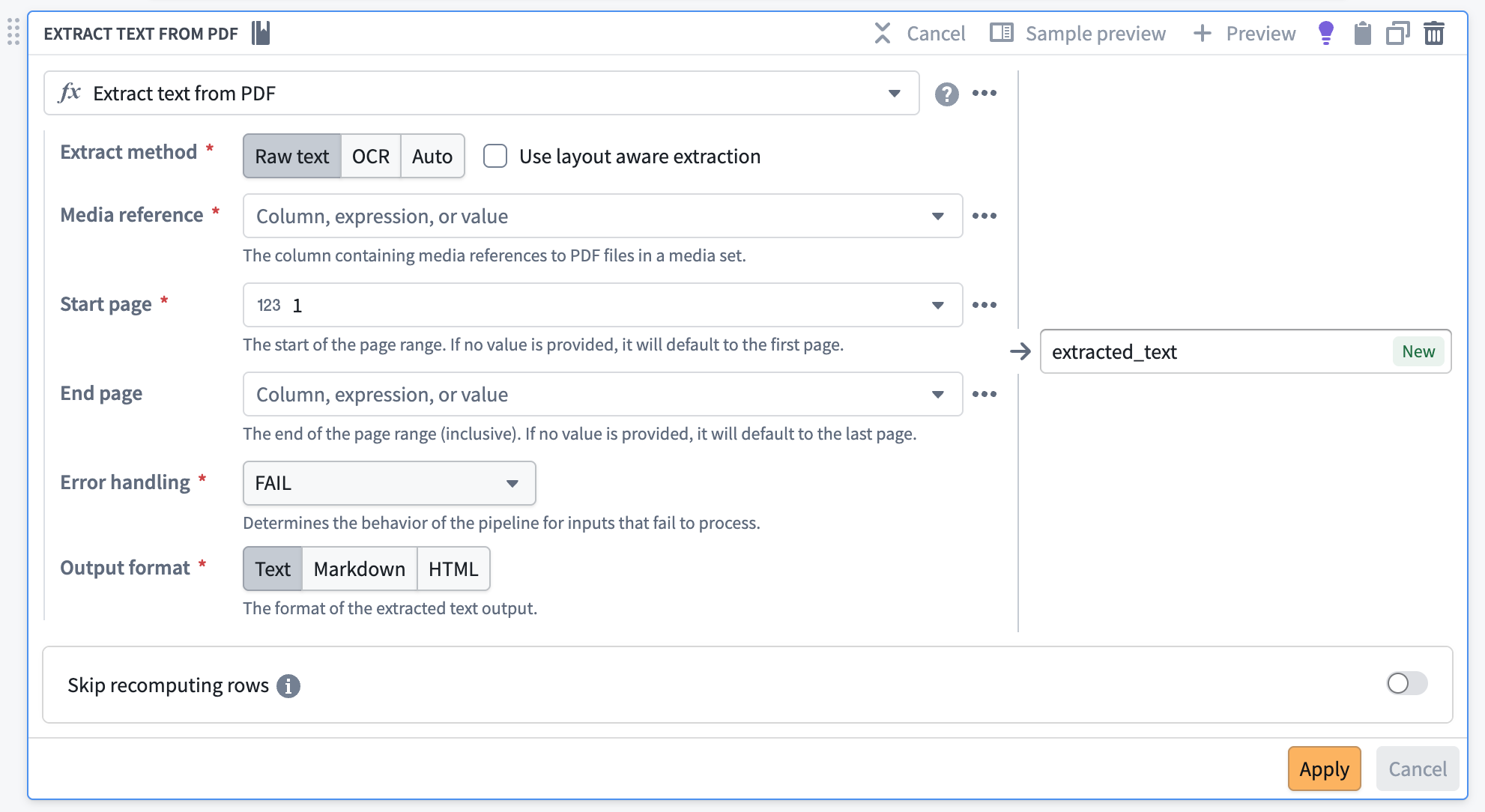
The Extract Text From PDF transform in Pipeline Builder.
What’s new?
- Flexible output formats: Export extracted content in Markdown or HTML in addition to plain text, making it easier than ever to integrate with downstream LLM applications.
- Automatic PDF type detection: The system intelligently selects the optimal extraction method for each document, maximizing accuracy and speed.
- Document understanding: Benefit from advanced layout analysis powered by a hybrid Graph Neural Network (GNN) approach (PyMuPDF-layout), enabling precise identification of document elements—titles, paragraphs, tables, and figures.
- CPU execution: All extraction methods—raw text and OCR—are now handled by PyMuPDF, ensuring consistent results and improved performance, all while running efficiently on CPUs.
How to upgrade
- Enable the feature flag Enable extract text v2 expressions in Pipeline Builder to start creating v2 boards by default.
- Open the Warnings tab (bottom panel) to list every v1 Extract Text from PDF board in your pipeline.
- Navigate to each board and select Upgrade.
- Save and deploy your pipeline.
Share your feedback
To share feedback on this feature, contact us through our Palantir Support channels or join the conversation in our Developer Community using the pipeline-builder tag ↗ .
View property security markings in select Workshop widgets
Date published: 2026-05-19
Now generally available across Foundry enrollments, property security markings enable you to display the markings and Classification-based Access Controls (CBAC) values configured through object and property security policies when you view or select a property in the following Workshop widgets:
Displayed strictly for informational purposes, property security markings render as a condensed gray pill with an expanded window view on hover or selection.
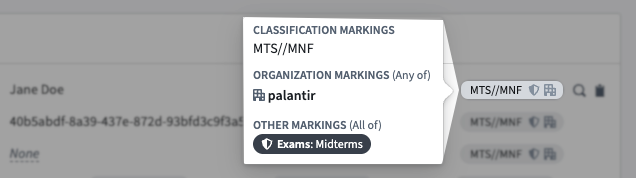
Hover over a property security marking's gray pill for a detailed view of property value-specific markings and CBAC values.
Property security markings abstract away certain complexities about the requirements necessary to view the property's data. As an example, a property marked with the Mock Unclassified CBAC marking within an object with the Mock Secret CBAC marking will be displayed as Mock Unclassified in the object view. However, users must have access to the Mock Secret CBAC marking to view the property's data.
Enable property security markings in Workshop
Toggle on Show security markings in the Widget setup tab when configuring a Property List, Object List, or Object Table widget in Workshop. Configure the display setting for a property security marking using the following options:
- Responsive: Displays the full security marking when space permits and a truncated tag to fit available space. Foundry displays the full marking in a tooltip upon hover. This option is not available for the Object Table widget.
- Full Tag: Displays the full security marking at all times, line-wrapping at small widths.
- Icon Only: Displays the marking icon and the full security marking only upon hover.
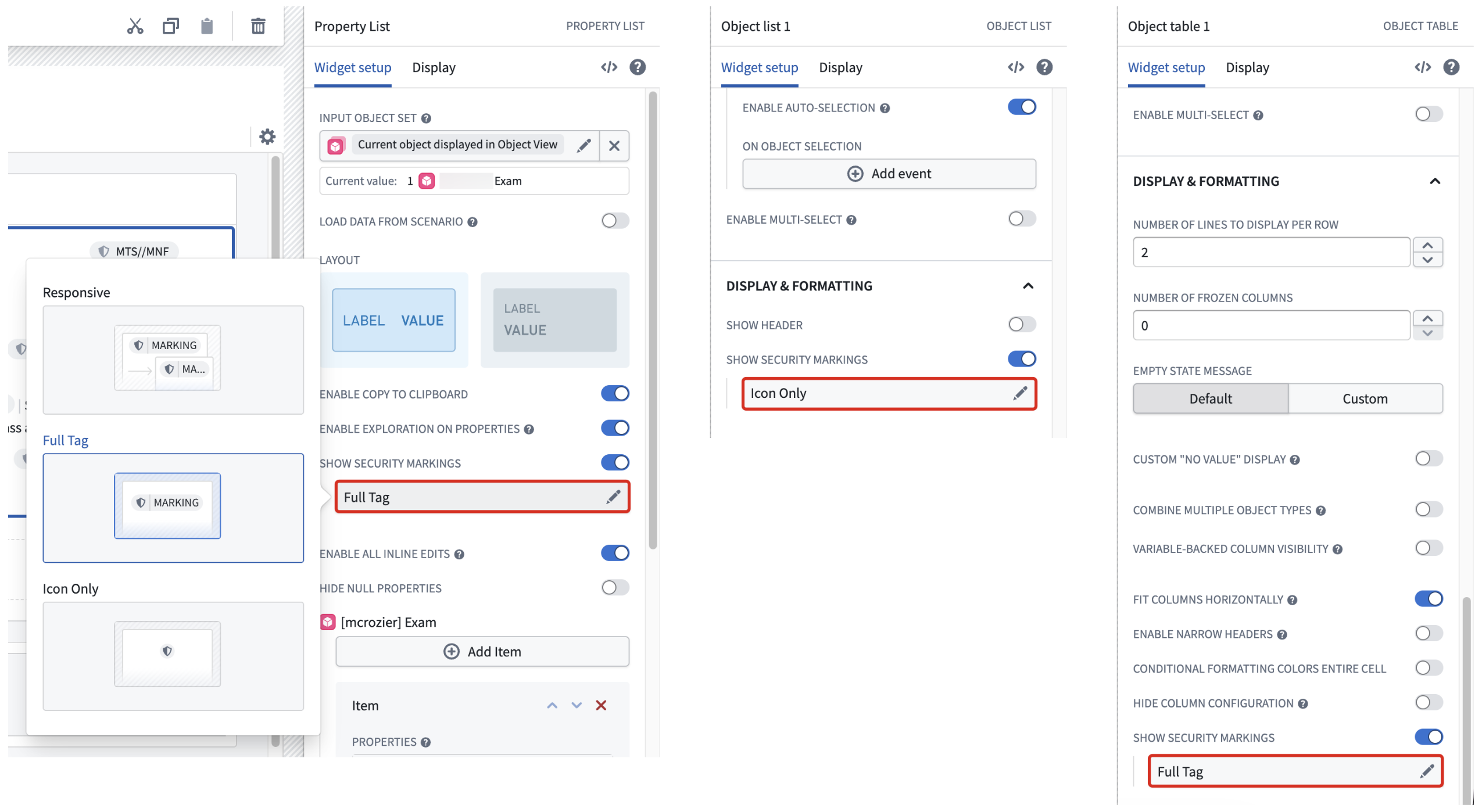
Toggle on Show security markings in the Widget setup tab when configuring a Property List, Object List, or Object Table widget in Workshop.
Foundry verifies each property against its security markings to ensure all users with the appropriate access can view its value, even if you toggle the pill's visibility off in any of its supported widgets.
What's next
Moving forward, the ability to view property security markings will extend to additional Workshop widgets and other Foundry applications.
Learn more about property security markings in Foundry.
Grok 4.3 from xAI is now available in AIP
Date published: 2026-05-14
Grok 4.3 is now available for enrollments with xAI enabled in the US and other supported regions.
Model overview
xAI's fastest, most intelligent model to date, Grok-4.3 is effective at agentic tool calling and instruction following. The model is particularly effective in use cases involving case law and corporate finance. Supports low, medium, and high reasoning efforts and a one million token context window.
For more information, review xAI's model documentation ↗.
Getting started
To use these models:
- Confirm your enrollment administrator has enabled the xAI model family.
- Review token costs and pricing.
- See the complete list of all the models available in AIP.
Your feedback matters
We want to hear about your experiences using language models in the Palantir platform and welcome your feedback. Share your thoughts with Palantir Support channels or on our Developer Community ↗ using the language-model-service tag ↗.
Use parameters in Python transforms and run schedules via actions
Date published: 2026-05-14
The ability to parameterize schedules of Python transforms and configure a schedule rule on an action type is now available in beta.
Use parameterization to declare type parameters in your Python transforms whose values are set on a schedule.
In standard mode, the schedule sets the values directly, enabling use cases like periodic compactions for incremental transforms. In parallelized mode, the schedule manages many independent run setups, each with its own parameter values, enabling use cases like high-scale scenario simulations by running transforms in parallel.
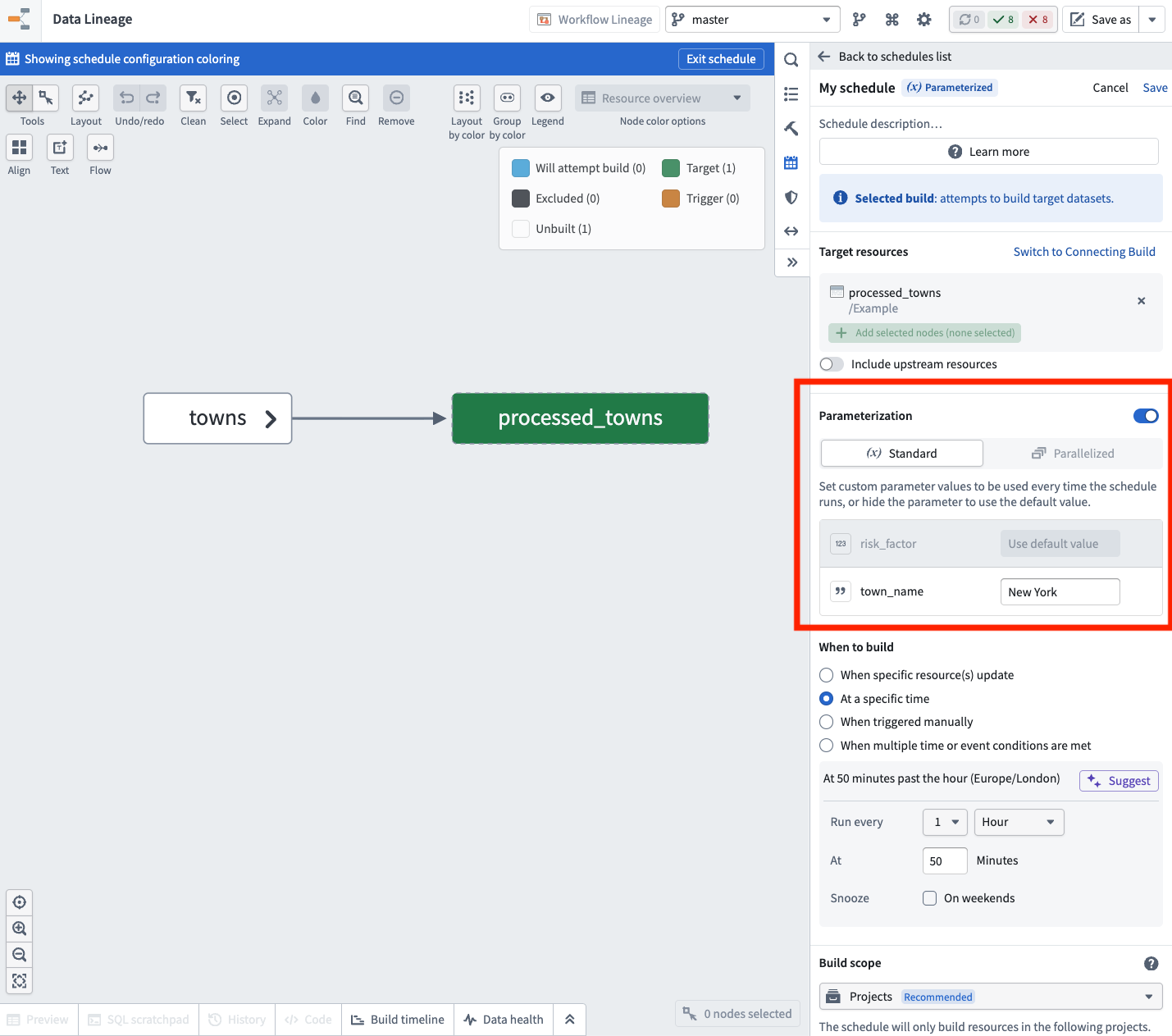
Create a parameterized schedule and select values for the parameters declared on the target dataset's transform.
With a schedule rule on action types, you can trigger a build of a referenced schedule when an action is applied, forwarding the action's parameter values to the underlying transforms. This enables recomputing datasets directly within operational applications or as part of action effects in Automate.
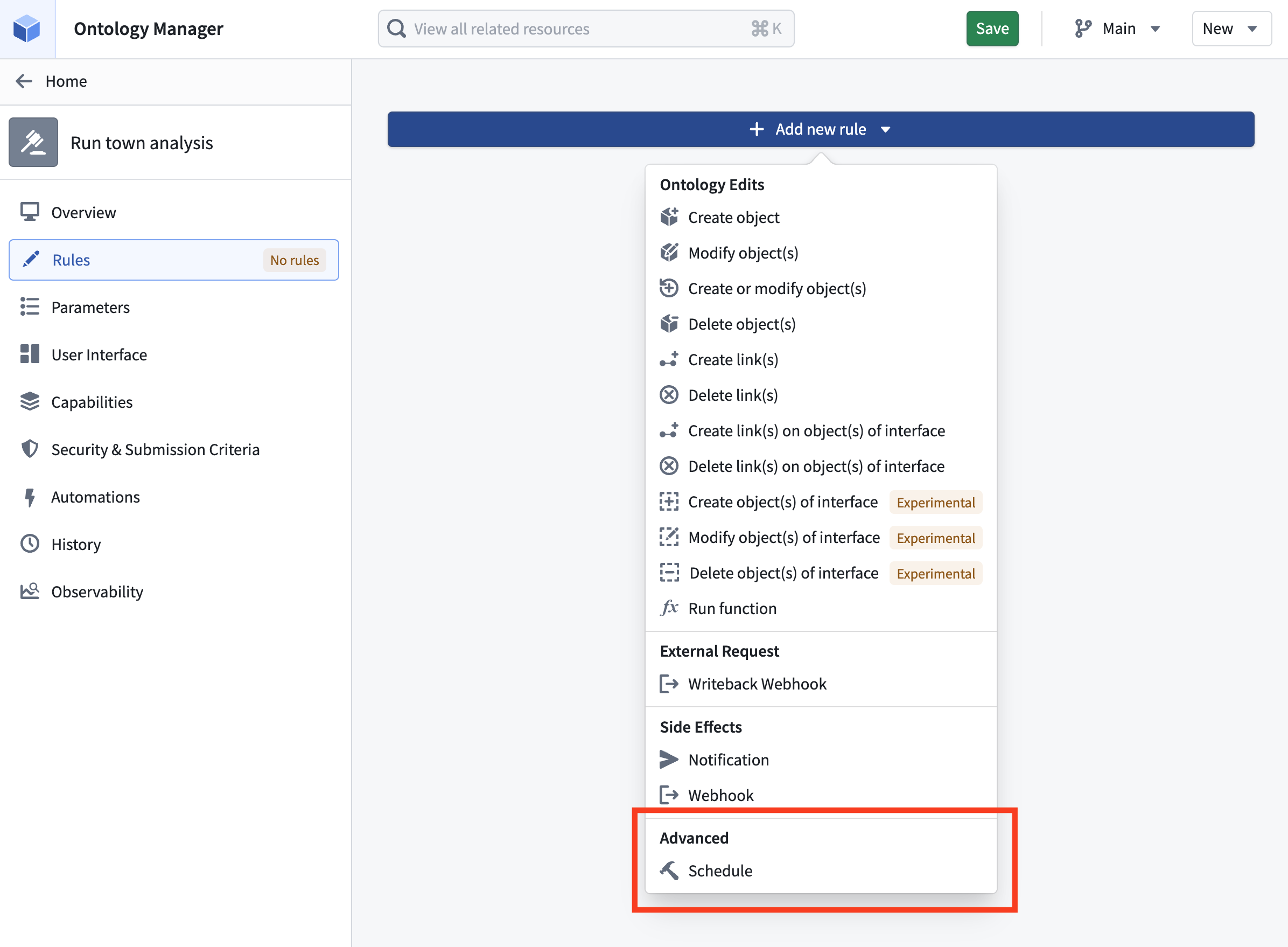
Configure a schedule rule on an action type in Ontology Manager.
Share your feedback
We want to hear about your experiences using schedules and parameterized transforms in the Palantir platform and welcome your feedback. Share your thoughts with Palantir Support channels or on our Developer Community ↗ using the scheduler ↗ tag.
Claude Opus 4.7, Opus 4.6, and Sonnet 4.6 are now available from Anthropic on commercial US georestricted enrollments
Date published: 2026-05-12
Claude Opus 4.7, Claude Opus 4.6, and Claude Sonnet 4.6 are now available from Anthropic Direct on commercial US georestricted enrollments. This is in addition to the models previously made available for enrollments via AWS Bedrock and Google Vertex AI.
Benefits of enabling Anthropic Direct in addition to Bedrock and Vertex AI include:
- Higher capacity: Additional enrollment capacity is granted for each enabled model provider, increasing an enrollment's total available capacity.
- Greater stability: If one provider experiences disruption, traffic can continue flowing through other enabled providers, improving overall reliability.
- Faster access to new features: Anthropic Direct typically receives new model capabilities — such as extended thinking improvements and updated tool use — ahead of hosted providers, so enrollments with Anthropic Direct enabled are first in line to receive those enhancements.
Getting started
To use these models:
- Confirm that your enrollment administrator has enabled the relevant model family.
- Review token costs and pricing.
- See the complete list of all available models in AIP.
Your feedback matters
We want to hear about your experiences using language models in the Palantir platform and welcome your feedback. Share your thoughts with Palantir Support channels or on our Developer Community ↗ using the language-model-service tag ↗.
Additional Gemini and Claude models are now available on IL2 and IL4 enrollments via Google Vertex
Date published: 2026-05-12
Additional models from the Google Gemini and Anthropic Claude model families are now accessible from AIP applications in IL2 and IL4 enrollments via Google Vertex.
Frontier models
You can access the following frontier models via Google Vertex after your enrollment administrator enables each model family:
- Google Gemini
- Anthropic Claude
Legacy models
Additionally, you can access the following legacy models via Google Vertex after your enrollment administrator enables each model family:
- Google Gemini
- Anthropic Claude
Getting started
To use these models:
- Confirm that your enrollment administrator has enabled the relevant model family.
- Review token costs and pricing.
- See the complete list of all models available in AIP.
Your feedback matters
We want to hear about your experiences using language models in the Palantir platform and welcome your feedback. Share your thoughts with Palantir Support channels or on our Developer Community ↗ using the language-model-service tag ↗.
Develop OSDK React applications using Palantir's @osdk/react library
Date published: 2026-05-12
You can now develop OSDK React applications in an idiomatic, React-first way using Palantir's @osdk/react library ↗. Generally available as of the week of May 11, the library provides React hooks and built-in performance optimizations, such as global caching, optimistic updates, and more to make it easier to build frontend OSDK applications that interact with Foundry.
Library benefits
Use @osdk/react when your application primarily consumes data through the OSDK to streamline how you query data and execute actions in your ontology. The library provides the following benefits to enhance your development experience:
- Normalized object caching: The library stores every object once. When you call an action to edit an object, every list, link, and view referencing the object updates automatically.
- Action-driven invalidation: Action responses specify which objects were added, modified, or deleted. Lists are re-evaluated against their
whereclauses without manual invalidation. - Optimistic updates with automatic rollback: Immediately update the local cache before the server responds after creating, editing, or deleting an object. The optimistic changes are applied to a temporary store layer and automatically roll back if the action fails.
- Cross-component deduplication: Two components running the same query share one network request and one cache entry.
To improve development simplicity, the library also provides idiomatic React hooks for every Ontology primitive, platform APIs you can use with OSDK React hooks, and default guidance for LLMs through an AGENTS.md file.
Learn more about the development benefits gained through the @osdk/react library ↗.
Get started and migrate from the beta version
To begin using the @osdk/react library, review the installation and setup guide ↗. Additionally, Developer Console provides React code snippets you can copy and paste for your generated SDK.
You can migrate from the beta version by importing @osdk/react instead of @osdk/react/experimental. The @osdk/react/experimental paths still resolve as @deprecated backwards-compatible re-exports, so you can upgrade incrementally before they are removed in a future release.
Contribute to the library
Review the contribution guide ↗ to add new features to the @osdk/react library.
Workflow Lineage now supports Global Branching
Date published: 2026-05-12
Workflow Lineage now supports Global Branching. You can use a global branch to manage, edit, and collaborate on workflow resources, and to develop and test end-to-end workflows in the Palantir platform before merging changes into a live production environment. For more information on branching in Workflow Lineage, review the documentation.
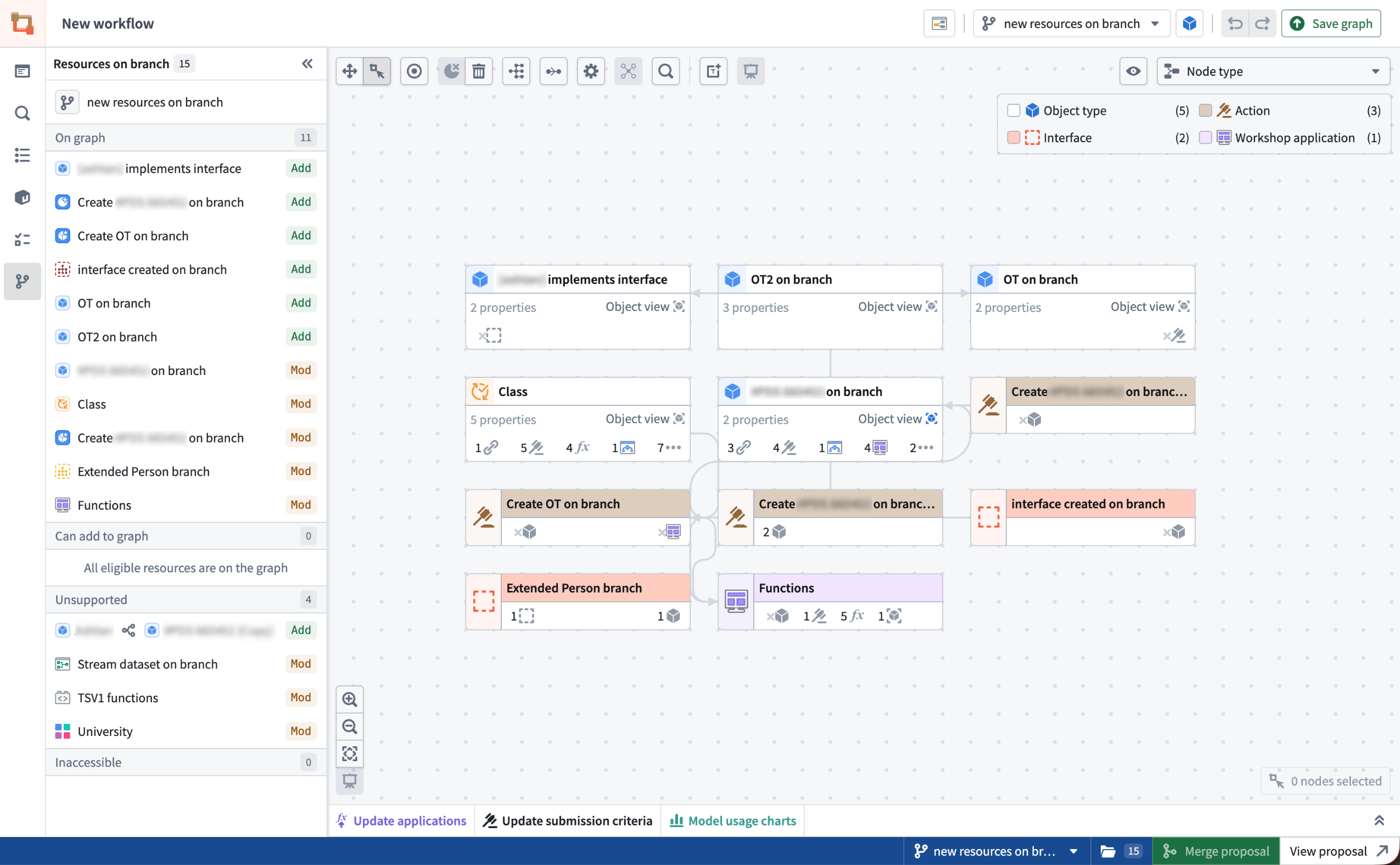
A Workflow Lineage graph on the "new resources on branch" global branch with the Resources on branch side panel.
Additionally, the new branch side panel allows you to view all modified resources on the graph, add modified resources that are not yet displayed, and navigate to relevant apps for unsupported Workflow Lineage resource nodes.
Bulk edits on a global branch
Global Branching introduces several new capabilities in Workflow Lineage. You can now perform bulk edits on a global branch, including bulk upgrading function versions for action types and Workshop modules, bulk updating submission criteria for action types, and bulk deleting ontology resources.
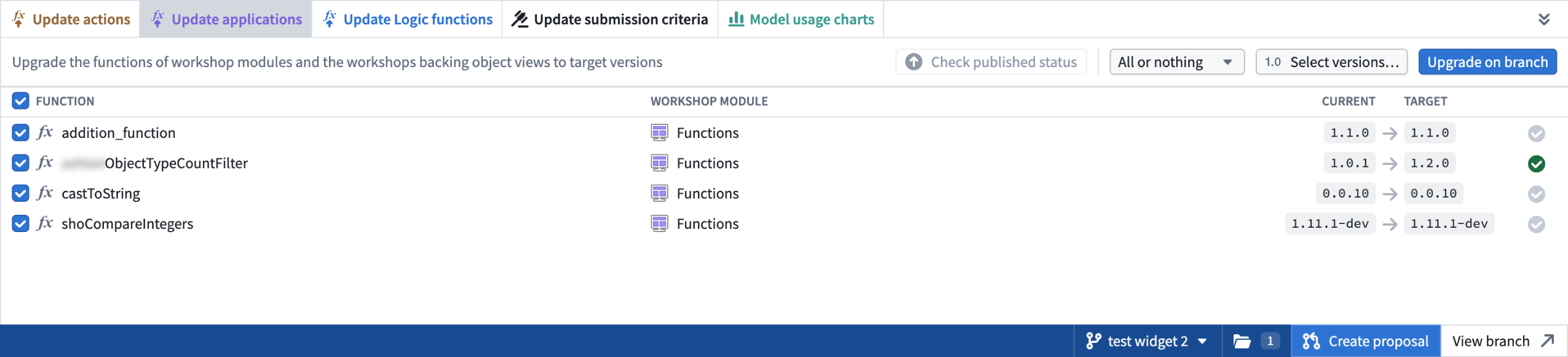
Example of the update application panel where you can bulk update functions in Workshop on a global branch.
Branch navigation shortcuts
When viewing a resource on a branch, use Cmd + I on Mac or Ctrl + I on Windows to open a new Workflow Lineage tab on that branch. The shortcut works in Workshop, Ontology Manager, Logic, and Pipeline Builder object outputs.
Global branches can also be opened from external apps, including AI FDE, through right-click actions on global branch tags or when selecting a global branch context, as well as from the branch bottom bar, branch page, and proposal page. Workflow Lineage automatically places eligible nodes on the graph and opens the sidebar panel to provide additional context.
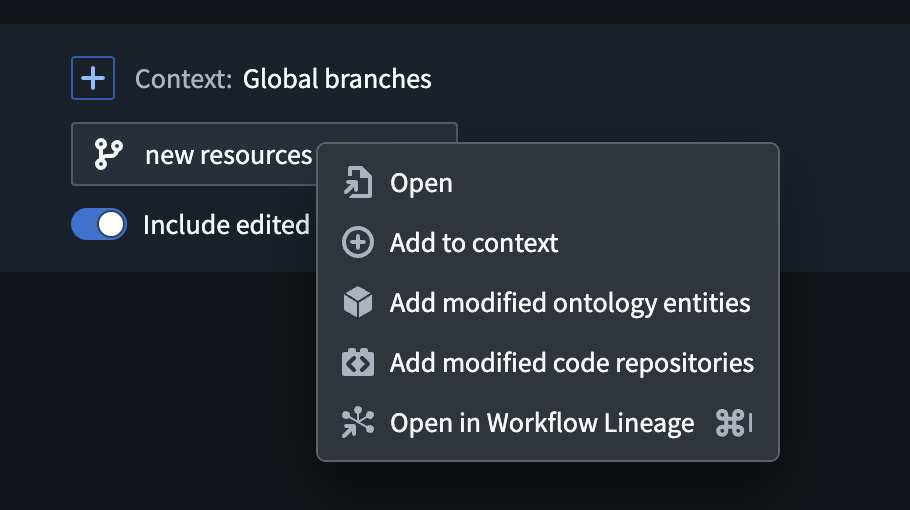
Open in Workflow Lineage option in AI FDE.
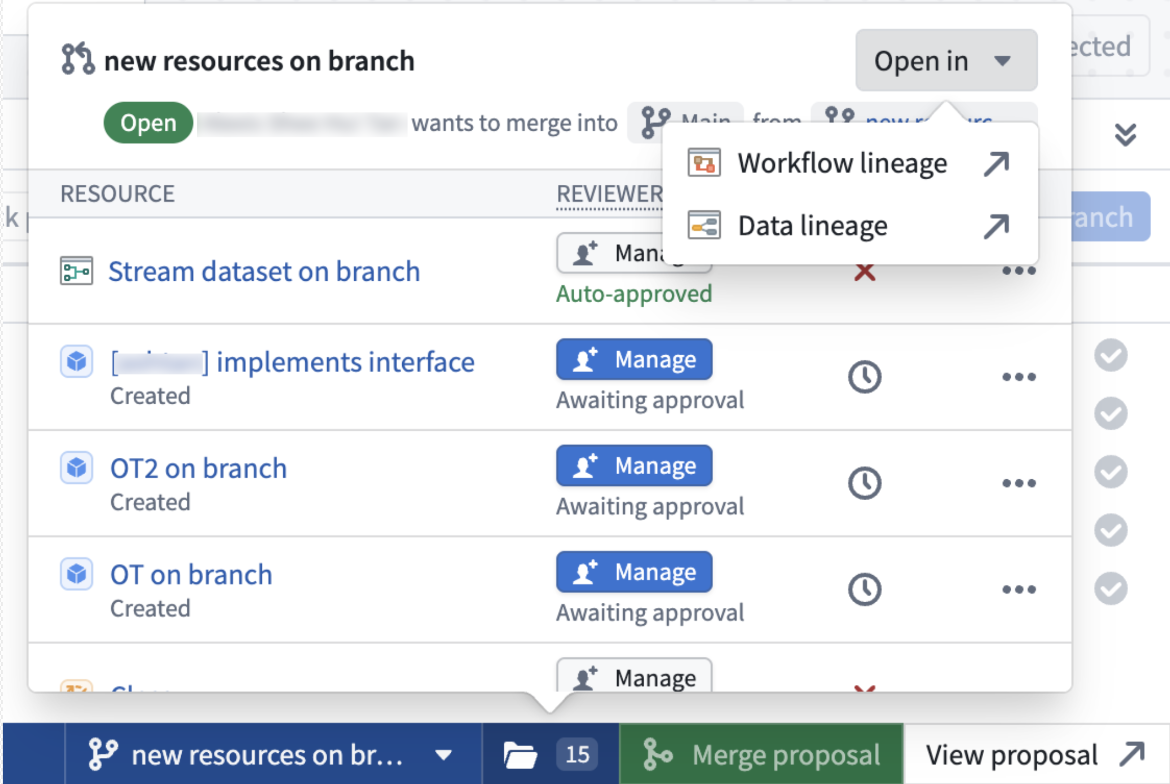
Open Workflow Lineage option from the bottom branch picker.
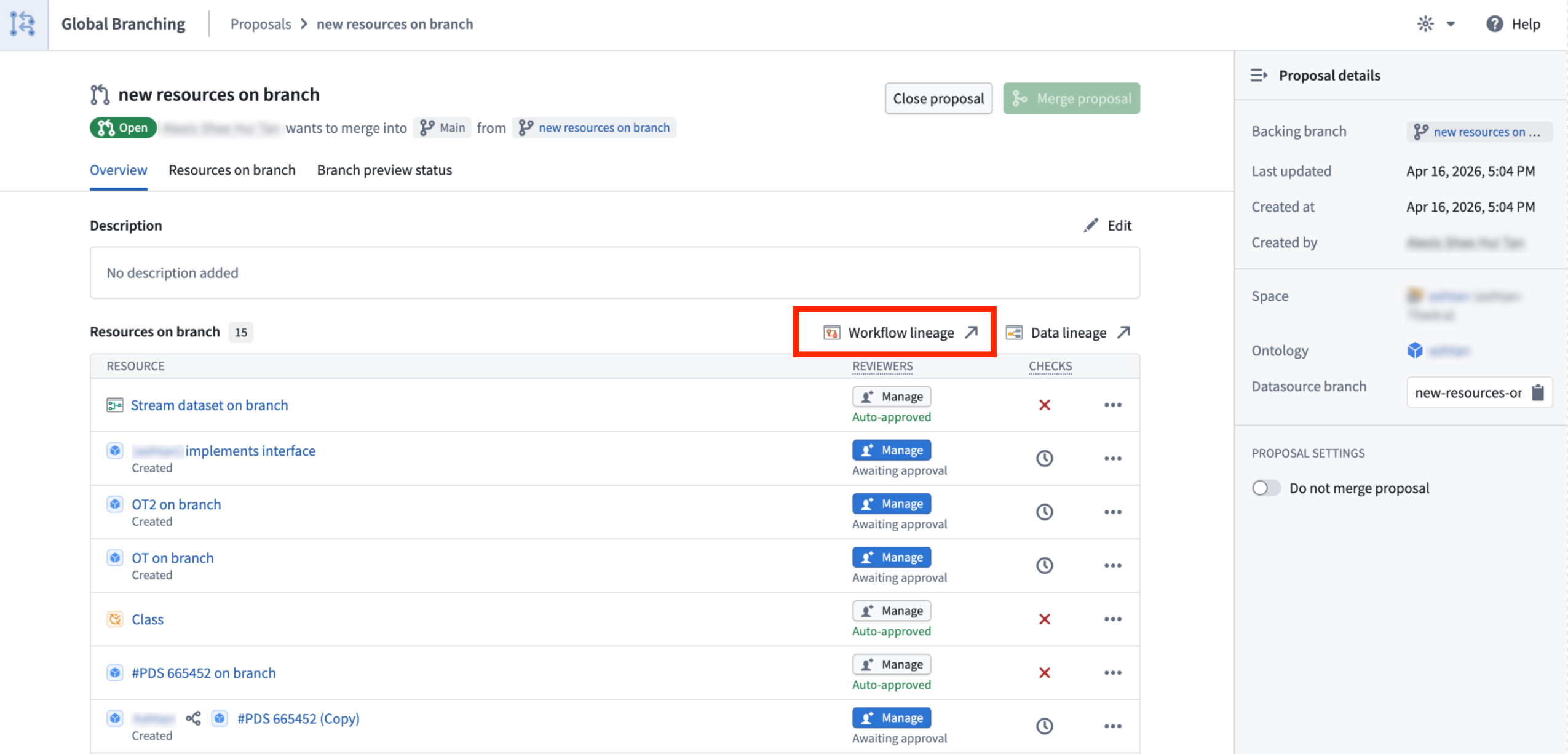
The Workflow Lineage option on a proposal page.
Color modes on global branches
Global branches now support color modes, including functions repository, action rule, ontology status, usages, and out-of-date dependencies color modes.
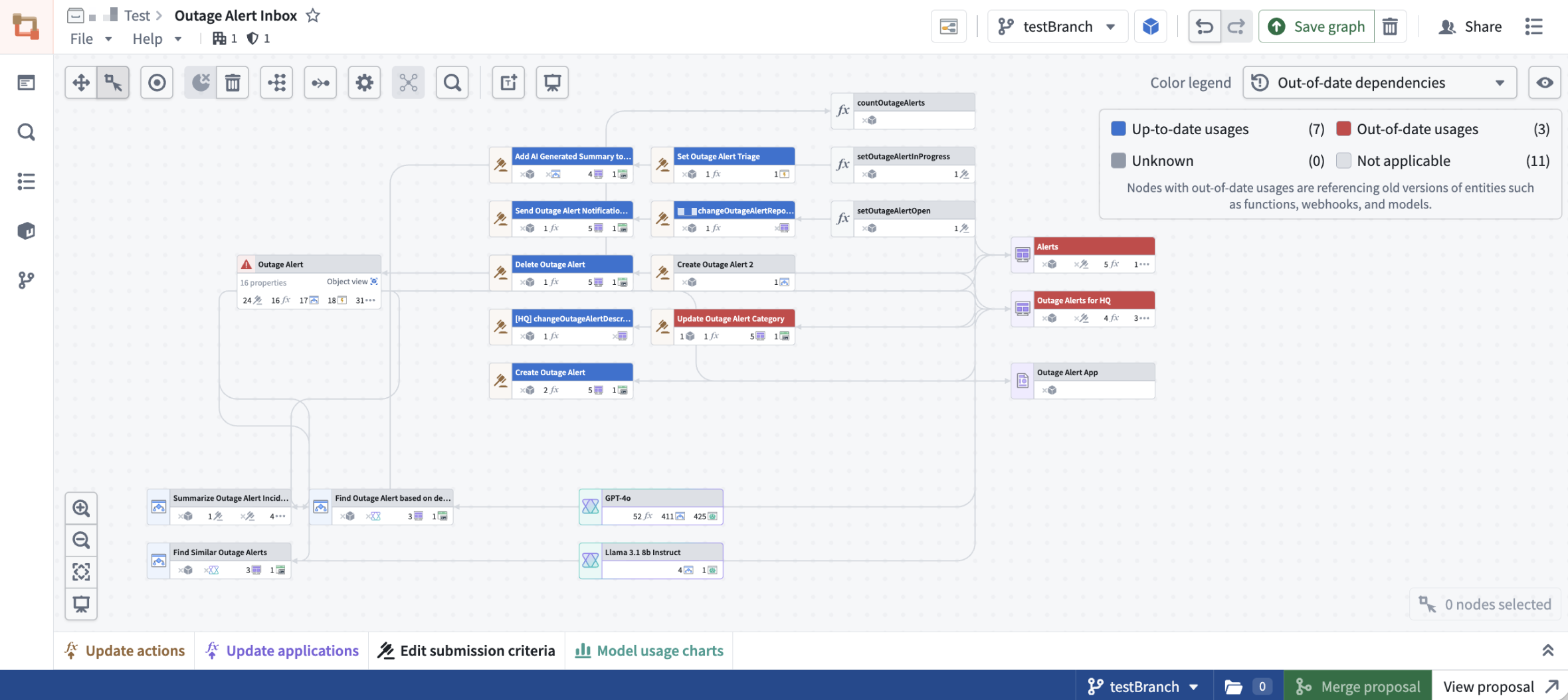
Out-of-date-dependencies coloring on the testBranch global branch.
We want to hear from you
As we continue to develop Workflow Lineage, we want to hear about your experiences and welcome your feedback. Share your thoughts with Palantir Support channels or our Developer Community ↗ using the Workflow-lineage ↗ tag.
Learn more about Workflow Lineage.
Introducing SQL Studio, Foundry's dedicated SQL application
Date published: 2026-05-07
Update: As of the week of June 15, 2026, this product is now generally available.
SQL Studio, Foundry's dedicated application for writing and running SQL queries, is now available in beta. SQL Studio brings interactive SQL analysis to Foundry across both tabular data and ontology object types, backed by purpose-built SQL engines and AI-assisted query writing.
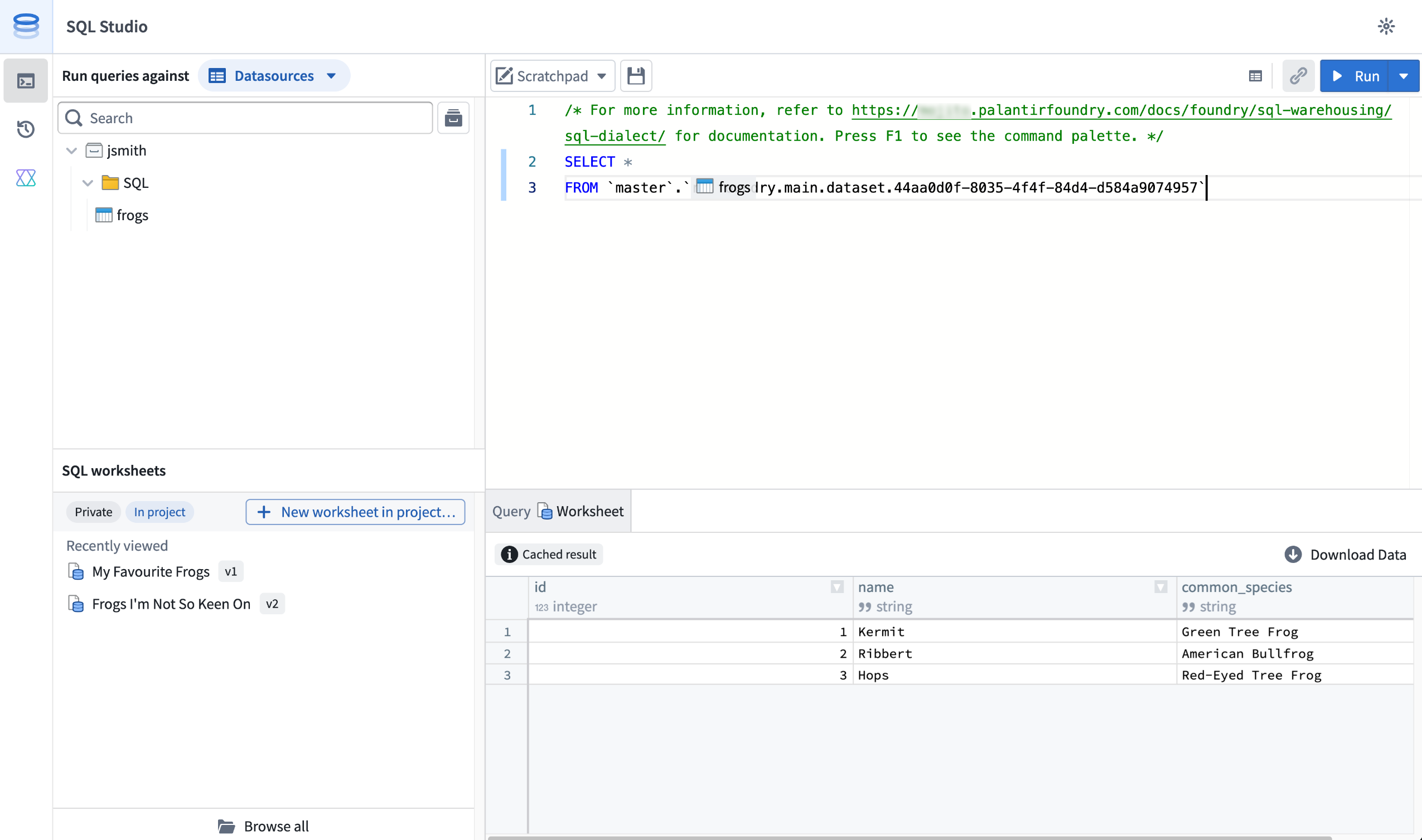
SQL Studio provides an interactive, AI-assisted interface for SQL analysis of tabular data and Ontology objects.
SQL Studio builds on the contextual SQL console embedded in applications such as Dataset Preview, Data Lineage, and Ontology Manager, now providing a dedicated application with read and write SQL support for tabular data, read support for ontology object types, and the ability to publish reusable Ontology SQL functions.
Powered by Ontology SQL and Furnace
SQL Studio is built on two Foundry SQL engines that share a common Spark SQL dialect: Ontology SQL for querying ontology object types, and Furnace for querying tabular data.
Ontology SQL is Foundry's SQL engine for querying ontology object types and many-to-many links. Queries execute directly against object storage using an in-memory compute path for fast response times on supported query shapes, with more complex queries automatically routed to Spark.
Furnace is Foundry's SQL engine for tabular data. It dynamically routes queries between Trino and Spark, delivering meaningfully faster query times for the right workloads. Furnace supports both read and write operations.
Key features
SQL Studio brings together a complete SQL analysis experience in one place:
- Unified data and object querying: Query tabular data and ontology object types from a single application, switching between data mode and object mode, while using a common Spark SQL dialect.
- Low-latency, interactive analysis: SQL Studio is built for iterative, interactive development workflows. Queries are dynamically routed to the most appropriate compute engine, including faster non-Spark options for supported query shapes, and run on warm, fully managed compute.
- AI-assisted code generation: A conversational AIP side panel helps you write, explain, and debug queries. It understands Foundry's supported SQL dialect and has visibility into your editor, including the current code and schemas for any referenced datasets, tables, object types.
- Preview results as tables or charts: View query results as tabular output or visualize them with built-in line and bar charts. Result limits are configurable, with the option to return up to 10,000 rows per query rather than the default 1,000-row preview for users with the appropriate permissions.
- Save and share SQL worksheets: Use the scratchpad for one-off analyses, or save your work as a SQL worksheet. Worksheets can be saved privately for personal reuse or in a project to share with colleagues. Saving creates a new version that you can review and restore later; unsaved changes are auto-staged so a user’s in-progress work persists between sessions.
- Read and write support: In addition to
SELECTqueries, SQL Studio supportsCREATE TABLEoperations on datasets andCREATE,INSERT,UPDATE, andDELETEoperations on Iceberg tables. - Ontology SQL functions (Beta): Define reusable, parameterized SQL queries over object types and publish them as SQL functions. Supported query shapes can execute with low latency on the same in-memory path as Ontology SQL queries. Use them across Foundry, including in Workshop, Actions, Automate, and the Ontology SDK. SQL functions are experimental and are not enabled on all Foundry environments, contact your Palantir representative to enroll.
Getting started
To get started with SQL Studio, Foundry administrators should enable the application from the Application access page of Control Panel. Once enabled, SQL Studio is directly accessible from the Applications menu.
For information about SQL Studio features, see the SQL Studio documentation. For syntax guidance, refer to the SQL dialect documentation. To learn more about the underlying engines, see the Furnace and Ontology SQL overviews.
What's coming next
SQL Studio is under active development, and several capabilities are on the near-term roadmap, including:
- Global branching and Marketplace packaging support for SQL worksheets.
- Application usability improvements, such as multiple editor tabs, improved query history, and more chart type options.
- Integration with Foundry's production pipeline tooling and Git-based CI/CD development workflows.
We want to hear from you
As we continue to develop SQL Studio, we want to hear about your experiences and welcome your feedback, both about the SQL Studio application and the broader SQL experience in Foundry. Share your thoughts with Palantir Support channels or our Developer Community ↗.
Replace language models used by AIP Logic functions in bulk from Workflow Lineage
Date published: 2026-05-07
You can now replace a language model used by multiple AIP Logic functions in a single action from Workflow Lineage instead of opening each function and updating the model individually. The ability to bulk replace models is now generally available across Foundry enrollments, making it easier to migrate workflows off deprecated models and evaluate new models across an entire workflow.
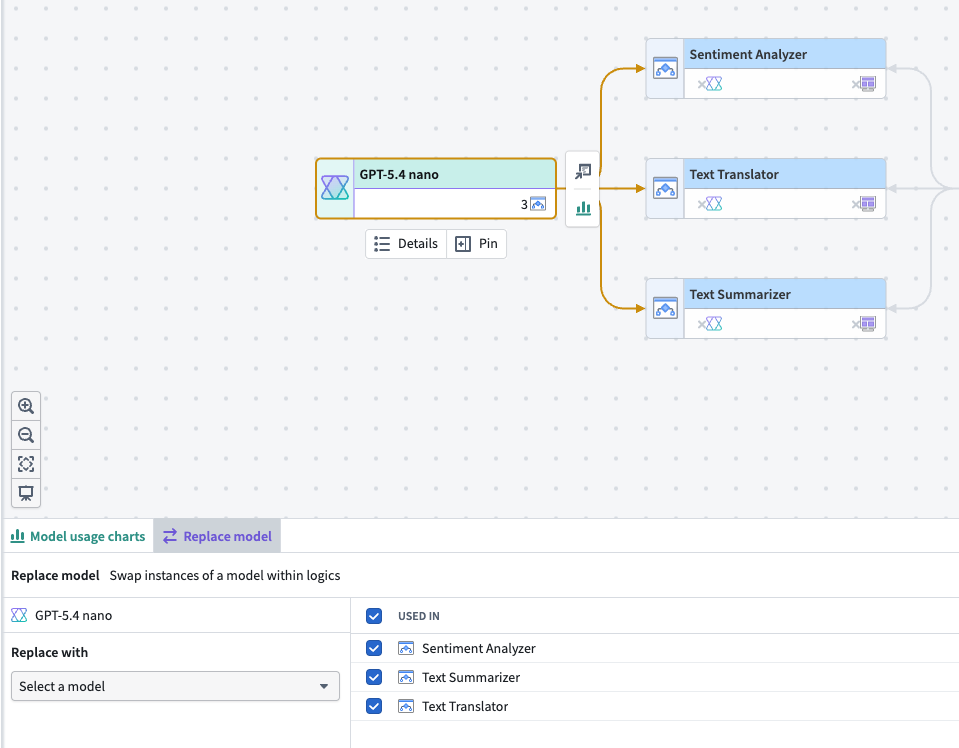
Choose an existing language model node on a Workflow Lineage graph to swap models in multiple AIP Logic functions.
Follow the instructions in the Workflow Lineage documentation to bulk replace models backing your AIP Logic functions with any model provided by Palantir. Support for bulk model replacement with additional resource types beyond AIP Logic functions is in development.
To migrate off deprecated models, review the model deprecation guide.
Your feedback matters
We want to hear about your experience using the Replace model feature in Workflow Lineage. Share your thoughts with Palantir Support channels or on our Developer Community ↗ using the workflow-lineage tag ↗.
GPT-5.5 is now available in AIP
Date published: 2026-05-05
GPT-5.5 is now available from Azure on US and EU georestricted, and non-georestricted enrollments. The model is available from OpenAI on US georestricted and non-georestricted enrollments.
Model overview
GPT-5.5 is OpenAI's newest model, excelling at agentic coding, debugging, research, tool calling, and a wide range of other tasks. For more information, review OpenAI's model documentation ↗.
- Context window: 1,050,000 tokens
- Knowledge cutoff: December 1, 2025
- Modalities: Text, image
- Capabilities: Reasoning tokens, function calling, structured outputs
Getting started
To use this model:
- Confirm that your enrollment administrator has enabled the relevant model family.
- Review token costs and pricing.
- See the complete list of all available models in AIP.
Your feedback matters
We want to hear about your experiences using language models in the Palantir platform and welcome your feedback. Share your thoughts with Palantir Support channels or on our Developer Community ↗ using the language-model-service tag ↗.
Global Branching is generally available May 18: branch, test, and merge across applications
Date published: 2026-05-05
Starting the week of May 18, 2026, Global Branching (formerly Foundry Branching) will be generally available to all users on all enrollments. Global Branching provides a shared workflow to make changes across multiple applications on a single branch, test those changes end-to-end without disrupting production workflows, and merge them back into Main. Consult the Global Branching documentation to learn more.
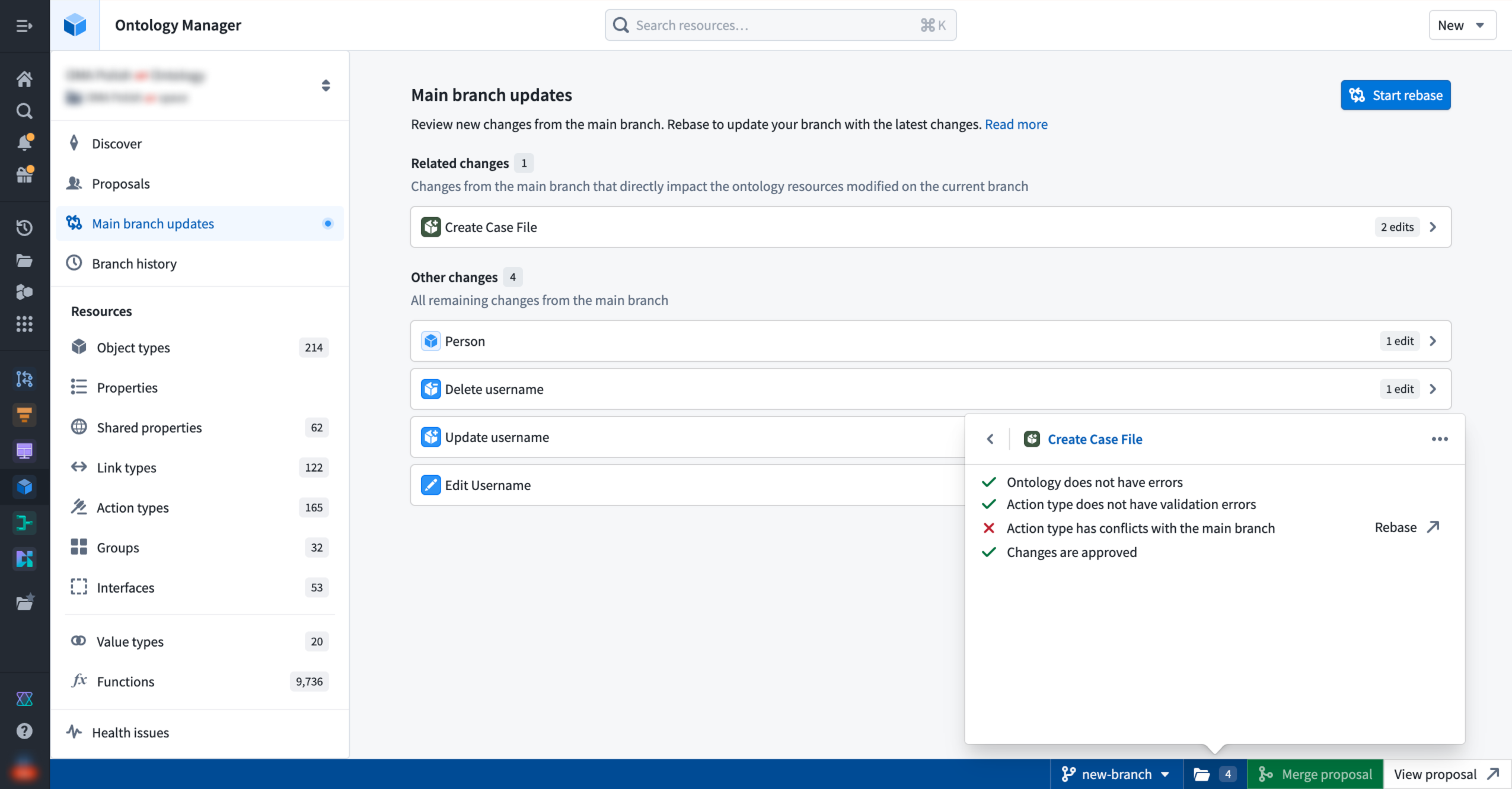
Reviewing main branch updates and resource check status in Ontology Manager.
Supported applications and workflows
Global Branching is available for transforms and TypeScript v1 functions repositories, Pipeline Builder, the Ontology, Workshop, AIP Logic, and Object Views.
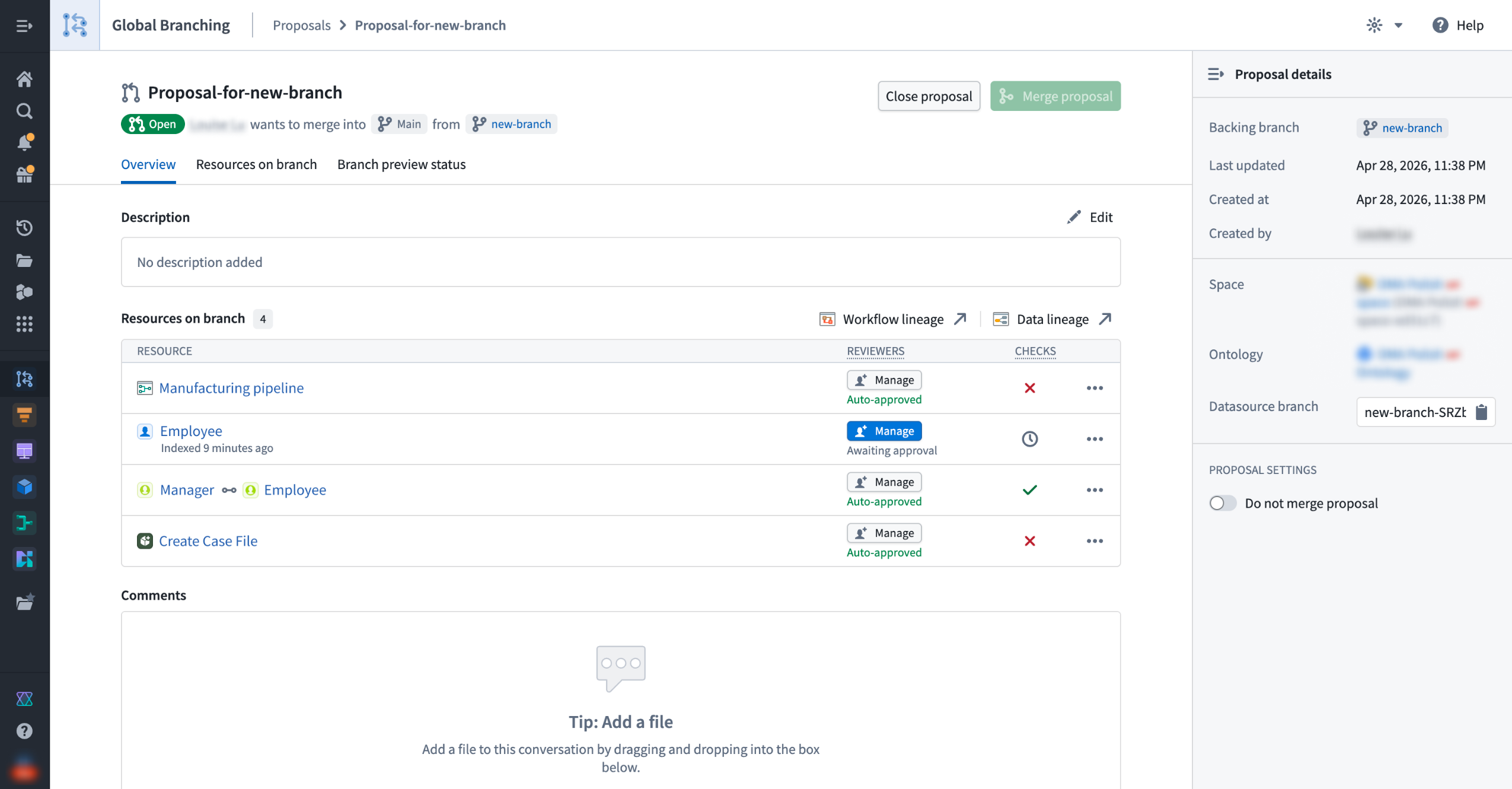
A proposal overview showing resources, approval status, and the "Do not merge proposal" setting.
For these applications, the following workflows are supported:
- Branch and modify resources: Create or access a branch, and make changes to resources without affecting the
Mainbranch. - Remove resources: Remove a resource from a branch to reset it to its state on the
Mainbranch. - Include new updates from
Mainand resolve conflicts: Rebase your branched resource to update it with the latest changes from theMainbranch. If conflicts exist, you will be redirected to the appropriate application to resolve them. - Protect resources: Resource owners can protect resources so that changes must go through a branch and receive approval before merging.
- Define approval policies: Project owners define approval policies specifying eligible reviewers, required approvals, and whether contributors can self-approve. For Code Repositories and Pipeline Builder, you define policies within the resource itself.
- View branched resources: Use Data Lineage to inspect the branched state of your resources and trace how changes propagate.
- Clear all checks and merge changes: When a proposal is created, the system runs checks on each resource to surface issues such as conflicts or missing approvals. Once all checks pass, you can merge your proposal.
Updated security model and branch lifecycle
The security model updates ship with Global Branching GA. Branch lifecycle changes follow in the coming weeks.
- Merge permissions (available with GA): Merging no longer requires a dedicated branch role. Any user who can view a proposal can merge it once all approvals and checks pass. A new Do not merge setting lets branch owners block merges until they are ready.
- Branch lifecycle (coming in the next few weeks): When a branch becomes inactive, the system will de-index its ontology resources and eventually delete its data; all logic will be preserved. Branches will no longer close automatically and instead, you will be able to archive and restore them manually at any time.
Restricted Views, Automate, and what's ahead
Restricted Views and Automate are now available in beta. The core branching workflow is functional, but some GA-level features — such as approval integration and removing a resource from a branch — are not yet available. Contact Palantir Support to enable, and consult the application-specific documentation to learn more about each application's current scope.
Beyond these two applications, we are actively working to expand branching support across the Palantir platform, starting with OSDK, TypeScript v2 and Python functions, and Developer Console.
Your feedback matters
Have thoughts on Global Branching? Let us know through Palantir Support channels and our Developer Community using the global-branching tag ↗.