- Capabilities
- Getting started
- Architecture center
- Platform updates
Parameterized pipelines [Beta]
Parameterized pipelines are in the beta phase of development and may not be available on your enrollment. Functionality may change during active development. Contact Palantir Support to request access.
Parameterized pipelines enable you to run the same transform logic multiple times with different parameter values, creating separate deployments that can be managed independently. Each pipeline maintains its own parameter configuration and produces outputs that are aggregated into union datasets, allowing you to process and analyze data across all deployments. This feature is particularly useful when you need to execute parameterized transformations at scale from user-facing applications.
Example use cases
- High-scale scenario simulations
Prerequisites
Before using parameterized pipelines, ensure the following requirements are met:
- Contact Palantir Support to enable parameterized pipelines on your enrollment.
- For single-node compute engines, your code repository
transformsVersionmust be10.68.0or later andtransformsLangPythonPluginVersionmust be1.1110.0or later. - For Spark, your code repository
transformsVersionmust be10.24.0or later.
Upgrade your repository with the repository upgrade guide.
Configure parameters in Python transforms
To use parameterized pipelines, you must first declare parameters in your Python transforms alongside other inputs. Parameters define the configurable values that distinguish each deployment.
Copied!1 2 3 4 5 6 7 8 9 10@transform.using( output=Output('/path/to/output'), town=Input('/path/to/input_towns'), power_link=Input('/path/to/power_link'), risk_factor=IntegerParam(5), ) def process_data(output, town, power_link, risk_factor): ... riskiness = risk_factor.value ...
Copied!1 2 3 4 5 6 7 8 9 10@transform.spark.using( output=Output('/path/to/output'), town=Input('/path/to/input_towns'), power_link=Input('/path/to/power_link'), risk_factor=IntegerParam(5), ) def process_data(ctx, output, town, power_link, risk_factor): ... riskiness = risk_factor.value ...
Foundry supports several parameter types for use in transforms:
- StringParam: Text values
- IntegerParam: Whole numbers
- FloatParam: Decimal numbers
- BooleanParam: True or false values
Learn more about working with parameters in Python transforms.
Configure pipelines in Data Lineage
After defining parameters in your transforms, configure deployment settings for your pipeline through Data Lineage:
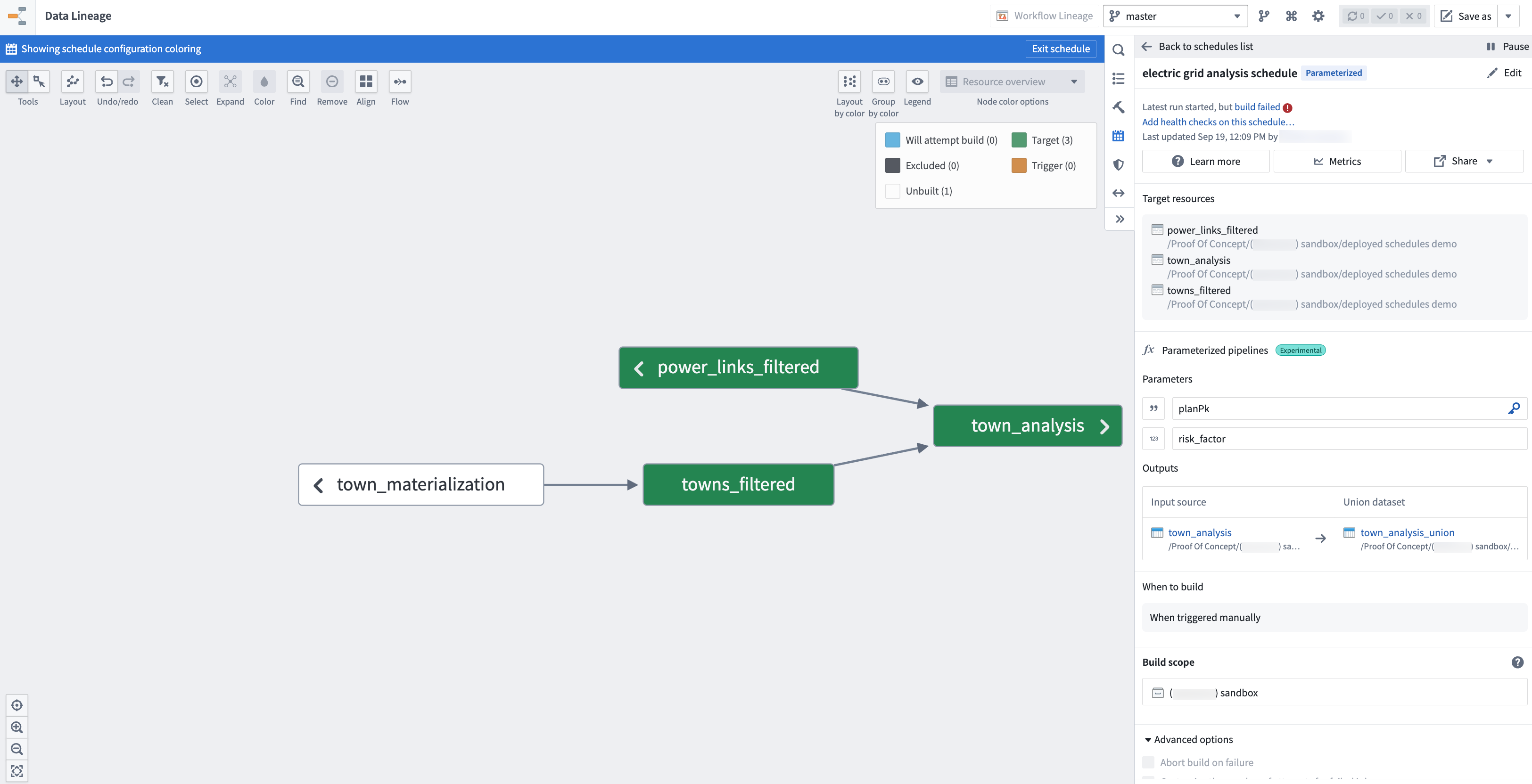
- Select the transform datasets you want to deploy.
- Toggle on the Parameterized pipelines option from the Manage schedules configuration panel to the right.
- Configure the pipeline settings:
- Deployment key: Select a parameter that uniquely identifies each deployment. This key distinguishes one deployment from another.
- Parameters: Review the parameters discovered from your transforms. Parameter types are automatically detected based on your transform definitions.
- Outputs: To add pipeline datasets downstream, choose them as outputs of your parameterized pipeline.
- Set the schedule trigger to When triggered manually. Automated triggers are not yet supported for parameterized pipelines.
Each output will create a single union view that will automatically aggregate the output data of each deployment build, allowing you to query and analyze data across all parameter configurations in a single dataset. Be sure your transform adds a column to your output dataset that contains the deployment key parameter; this will help you understand which rows in the union output correspond to which pipeline builds.
Manage deployments
After configuring the deployments in Data Lineage, navigate to the Build Schedules application to create and manage individual deployments.
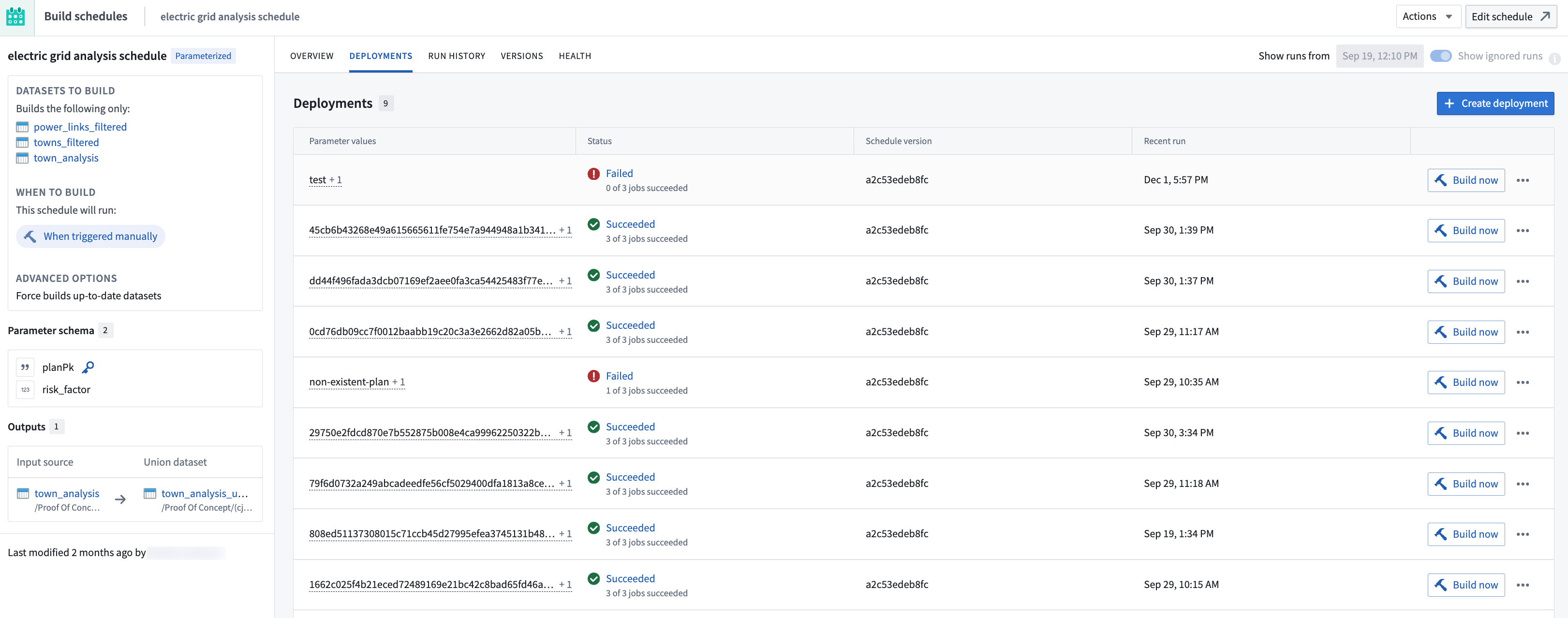
Create a deployment
- Navigate to the Build Schedules application by selecting the Metrics button at the top of the Manage schedules configuration panel in Data Lineage.
- Select the Deployments tab.
- Choose to Create deployment.
- Fill in the parameter values for this deployment. The deployment key value you provide will uniquely identify this deployment.
- Choose Save to create the deployment.
Run a deployment
To build a deployment and generate its output data:
- Locate the deployment in the Deployments list.
- Select Build now on the deployment row.
- Monitor the build status from the interface.
Once the build succeeds, the union datasets will be updated to include data from this deployment. Each row in the union dataset includes the deployment key value, allowing you to filter and analyze data by deployment.
Edit a deployment
To modify the parameter values for an existing deployment:
- Select the (•••) menu icon on the deployment row.
- Select Edit.
- Update the parameter values as needed.
- Choose Save.
The next time the deployment builds, it will use the updated parameter values. Previous build outputs remain in the union dataset with the old parameter values until the deployment is rebuilt.
Delete a deployment
To remove a deployment and its data from union datasets:
- Select the (•••) menu icon on the deployment row.
- Select Delete.
- Confirm the deletion.
When a deployment is deleted, its corresponding rows are removed from all union datasets. This operation cannot be undone.
Current limitations
Parameterized pipelines are in active development. The following limitations currently apply:
- Manual triggers only: Deployments must be triggered manually. Time-based and event-based triggers are not yet supported.
- No Marketplace integration: Parameterized pipelines cannot currently be packaged in Marketplace products.
- No actions support: Programmatic creation and management of deployments through Ontology actions is not yet available.