- Capabilities
- Getting started
- Architecture center
- Platform updates
GitHub
The GitHub connector is a Palantir-provided driver for GitHub.
To create a new GitHub source, follow the standard setup flow for Palantir-provided drivers, then use the sections below for GitHub-specific configuration and networking. For the complete property reference, see the official GitHub driver documentation ↗.
Supported capabilities
| Capability | Status |
|---|---|
| Exploration | 🟢 Generally available |
| Batch syncs | 🟢 Generally available |
| Incremental | 🟢 Generally available |
| OAuth 2.0 authentication | 🟢 Generally available |
| Table exports | 🟢 Generally available |
Introduction
The GitHub connector is best suited for reading data in bulk. It surfaces the GitHub data model — repositories, issues, pull requests, commits, and related entities — as relational tables. You can browse these in the source explorer and pull them into Foundry with a batch sync. This makes it a good fit for mirroring an entire repository or organization into Foundry for downstream analysis.
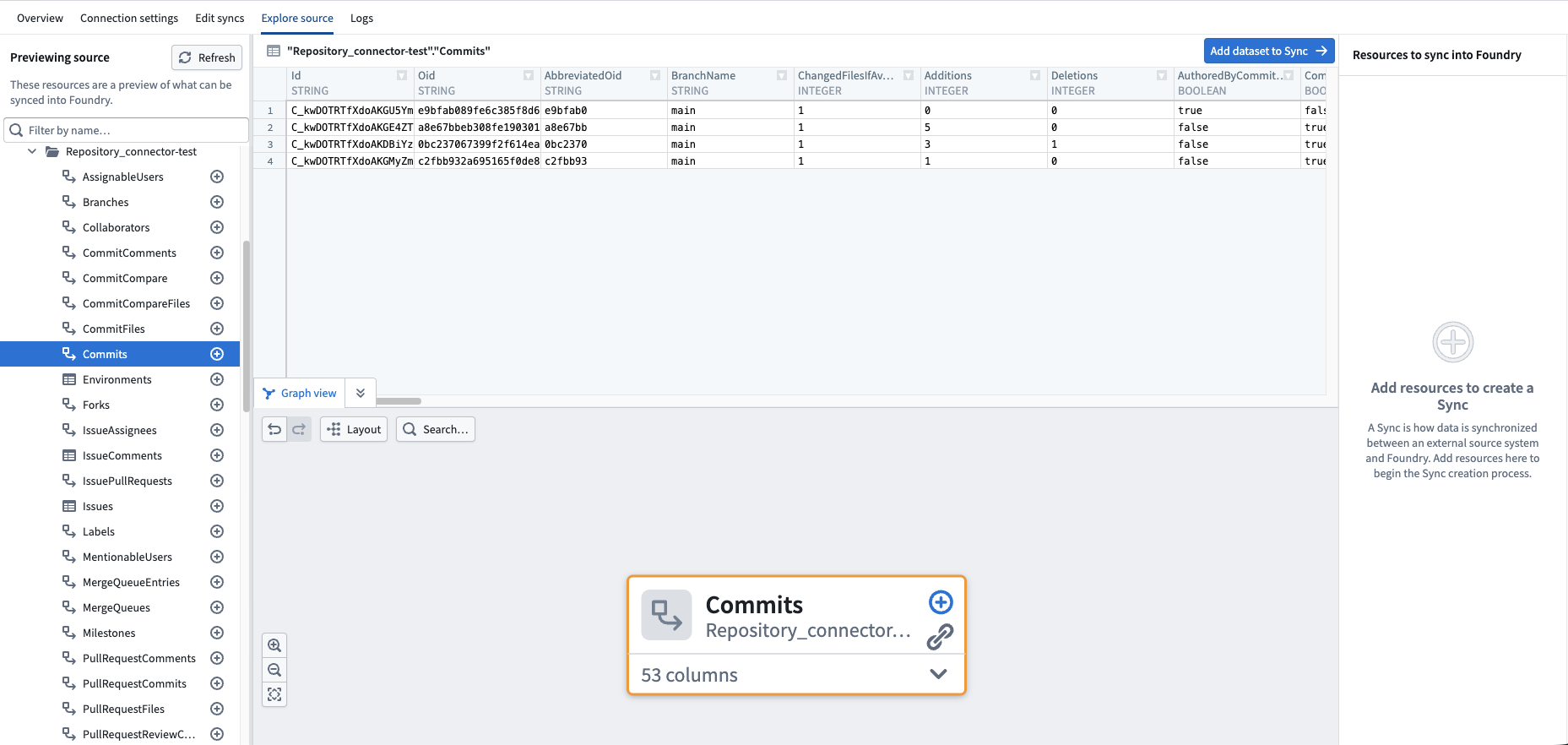
To create or update records in GitHub, reuse your existing GitHub source and call the GitHub REST API ↗ from an external transform or external function. No second source is required. See Use GitHub sources in code below.
Authentication
The connector authenticates with GitHub over OAuth 2.0. You register an application on GitHub, then enter its Client ID and Client secret on the Foundry source (OAuthClientId / OAuthClientSecret). With InitiateOAuth set to REFRESH, the driver runs GitHub's OAuth web application flow ↗ on the first sync and keeps the token refreshed.
GitHub offers two application types, both built on OAuth 2.0 and configured the same way. A GitHub App (recommended) adds fine-grained, per-resource permissions — for example, read-only access to a single repository's issues — and short-lived tokens. An OAuth app uses broad, account-level scopes, such as repo. The steps below use a GitHub App; an OAuth app is identical apart from the provisioning permissions workflow, where you instead select OAuth app from Settings > Developer settings. For a full comparison, see Differences between GitHub Apps and OAuth apps ↗.
Create the application
In GitHub, select Settings > Developer settings > GitHub Apps > New GitHub App ↗ and set the Callback URL to the value shown on the Foundry source setup page.
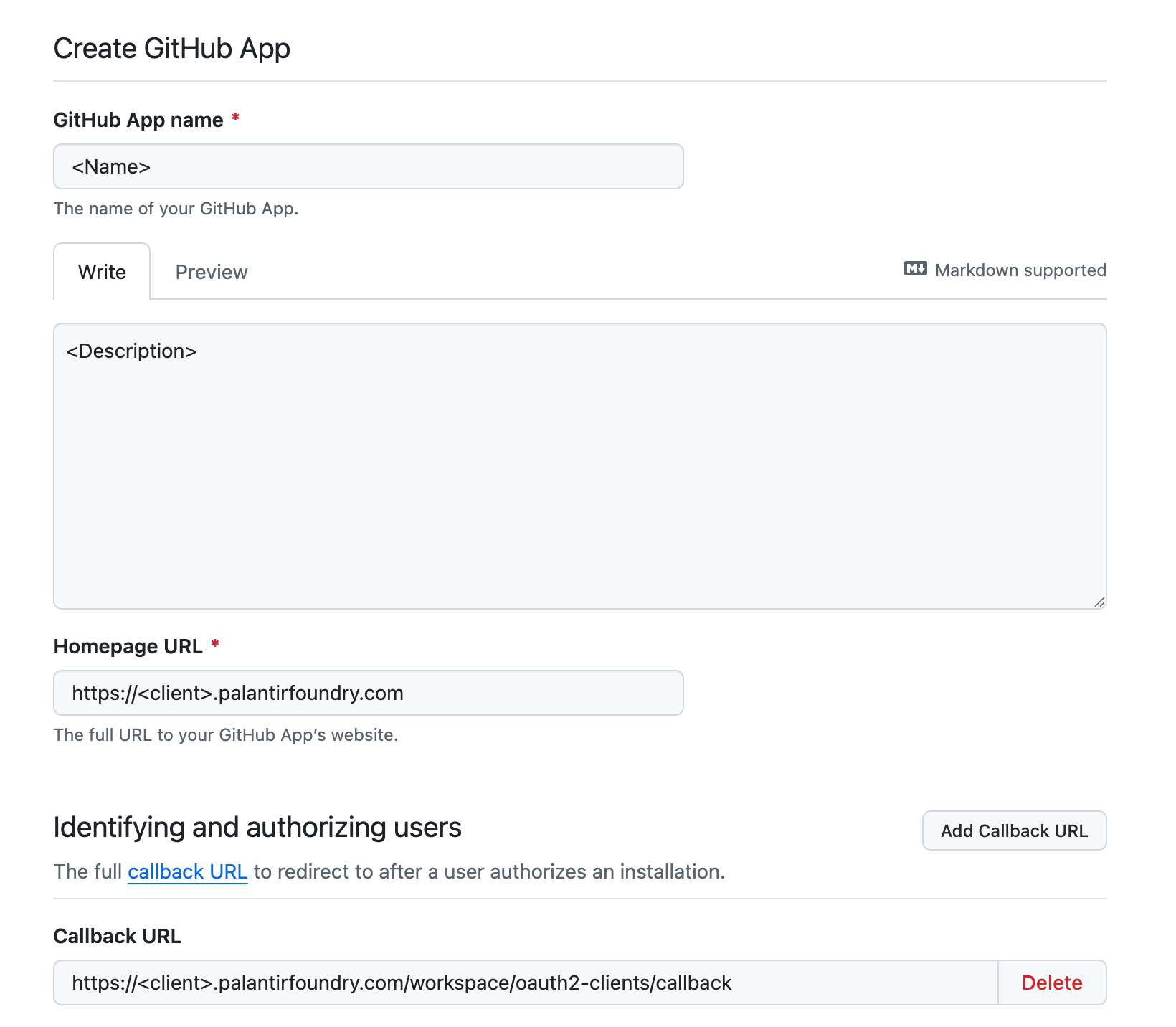
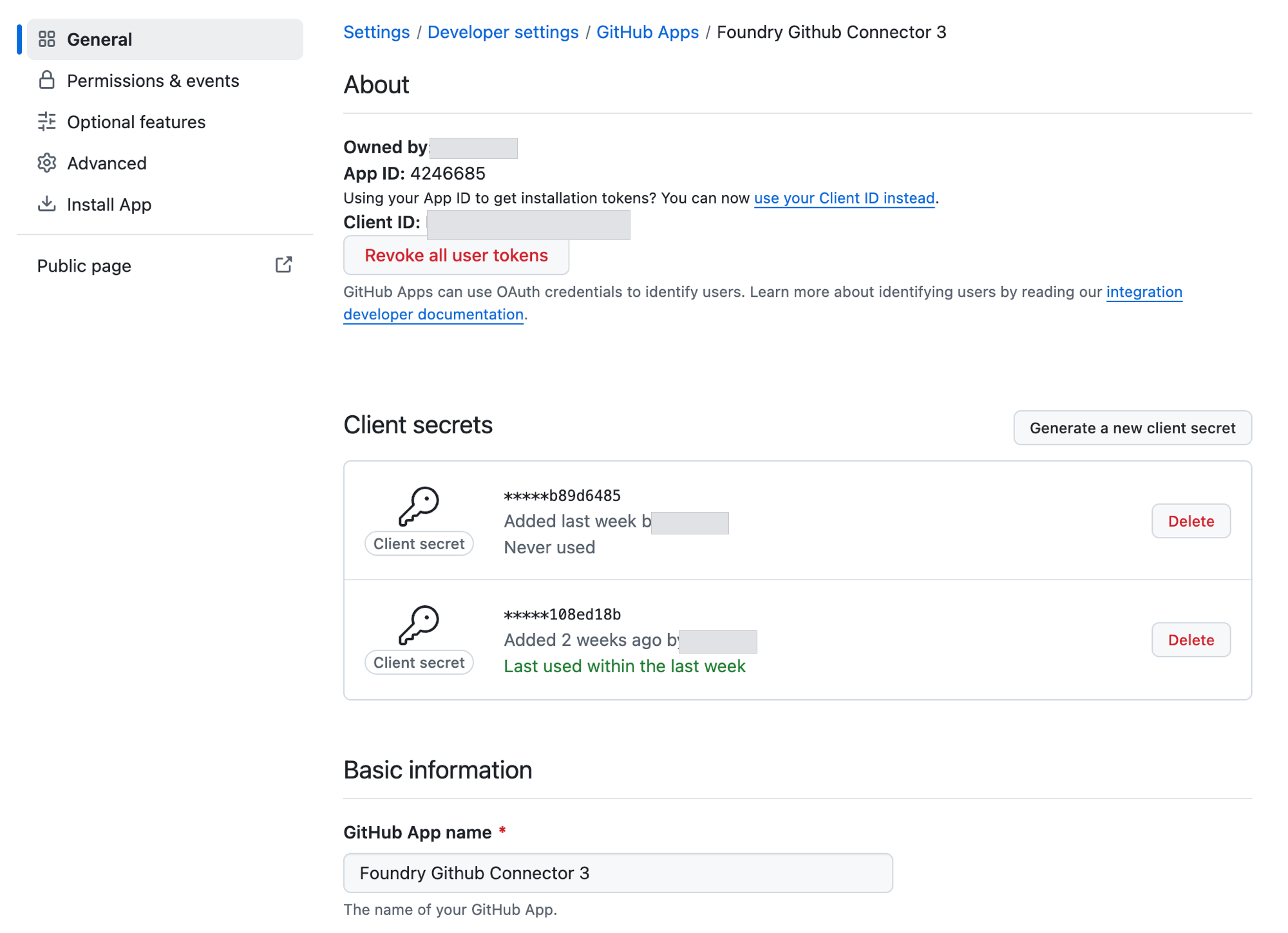
Under Permissions & events, grant only what the sync needs (for example, read-only Contents and Issues), create the app, and install it from the Install App tab on the target repositories or organization. Then, on the app's General page, copy the Client ID and generate a Client secret.
Add your GitHub client ID and secret to the source
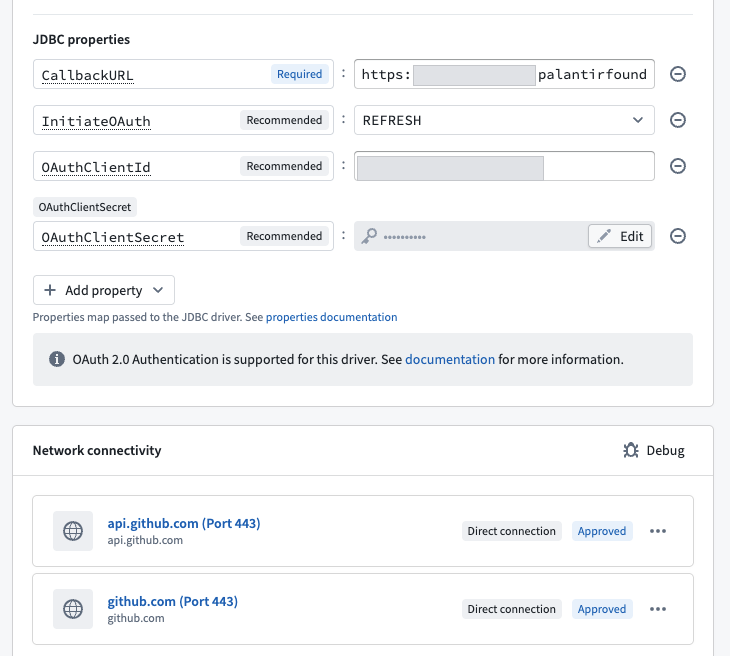
Navigate to Data Connection in Foundry and enter the Client ID and Client secret into the source's OAuthClientId and OAuthClientSecret properties and keep InitiateOAuth set to REFRESH.
Configuration
The properties below are mandatory or recommended.
| Property | Required? | Description | Default |
|---|---|---|---|
InitiateOAuth ↗ | Recommended | Specifies the process for obtaining or refreshing the OAuth access token, which maintains user access while an authenticated, authorized user is working. | REFRESH |
OAuthClientId ↗ | Recommended | Specifies the client ID (also known as the consumer key) assigned to your custom OAuth application. This ID is required to identify the application to the OAuth authorization server during authentication. | — |
OAuthClientSecret ↗ | Recommended | Specifies the client secret assigned to your custom OAuth application. This confidential value is used to authenticate the application to the OAuth authorization server. | — |
Networking
The table below lists the domains that the source must be able to access to run.
For each domain, add a corresponding egress policy. If the source is hosted on-premises and not directly reachable from Foundry, use an agent proxy egress policy instead. The agent host itself must also be able to reach the listed domains. See using an agent as a proxy for details.
| Domain | Required |
|---|---|
| github.com | Always |
| api.github.com | Always |
OAuth 2.0 authentication
This connector supports OAuth 2.0 authentication. Follow the OAuth 2.0 guidance for Palantir-provided drivers to configure and authorize the connection.
Table exports
This connector supports table exports. Learn how to set up a table export.
Use GitHub sources in code
To create or update records in GitHub, or to use any part of the GitHub REST API ↗ beyond bulk reads, call the API from an external transform or external function. Reuse your existing GitHub source, authenticating with a short-lived (roughly one hour time-to-live) GitHub App installation token minted in code. No second source is required.
Next, import the source into your external transforms or functions repository. The source does not expose a built-in HTTPS client (get_https_connection().get_client()), but it inherits its api.github.com egress, which is covered by the network egress policies above. You can call the GitHub REST API directly with requests ↗ in Python or the source's fetch in TypeScript.
Read GitHub issues
The examples below read GitHub issues using Python or TypeScript through a GitHub App.
This workflow is not supported by an OAuth app, which requires a personal access token.
First, navigate to your source's Connection details page in Data Connection and add the GitHub App's private key by selecting Add property > New encrypted property. Name the property Other, enabling it to be read back with get_secret("Other").
Next, set APP_ID in the Python examples to the GitHub App ID or client ID. This identifier is public and does not need secret storage. The TypeScript examples instead read it from the source's OAuthClientId property.
Live preview cannot bind the source to the function, so these examples always error during preview. Instead, deploy the function and run it from a Workshop application, or via any serverless execution, to confirm it works.
Copied!1 2 3 4 5 6 7 8 9 10 11 12 13 14 15 16 17 18 19 20 21 22 23 24 25 26 27 28 29 30 31 32 33 34 35 36 37 38 39 40 41 42 43 44 45 46 47 48 49 50 51import time import jwt import pandas as pd import requests from transforms.api import LightweightOutput, Output, transform from transforms.external.systems import ResolvedSource, Source, external_systems API = "https://api.github.com" APP_ID = "<github_app_id_or_client_id>" OWNER = "<owner>" REPOSITORY = "<repository>" def github_headers(github: ResolvedSource) -> dict[str, str]: now = int(time.time()) app_jwt = jwt.encode( {"iat": now - 60, "exp": now + 540, "iss": APP_ID}, github.get_secret("Other"), algorithm="RS256", ) headers = { "Accept": "application/vnd.github+json", "X-GitHub-Api-Version": "2022-11-28", "Authorization": f"Bearer {app_jwt}", } installation_id = requests.get( f"{API}/repos/{OWNER}/{REPOSITORY}/installation", headers=headers ).json()["id"] token = requests.post( f"{API}/app/installations/{installation_id}/access_tokens", headers=headers, ).json()["token"] return {**headers, "Authorization": f"Bearer {token}"} @external_systems(github=Source("<source_rid>")) @transform.using(output=Output("<issues_output_dataset_rid>")) def get_issues(github: ResolvedSource, output: LightweightOutput) -> None: response = requests.get( f"{API}/repos/{OWNER}/{REPOSITORY}/issues", headers=github_headers(github), params={"state": "all", "per_page": 100}, ) response.raise_for_status() output.write_table(pd.DataFrame([{ "number": issue["number"], "title": issue["title"], "body": issue["body"], "state": issue["state"], } for issue in response.json()]))
Copied!1 2 3 4 5 6 7 8 9 10 11 12 13 14 15 16 17 18 19 20 21 22 23 24 25 26 27 28 29 30 31 32 33 34 35 36 37 38 39 40 41 42 43 44 45 46 47 48 49 50 51 52 53import time from dataclasses import dataclass import jwt import requests from functions.api import function from functions.sources import get_source API = "https://api.github.com" APP_ID = "<github_app_id_or_client_id>" SOURCE_ALIAS = "<source_alias>" @dataclass class GitHubIssue: number: int title: str body: str | None state: str def github_headers(github, owner: str, repository: str) -> dict[str, str]: now = int(time.time()) app_jwt = jwt.encode( {"iat": now - 60, "exp": now + 540, "iss": APP_ID}, github.get_secret("Other"), algorithm="RS256", ) headers = { "Accept": "application/vnd.github+json", "X-GitHub-Api-Version": "2022-11-28", "Authorization": f"Bearer {app_jwt}", } installation_id = requests.get( f"{API}/repos/{owner}/{repository}/installation", headers=headers ).json()["id"] token = requests.post( f"{API}/app/installations/{installation_id}/access_tokens", headers=headers, ).json()["token"] return {**headers, "Authorization": f"Bearer {token}"} @function(sources=["<source_alias>"]) def get_issues(owner: str, repository: str) -> list[GitHubIssue]: response = requests.get( f"{API}/repos/{owner}/{repository}/issues", headers=github_headers(get_source(SOURCE_ALIAS), owner, repository), params={"state": "all", "per_page": 100}, ) response.raise_for_status() return [GitHubIssue(issue["number"], issue["title"], issue["body"], issue["state"]) for issue in response.json()]
Copied!1 2 3 4 5 6 7 8 9 10 11 12 13 14 15 16 17 18 19 20 21 22 23 24 25 26 27 28 29 30 31 32 33 34 35 36 37 38 39 40 41 42 43 44 45 46 47 48 49 50 51 52 53import { ExternalSystems, Function, Integer } from "@foundry/functions-api"; import { GitHubSource } from "@foundry/external-systems/sources"; import * as jwt from "jsonwebtoken"; const API = "https://api.github.com"; export interface GitHubIssue { number: Integer; title: string; body?: string; state: string; } async function githubHeaders(owner: string, repository: string): Promise<Record<string, string>> { const now = Math.floor(Date.now() / 1000); const appJwt = jwt.sign( { iat: now - 60, exp: now + 540, iss: GitHubSource.getSecret("OAuthClientId") }, GitHubSource.getSecret("Other"), { algorithm: "RS256" }, ); const headers = { Accept: "application/vnd.github+json", "X-GitHub-Api-Version": "2022-11-28", Authorization: `Bearer ${appJwt}`, }; const installation = await GitHubSource.fetch( `${API}/repos/${owner}/${repository}/installation`, { method: "GET", headers } ); const { id } = await installation.json() as { id: number }; const tokenResponse = await GitHubSource.fetch( `${API}/app/installations/${id}/access_tokens`, { method: "POST", headers } ); const { token } = await tokenResponse.json() as { token: string }; return { ...headers, Authorization: `Bearer ${token}` }; } export class GitHubFunctions { @ExternalSystems({ sources: [GitHubSource] }) @Function() public async getIssues(owner: string, repository: string): Promise<GitHubIssue[]> { const response = await GitHubSource.fetch( `${API}/repos/${owner}/${repository}/issues?state=all&per_page=100`, { method: "GET", headers: await githubHeaders(owner, repository) }, ); if (!response.ok) throw new Error(`GitHub returned ${response.status}`); const issues = await response.json() as Array<{ number: number; title: string; body: string | null; state: string; }>; return issues.map(({ number, title, body, state }) => ({ number, title, body: body ?? undefined, state, })); } }
Copied!1 2 3 4 5 6 7 8 9 10 11 12 13 14 15 16 17 18 19 20 21 22 23 24 25 26 27 28 29 30 31 32 33 34 35 36 37 38 39 40 41 42 43 44 45 46 47 48 49 50 51 52 53 54import { Integer } from "@osdk/functions"; import { getFetch, getSource } from "@palantir/functions-sources"; import jwt from "jsonwebtoken"; const API = "https://api.github.com"; const SOURCE_RID = "<source_rid>"; export const config = { sources: [SOURCE_RID] }; export interface GitHubIssue { number: Integer; title: string; body?: string; state: string; } async function githubClient(owner: string, repository: string) { const source = await getSource({ rid: SOURCE_RID }); const request = await getFetch(source); const now = Math.floor(Date.now() / 1000); const appJwt = jwt.sign( { iat: now - 60, exp: now + 540, iss: source.secrets.OAuthClientId! }, source.secrets.Other!, { algorithm: "RS256" }, ); const headers = { Accept: "application/vnd.github+json", "X-GitHub-Api-Version": "2022-11-28", Authorization: `Bearer ${appJwt}`, }; const installation = await request( `${API}/repos/${owner}/${repository}/installation`, { method: "GET", headers } ); const { id } = await installation.json() as { id: number }; const tokenResponse = await request( `${API}/app/installations/${id}/access_tokens`, { method: "POST", headers } ); const { token } = await tokenResponse.json() as { token: string }; return { request, headers: { ...headers, Authorization: `Bearer ${token}` } }; } export default async function getIssues(owner: string, repository: string): Promise<GitHubIssue[]> { const { request, headers } = await githubClient(owner, repository); const response = await request( `${API}/repos/${owner}/${repository}/issues?state=all&per_page=100`, { method: "GET", headers }, ); if (!response.ok) throw new Error(`GitHub returned ${response.status}`); const issues = await response.json() as Array<{ number: number; title: string; body: string | null; state: string; }>; return issues.map(({ number, title, body, state }) => ({ number, title, body: body ?? undefined, state, })); }
Update GitHub issues
The examples below update the body of a GitHub issue through the same GitHub App authentication flow as in the examples for reading GitHub issues.
Each example immediately replaces the selected issue's entire body. Supply only an issue whose body you intend to overwrite.
Copied!1 2 3 4 5 6 7 8 9 10 11 12 13 14 15 16 17 18 19 20 21 22 23 24 25 26 27 28 29 30 31 32 33 34 35 36 37 38 39 40 41 42 43 44 45 46 47 48 49 50 51import time import jwt import pandas as pd import requests from transforms.api import LightweightOutput, Output, transform from transforms.external.systems import ResolvedSource, Source, external_systems API = "https://api.github.com" APP_ID = "<github_app_id_or_client_id>" OWNER = "<owner>" REPOSITORY = "<repository>" ISSUE_NUMBER = "<issue_number>" UPDATED_BODY = "<updated_issue_body>" def github_headers(github: ResolvedSource) -> dict[str, str]: now = int(time.time()) app_jwt = jwt.encode( {"iat": now - 60, "exp": now + 540, "iss": APP_ID}, github.get_secret("Other"), algorithm="RS256", ) headers = { "Accept": "application/vnd.github+json", "X-GitHub-Api-Version": "2022-11-28", "Authorization": f"Bearer {app_jwt}", } installation_id = requests.get( f"{API}/repos/{OWNER}/{REPOSITORY}/installation", headers=headers ).json()["id"] token = requests.post( f"{API}/app/installations/{installation_id}/access_tokens", headers=headers, ).json()["token"] return {**headers, "Authorization": f"Bearer {token}"} @external_systems(github=Source("<source_rid>")) @transform.using(output=Output("<update_output_dataset_rid>")) def patch_issue(github: ResolvedSource, output: LightweightOutput) -> None: response = requests.patch( f"{API}/repos/{OWNER}/{REPOSITORY}/issues/{ISSUE_NUMBER}", headers=github_headers(github), json={"body": UPDATED_BODY}, ) response.raise_for_status() output.write_table(pd.DataFrame([{ "issue_number": ISSUE_NUMBER, "body": UPDATED_BODY, }]))
Copied!1 2 3 4 5 6 7 8 9 10 11 12 13 14 15 16 17 18 19 20 21 22 23 24 25 26 27 28 29 30 31 32 33 34 35 36 37 38 39 40 41 42 43 44 45import time import jwt import requests from functions.api import function from functions.sources import get_source API = "https://api.github.com" APP_ID = "<github_app_id_or_client_id>" SOURCE_ALIAS = "<source_alias>" def github_headers(github, owner: str, repository: str) -> dict[str, str]: now = int(time.time()) app_jwt = jwt.encode( {"iat": now - 60, "exp": now + 540, "iss": APP_ID}, github.get_secret("Other"), algorithm="RS256", ) headers = { "Accept": "application/vnd.github+json", "X-GitHub-Api-Version": "2022-11-28", "Authorization": f"Bearer {app_jwt}", } installation_id = requests.get( f"{API}/repos/{owner}/{repository}/installation", headers=headers ).json()["id"] token = requests.post( f"{API}/app/installations/{installation_id}/access_tokens", headers=headers, ).json()["token"] return {**headers, "Authorization": f"Bearer {token}"} @function(sources=["<source_alias>"]) def patch_issue( owner: str, repository: str, issue_number: int, body: str ) -> str: response = requests.patch( f"{API}/repos/{owner}/{repository}/issues/{issue_number}", headers=github_headers(get_source(SOURCE_ALIAS), owner, repository), json={"body": body}, ) response.raise_for_status() return body
Copied!1 2 3 4 5 6 7 8 9 10 11 12 13 14 15 16 17 18 19 20 21 22 23 24 25 26 27 28 29 30 31 32 33 34 35 36 37 38 39 40 41 42 43 44 45 46 47import { ExternalSystems, Function, Integer } from "@foundry/functions-api"; import { GitHubSource } from "@foundry/external-systems/sources"; import * as jwt from "jsonwebtoken"; const API = "https://api.github.com"; async function githubHeaders(owner: string, repository: string): Promise<Record<string, string>> { const now = Math.floor(Date.now() / 1000); const appJwt = jwt.sign( { iat: now - 60, exp: now + 540, iss: GitHubSource.getSecret("OAuthClientId") }, GitHubSource.getSecret("Other"), { algorithm: "RS256" }, ); const headers = { Accept: "application/vnd.github+json", "X-GitHub-Api-Version": "2022-11-28", Authorization: `Bearer ${appJwt}`, }; const installation = await GitHubSource.fetch( `${API}/repos/${owner}/${repository}/installation`, { method: "GET", headers } ); const { id } = await installation.json() as { id: number }; const tokenResponse = await GitHubSource.fetch( `${API}/app/installations/${id}/access_tokens`, { method: "POST", headers } ); const { token } = await tokenResponse.json() as { token: string }; return { ...headers, Authorization: `Bearer ${token}` }; } export class GitHubFunctions { @ExternalSystems({ sources: [GitHubSource] }) @Function() public async patchIssue( owner: string, repository: string, issueNumber: Integer, body: string ): Promise<string> { const response = await GitHubSource.fetch( `${API}/repos/${owner}/${repository}/issues/${issueNumber}`, { method: "PATCH", headers: { ...await githubHeaders(owner, repository), "Content-Type": "application/json" }, body: JSON.stringify({ body }), }, ); if (!response.ok) throw new Error(`GitHub returned ${response.status}`); return body; } }
Copied!1 2 3 4 5 6 7 8 9 10 11 12 13 14 15 16 17 18 19 20 21 22 23 24 25 26 27 28 29 30 31 32 33 34 35 36 37 38 39 40 41 42 43 44 45 46 47 48import { Integer } from "@osdk/functions"; import { getFetch, getSource } from "@palantir/functions-sources"; import jwt from "jsonwebtoken"; const API = "https://api.github.com"; const SOURCE_RID = "<source_rid>"; export const config = { sources: [SOURCE_RID] }; async function githubClient(owner: string, repository: string) { const source = await getSource({ rid: SOURCE_RID }); const request = await getFetch(source); const now = Math.floor(Date.now() / 1000); const appJwt = jwt.sign( { iat: now - 60, exp: now + 540, iss: source.secrets.OAuthClientId! }, source.secrets.Other!, { algorithm: "RS256" }, ); const headers = { Accept: "application/vnd.github+json", "X-GitHub-Api-Version": "2022-11-28", Authorization: `Bearer ${appJwt}`, }; const installation = await request( `${API}/repos/${owner}/${repository}/installation`, { method: "GET", headers } ); const { id } = await installation.json() as { id: number }; const tokenResponse = await request( `${API}/app/installations/${id}/access_tokens`, { method: "POST", headers } ); const { token } = await tokenResponse.json() as { token: string }; return { request, headers: { ...headers, Authorization: `Bearer ${token}` } }; } export default async function patchIssue( owner: string, repository: string, issueNumber: Integer, body: string ): Promise<string> { const { request, headers } = await githubClient(owner, repository); const response = await request( `${API}/repos/${owner}/${repository}/issues/${issueNumber}`, { method: "PATCH", headers: { ...headers, "Content-Type": "application/json" }, body: JSON.stringify({ body }), }, ); if (!response.ok) throw new Error(`GitHub returned ${response.status}`); return body; }