- Capabilities
- Getting started
- Architecture center
- Platform updates
Transforms with Iceberg
This page provides an introductory guide to working with Iceberg tables in Python transforms, including background on the relevant APIs and syntax. To jump straight to runnable code, see Code examples. For incremental logic, see Incremental Python transforms with Iceberg.
Just like when working with datasets, Python transforms on Foundry Iceberg tables are composed of three key components:
- Input and output declaration through the transform decorator
- Runtime object definition through the compute function signature
- Compute logic through the body of your compute function
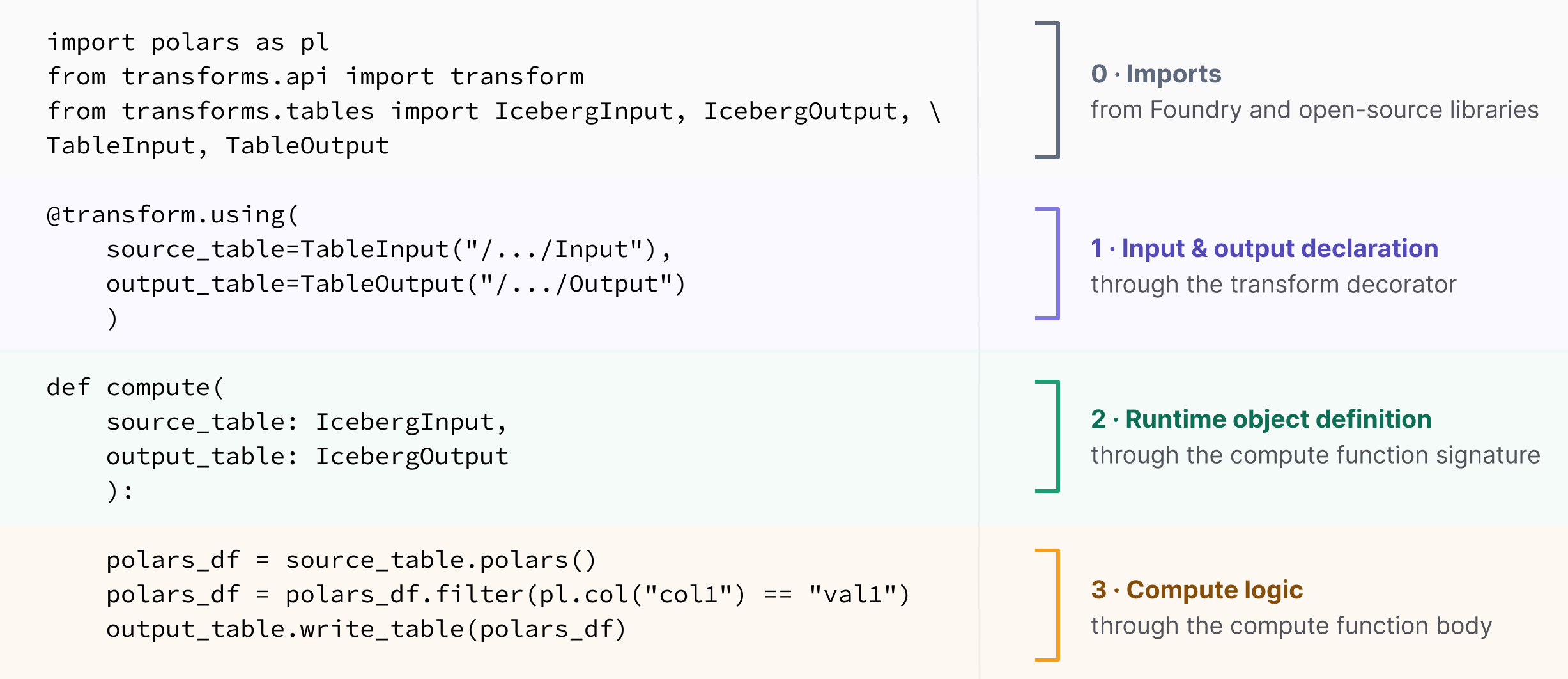
Input and output declaration
Foundry provides the following declaration classes as part of the transforms.tables library for defining Iceberg table inputs and outputs to a transform:
| API & import path | Description | Dataset equivalent |
|---|---|---|
TableInput | Declares an Iceberg table as an input inside the transforms decorator. | Input( transforms.api) |
TableOutput | Declares an Iceberg table as an output inside the transforms decorator. | Output( transforms.api) |
These inputs and outputs are declared inside the transform decorator. Iceberg leverages the same transforms decorators as datasets: @transform.using for single-node compute and @transform.spark.using for PySpark.
Runtime object definition
Foundry provides the following runtime objects as part of the transforms.tables and transforms.api libraries for reading and writing Iceberg tables in a transform:
| Single-node API | PySpark API | Description | Dataset equivalents |
|---|---|---|---|
IcebergInput | TableTransformInput | Handle to the input table. | LightweightInput, TransformInput( transforms.api) |
IcebergOutput | TableTransformOutput | Handle to the output table. | LightweightOutput, TransformOutput( transforms.api) |
IncrementalIcebergInput | IncrementalTableTransformInput | Handle to the input table for incremental transforms. | IncrementalTransformInput( transforms.api) |
IncrementalIcebergOutput | TableTransformOutput | Handle to the output table for incremental transforms. | IncrementalTransformOutput( transforms.api) |
Compute logic
The body of your compute function is where you read from your inputs, transform the data, and write to your outputs. You can generally do this with standard dataframe code, which is agnostic to whether the runtime objects are Iceberg tables or datasets.
You read the input table into a dataframe, transform it with the dataframe library of your choice, and write the result back. The fact that the underlying table is Iceberg is invisible at this layer: the runtime object performs the Iceberg-aware read and write, and your dataframe library performs the compute in between.
The read and write methods available to you depend on the runtime object you received:
| Runtime compute | Read the input | Write the output |
|---|---|---|
| Single node ( IcebergInput,IcebergOutput) | .polars() → Polars LazyFrame ↗, .pandas() → pandas DataFrame ↗, .arrow() → Arrow Table ↗* | .write_table(df) |
| PySpark ( TableTransformInput,TableTransformOutput) | .dataframe() → PySpark DataFrame ↗ | .write_dataframe(df) |
* Arrow tables are commonly used with the DuckDB SQL API ↗.
The above-listed methods are Foundry APIs, which enable you to read from and write to the runtime objects. Once you have read the input, you can use the open-source APIs linked in the table for data transformation, without needing to reference any Foundry-specific implementation.
For example:
Copied!1 2 3 4 5 6 7 8 9 10 11 12 13import polars as pl from transforms.api import transform from transforms.tables import IcebergInput, IcebergOutput, TableInput, TableOutput @transform.using( source=TableInput("/path/source"), output=TableOutput("/path/output"), ) def compute(source: IcebergInput, output: IcebergOutput): df = source.polars() # read into a Polars LazyFrame df = df.filter(pl.col("status") == "active") # generic Polars output.write_table(df) # write the frame back
Copied!1 2 3 4 5 6 7 8 9 10 11 12 13 14 15from transforms.api import transform, LightweightContext from transforms.tables import IcebergInput, IcebergOutput, TableInput, TableOutput @transform.using( source=TableInput("/path/source"), output=TableOutput("/path/output"), ) def compute(ctx: LightweightContext, source: IcebergInput, output: IcebergOutput): conn = ctx.duckdb().conn # DuckDB connection from the context conn.register("source", source.arrow()) # read into arrow & register with DuckDB query = conn.sql( # generic DuckDB SQL "SELECT * FROM source WHERE status = 'active'" ) output.write_table(query.to_arrow_table()) # write the Arrow table back
Copied!1 2 3 4 5 6 7 8 9 10 11 12 13import pandas as pd from transforms.api import transform from transforms.tables import IcebergInput, IcebergOutput, TableInput, TableOutput @transform.using( source=TableInput("/path/source"), output=TableOutput("/path/output"), ) def compute(source: IcebergInput, output: IcebergOutput): df = source.pandas() # read into a pandas DataFrame df = df[df["status"] == "active"] # generic pandas output.write_table(df) # write the DataFrame back
Copied!1 2 3 4 5 6 7 8 9 10 11 12from transforms.api import transform from transforms.tables import TableInput, TableOutput, TableTransformInput, TableTransformOutput @transform( source=TableInput("/path/source"), output=TableOutput("/path/output"), ) def compute(source: TableTransformInput, output: TableTransformOutput): df = source.dataframe() # read into a PySpark DataFrame df = df.filter(df.status == "active") # generic PySpark output.write_dataframe(df) # write the DataFrame back
Advanced: Accessing the underlying Iceberg tables
For advanced operations and access to underlying Iceberg Spark ↗ and PyIceberg ↗ APIs, you can reach through the runtime object to the underlying open-source objects and identifiers. See the advanced Iceberg APIs page for details.