- Capabilities
- Getting started
- Architecture center
- Platform updates
Microsoft Teams
The Microsoft Teams connector is a Palantir-provided driver for Microsoft Teams.
To create a new Microsoft Teams source, follow the standard setup flow for Palantir-provided drivers, then use the sections below for Microsoft Teams-specific configuration and networking. For the complete property reference, see the official Microsoft Teams driver documentation ↗.
Supported capabilities
| Capability | Status |
|---|---|
| Exploration | 🟢 Generally available |
| Batch syncs | 🟢 Generally available |
| Incremental | 🟢 Generally available |
| OAuth 2.0 authentication | 🟢 Generally available |
| Table exports | 🟢 Generally available |
Introduction
The Microsoft Teams connector reads your organization's Teams over the Microsoft Graph API. It surfaces teams, channels, chats, members, and messages as relational tables that you browse in the source explorer.
For scheduled reads, use a batch sync to write Teams data to a dataset. For interactive reads or writes, call Microsoft Graph in code from a function.
Authentication and Microsoft Graph permissions determine which Teams data the connector can access. See Authentication to choose an authentication method and Permissions by capability for the permissions required by each operation.
Authentication
The Microsoft Teams connector authenticates to Microsoft Graph through Microsoft Entra ID. Use AuthScheme to select an authentication method:
AuthScheme | Authentication method | Use when |
|---|---|---|
AzureAD | Delegated user authentication | Source access should follow the permissions of a signed-in user, and interactive authorization is acceptable. |
AzureServicePrincipal | Service principal with a client secret | Source access should not be scoped to a signed-in user. Microsoft Graph permissions can provide tenant-wide access or access restricted to selected teams through resource-specific consent. |
AzureServicePrincipalCert | Service principal with a certificate | The use case is the same as AzureServicePrincipal, but your organization requires certificate-based credentials. |
Delegated user authentication (AzureAD)
With AuthScheme=AzureAD the source signs in as an interactive user and reads Graph as that user.
Register an application
Register an application in the Microsoft Entra admin center ↗, then record its client ID, generate a client secret, and note your tenant (ID or a domain such as contoso.onmicrosoft.com).
- Grant the delegated Microsoft Graph permissions listed under Permissions by capability for your use case.
- If your tenant restricts user consent for these scopes, a Global Administrator grants admin consent for the application first.
- When you configure the source, add the
CallbackURLproperty. Copy the URL that Foundry fills in and add it to the application as a Web redirect URI.
Configure the source
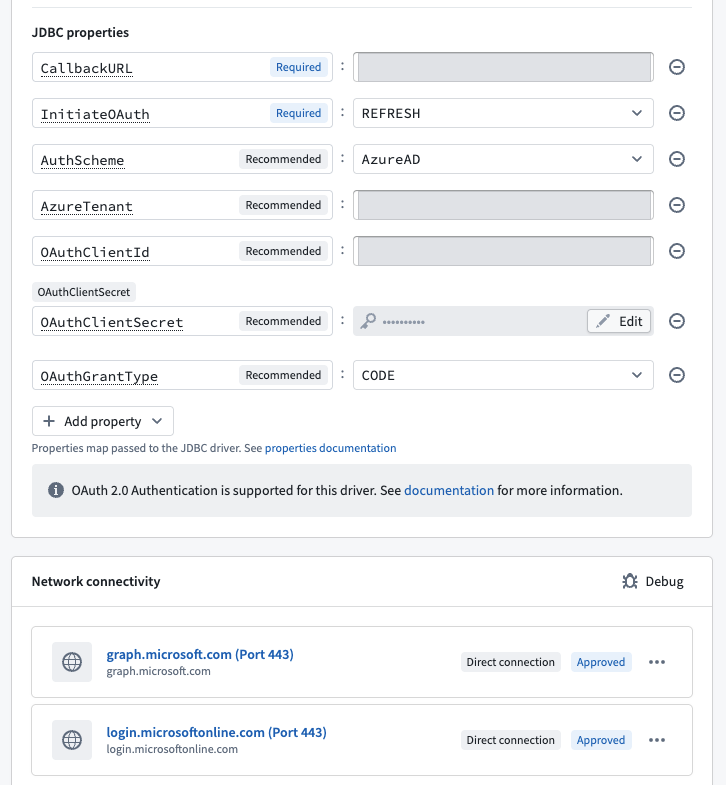
Set AuthScheme=AzureAD, AzureTenant, OAuthClientId, OAuthClientSecret, and InitiateOAuth=REFRESH, then add the auto-filled CallbackURL property. Select Authorize and sign in as the user whose Teams data you want to read. Foundry completes the interactive OAuth exchange and refreshes the token automatically.
Service principal authentication (AzureServicePrincipal)
With AuthScheme=AzureServicePrincipal, the source authenticates as an application rather than as a signed-in user. The application can read across the tenant, depending on its granted permissions.
Register an application
Register an application in the Microsoft Entra admin center ↗ and record its client ID and your tenant, as for the delegated scheme. The permissions differ:
- Under API permissions, add the application Microsoft Graph permissions your use case needs, then have a Global Administrator select Grant admin consent. Application permissions have no effect until an administrator consents to them.
- Under Certificates & secrets, generate a client secret, or upload a certificate if your organization requires certificate credentials.
- No redirect URI is required; there is no interactive sign-in.
Microsoft documents the full flow under get access without a user ↗.
Configure the source
Set AuthScheme=AzureServicePrincipal, AzureTenant, OAuthClientId, and OAuthClientSecret. There is no Authorize step. For certificate credentials, set AuthScheme=AzureServicePrincipalCert instead and configure the certificate properties from the official Microsoft Teams driver documentation ↗.
Permissions by capability
Grant only the Microsoft Graph permissions required for your use case. Your tenant's consent policies may impose additional restrictions. For the complete list, see the Microsoft Graph permissions reference ↗.
| What you want to do | Delegated | Application |
|---|---|---|
| Discover teams and channels | Team.ReadBasic.All and Channel.ReadBasic.All. Requires user consent. | Team.ReadBasic.All and Channel.ReadBasic.All. Requires administrator consent. |
| Read channel message content | ChannelMessage.Read.All. Requires administrator consent. | ChannelMessage.Read.All provides tenant-wide access and requires administrator consent. ChannelMessage.Read.Group provides access to an installed team and requires resource-specific consent for that team. |
| Read chats and chat messages | — | Chat.Read.All. Requires administrator consent. |
| List members and owners | GroupMember.Read.All, TeamMember.Read.All, and ChannelMember.Read.All. Requires administrator consent. | GroupMember.Read.All, TeamMember.Read.All, and ChannelMember.Read.All. Requires administrator consent. |
| Send a channel message | ChannelMessage.Send. Requires user consent. | ChannelMessage.Send.Group. Requires resource-specific consent for each team where the application is installed. |
Reading data
To read Microsoft Teams data into Foundry, select a table in the source explorer and set up a batch sync. With delegated authentication, the sync reads data available to the signed-in user. With service principal authentication, access depends on the permissions granted to the application and can cover the tenant or selected teams. See Authentication to configure access.
Rate limits
Microsoft throttles GET /teams/{team-id}/channels/{channel-id}/messages at 200 requests per second per application, 20 requests per second per application per tenant, and 1 request per second per channel. See the Microsoft Teams service limits ↗.
Configuration
The properties below are mandatory or recommended.
| Property | Required? | Description | Default |
|---|---|---|---|
AuthScheme ↗ | Recommended | Specifies the type of authentication to use when connecting to Microsoft Teams. If this property is left blank, the default authentication is used. | AzureAD |
AzureTenant ↗ | Recommended | Identifies the Microsoft Teams tenant being used to access data, either by name (for example, contoso.onmicrosoft.com) or ID. (Conditional). | — |
InitiateOAuth ↗ | Recommended | Specifies the process for obtaining or refreshing the OAuth access token, which maintains user access while an authenticated, authorized user is working. | GETANDREFRESH |
OAuthClientId ↗ | Recommended | Specifies the client Id that was assigned when the custom OAuth application was created. (Also known as the consumer key.) This ID registers the custom application with the OAuth authorization server. | — |
OAuthClientSecret ↗ | Recommended | Specifies the client secret that was assigned when the custom OAuth application was created. (Also known as the consumer secret). This secret registers the custom application with the OAuth authorization server. | — |
Networking
The table below lists the domains that the source must be able to access to run.
For each domain, add a corresponding egress policy. If the source is hosted on-premises and not directly reachable from Foundry, use an agent proxy egress policy instead. The agent host itself must also be able to reach the listed domains. See using an agent as a proxy for details.
| Domain | Required |
|---|---|
| graph.microsoft.com | If AzureEnvironment=GLOBAL (default) |
| login.microsoftonline.com | If AuthScheme=AzureAD (default), AzureServicePrincipal, AzureServicePrincipalCert AND AzureEnvironment=GLOBAL (default) |
| microsoftgraph.chinacloudapi.cn | If AzureEnvironment=CHINA |
| login.chinacloudapi.cn | If AuthScheme=AzureAD (default), AzureServicePrincipal, AzureServicePrincipalCert AND AzureEnvironment=CHINA |
| graph.microsoft.us | If AzureEnvironment=USGOVT |
| login.microsoftonline.us | If AuthScheme=AzureAD (default), AzureServicePrincipal, AzureServicePrincipalCert AND AzureEnvironment=USGOVT or USGOVTDOD |
| dod-graph.microsoft.us | If AzureEnvironment=USGOVTDOD |
OAuth 2.0 authentication
This connector supports OAuth 2.0 authentication. Follow the OAuth 2.0 guidance for Palantir-provided drivers to configure and authorize the connection.
Table exports
This connector supports table exports. Learn how to set up a table export.
Use Microsoft Teams sources in code
To read channel messages from a pipeline or function, call Microsoft Graph using a Microsoft Teams source. To send messages as a signed-in user, use a REST API source configured with an outbound application. The examples below demonstrate both workflows in Python and TypeScript.
Read channel messages (service principal)
To run these examples, import your Microsoft Teams source into your code repository. Configure the source with service principal authentication and the permissions required to read channel messages.
Replace the placeholders with your source, tenant, application, team, and channel identifiers. You can find the team and channel identifiers in the Teams and Channels tables in the source explorer. In the TypeScript v1 example, replace MicrosoftTeamsSource with the identifier generated from your source's API name. Each example returns non-content metadata for up to 20 recent messages.
Copied!1 2 3 4 5 6 7 8 9 10 11 12 13 14 15 16 17 18 19 20 21 22 23 24 25 26 27 28 29 30 31 32 33 34 35 36 37 38 39 40 41 42 43 44 45 46 47 48 49 50import pandas as pd import requests from transforms.api import Output, transform from transforms.external.systems import ResolvedSource, Source, external_systems SOURCE_RID = "<source_rid>" TENANT_ID = "<tenant_id>" CLIENT_ID = "<client_id>" TEAM_ID = "<team_id>" CHANNEL_ID = "<channel_id>" OUTPUT_RID = "<output_dataset_rid>" @external_systems(teams=Source(SOURCE_RID)) @transform.using(output=Output(OUTPUT_RID)) def read_channel_messages(teams: ResolvedSource, output) -> None: session = requests.Session() proxy = teams.get_https_proxy_uri() if proxy: session.proxies.update({"http": proxy, "https": proxy}) token_response = session.post( f"https://login.microsoftonline.com/{TENANT_ID}/oauth2/v2.0/token", data={ "client_id": CLIENT_ID, "client_secret": teams.get_secret("OAuthClientSecret"), "scope": "https://graph.microsoft.com/.default", "grant_type": "client_credentials", }, timeout=30, ) token_response.raise_for_status() response = session.get( f"https://graph.microsoft.com/v1.0/teams/{TEAM_ID}/channels/{CHANNEL_ID}/messages", params={"$top": 20}, headers={"Authorization": f"Bearer {token_response.json()['access_token']}"}, timeout=30, ) response.raise_for_status() rows = [ { "id": message.get("id"), "created_date_time": message.get("createdDateTime"), "web_url": message.get("webUrl"), } for message in response.json().get("value", []) ] output.write_table(pd.DataFrame(rows))
Copied!1 2 3 4 5 6 7 8 9 10 11 12 13 14 15 16 17 18 19 20 21 22 23 24 25 26 27 28 29 30 31 32 33 34 35 36 37 38 39 40 41 42 43 44 45 46 47 48 49 50import json import requests from functions.api import function from functions.sources import get_source SOURCE_ALIAS = "<source_alias>" TENANT_ID = "<tenant_id>" CLIENT_ID = "<client_id>" TEAM_ID = "<team_id>" CHANNEL_ID = "<channel_id>" @function(sources=[SOURCE_ALIAS]) def list_channel_messages() -> str: source = get_source(SOURCE_ALIAS) session = requests.Session() proxy = source.get_https_proxy_uri() if proxy: session.proxies.update({"http": proxy, "https": proxy}) token_response = session.post( f"https://login.microsoftonline.com/{TENANT_ID}/oauth2/v2.0/token", data={ "client_id": CLIENT_ID, "client_secret": source.get_secret("OAuthClientSecret"), "scope": "https://graph.microsoft.com/.default", "grant_type": "client_credentials", }, timeout=30, ) token_response.raise_for_status() response = session.get( f"https://graph.microsoft.com/v1.0/teams/{TEAM_ID}/channels/{CHANNEL_ID}/messages", params={"$top": 20}, headers={"Authorization": f"Bearer {token_response.json()['access_token']}"}, timeout=30, ) response.raise_for_status() messages = [ { "id": message.get("id"), "createdDateTime": message.get("createdDateTime"), "webUrl": message.get("webUrl"), } for message in response.json().get("value", []) ] return json.dumps(messages)
Copied!1 2 3 4 5 6 7 8 9 10 11 12 13 14 15 16 17 18 19 20 21 22 23 24 25 26 27 28 29 30 31 32 33 34 35 36 37 38 39 40 41 42 43 44import { ExternalSystems, Function } from "@foundry/functions-api"; import { MicrosoftTeamsSource } from "@foundry/external-systems/sources"; const TENANT_ID = "<tenant_id>"; const CLIENT_ID = "<client_id>"; const TEAM_ID = "<team_id>"; const CHANNEL_ID = "<channel_id>"; export class TeamsGraphFunctions { @ExternalSystems({ sources: [MicrosoftTeamsSource] }) @Function() public async listChannelMessages(): Promise<string> { const tokenResponse = await MicrosoftTeamsSource.fetch( `https://login.microsoftonline.com/${TENANT_ID}/oauth2/v2.0/token`, { method: "POST", headers: { "Content-Type": "application/x-www-form-urlencoded" }, body: new URLSearchParams({ client_id: CLIENT_ID, client_secret: MicrosoftTeamsSource.getSecret("OAuthClientSecret"), scope: "https://graph.microsoft.com/.default", grant_type: "client_credentials", }).toString(), }, ); if (!tokenResponse.ok) throw new Error(`Microsoft token exchange returned ${tokenResponse.status}`); const token = await tokenResponse.json() as { access_token: string }; const response = await MicrosoftTeamsSource.fetch( `https://graph.microsoft.com/v1.0/teams/${TEAM_ID}/channels/${encodeURIComponent(CHANNEL_ID)}/messages?$top=20`, { headers: { Authorization: `Bearer ${token.access_token}` } }, ); if (!response.ok) throw new Error(`Microsoft Graph returned ${response.status}`); const payload = await response.json() as { value?: Array<{ id?: string; createdDateTime?: string; webUrl?: string }>; }; return JSON.stringify((payload.value ?? []).map((message) => ({ id: message.id, createdDateTime: message.createdDateTime, webUrl: message.webUrl, }))); } }
Copied!1 2 3 4 5 6 7 8 9 10 11 12 13 14 15 16 17 18 19 20 21 22 23 24 25 26 27 28 29 30 31 32 33 34 35 36 37 38 39 40 41 42 43 44 45 46 47import { getFetch, getSource } from "@palantir/functions-sources"; const SOURCE_RID = "<source_rid>"; const TENANT_ID = "<tenant_id>"; const CLIENT_ID = "<client_id>"; const TEAM_ID = "<team_id>"; const CHANNEL_ID = "<channel_id>"; export const config = { sources: [SOURCE_RID] }; export default async function listChannelMessages(): Promise<string> { const source = await getSource({ rid: SOURCE_RID }); const clientSecret = source.secrets.OAuthClientSecret; if (!clientSecret) throw new Error("Add OAuthClientSecret to the source"); const sourceFetch = await getFetch(source); const tokenResponse = await sourceFetch( `https://login.microsoftonline.com/${TENANT_ID}/oauth2/v2.0/token`, { method: "POST", headers: { "Content-Type": "application/x-www-form-urlencoded" }, body: new URLSearchParams({ client_id: CLIENT_ID, client_secret: clientSecret, scope: "https://graph.microsoft.com/.default", grant_type: "client_credentials", }).toString(), }, ); if (!tokenResponse.ok) throw new Error(`Microsoft token exchange returned ${tokenResponse.status}`); const token = (await tokenResponse.json()) as { access_token: string }; const response = await sourceFetch( `https://graph.microsoft.com/v1.0/teams/${TEAM_ID}/channels/${encodeURIComponent(CHANNEL_ID)}/messages?$top=20`, { headers: { Authorization: `Bearer ${token.access_token}` } }, ); if (!response.ok) throw new Error(`Microsoft Graph returned ${response.status}`); const payload = (await response.json()) as { value?: Array<{ id?: string; createdDateTime?: string; webUrl?: string }>; }; return JSON.stringify((payload.value ?? []).map((message) => ({ id: message.id, createdDateTime: message.createdDateTime, webUrl: message.webUrl, }))); }
Send a channel message (delegated user)
To send a channel message as a signed-in user, configure a REST API source for https://graph.microsoft.com with an outbound application. Grant the permissions required to send channel messages, then authorize the outbound application as the user who will send the messages.
The examples below send a message from a Python or TypeScript v2 function. Import the REST API source into your Functions repository and replace the source, team, and channel identifiers. Each example retrieves the user's access token and includes it in the request's Authorization header.
For application access to selected teams, use ChannelMessage.Send.Group with resource-specific consent and the application-token pattern from the read examples. Teamwork.Migrate.All is intended for historical message import ↗, not for sending new channel messages.
Before using this function directly in Workshop or in an automated workflow, authorize the outbound application through a function-backed action. The function uses the calling user's authorization. If that authorization expires or is revoked, the user must authorize again through an interactive workflow.
Running either function posts a message that is visible to channel members. Review the input and use a non-production channel while testing.
Copied!1 2 3 4 5 6 7 8 9 10 11 12 13 14 15 16 17 18 19 20 21 22 23 24 25 26import requests from functions.api import function from functions.sources import get_source SOURCE_ALIAS = "<source_alias>" TEAM_ID = "<team_id>" CHANNEL_ID = "<channel_id>" @function(sources=[SOURCE_ALIAS]) def send_channel_message(text: str) -> str: source = get_source(SOURCE_ALIAS) credentials = source.get_session_credentials().get() session = requests.Session() proxy = source.get_https_proxy_uri() if proxy: session.proxies.update({"http": proxy, "https": proxy}) response = session.post( f"https://graph.microsoft.com/v1.0/teams/{TEAM_ID}/channels/{CHANNEL_ID}/messages", headers={"Authorization": f"Bearer {credentials.access_token}"}, json={"body": {"content": text}}, timeout=30, ) response.raise_for_status() return response.json()["id"]
Copied!1 2 3 4 5 6 7 8 9 10 11 12 13 14 15 16 17 18 19 20 21 22 23 24 25 26 27 28import { getFetch, getSource } from "@palantir/functions-sources"; const SOURCE_RID = "<source_rid>"; const TEAM_ID = "<team_id>"; const CHANNEL_ID = "<channel_id>"; export const config = { sources: [SOURCE_RID] }; export default async function sendChannelMessage(text: string): Promise<string> { const source = await getSource({ rid: SOURCE_RID }); const credentials = await source.sessionCredentials?.get(); if (credentials?.type !== "oauth") throw new Error("Authorize the source first"); const sourceFetch = await getFetch(source); const response = await sourceFetch( `https://graph.microsoft.com/v1.0/teams/${TEAM_ID}/channels/${encodeURIComponent(CHANNEL_ID)}/messages`, { method: "POST", headers: { Authorization: `Bearer ${credentials.accessToken}`, "Content-Type": "application/json", }, body: JSON.stringify({ body: { content: text } }), }, ); if (!response.ok) throw new Error(`Microsoft Graph returned ${response.status}`); return ((await response.json()) as { id: string }).id; }