- Capabilities
- Getting started
- Architecture center
- Platform updates
Iceberg storage architecture overview
Palantir supports using the Iceberg format, both as managed Iceberg tables and as virtual Iceberg tables.
Managed Iceberg tables are managed by Foundry's Iceberg catalog. Virtual Iceberg tables are virtual tables using external storage and are managed by an external Iceberg catalog, such as Glue ↗, Horizon ↗, Polaris ↗, or Unity ↗.
Storage options
Iceberg tables support the following storage configurations:
| Storage | Catalog type | Storage type | Iceberg status |
|---|---|---|---|
| Managed storage | Managed | Managed | Beta (AWS only) |
| Bring-your-own-bucket (AWS, Azure, Google) | Managed | External | Beta |
| Virtual tables | External | External | Beta |
Contact Palantir Support for help setting up bring-your-own-bucket storage.
Architecture overview
The following diagram shows the architecture options for working with Iceberg tables in Foundry, based on the location of the table's storage and the Iceberg catalog responsible for managing it.
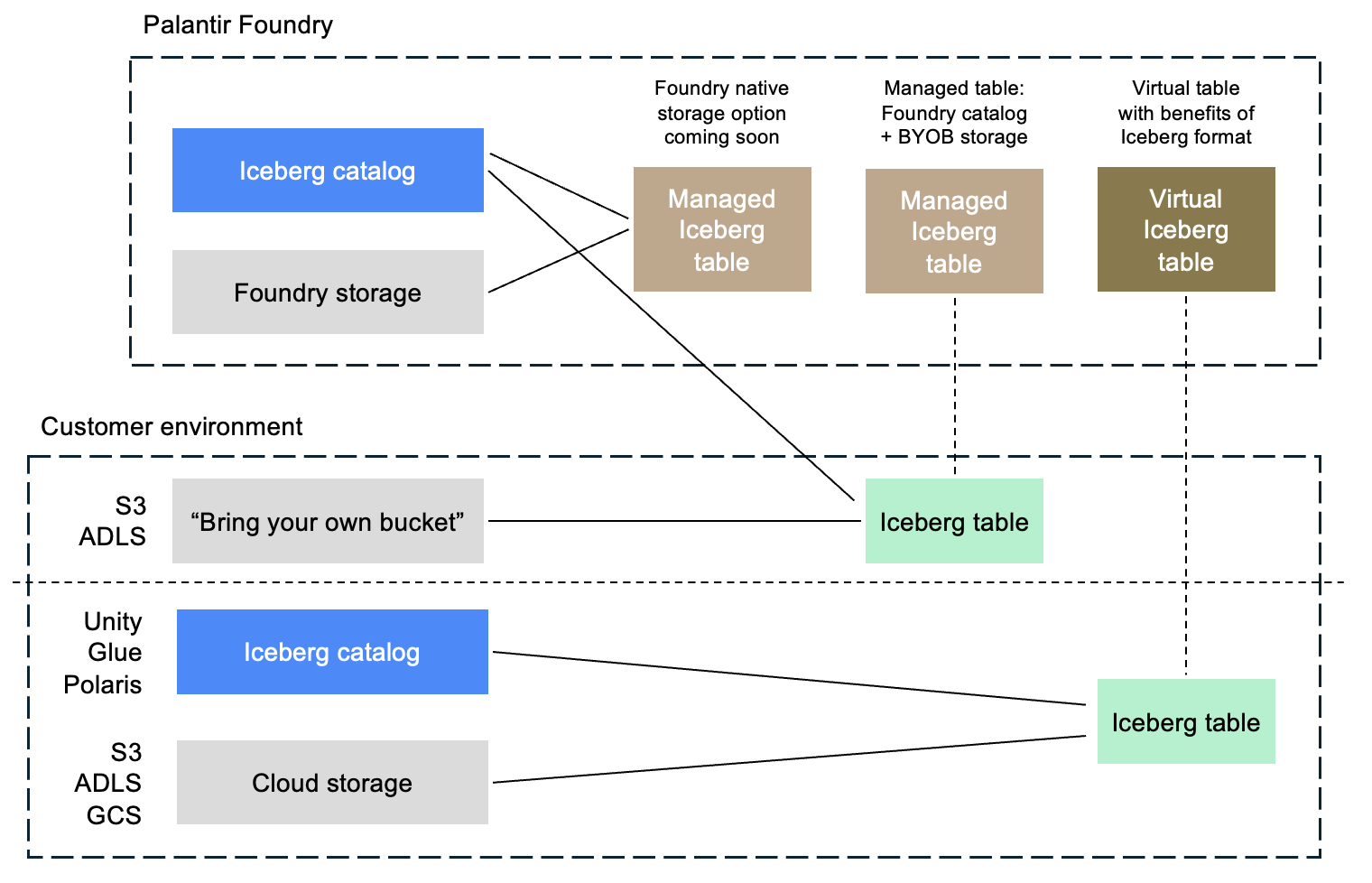
Solid lines represent direct relationships between a table and its associated Iceberg catalog and storage location. Dotted lines indicate that no data is copied between the external storage location and the Foundry table.
Support and features
Managed and virtual Iceberg tables work with most core Foundry features.
For managed Iceberg tables, Foundry administers the table through its implementation of the Iceberg REST catalog. This enables additional functionality in Foundry, such as guided frontends for configuring maintenance operations.
For information on current feature availability, see Foundry functionality not yet available for Iceberg tables.
Encryption settings
This section describes encryption settings and configuration options for Foundry-managed Iceberg tables.
Server-side encryption (SSE)
Server-side encryption (SSE) is mandatory for all tables. For Foundry-managed storage, Palantir enforces the encryption. For customer-provided storage buckets, customer administrators must enforce SSE on the storage bucket.
Client-side encryption (CSE)
Client-side Iceberg table encryption ↗ can be enabled or disabled in Control Panel. Iceberg table encryption encrypts your data within Foundry using client-side encryption (CSE) before it is written to the storage location, providing an additional layer of encryption on top of server-side encryption.
Client-side Iceberg table encryption is a new and evolving capability that is not yet supported by all Foundry features, external compute engines, or tools that connect to Iceberg tables. Enabling it may limit functionality until broader compatibility is available. Within Foundry, use of Iceberg tables with CSE in single-node transforms and "faster" Pipeline Builder pipelines is not yet supported.
Per-project storage settings
Storage location and client-side encryption (CSE) settings can be configured independently and applied at the enrollment "default" level, with the option to override settings for specific projects or namespaces. This allows different storage settings to be applied to different subsets of Iceberg tables as needed. These settings are managed via Control Panel.