- Capabilities
- Getting started
- Architecture center
- Platform updates
Iceberg storage architecture
Palantir supports using the Iceberg format, both as managed Iceberg tables and as virtual Iceberg tables.
Managed Iceberg tables are managed by Foundry's Iceberg catalog. Virtual Iceberg tables are virtual tables using external storage and are managed by an external Iceberg catalog, such as Glue ↗, Horizon ↗, Polaris ↗, or Unity ↗.
Architecture
Iceberg tables in Foundry support the following catalog and storage configurations:
| Iceberg table configuration | Iceberg catalog | Storage |
|---|---|---|
| Managed table with managed storage | Managed | Managed |
| Managed table with bring-your-own-bucket (BYOB) storage | Managed | External |
| Virtual Iceberg table | External | External |
Foundry-managed Iceberg tables can either use Foundry-managed storage or BYOB storage, or a combination, where different projects or namespaces target different storage locations.
The following diagram shows the architecture options for working with Iceberg tables in Foundry, based on the location of the table's storage and the Iceberg catalog responsible for managing it. Solid lines represent direct relationships between a table and its associated Iceberg catalog and storage location. Dotted lines indicate that no data is copied between the external storage location and the Foundry table.
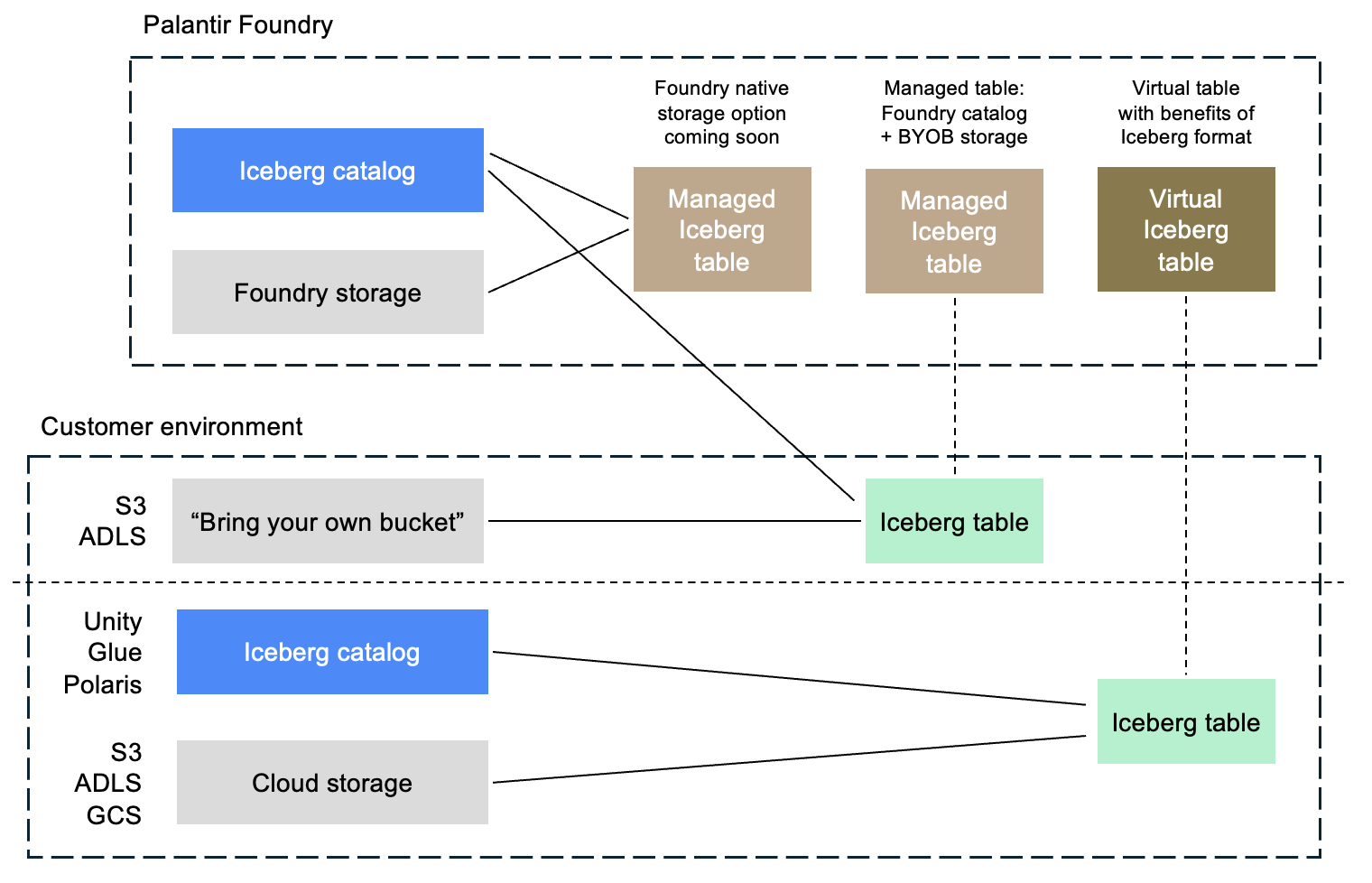
Storage configuration options
For Foundry-managed tables, storage on AWS, Azure, and GCP is supported.
Server-side encryption (SSE) is required in all cases. Client-side encryption (CSE) via Iceberg table encryption ↗ can optionally be applied as an additional layer of encryption before data is written to storage. For more information, see Encryption settings.
| Cloud provider | Foundry-managed storage | Bring-your-own-bucket (BYOB) |
|---|---|---|
| AWS | CSE: optional | CSE: optional |
| Azure | CSE: optional | CSE: optional |
| Google Cloud | CSE: required | CSE: optional |
To configure BYOB storage, see Configuring bring-your-own-bucket storage for Iceberg tables. To choose your storage settings, see Configuring Iceberg settings in Control Panel.
If your environment uses another storage configuration not mentioned here, such as on-premises infrastructure, contact Palantir Support to discuss supported Iceberg storage options.
Support and features
Managed and virtual Iceberg tables work with most core Foundry features.
For managed Iceberg tables, Foundry administers the table through its implementation of the Iceberg REST catalog. This enables additional functionality in Foundry, such as guided frontends for configuring maintenance operations.
For information on current feature availability, see Foundry functionality not available for Iceberg tables.
Encryption settings
This section describes encryption settings and configuration options for Foundry-managed Iceberg tables.
Server-side encryption (SSE)
Server-side encryption (SSE) is mandatory for all tables. For Foundry-managed storage, Palantir enforces the encryption. For customer-provided storage buckets, customer administrators must enforce SSE on the storage bucket.
Client-side encryption (CSE)
Client-side Iceberg table encryption ↗ can be enabled or disabled in Control Panel. Iceberg table encryption encrypts your data within Foundry using client-side encryption (CSE) before it is written to the storage location, providing an additional layer of encryption on top of server-side encryption.
Client-side Iceberg table encryption is a new and evolving capability that is not yet supported by all Foundry features, external compute engines, or tools that connect to Iceberg tables. Enabling it may limit functionality until broader compatibility is available.
Per-project storage settings
Storage location and client-side encryption (CSE) settings can be configured independently and applied at the enrollment "default" level, with the option to override settings for specific projects or namespaces. This allows different storage settings to be applied to different subsets of Iceberg tables as needed. These settings are managed via Control Panel.