Resource selection
Data selection rules allow you to define the contents of the Bundles that are built for an Export Pipeline. Resource selection rules allow you to further filter down what resources are exported. This provides you the flexibility to include or exclude specific Apollo resources from the Bundle.
To get started, select one of the available presets or create a custom selection.
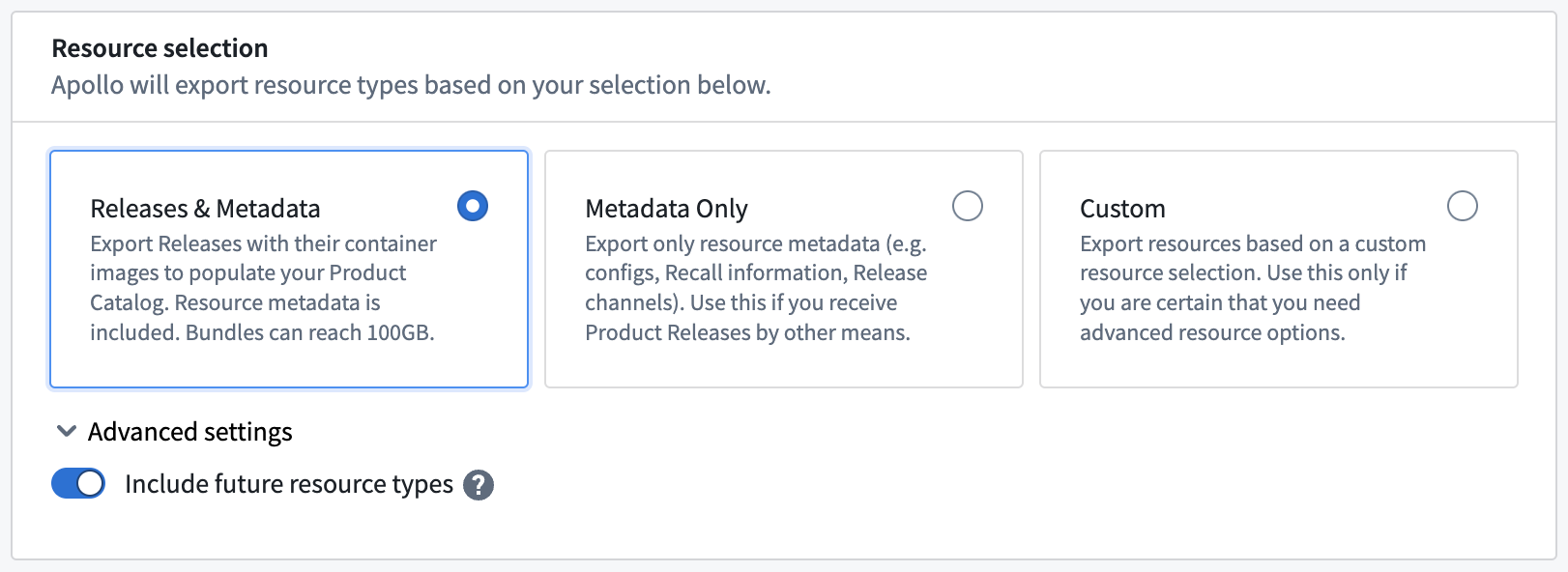
Resource selection presets
Product Releases and metadata
This preset includes all Product Releases and metadata chosen according to the data selection rules. Use this preset to update the Product Catalog in your Target Hub with new Product Releases and their associated artifacts, and to update metadata for all resources. Bundles created with this preset can be up to 100GB+ in size.
Metadata only
This preset includes only metadata for the resources that are selected by the data selection rules. This metadata includes:
- Environment metadata (such as configs)
- Recalls
- Release Channel memberships (for example if a Product Release was tagged to a Release Channel)
- Module definitions
- Teams
- Vulnerability suppressions and reports
Use this preset to update metadata in your Target Hub without transferring large artifacts. Bundles created with this preset are typically a few MB in size.
Custom
To include a specific set of resources in the Bundle, you can create a custom selection. Refer to supported resources for the full list of available resources and their descriptions.
Advanced settings
You can also configure advanced settings for resource selection by expanding the Advanced settings menu.
You can automatically include new resource types added to Apollo Export in a Bundle by toggling on Include future resource types. By disabling this option, you will need to manually add new resource types to your Pipeline.
Supported resources
Apollo exports the following resources:
- Product: A Product, identified by its Product ID. Typically less than 1MB without subresources.
- Product Release Metadata: Metadata for a single Product Release, identified by its Maven coordinate. Includes the original immutable manifest and mutable metadata, such as Release Channel membership and associated recalls.
- Product Release Mutable Metadata: Mutable metadata for a single Product Release, identified by its Maven coordinate. Includes mutable metadata, such as Release Channel memberships.
- Container Image: Software deployable to a container runtime. For Products of type “service”, this includes the main image and any additional container images. For other Product types, such as “terraform-module”, this includes plain text files. Container images can be excluded if you are not targeting these runtime environments. File sizes typically range from several megabytes to low gigabytes.
- Product Binary: A compressed tar file (.tgz) containing executables for Products of type “service”, “daemon”, and “asset”. This artifact is used for both assets and executable installations in VM-based environments. Product binaries can be excluded if you are only deploying to a container runtime. File sizes typically range from several megabytes to low gigabytes.
- Vulnerability Suppression: Approved suppressions for vulnerabilities detected in Products. A suppression will prevent a vulnerability finding from becoming active and causing a recall. This allows you to manage risks without immediate disruptions.
- SLS Config: YAML configuration files required to install Products of type “service” or “k8s-app”. Typically under 1MB in size. These must be transferred for releases of these types, or they cannot be deployed.
- Asset Binary: A compressed tar file (.tgz) containing static files associated with Product Releases of type “asset.” These can be statically served for both frontend applications to the browser or as data for other system processes. File sizes typically range from 1MB to 1GB.
- Recall: Recalls for a Product prevent upgrades to a defined range of affected Product Releases. Sensitive metadata will be redacted on export.
- Module: A Module definition, typically less than 1MB. Products and Product Releases referenced in the Module definition are transferred separately using the Product and Product Release Metadata types.
- Environment: Environment metadata, including all declared Entities, Instance Groups, K8S Namespaces, Network Security Rules and configurations for the Environment and its Entities.
- Vulnerability Scan Report: A report of the vulnerabilities detected for the artifacts in a Bundle. This report is generated by the Apollo Hub.
- Team: Team identifiers. Team membership is not included and must be configured in the Target Hub.
- Contact Team: Contact team identifiers. Team membership is not included and must be configured in the Target Hub.
- Bootstrap Plans: Set of tasks for deploying Entities directly into a Kubernetes cluster in the target environment. This type is exclusively used to build new remote Apollo Hubs and will typically not be included in a produced Bundle.