- Capabilities
- Getting started
- Architecture center
- Platform updates
Migrate from TypeScript v1 to TypeScript v2
This guide describes the syntax and structure differences you may encounter while migrating existing TypeScript functions from v1 to v2. Refer to the feature support documentation to learn about v2 enhancements and what each version supports.
Declare a function
To publish a function to the platform in TypeScript v1, you must annotate it with the @Function() decorator from the @foundry/functions-api package. Additionally, the function must be a method of a class that is exported from the root index.ts file of the repository.
Copied!1 2 3 4 5 6 7 8 9 10 11// src/index.ts import { Function } from "@foundry/functions-api"; export class MyFunctions { @Function() public reverseStringArray(arr: string[]): string[] { return arr.reverse(); } }
To publish a function to the platform in TypeScript v2, you must write it in a file in the src/functions directory and export it using export default. Each file can export a single function.
Copied!1 2 3 4 5 6 7// src/functions/reverseStringArray.ts export default function reverseStringArray( arr: string[] ): string[] { return arr.reverse(); }
To keep your repository organized, we recommend grouping related functions into subdirectories within the src/functions directory. For example, the following folder structure organizes functions into payroll and staffing subdirectories to make the separation of responsibilities clearer.
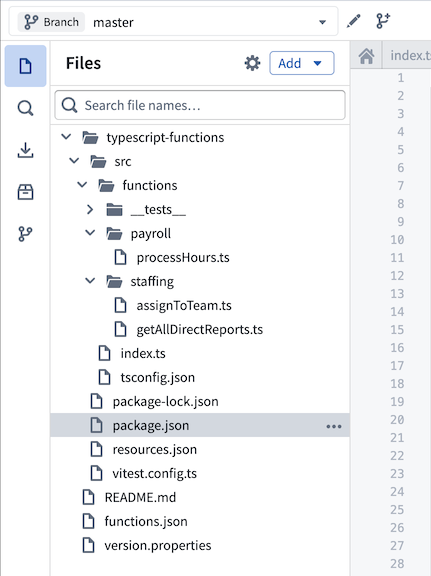
Refer to our documentation on getting started with TypeScript v2 functions for more information.
Use the @osdk/functions package
In TypeScript v1, you must import primitive types like Integer and Double from the @foundry/functions-api package to use them in the signature. In TypeScript v2, however, you must instead use the @osdk/functions package.
The following example imports the Integer type from the @foundry/functions-api package and uses it in the signature of a TypeScript v1 function to calculate the greatest common divisor of two integers:
Copied!1 2 3 4 5 6 7 8 9 10 11 12import { Function, Integer } from "@foundry/functions-api"; export class MyFunctions { @Function() public gcd(a: Integer, b: Integer): Integer { if (b === 0) { return a; } return gcd(b, a % b); } }
In TypeScript v2, the core TypeScript logic is identical, but you must use the Integer type from the @osdk/functions package:
Copied!1 2 3 4 5 6 7 8import { Integer } from "@osdk/functions"; export default function gcd(a: Integer, b: Integer): Integer { if (b === 0) { return a; } return gcd(b, a % b); }
Refer to the types reference for examples of how to import and use types in the signature across both TypeScript v1 and TypeScript v2 functions.
Dates and timestamps
TypeScript v1 uses the LocalDate and Timestamp types from the @foundry/functions-api package for working with temporal data. TypeScript v2 replaces these with the DateISOString and TimestampISOString types from the @osdk/functions package, which represent dates and timestamps as ISO 8601 ↗ strings.
TypeScript v2 functions can use any date and timestamp library available in the NPM ecosystem, such as dayjs ↗, date-fns ↗, and luxon ↗.
Generate the Ontology SDK
TypeScript v2 functions provide first-class support for querying and editing the Ontology through the Ontology SDK. Like in TypeScript v1, TypeScript v2 repositories allow you to import Ontology entities through the Resource imports sidebar. Once you add your object types and link types, you are prompted to create an initial version of the Ontology SDK.
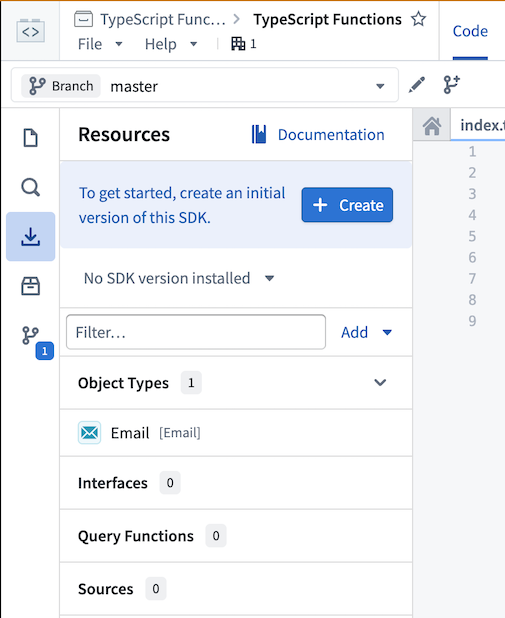
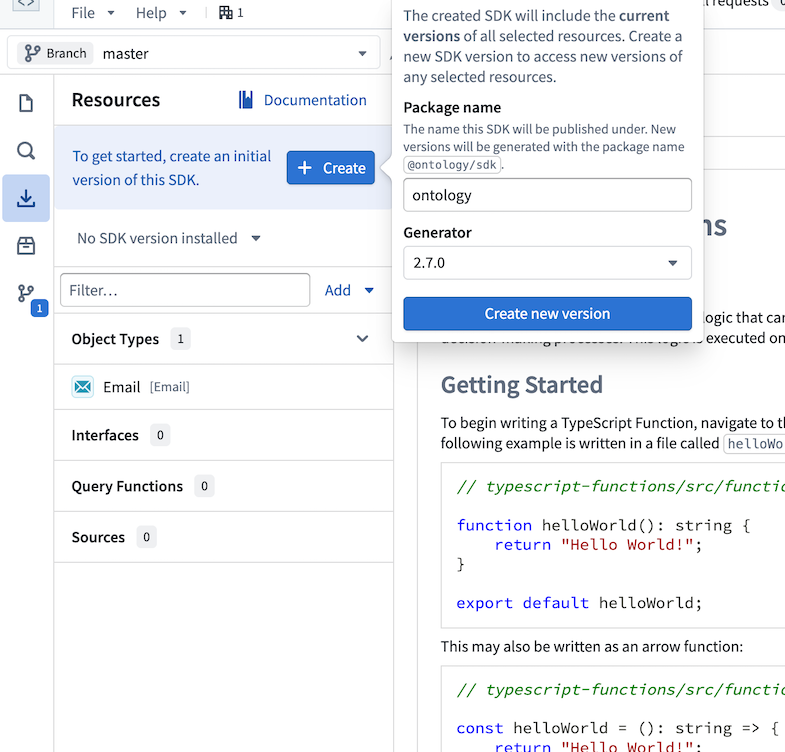
Select Create, then choose a name for the Ontology SDK. This name cannot be changed after the first version is generated. Select Create new version to generate the Ontology SDK.
Once the Ontology SDK is created, you will see an option to install it into the workspace. Selecting Install will add the Ontology SDK as a dependency in the package.json file and make it available to use in TypeScript code.
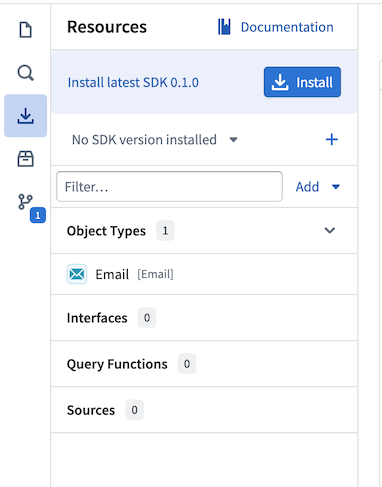
View the Documentation tab in the sidebar for comprehensive examples of working with your Ontology in TypeScript.
Query the Ontology
In TypeScript v1, you must import Objects from the @foundry/ontology-api package to perform searches against your Ontology:
Copied!1 2 3 4 5 6 7 8 9 10 11 12import { Function, Integer } from "@foundry/functions-api"; import { Objects } from "@foundry/ontology-api"; export class MyFunctions { @Function() public async countAircraft(): Promise<Integer> { const count = await Objects.search().aircraft().count() ?? 0; return count; } }
In TypeScript v2, you must access an Ontology SDK client by specifying it as the first argument in the function signature:
Copied!1 2 3 4 5 6 7 8 9 10 11 12 13import { Aircraft } from "@ontology/sdk"; import { Client } from "@osdk/client"; import { Integer } from "@osdk/functions"; export default async function countAircraft(client: Client): Promise<Integer> { const aircraft = await client(Aircraft).aggregate({ $select: { $count: "unordered" } }); return aircraft.$count; }
The remainder of this section maps the TypeScript v1 query vocabulary to its TypeScript v2 equivalent. For the full TypeScript v2 query vocabulary, review the TypeScript OSDK reference.
Every property you filter, order, or aggregate on must be marked Searchable in Ontology Manager, in both versions. Searchable controls how the property is indexed, so the requirement belongs to the Ontology rather than to either SDK. What changes is where you find out: in TypeScript v1 the code generator omits the filter, ordering, and aggregation methods for an unmarked property, so using one fails to compile, while the Ontology SDK accepts any property on the object type in .where(), $orderBy, and .aggregate().
Before you migrate, confirm in Ontology Manager that every property you filter, order, or aggregate on is marked Searchable. In TypeScript v2 an unmarked property compiles, so the problem appears only when the function runs: a full-text predicate such as $containsAnyTerm returns an empty page instead of an error, so a filter can match nothing while reporting success.
Filter operator mapping
In TypeScript v1, the .filter() method takes a filter definition chosen by the type of the property you are filtering on. TypeScript v2 replaces that family of methods with a single .where() call that takes a clause object. The following table maps each TypeScript v1 filter method to its TypeScript v2 where-clause key and the property types it applies to.
The TypeScript v2 restrictions are stricter than the TypeScript v1 equivalents: a geospatial property accepts only $within, $intersects, and $isNull, and an array property accepts only $contains and $isNull. Review Filtering in the TypeScript OSDK reference for the shape of each filter it documents; it does not cover $within, $intersects, or $interval.
| TypeScript v1 | TypeScript v2 where-clause key | Applies to |
|---|---|---|
.exactMatch(value) | $eq, or the bare value | Boolean, Datetime, Number, String |
.exactMatch(...values) | $in: [...] | Boolean, Datetime, Number, String |
Filters.not(exactMatch) | $ne | Boolean, Datetime, Number, String |
.hasProperty() | $isNull: false | Array, Boolean, Datetime, Geopoint, GeoShape, Number, String |
Filters.not(hasProperty()) | $isNull: true | Array, Boolean, Datetime, Geopoint, GeoShape, Number, String |
.range().lt(x) | $lt | Datetime, Number |
.range().lte(x) | $lte | Datetime, Number |
.range().gt(x) | $gt | Datetime, Number |
.range().gte(x) | $gte | Datetime, Number |
.isTrue() / .isFalse() | $eq: true / $eq: false | Boolean |
.matchAnyToken(...) | $containsAnyTerm | String |
.matchAllTokens(...) | $containsAllTerms | String |
.phrase(...) | $containsAllTermsInOrder | String |
.phrasePrefix(), .prefixOnLastToken() | $interval, carrying the search string in $match and $prefixOnLastTerm: true | String |
.contains(...) | $contains, taking exactly one inner filter | Array |
.withinDistanceOf(), .withinPolygon(), .withinBoundingBox() | $within | Geopoint, GeoShape |
.intersectsPolygon(), .intersectsBoundingBox() | $intersects | GeoShape |
.doesNotIntersectPolygon(), .doesNotIntersectBoundingBox() | $not wrapping $intersects | GeoShape |
.isPresent() | No where-clause key exists | Links |
Three behavioral differences change the shape of a converted filter. For the TSv2 clause-shape rules themselves, review Filtering.
- A bounded range becomes two clauses. A TypeScript v1
.range().gte(a).lte(b)chain is a single call, but TypeScript v2 accepts only one operator key per property, so the same filter becomes$and: [{ p: { $gte: a } }, { p: { $lte: b } }]. - A multi-value
.contains()becomes an$or. TypeScript v1.contains()takes several values and matches any of them, while TypeScript v2$containstakes exactly one inner filter. - Datetime comparisons take ISO 8601 strings, as in
{ $gt: "2010-10-01T00:00:00Z" }.
Link traversal mapping
TypeScript v1 generates a field per link type on each object interface, plus a searchAround method per link type on an object set. TypeScript v2 nests the per-link accessor under $link and replaces the whole searchAround family with a single pivotTo() method.
| TypeScript v1 | TypeScript v2 |
|---|---|
SingleLink field, read with .get() or .getAsync() | $link.{linkApiName}.fetchOne(), or fetchOneWithErrors() for a { value } / { error } wrapper instead of a throw. Note the behavior change on absence: .get() returns undefined, while fetchOne() throws and fetchOneWithErrors() reports { error }, indistinguishable from any other failure |
MultiLink field, read with .all() or .allAsync() | $link.{linkApiName}, which is already an ObjectSet, iterated with asyncIter() |
searchAround<LinkApiName>() on an object set | pivotTo("<linkApiName>") |
Do not derive the link API name from the searchAround method name; the method name does not reliably preserve it. Look the link API name up instead: in your generated TypeScript v2 SDK, the keys of an object type's $link container are exactly the link API names, and pivotTo() takes that value verbatim. For example, a link whose API name is toOtherObjectType is traversed with pivotTo("toOtherObjectType").
TypeScript v1 also restricts what you can do with a link reached from a single object instance: a MultiLink cannot be converted to an object set, so you must rebuild an object set from the object first. In TypeScript v2 you can chain directly, because a many-multiplicity $link entry is already an ObjectSet and pivotTo() returns one. For the TSv2 APIs themselves, review Links in the TypeScript OSDK reference.
Group-by strategy mapping
TypeScript v1 buckets an aggregation by calling .groupBy() with a bucketing method chosen by property type. TypeScript v2 supplies the same information as a value in the $groupBy object of a single .aggregate() call. The following table maps each TypeScript v1 bucketing method to its TypeScript v2 $groupBy value.
$ranges takes an array of two-element tuples and $duration takes a [value, unit] tuple. Ranges are inclusive at the start and exclusive at the end, matching TypeScript v1. Only "seconds", "minutes", "hours", and "days" accept an arbitrary value; the coarser units accept only 1. For the grouping strategies themselves, review Types of grouping.
| TypeScript v1 | TypeScript v2 $groupBy value |
|---|---|
.exactValues() | "exact" |
.exactValues({ maxBuckets: n }) | { $exactWithLimit: n } |
.topValues() | "exact" |
.byFixedWidth(50) | { $fixedWidth: 50 } |
.byRanges({ min: 0, max: 50 }, { min: 50, max: 100 }) | { $ranges: [[0, 50], [50, 100]] } |
.byYear() | { $duration: [1, "years"] } |
.byQuarter() | { $duration: [1, "quarters"] } |
.byMonth() | { $duration: [1, "months"] } |
.byWeek() | { $duration: [1, "weeks"] } |
.byDays(n) | { $duration: [n, "days"] } |
.byHours(n), .byMinutes(n), .bySeconds(n) | { $duration: [n, "hours"] }, { $duration: [n, "minutes"] }, { $duration: [n, "seconds"] } |
.segmentBy(...) | A second key in the same $groupBy object |
Every exact-value grouping request carries a maximum bucket count, and the default differs between versions: TypeScript v1 .topValues() defaults to 1,000, while TypeScript v2 "exact" defaults to 10,000. Results are accurate only when the property's distinct values fit inside that count. Above it, objects are excluded from the returned groups and the aggregation becomes approximate. The platform reports on every response whether the result was accurate or approximate, but the TypeScript OSDK does not expose that field, so an approximate result reads the same as an exact one inside a TypeScript v2 function. For a high-cardinality property, raise the count with { $exactWithLimit: n }, or narrow the object set with .where() first. A boolean property has at most two distinct values, so "exact" is always accurate for one.
Aggregation metric mapping
After grouping an object set, TypeScript v1 computes a metric by calling an aggregation method such as .count() or .average(). TypeScript v2 selects metrics through the $select object of a single .aggregate() call. The following table maps each TypeScript v1 aggregation method to its TypeScript v2 $select key.
Every non-count key is a string of the form "<propertyApiName>:<metric>", and every value is an ordering directive: "unordered", "asc", or "desc". Numeric properties accept every suffix; datetime and timestamp properties accept only min, max, approximateDistinct, and exactDistinct, and every other type accepts only the two distinct-count suffixes. Review Aggregations in the TypeScript OSDK reference for the aggregation concepts.
| TypeScript v1 | TypeScript v2 $select key |
|---|---|
.count() | $count: "unordered" |
.average(e => e.p) | "p:avg": "unordered" |
.max(e => e.p) | "p:max": "unordered" |
.min(e => e.p) | "p:min": "unordered" |
.sum(e => e.p) | "p:sum": "unordered" |
.cardinality(e => e.p) | "p:approximateDistinct": "unordered" |
| No TypeScript v1 equivalent | "p:exactDistinct": "unordered" |
One difference affects the shape of a converted call: .aggregate() takes a single request object with exactly two keys, the required $select and the optional $groupBy. There is no where key, so filter the object set with a chained .where() before calling .aggregate().
The result shape also changes, so a converted function has to read its own output differently. For the $select directives, the ordering restrictions, and how to read a grouped result, review Aggregations.
Capabilities with no TypeScript v2 equivalent
Some TypeScript v1 query capabilities have no TypeScript v2 counterpart, so plan for them before converting a search or an aggregation.
Filtering
- Link-presence filtering has no where-clause key. In TypeScript v1,
.isPresent()filters an object set to the objects that have at least one linked object of a given type, or, when negated, to those that have none. TypeScript v2 has no$key that does this. The nearest approach is a derived property: define one that counts the linked objects, then filter on that count being greater than zero. Test that against your own data before relying on it; it is a workaround rather than a supported equivalent. Fuzzinessedit distances have no TypeScript v2 form. The TypeScript v2 term operators$containsAnyTermand$containsAllTermsaccept a plainfuzzySearchboolean and offer no edit-distance control, soFuzziness.LEVENSHTEIN_ONEandFuzziness.LEVENSHTEIN_TWOhave no direct TypeScript v2 form.$containsAllTermsInOrderaccepts no fuzzy option at all. The$intervalkey exposes$fuzzyand$fuzzinesssub-keys that carry an edit distance, so test that construct against your own data before relying on it.
Grouping
- Open-ended range buckets are gone. TypeScript v1 allows you to omit
minormaxto get a bucket running from negative infinity tomax, or fromminto infinity. A TypeScript v2$rangestuple requires both endpoints. - A
Longproperty cannot be grouped in TypeScript v2. TypeScript v1 listsLongamong the numeric types available for grouping, but the TypeScript v2 types offer no$groupByvalue for aLongproperty. - Grouping by an array property is unsupported in TypeScript v2. TypeScript v1 gives an array property the same bucketing methods as its element type. The TypeScript v2 types accept an array property in
$groupBy, so the mistake compiles, but the results are not guaranteed; group by a scalar property instead. - There is no
segmentByin TypeScript v2. TypeScript v1 calls.segmentBy()after.groupBy()to compute a three-dimensional aggregation bucketed by two properties. The TypeScript v2 equivalent is a second key in the same$groupByobject, but it does not return the same shape: TypeScript v1 produces nested buckets, while TypeScript v2 returns a flat array of rows, each carrying a$groupobject holding the value of every group-by key. A function that must return a three-dimensional aggregation therefore has to rebuild the nesting itself; see Aggregation types for the shape each version expects.
Aggregation metrics
- Averaging a date or timestamp is TypeScript v1 only. TypeScript v1
.average()accepts timestamp and date properties. TypeScript v2 offers onlymin,max,approximateDistinct, andexactDistincton a date or timestamp property, so neitheravgnorsumis available for one. - TypeScript v2 has no metric aliasing. The result key is always derived from the property and the metric, so any
$selectkey other than$countor a"property:metric"string is a type error.
Ordering and loading
- There is no
.take()or.limit()in TypeScript v2. Ordering is no longer a chained clause: it moves into the options object offetchPage()orasyncIter()as$orderBy, and you bound the number of results with$pageSizein the same options object. - There is no
.all()in TypeScript v2. TypeScript v1.all()and.allAsync()materialize an entire object set at once. TypeScript v2 iterates withasyncIter()or reads a single page withfetchPage(), as described under Load objects into memory. - The nearest-neighbor bound widened. TypeScript v1 limits the
kvalue to0 < K <= 100, while the TypeScript v2nearestNeighbors()method accepts anumNeighborsbetween 1 and 500. A TypeScript v1 search at the top of its range can therefore request five times as many neighbors after migrating. - Relevance ordering works only with nearest-neighbor searches. In TypeScript v2,
$orderBy: "relevance"applies to anearestNeighbors()search, wherenumNeighborsbounds the results and each returned object carries a$score. It has no effect on a token-matchwhereclause, so the TypeScript v1 pattern of filtering with.matchAnyToken(), ordering by relevance, and then taking the first N results has no TypeScript v2 equivalent.
Identify objects
TypeScript v1 exposes the identity of an object through its rid, primaryKey, and typeId fields. TypeScript v2 prefixes every built-in identifier field with $ to distinguish it from the object's own properties, and adds $objectSpecifier, a single string that encodes both the object type and the primary key. Because $rid is present only when a read opts in with $includeRid: true, use $objectSpecifier rather than $rid as the basis for identity logic in TypeScript v2.
Identifier reference
The following table maps each TypeScript v1 identifier and type to its TypeScript v2 equivalent.
| TypeScript v1 | TypeScript v2 | Notes |
|---|---|---|
obj.rid | obj.$rid | Present only when the read passes $includeRid: true. |
obj.primaryKey | obj.$primaryKey | Always present. |
obj.typeId | obj.$apiName or obj.$objectType | Always present. Both carry the object type API name; only $apiName is a literal type. |
| Not available | obj.$objectSpecifier | Always present. The string "<apiName>:<primaryKey>". |
Employee | Osdk.Instance<Employee> | The type of a loaded object instance. |
OntologyObject | No equivalent | OsdkBase from @osdk/api is the nearest type. |
IsOntologyObject | No equivalent | Removed, with no direct replacement. |
FunctionsMap<T, V> with object keys | Record<ObjectSpecifier<T>, V> | A FunctionsMap with scalar keys becomes a plain Record<K, V>. See Object mappings. |
Comparing two objects for equality gets simpler on migration. In TypeScript v1 you must compare both typeId and primaryKey, because a primary key is unique only within a single object type. TypeScript v2 encodes both values in $objectSpecifier, so the equivalent check is a single string comparison that stays correct even when the two objects are of different object types:
Copied!1 2 3function isEqual(o1: { $objectSpecifier: string }, o2: { $objectSpecifier: string }): boolean { return o1.$objectSpecifier === o2.$objectSpecifier; }
For a worked example of an object-keyed map in both versions, review Map in the types reference. For the TypeScript v1 forms of both examples, and for the conceptual background on why object equality needs care, review Object identifiers.
Edit the Ontology
To write an Ontology edit function in TypeScript v1, you must annotate it with the @OntologyEditFunction() decorator from the @foundry/functions-api package and give it a void return type. You must also apply the @Edits decorator to declare all edited object types up front, allowing permissions on those object types to be enforced before the function-backed action is called.
Copied!1 2 3 4 5 6 7 8 9 10 11 12import { Edits, OntologyEditFunction } from "@foundry/functions-api"; import { Aircraft, Employee } from "@foundry/ontology-api"; export class MyOntologyEditFunctions { @Edits(Aircraft, Employee) @OntologyEditFunction() public myFunction(aircraft: Aircraft, employee: Employee): void { aircraft.businessCapacity = 3; employee.department = "HR"; } }
In TypeScript v2, you must import the createEditBatch function from the @osdk/functions package to construct a store of edits that is used for the duration of the execution. You must use the Edits type to declare which entities your function is permitted to edit. This enforces type safety at compile time; if you attempt to edit an object or link of a type not covered by your Edits type, the TypeScript compiler will return an error.
Copied!1 2 3 4 5 6 7 8 9 10 11 12 13 14 15 16 17 18 19import { createEditBatch, Edits } from "@osdk/functions"; import { Aircraft, Employee } from "@ontology/sdk"; import { Client, Osdk } from "@osdk/client"; type OntologyEdit = Edits.Object<Aircraft> | Edits.Object<Employee>; export default function myFunction( client: Client, aircraft: Osdk.Instance<Aircraft>, employee: Osdk.Instance<Employee> ): OntologyEdit[] { const batch = createEditBatch<OntologyEdit>(client); batch.update(aircraft, { businessCapacity: 3 }); batch.update(employee, { department: "HR" }); return batch.getEdits(); }
In TypeScript v2, use Edits.Interface<MyInterface> to create, update, and delete objects through Ontology interface properties. For details, see Ontology edits.
In TypeScript v1, edits are not applied to the Ontology during function execution. As described in our edits and object search documentation, changes to objects and links are only propagated after the function finishes executing, and only when called within a function-backed action.
TypeScript v2 makes this behavior more explicit. Rather than implicitly accumulating edits, your function must track them using an edit batch and return them upon completion.
Refer to the Ontology edits section in the TypeScript v2 documentation for the full list of supported operations.
TypeScript v2 also supports staged writes, an alternative execution model with read-after-write guarantees. Staged-write functions use a WriteableClient instead of createEditBatch and need not return edits explicitly.
Generate unique IDs for objects
To generate unique IDs for newly created objects in TypeScript v1, use the Uuid utility from the @foundry/functions-utils package.
Copied!1 2 3 4 5 6 7 8 9 10 11 12 13import { Edits, OntologyEditFunction } from "@foundry/functions-api"; import { Uuid } from "@foundry/functions-utils"; import { FlightScenario, Objects } from "@foundry/ontology-api"; export class ExampleEditFunctions { @Edits(FlightScenario) @OntologyEditFunction() public createFlightScenario(): void { const scenario = Objects.create().flightScenarios(Uuid.random()); scenario.scenarioName = "New scenario"; } }
TypeScript v2 runs in a full Node.js environment, so you can use the node:crypto core module instead:
Copied!1 2 3 4 5 6 7 8 9 10 11 12 13 14 15 16 17 18import { FlightScenario } from "@ontology/sdk"; import { Client } from "@osdk/client"; import { createEditBatch, Edits } from "@osdk/functions"; import { randomUUID } from "node:crypto"; type OntologyEdit = Edits.Object<FlightScenario>; export default function createFlightScenario(client: Client): OntologyEdit[] { const batch = createEditBatch<OntologyEdit>(client); batch.create(FlightScenario, { id: randomUUID(), scenarioName: "New scenario", }); return batch.getEdits(); }
Avoid calling randomUUID or other random value generators at the top level of a module outside of the function body. TypeScript v2 functions use warm invocations where all module-level code is evaluated once during initialization and then reused across subsequent invocations. This means that a randomUUID call at the module level will be evaluated a single time and produce the same value for every warm invocation. Always generate random values inside the function body to ensure uniqueness.
Load objects into memory
TypeScript v1 functions expose the .all() and .allAsync() APIs to load all objects of a particular type into memory for processing. However, this approach can lead to high memory usage and slower performance as the number of objects in your Ontology grows.
Copied!1 2 3 4 5 6 7 8 9 10 11 12 13 14 15 16import { Edits, OntologyEditFunction } from "@foundry/functions-api"; import { Aircraft, Objects } from "@foundry/ontology-api"; export class MyFunctions { @Edits(Aircraft) @OntologyEditFunction() public editAircraft(): void { const aircraft = Objects.search().aircraft().all(); aircraft.forEach(a => { a.arrived = true; }); } }
TypeScript v2 functions support streaming object processing via the Ontology SDK, avoiding the need to hold the entire set of objects in memory at once. We recommend this approach where possible.
Copied!1 2 3 4 5 6 7 8 9 10 11 12 13 14 15 16import { Aircraft } from "@ontology/sdk"; import { Client } from "@osdk/client"; import { createEditBatch, Edits } from "@osdk/functions"; type OntologyEdit = Edits.Object<Aircraft>; export default async function editAircraft(client: Client): Promise<OntologyEdit[]> { const batch = createEditBatch<OntologyEdit>(client); for await (const a of client(Aircraft).asyncIter()) { batch.update(a, { arrived: true }); } return batch.getEdits(); }
If data scale is not a concern, the following alternative loads all objects of a particular type:
Copied!1 2 3 4 5 6 7 8 9 10 11 12 13 14 15 16 17 18import { Aircraft } from "@ontology/sdk"; import { Client } from "@osdk/client"; import { createEditBatch, Edits } from "@osdk/functions"; type OntologyEdit = Edits.Object<Aircraft>; export default async function editAircraft(client: Client): Promise<OntologyEdit[]> { const batch = createEditBatch<OntologyEdit>(client); const aircraft = await Array.fromAsync(client(Aircraft).asyncIter()); aircraft.forEach(a => { batch.update(a, { arrived: true }); }); return batch.getEdits(); }