- Capabilities
- Getting started
- Architecture center
- Platform updates
Source aliases
Source aliases are named, portable references to Data Connection sources. By referring to a source by its alias key instead of a specific source identifier, you decouple your function logic from any one source. This keeps your functions portable across environments.
Import a source
To import a source:
-
Open a TypeScript v2 or Python code repository and navigate to the Resource imports panel.
-
Select the Ontology SDK tab.
-
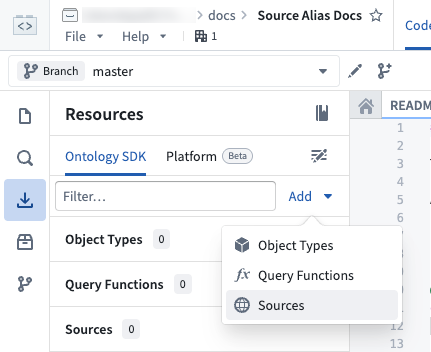
Select Add > Sources.
-
Search for and select the source to import, then choose Confirm selection.
Add a source alias
After importing a source, you can add an alias to it:
-
In the Resource imports panel, locate the source under Sources.
-
Select Add alias below the source name.
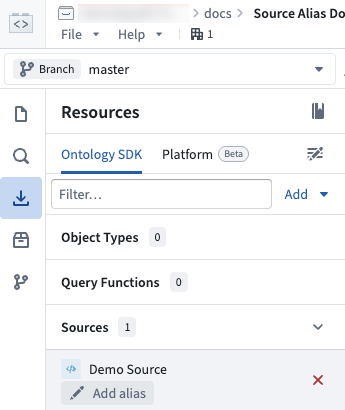
Alias keys must be unique within the repository.
Edit a source alias
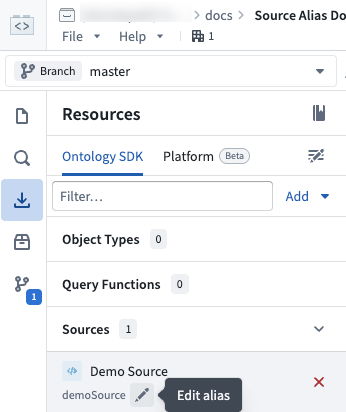
To edit an existing source alias, navigate to the Sources section in the Resource imports panel. Select the pen icon next to the alias to edit it inline.
Use a source alias in code
To use a source alias in your function, reference the alias by its key wherever you declare and retrieve the source. Pass the alias key to the sources configuration and to getSource (TypeScript v2) or get_source (Python):
Copied!1 2 3 4 5 6 7 8 9 10 11 12 13 14 15import { getSource, getHttpsConnection, getFetch } from "@palantir/functions-sources"; export const config = { sources: ["demoSource"] } async function myExternalFunction(): Promise<string> { const source = await getSource("demoSource"); const { url } = getHttpsConnection(source); const fetch = await getFetch(source); const response = await fetch(url); return response.text(); }
Copied!1 2 3 4 5 6 7 8 9 10 11from functions.api import function from functions.sources import get_source @function(sources=["demoSource"]) def my_external_function() -> str: source = get_source("demoSource") url = source.get_https_connection().url client = source.get_https_connection().get_client() response = client.get(url) return response.text
If you need the resource identifier (RID) of the source that an alias resolves to, use the Aliases.source utility in TypeScript v2 or the source utility in Python. Read the resolved RID from the .rid property:
Copied!1 2 3import { Aliases } from "@osdk/functions"; const sourceRid = Aliases.source("demoSource").rid;
Copied!1 2 3from functions.aliases import source source_rid = source("demoSource").rid
For more information about using sources in functions, including accessing credentials and using pre-configured clients, see Make API calls from functions.
Use source aliases with Marketplace
When you add a function that uses source aliases to a Marketplace product, each aliased source appears as a configurable input under Data connection sources. Installers can map each input source to an available source in their environment during installation, without needing to modify the function source code.

Set a description
To help installers understand which source to provide, you can add a description to the source input. Select the source under Inputs to open the Details panel, then enter a description on the General tab.

Installation experience
During installation, installers see the source description and can select a source appropriate for their environment. Marketplace remaps the selected source to the defined alias automatically, so the function code remains untouched.
