- Capabilities
- Getting started
- Architecture center
- Platform updates
Import object, interface, and link types
Any object, interface, or link types you want to use in your function must be imported into the Project that contains your repository. Select the Resource Imports sidebar to view the object types which have been imported into the Project.

To import additional object types, you will need to select the Add button in the Resource Imports sidebar. If no ontology was selected, you will be prompted to select an ontology. If you have at least one imported ontology type, the selected ontology will automatically be resolved.
Once an ontology is selected, a search modal will appear. Your ontology will depend on the object types available in your Organization. Start by selecting a few object types and link types that connect them. This example imports the Airport and Flight objects, in addition to the link type between them. Your Organization may not have the Airport and Flight object types; use any object types you have access to when following these steps.

You can also import ontology interfaces by selecting Interfaces under the Add button.
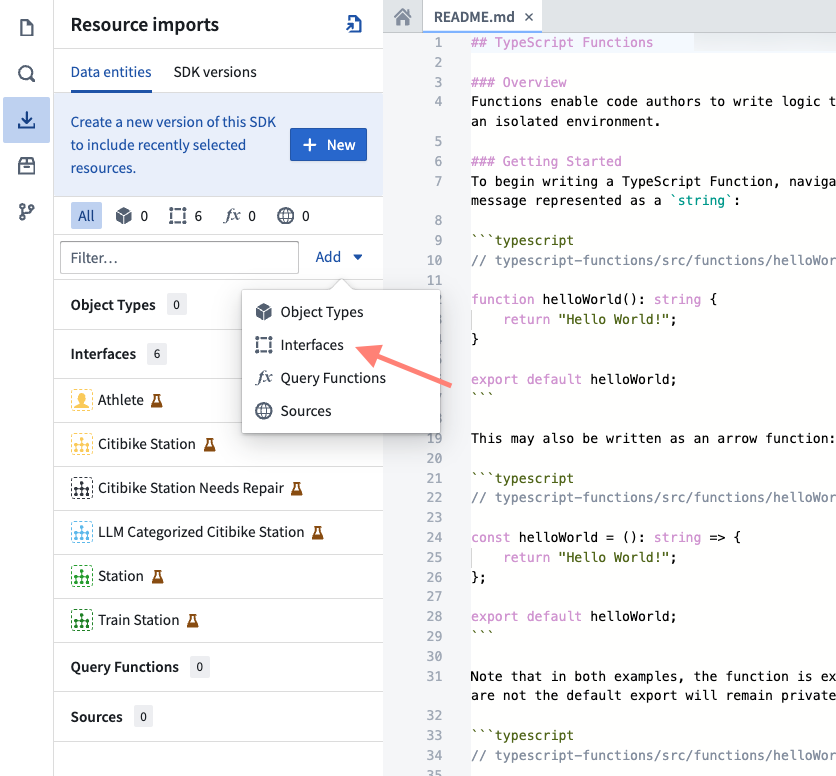
Choose Save to import the ontology types into the Project. Code Assist will automatically restart to regenerate code bindings to reflect the new object and link types you imported.
The package that provides these types in your code depends on the template your repository uses.
In a TypeScript v1 repository, you may now import ontology types from the @foundry/ontology-api package. If you are using a private ontology, the package name will instead be @foundry/ontology-api/<ontology-api-name>.
In a TypeScript v2 repository, you must generate the Ontology SDK after you import the ontology types, then import them from the @ontology/sdk package.
In a Python repository, generate a Python Ontology SDK in the same way. You then import object types from ontology_sdk.ontology.objects and object sets from ontology_sdk.ontology.object_sets.
In a TypeScript v1 repository, once Code Assist starts, you can view all the available object types by using Ctrl + click on the @foundry/ontology-api package name. The open index.ts file shows all the valid object types you can import into your code:

In a TypeScript v2 or Python repository, the generated Ontology SDK replaces this reference and provides code completion for the imported types.
If you have access to more than one ontology, you can use the selector to pick which ontology you would like to use. Currently, importing more than one ontology into a single project is unsupported.