- Capabilities
- Getting started
- Architecture center
- Platform updates
Permissions
Automate is governed by the same security and permissions model as the rest of the platform. Users can only see and interact with the automations to which they have access. This ensures condition evaluations and effects always reflect the appropriate data access at the time when the automation is evaluated.
Permissions for executions
-
Condition evaluation: Uses automation owner's permissions
-
Action, Logic, and Function effects: Execute as the automation owner. This means:
- Action submission criteria are evaluated against the owner (for example, if an action requires the user to be in group Y, the owner must be in group Y)
- Function executions in compute modules receive authentication tokens from the owner
- Ontology edit history shows the owner in the Edited by field
- Audit logs record Ontology edits as performed by the automation owner
-
Notification effects: Use each recipient's individual permissions. To be eligible to receive notifications, recipients must have:
- At least Viewer permission on the automation (required for both static and dynamic recipients)
- Viewer permission on the object instances that trigger the automation
- Viewer permission on all the properties of the object instances if the triggering object type is a multi-datasource object type
- Viewer permission on all the object instances accessed by the Function execution in a Function-backed notification
These requirements apply for both active and pre-registered users. Because notification effects use recipient permissions, an automation may:
- Trigger for some recipients but not others (based on their access)
- Send different notification content to different recipients (for function-backed notifications)
- Render different attachments for each recipient
Manual executions bypass trigger conditions, so Automate does not perform the trigger-object permission checks described above. The input object set is still evaluated with the permissions of the user who starts the manual run.
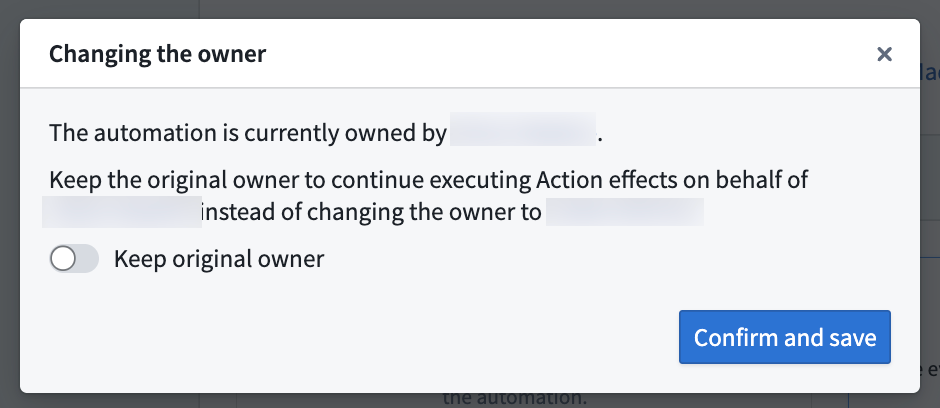
When you edit and save an automation, you may have the option to become the automation owner (taking ownership from the previous owner) or to keep the original owner. You must take ownership of the automation to make edits to the condition or effects.
Future actions effects will execute on behalf of the new owner.
Example use case permissions
A Sales Opportunity object type uses a restricted view. Users have different permissions: some can access sales opportunities from Europe, others from the US.
You can configure an automation to notify users when new Sales Opportunity objects are added by using an Objects added to set condition. When a new opportunity from Europe arrives, the condition will be evaluated per recipient.
- Users without access to sales opportunities from
Europewill not see any activity on the automation; no condition event appears, no notification sent. - Users with access to opportunities from
Europewill be notified as expected.
Third-party application ownership
Automations can be owned by third-party applications instead of individual users. When an automation is owned by a third-party application, it uses a service user for all executions, providing team continuity when individual users leave or are out of office.
The following applies for third-party application ownership:
- The service user's permissions are used for condition evaluation and action, Logic, and function effects.
- Automation execution history and permissions are tied to the service user.
- Multiple automations can share the same third-party application ownership.
Learn more about setting up and transferring automation ownership in Third-party application ownership.