- Capabilities
- Getting started
- Architecture center
- Platform updates
Use ontology interfaces in Workshop
Ontology interfaces describe properties and links shared by multiple object types. In Workshop, you can create an interface-based object set as a variable and configure supported widgets against the interface instead of configuring each implementing object type separately.
For example, an Alert interface could be implemented by Maintenance Alert, Inspection Alert, and Safety Alert object types. A Workshop application can use one interface-based object set variable to display and filter all three types by shared interface properties. If another object type implements the interface, it becomes available to the interface-based workflow without requiring you to rebuild the object set.
Create an interface-based object set
To create an interface-based object set:
- Create or edit an Object set variable.
- Select Object set definition.
- Open the Select starting object set... dropdown menu and choose All resources > Interfaces.
- Search for and select an interface.
- Optionally filter the object set by interface properties or traverse interface links.
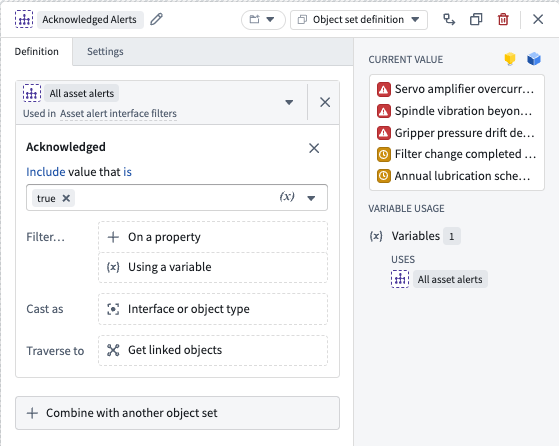
The resulting object set contains objects from the object types that implement the selected interface, subject to the user's permissions. In the example below, the interface-based object set contains objects from two object types that both implement the selected interface and include an Acknowledged property value of true.
Cast as an interface or object type
You can cast an object set as an interface or a compatible object type. Casting changes the Ontology type context available to supported widgets and downstream variables.
To cast an object set:
- Edit the object set definition.
- Under Cast as, select Interface or object type.
- Select a compatible interface or object type.
Cast a set based on an object type as an interface implemented by that object type to configure properties and links from the interface. The objects in the set remain the same.
Cast a set based on an interface as an implementing object type to narrow the set to objects of that type. You can then configure properties and links from the object type.
In the example below, an interface-based object set is cast as an implementing object type to limit the current values to only objects of that type.
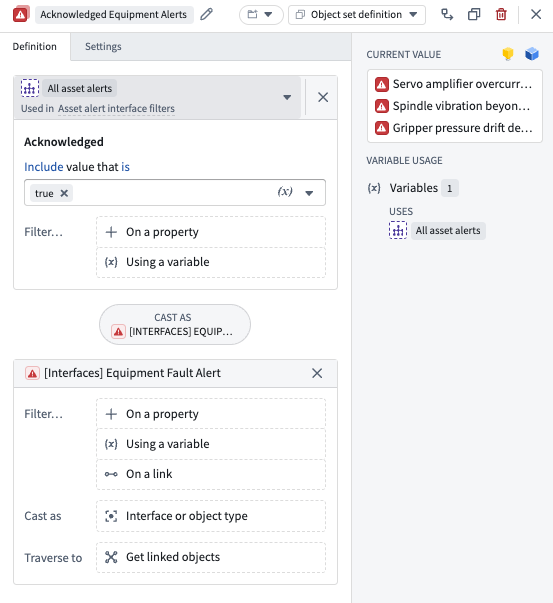
An object set definition supports one type-changing transform: either Cast as or Traverse to that performs a link traversal. After you add a cast, you cannot add another cast or link traversal to the same definition.
Use interface-based object sets in widgets
Most core widgets support configuring interface properties from an interface-based object set, including:
- Object List
- Object Table
- Filter List
- Metric Card
- Object Dropdown
- Property List
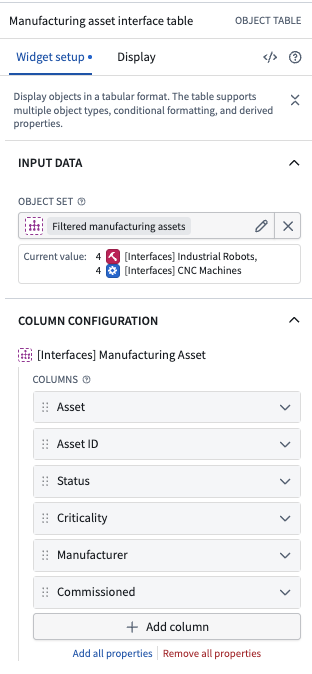
Pass the interface-based object set to a supported widget, then configure the widget using properties defined by the interface. This allows one widget configuration to display objects from multiple implementing object types. In the example below, an Object Table is configured with interface properties shared across multiple implementing object types.
Unsupported widgets
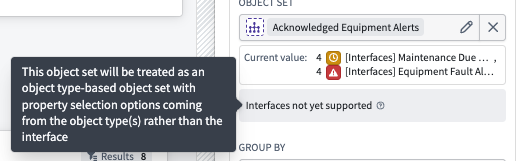
Not all Workshop widgets support ontology interfaces. If you pass an interface-based object set to an unsupported widget, Workshop displays an Interfaces not yet supported notification in the widget configuration.
The widget can still use the object set, but treats it as an object type-based object set. Property selection options come from the implementing object types rather than from the interface. As a result, interface properties and interface-specific configuration are not available in that widget.