- Capabilities
- Getting started
- Architecture center
- Platform updates
SQL query variables
A SQL query variable is a Workshop variable whose value is computed by running a SQL query against object sets and other variables in your module. You write a single Ontology SQL SELECT statement in the variable editor, binding object set and interface set variables as tables and other variables as parameters. Workshop resolves the query to a variable value each time its inputs change.
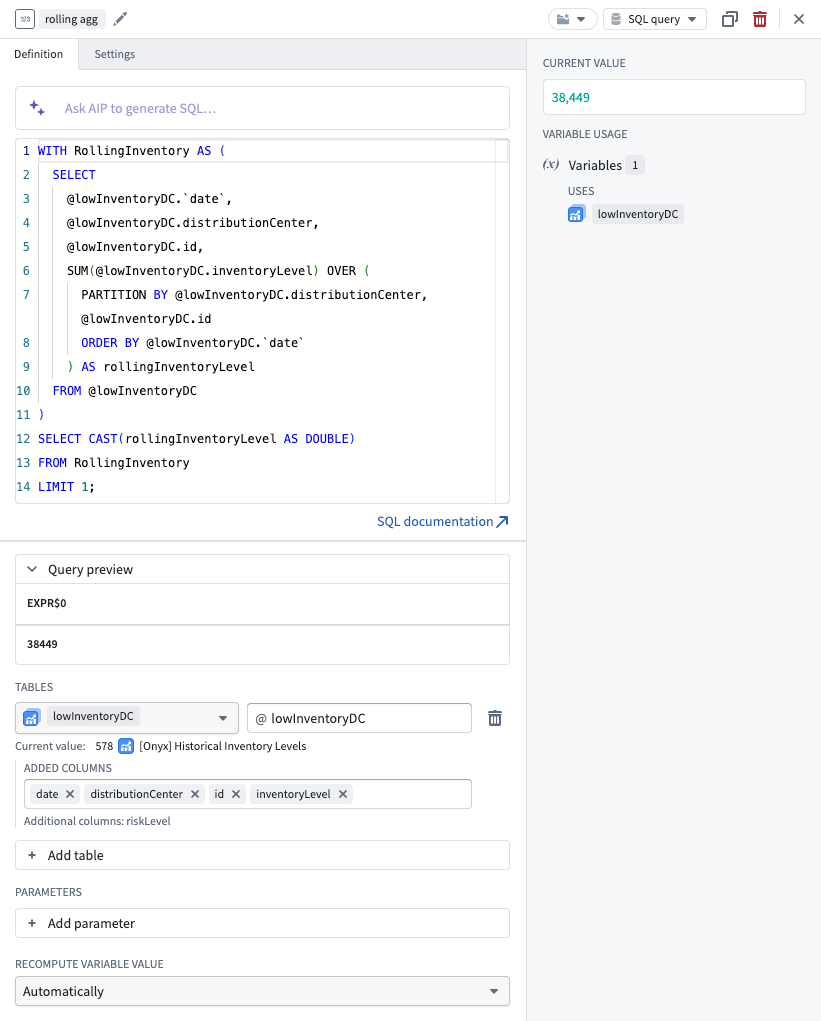
SQL query variables are best for calculations that are idiomatic in SQL but difficult to express elsewhere. For example, window functions such as RANK(), ROW_NUMBER(), LAG(), and LEAD() let you compute rankings, running totals, and period-over-period comparisons directly against your ontology data without writing and deploying a function. They are also effective for consolidating complex ontology queries into a single request, such as joining multiple object sets and returning an array of structs for a custom widget.
When to use SQL query variables
Consider how a SQL query variable compares to the other ways of computing a variable value:
- SQL query variable: Use for a value that is specific to one Workshop application, where the logic is most naturally written in SQL. Because the query is defined inside the module, there is nothing to publish or version separately.
- SQL functions: Use when your logic should be shared and reused across multiple applications and Foundry surfaces. SQL query variables are scoped to the module that defines them and are not reusable elsewhere.
- TypeScript and Python function-backed variables: Use when the logic is easier to express in TypeScript or Python, or when it requires capabilities beyond a SQL
SELECTstatement. - Variable transformations: Use for simple, in-application logic defined as a series of common operations, without writing a query or code.
- Object set variables: Use for native, point-and-click transformations on object sets within an application, such as filtering by property values or pivoting to linked objects.
Supported variable types
The SQL query definition type is available for the following variable types:
| Variable type | Query result the variable expects |
|---|---|
| String, Numeric, Boolean, Date, Timestamp | Exactly one row and one column. |
| String, Numeric, Boolean, Date, or Timestamp array | Exactly one column, with fewer than 10,000 rows. |
| Struct | Exactly one row. Each column becomes a struct field. |
| Struct array | Fewer than 10,000 rows. Each row becomes one struct. |
Currently, object set, geopoint, and geoshape variables cannot be backed by a SQL query.
Create a SQL query variable
- Open the Variables panel in the Workshop editor and select or create a variable of a supported type.
- Set the Variable definition type dropdown menu to SQL query.
- In the editor, add the tables and parameters your query references, write the query, and select Save and run to execute it and populate the variable.
Add tables
Object set variables are made available to your query as tables. Under Tables, select Add table, choose an object set variable, and give it an alias. Reference the table in your query with the @alias syntax:
Copied!1SELECT COUNT(*) FROM @orders;
Aliases must start with a letter or underscore and contain only alphanumeric characters or underscores. Qualify a column from a table with @alias.column_name. Columns named date must be escaped with backticks:
Copied!1SELECT AVG(@orders.total) FROM @orders WHERE @orders.`date` >= '2026-01-01';
Each bound table must have at least one column selected. Use the column search under the table binding to add the properties your query references. A table binding with no columns defined fails with the error Table binding '@alias' does not have any columns defined.
Both object set variables and interface set variables can be bound as tables. For an interface set variable, the columns available to your query are the interface's properties, so a single query can span every object type that implements the interface.
Join multiple tables
You can bind more than one table and join them in your query. Joins must be on a primary key and foreign key relationship, matching a foreign key property on one table to the primary key of the other:
Copied!1 2 3SELECT COUNT(*) FROM @orders INNER JOIN @customers ON @orders.customerId = @customers.id;
Every column used in the ON clause must be among the columns selected for its table binding, in the same way as the columns in your SELECT list.
Many-to-many relationships are not yet supported, because they are resolved through a join table rather than a direct primary key and foreign key relationship.
Add parameters
Other variables can be bound into your query as parameters. Under Parameters, select Add parameter, choose a variable, and give it an alias. Reference the parameter with the same @alias syntax. The variable's current value is substituted at execution time, and the query recomputes whenever a bound parameter changes:
Copied!1SELECT COUNT(*) FROM @orders WHERE @orders.region = @selectedRegion;
Write and run the query
The query editor can autocomplete your bound tables, columns, and parameters. Select Save and run, or use the Cmd + Enter (macOS) or Ctrl + Enter (Windows) keyboard shortcut to execute the query and update the variable value. The query uses the Ontology SQL dialect; refer to the SQL dialect reference for supported syntax and functions.
Expand the Query preview panel below the editor to see the rows and columns your query actually returns. The preview reads up to 50 rows and shows the raw SQL result, so it remains useful while you are still shaping a query that the variable itself would reject.
Result shapes
The variable type determines how Workshop reads the query result. In all cases, row order is the order your query returns; use ORDER BY when order matters.
Scalar variables
A scalar variable expects exactly one row and one column. A query that returns more than one row or more than one column fails rather than silently reading the first value.
Array variables
An array variable expects exactly one column. Every row contributes to the array, and a cell that is itself an array field contributes all its elements, flattened into a single ordered array:
Copied!1 2 3 4 5-- One array cell: resolves to ['a', 'b', 'c'] SELECT array('a', 'b', 'c') AS value; -- One scalar per row: resolves to one array of all returned names SELECT name FROM @employees ORDER BY name;
Additional behavior to be aware of:
- Null values are skipped at both the row and element level.
- An empty result sets an empty array rather than leaving the variable unset.
- Results are capped at 10,000 rows. A query that returns 10,000 or more rows fails with a request to add a
LIMITto your query, rather than truncating the array.
Struct variables
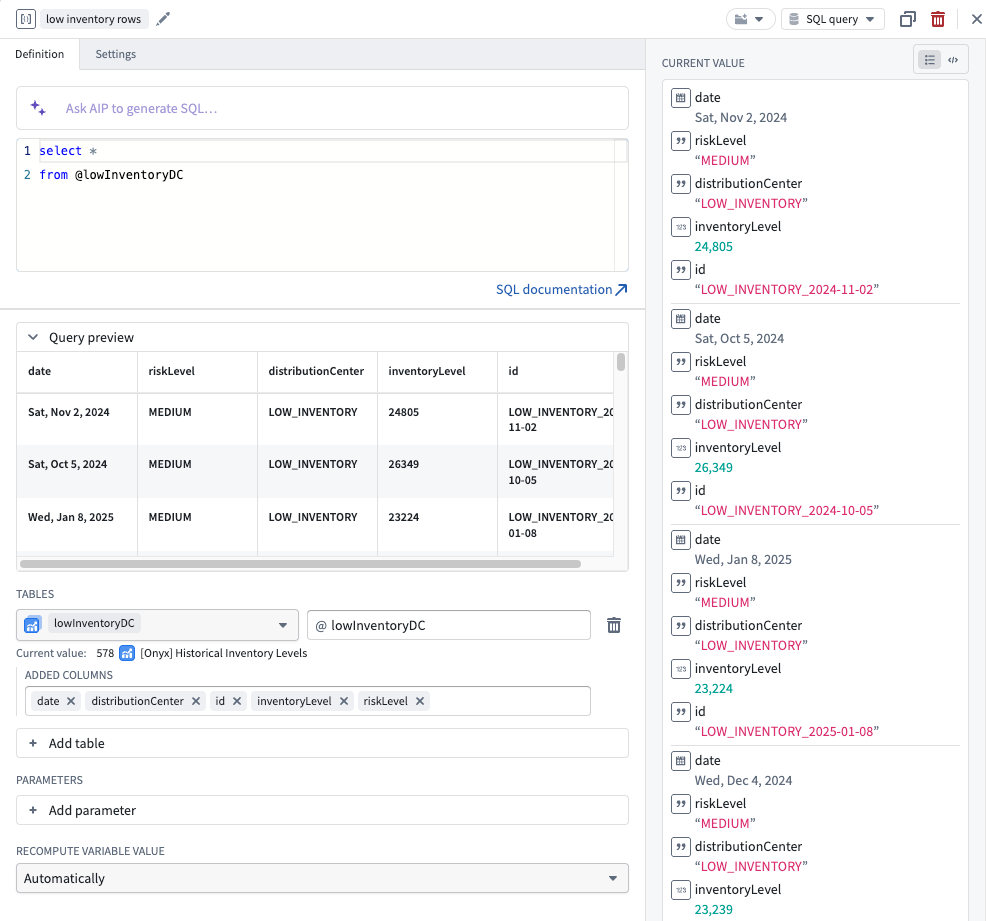
For a struct variable, the fields are derived from the query result rather than declared in the variable configuration. Three rules define the behavior:
- Each column becomes a struct field, named after the column.
- Each row becomes one struct.
- Structs cannot be nested.
The variable type determines the outer shape, and the query determines the fields:
| Variable type | Query result | Variable value |
|---|---|---|
| Struct | One row | One struct |
| Struct | More than one row | Error |
| Struct | No rows | Variable is unset |
| Struct array | Fewer than 10,000 rows | One struct per row |
| Struct array | No rows | Empty array |
Every successful run re-derives the fields, applying additions, removals, renames, and type changes to the variable. If a widget is bound to a field that a new query no longer returns, that binding breaks. Review your widget configuration after changing the columns a struct query selects.
A column that returns NULL produces a struct with no value for that field. The field itself still exists on the variable.
Requirements for struct queries
Each field must come from exactly one column, which places a few requirements on the SELECT list:
- Every column must have a usable name. Column names become field names, so they must be plain identifiers. Give computed columns an alias, for example
SELECT COUNT(*) AS order_count. - Column names must be unique. A query that returns two columns with the same name fails; alias each one with
AS. - Struct, map, and binary columns cannot be a field. Expand a struct column into one column per field with
@alias.column.*instead of selecting the struct column directly. - Array columns are supported. A column of type
ARRAY<STRING>produces a field holding a list of strings. An array of structs is not supported as a field.
The following examples show these rules for a bound table @t with a name column and an addr struct column containing a city field:
Copied!1 2 3 4 5SELECT name FROM @t; -- Struct: {'name': 'Ada'} SELECT @t.addr.* FROM @t; -- Struct: {'city': 'Springfield'}; note that this requires the column reference @t. SELECT @t.addr FROM @t; -- Error: expand the struct column instead SELECT name, name FROM @t; -- Error: duplicate column name SELECT COUNT(*) FROM @t; -- Error: give the column an alias
When your object type already has a struct property, you do not need to manually list each of its fields. Append .* to the property to expand it into one column per field, which then become the fields of your struct variable:
Copied!1 2SELECT @t.structField.* FROM @t;
A struct property with street, city, and postalCode fields produces a struct variable with those same three fields. Selecting the property without .* fails, because a struct column cannot itself be a field. To combine an expanded property with other columns, select both: SELECT @t.name, @t.addressStruct.* FROM @t. Ensure that the expanded field names do not collide with your other column names.
Saving a struct query
For a struct-valued variable, the query and its derived fields are saved together. Save and run runs the query first, and saves the query and the fields it derives only if the query succeeds and its columns can back a struct. If the query fails to execute or returns columns that cannot back a struct, nothing is saved. Your draft stays in the editor, and the previously saved query and fields remain in effect. The failure is reported both above the query preview and as an inline error in the editor.
The saved fields are also validated when the variable resolves at runtime, so a published application whose underlying data has changed reports an error naming the affected column instead of resolving to a different shape.
Generate SQL with AIP
You can generate a query from a natural language description instead of manually writing it. Enter a prompt describing the value you want to compute, and AIP produces a SQL query using your configured tables, parameters, and the variable's output type. AIP is constrained to the Ontology SQL dialect and to the aliases you have defined, so the generated query references only the tables, columns, and parameters available to the variable. The generated query populates the editor and runs automatically; review the result and edit the query if needed.
Example: Rank objects with a window function
Window functions are a common reason to reach for a SQL query variable. The following query binds an @employees object set and a @department parameter, and returns the name of the top earner in the selected department:
Copied!1 2 3 4 5 6 7 8SELECT name FROM ( SELECT name AS name, RANK() OVER (ORDER BY salary DESC) AS salary_rank FROM @employees WHERE department = @department ) WHERE salary_rank = 1;
Example: Return a summary as a struct
A struct variable can carry several related values computed in one query, which a widget can then bind to field by field. The following query returns a single struct summarizing the selected department:
Copied!1 2 3 4 5SELECT COUNT(*) AS headcount, AVG(salary) AS average_salary, MAX(salary) AS top_salary FROM @employees WHERE department = @department;
Example: Return a ranked list as a struct array
Setting the same variable type to a struct array returns one struct per row, which is useful for driving a ranked list in a loop layout:
Copied!1 2 3 4 5 6SELECT name, salary FROM @employees WHERE department = @department ORDER BY salary DESC LIMIT 10;