- Capabilities
- Getting started
- Architecture center
- Platform updates
Deploy extraction strategies to Python functions
Follow the Deploy to functions guide in AIP Document Intelligence and use the generated code snippets to set up a Python functions repository with your extraction strategy.
Setup
To get started with document extraction in functions, first create a Python functions repository or use an existing one.
Set up the repository with the correct imports and permissions to run document extraction:
- Install the platform SDK (if not already installed):
- Select Libraries in the left side panel to add a library.
- Install
foundry-platform-sdkversion >= 1.78. - If you need chunking, install
aip-workflowsversion >= 0.40.0. - If you want to embed, install
openai.
- Install
- For LLM-based extractions, import your selected model into the repository.
- Set up the function to have a larger timeout. We suggest choosing the maximum value allowed by your enrollment. To handle many PDFs and high page count PDFs, you will need to use these functions as part of an extraction strategy.
The following sections explain the various code snippets included in the Deploy to functions guide.
Helper functions
Helper functions are the same for all extraction strategies. You can copy them into the same Python file as your function, or into a shared utilities file if you have multiple functions. They are available in-platform and included below for reference.
Copied!1 2 3 4 5 6 7 8 9 10 11 12 13 14 15 16 17 18 19 20 21 22 23 24 25 26 27 28 29 30 31 32 33 34 35 36 37 38 39 40 41 42 43 44 45 46 47 48 49 50 51 52 53 54 55 56 57 58 59 60 61 62 63 64 65 66 67 68 69 70 71 72 73 74 75 76 77from dataclasses import dataclass from time import sleep from typing import Optional from foundry_sdk import FoundryClient from foundry_sdk._errors import PalantirException, PalantirQoSException, PalantirRPCException from foundry_sdk._errors.palantir_qos_exception import QoSRetryHint from foundry_sdk.v2.media_sets import models from functions.api import function @dataclass class TransformResult: """The outcome of a transform. Functions return this instead of raising on failure so your orchestration can branch on the result. result: The extracted content (Markdown or JSON, depending on your configuration) on success, otherwise None. error: The specific error name on failure (or a human-readable reason for rate-limit and availability errors), otherwise None. retryable: True when the failure is transient (rate limits or service availability) and worth retrying, False when it is not, and None on success. """ result: Optional[str] error: Optional[str] retryable: Optional[bool] def _create_transform_job( media_set_rid: str, media_item_rid: str, transformation: models.DocumentToTextTransformation ) -> str: fc = FoundryClient() job_initiation_resp = fc.media_sets.MediaSet.transform( media_set_rid=media_set_rid, media_item_rid=media_item_rid, transformation=transformation, preview=True, ) job_id = job_initiation_resp.job_id return job_id def _is_transform_finished(media_set_rid: str, media_item_rid: str, job_id: str) -> bool: fc = FoundryClient() status = fc.media_sets.MediaSet.get_status(media_set_rid, media_item_rid, job_id, preview=True) return status.status in ("SUCCESSFUL", "FAILED") def _get_transform_result(media_set_rid: str, media_item_rid: str, job_id: str) -> str: fc = FoundryClient() result = fc.media_sets.MediaSet.get_result(media_set_rid, media_item_rid, job_id, preview=True) return result.decode("utf-8") def _run_transform_blocking( media_set_rid: str, media_item_rid: str, transformation: models.DocumentToTextTransformation ) -> str: job_id = _create_transform_job(media_set_rid, media_item_rid, transformation) while not _is_transform_finished(media_set_rid, media_item_rid, job_id): sleep(0.5) return _get_transform_result(media_set_rid, media_item_rid, job_id) def _run_transform_error_handled( media_set_rid: str, media_item_rid: str, transformation: models.DocumentToTextTransformation ) -> TransformResult: try: result_text = _run_transform_blocking(media_set_rid, media_item_rid, transformation) return TransformResult(result=result_text, error=None, retryable=None) except PalantirQoSException as e: retryable = e.retry_hint != QoSRetryHint.DO_NOT_RETRY return TransformResult(result=None, error=e.reason, retryable=retryable) except PalantirRPCException as e: return TransformResult(result=None, error=e.name or type(e).__name__, retryable=False) except PalantirException as e: return TransformResult(result=None, error=type(e).__name__, retryable=False)
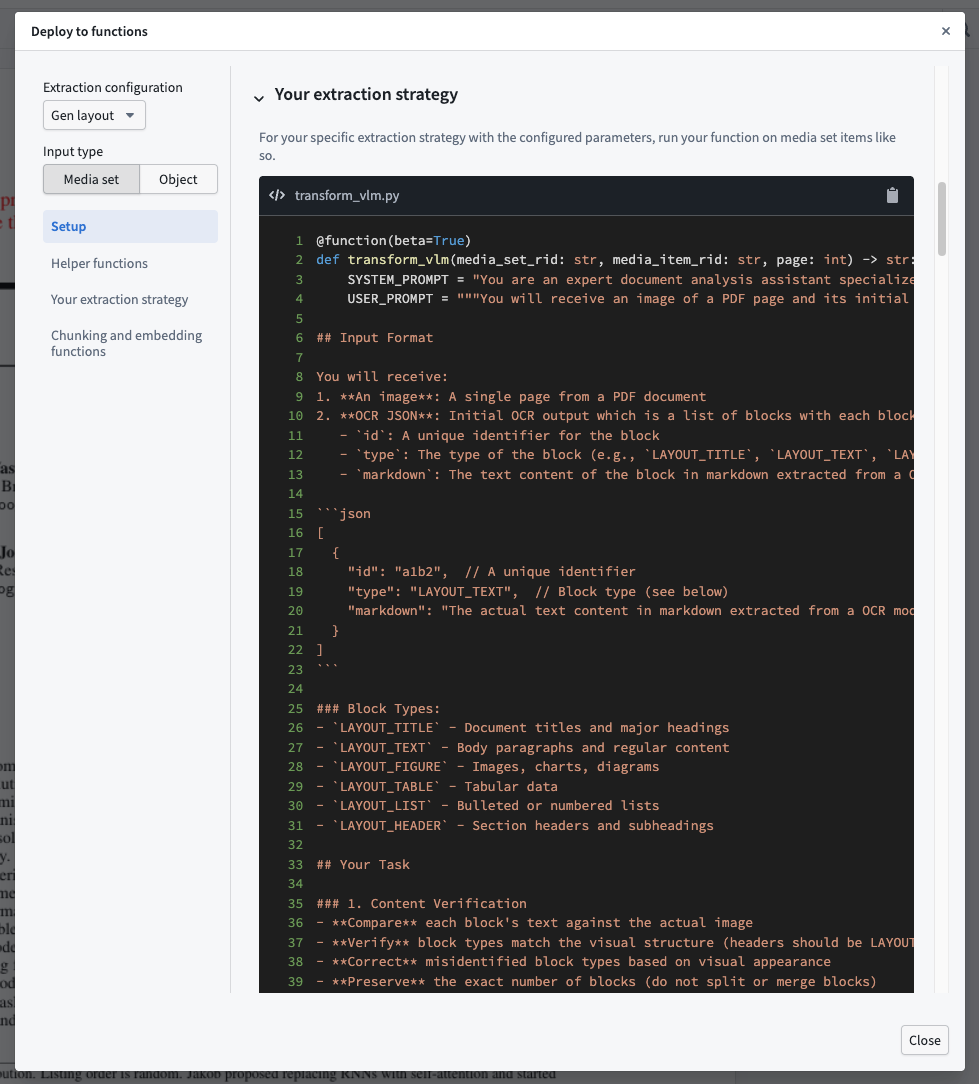
Your extraction strategy
This function corresponds to your extraction strategy and requires a media input and a given page. Because the function is dynamically generated, copy the code from inside the app. Whatever name you publish it under will be registered, so you can rename it as needed. You can provide the media input as a media set and item RID string combination or as an object property; use the selector in the top left to choose the template. The object property template requires you to import your object.
Chunking and embedding functions
Optionally, chunk extracted text and generate embeddings for downstream use in search or retrieval workflows. The functions below are static; the chunk size, chunk overlap, and embedding model are configured in the app, so replace the default parameter values with the ones you selected.
Copied!1 2 3 4 5 6 7 8 9 10 11 12 13 14 15 16 17 18 19 20 21 22 23 24 25 26 27 28 29 30 31 32 33 34 35 36 37 38 39 40 41 42 43 44 45 46 47 48 49 50 51 52 53 54 55 56 57 58 59 60 61 62 63 64 65 66 67 68 69 70 71 72from functions.api import function, Array, Boolean, Float, Integer, String from aip_workflows.document_intelligence.transforms import DocumentChunker @function(beta=True) def chunk_text( texts: Array[String], chunk_size: Integer = 8192, chunk_overlap: Integer = 0, concat_before_chunk: Boolean = False, chunk_mode: String = "markdown", ) -> Array[Array[String]]: """ Chunks a list of text strings. Args: texts: A list of text strings to chunk. chunk_size: Maximum number of characters per chunk. chunk_overlap: Number of overlapping characters between consecutive chunks. concat_before_chunk: If True, concatenates all texts into a single string before chunking, returning a single inner list. Recommended when input is per-page text of a document. If False, chunks each text independently, returning one inner list per input text. chunk_mode: The chunking strategy to use. Options: - "markdown": Recommended for Markdown text. - "recursive": Recommended for raw text without any format. Returns: A list of lists of chunk strings. Each inner list contains the chunks for one input text. When concat_before_chunk is True, input texts are concatenated into a single string so the output list has length of 1. """ chunks = DocumentChunker.create_chunks( texts, chunk_mode=chunk_mode, chunk_size=chunk_size, chunk_overlap=chunk_overlap, strip_markdown=True, concat_before_chunk=concat_before_chunk, ) if concat_before_chunk: return [chunks] return chunks from foundry_sdk.v2.language_models.utils import ( get_foundry_token, get_openai_base_url, get_http_client, ) from openai import OpenAI @function(beta=True) def embed_text( texts: Array[String], embedding_model_rid: String = "<YOUR_EMBEDDING_MODEL_RID>", ) -> Array[Array[Float]]: """ Generates embeddings for a list of text strings using the configured embedding model. Args: texts: A list of text strings to embed. embedding_model_rid: The RID of the embedding model to use. Returns: A list of vector embeddings, one per input text. """ client = OpenAI( api_key=get_foundry_token(preview=True), base_url=get_openai_base_url(preview=True), http_client=get_http_client(preview=True), ) response = client.embeddings.create( input=texts, model=embedding_model_rid, ) return [response.data[i].embedding for i in range(len(texts))]