- Capabilities
- Getting started
- Architecture center
- Platform updates
Dataset condition
Use a dataset condition to trigger automation effects when a dataset is updated. You can trigger on every update, or require the dataset to contain at least or at most a specified number of rows. For example, you can send a notification when a dataset is updated and is empty.
Configuration
You can configure dataset conditions on an automation's main branch and choose which dataset branch to monitor. Dataset conditions are not currently supported on automation branches created with Global Branching.
To configure a dataset condition, follow the steps below:
- Select the Dataset condition card.

- Select Search for datasets and choose the dataset to monitor.
- Select the dataset branch to monitor.
- Under Trigger condition, select one of the options described below.
- If you select a row-count condition, enter a whole number from
0to300in Number of rows.
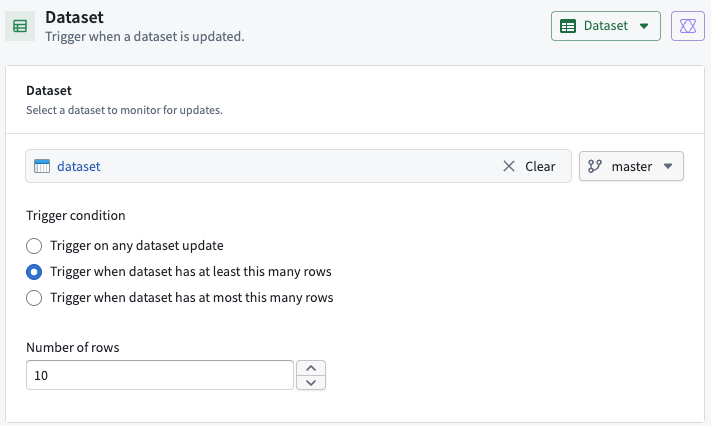
The following example monitors the master branch and triggers when the dataset is updated and contains at least 10 rows.
| Trigger condition | Behavior |
|---|---|
| Trigger on any dataset update | Triggers on every committed update to the selected dataset branch, regardless of the row count. |
| Trigger when dataset has at least this many rows | Triggers when the dataset is updated and contains at least the specified number of rows, including the specified value. |
| Trigger when dataset has at most this many rows | Triggers when the dataset is updated and contains at most the specified number of rows, including the specified value. |
For example, select Trigger when dataset has at least this many rows and enter 1 to trigger when the dataset is updated and nonempty. Select Trigger when dataset has at most this many rows and enter 0 to trigger when the dataset is updated and empty.
The row-count threshold is limited to 300. The monitored dataset can contain more than 300 rows. For example, a threshold of at least 300 rows is met by any update to a dataset with 300 or more rows.
Evaluation behavior
The condition is evaluated when a transaction is committed to the dataset on the selected branch. The row-count check uses the dataset as of that transaction and counts the rows in the dataset, rather than only the rows added by the update.
Each committed update that meets the row-count condition can trigger effects. The count does not need to cross the threshold between updates. For example, with a threshold of at least 1 row, consecutive updates containing 10 rows and 12 rows both meet the condition.