- Capabilities
- Getting started
- Architecture center
- Platform updates
SAP Data Accelerator [Beta]
The Foundry integration with SAP Data Accelerator is in the beta phase of development and may not be available on your enrollment. This includes source connectivity and user-attributed writeback. Functionality may change during active development.
SAP Data Accelerator ↗ is an SAP-managed connectivity service that routes Foundry's traffic to an on-premise SAP system through your SAP Cloud Connector. Instead of dialing the SAP host directly, Foundry tunnels its traffic through SAP Data Accelerator, which relays it to your SAP Cloud Connector ↗ and on to the backend SAP system.
To use SAP Data Accelerator, complete the one-time SAP setup below, then point an existing SAP ERP or SAP SLT source at it. Routing a source through SAP Data Accelerator does not change the data you sync, how you authenticate to the SAP add-on, or your sync configuration; only the network path to the SAP system changes.
Before you begin
SAP Data Accelerator is supported only on sources that use a Foundry worker. If your source uses an agent worker, migrate it to a Foundry worker first.
A Palantir-issued client certificate is required to use SAP Data Accelerator. Request it from your Palantir representative.
SAP setup
Provisioning and configuring SAP Data Accelerator happens entirely in SAP's tooling and is owned by your SAP administrator. Follow SAP's Data Accelerator documentation ↗ (see also SAP's step-by-step provisioning guide ↗) to do the following:
- Provision SAP Data Accelerator.
- Register Foundry as a partner system using the Palantir-issued client certificate.
- Connect your SAP Cloud Connector ↗ to SAP Data Accelerator, mapping a virtual host and port to the backend SAP system you want Foundry to reach.
After completing the SAP setup, make sure you have the following values to configure the Foundry source:
- Control plane URL: The SAP Data Accelerator control plane URL (for example,
https://<tenant>.sharing.hdl.<region>.hanacloud.ondemand.com) - Virtual host and virtual port: The values you mapped to the backend SAP system in your SAP Cloud Connector
- Cloud Connector Location ID: (optional) Only required when more than one Cloud Connector is registered against the same SAP Data Accelerator tenant
Configure the Foundry source
Configure the following on your SAP ERP or SAP SLT source, in addition to the source's normal settings.
1. Assign certificates
Create a Control Panel client certificate from the Palantir-issued client certificate (the same one you registered as a partner system in SAP Data Accelerator), then attach it to the source.
You can copy the client certificate directly from Foundry by hovering over it. Two certificates are copied to your clipboard; the first is the one you provide on the SAP side when configuring SAP Data Accelerator.
Depending on your SAP Data Accelerator configuration, you may also need to add server certificates so the Foundry worker can trust the TLS connection to SAP Data Accelerator. If the SAP Data Accelerator endpoints present certificates that are not signed by a publicly trusted certificate authority, add the relevant server certificates to the source.
2. Set the host and port to the Cloud Connector virtual host
Set the source's host and port to the virtual host and virtual port defined in your SAP Cloud Connector.
3. Enable the SAP Data Accelerator option
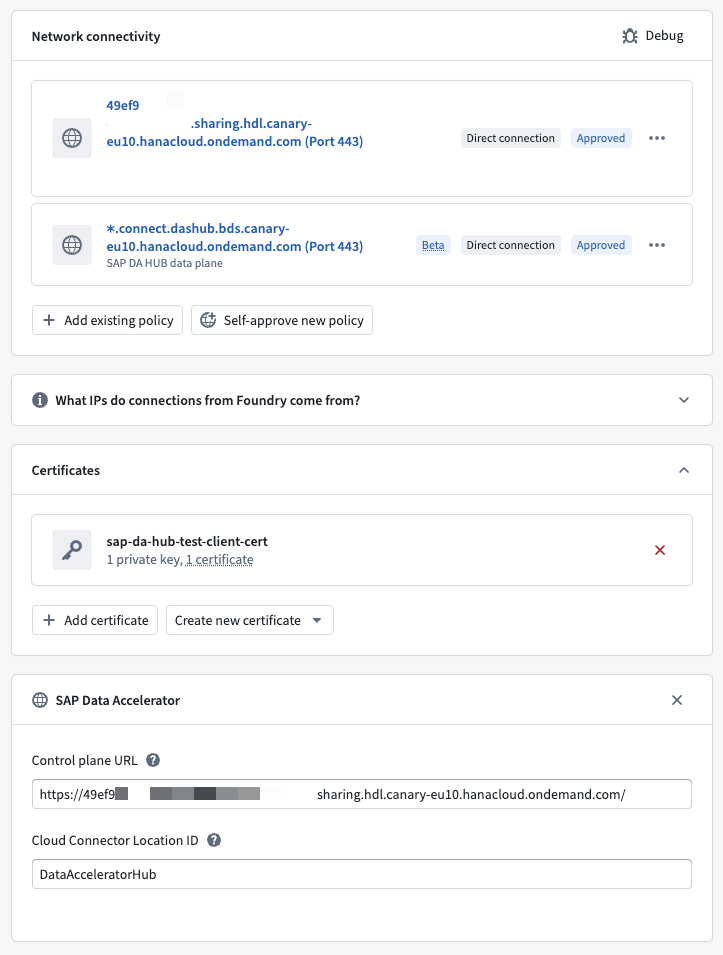
Add the optional SAP Data Accelerator property to the source and provide the following:
| Field | Required | Description |
|---|---|---|
| Control plane URL | Yes | The SAP Data Accelerator control plane URL you collected during SAP-side setup (for example, https://<tenant>.sharing.hdl.<region>.hanacloud.ondemand.com). |
| Cloud Connector Location ID | No | The Location ID of the Cloud Connector that fronts your SAP system. Required only when more than one Cloud Connector is registered against the same SAP Data Accelerator tenant; otherwise leave it empty. |
4. Configure egress
Allow outbound HTTPS (port 443) from the Foundry worker to both of the following:
- The control plane host you configured above (for example,
<tenant>.sharing.hdl.<region>.hanacloud.ondemand.com). - The data plane, which allocates per-connection subdomains dynamically. Allow the following wildcard:
https://*.connect.dashub.bds.<region>.hanacloud.ondemand.com.
See the egress policies documentation for how to configure network access.
After completing these steps, your configured source should resemble the following:
User-attributed writeback
To write back using each user's SAP authorization, create a get token webhook and a refresh token webhook on your SAP ERP source. Then, select both webhooks in an outbound application. Follow the instructions in the user-attributed SAP writeback with SAP Data Accelerator documentation to configure the webhook parameters and outbound application.