- Capabilities
- Getting started
- Architecture center
- Platform updates
SAP SLT
The SAP SLT connector allows you to connect Foundry to SAP systems via an SAP Landscape Transformation (SLT) Replication Server. Data is replicated from source SAP ERP systems to corresponding Operational Delta Queues (ODQ) in the SLT system based on database triggers. The SAP SLT connector enables Foundry to interact with:
- SLT Replication Server tables replicated from source ERP systems
- Local tables within the SLT Replication Server system
Using the SAP SLT source requires the installation of the Palantir Foundry Connector 2.0 for SAP Applications add-on on the SAP SLT Replication Server. Learn more about connecting via SLT.
Supported capabilities
| Capability | Status |
|---|---|
| Exploration | 🟢 Generally available |
| Batch syncs | 🟢 Generally available |
| Incremental | 🟢 Generally available |
| Streaming syncs | 🟢 Generally available |
| Use in code repositories | 🟢 Generally available |
Setup
- Open the Data Connection application and select + New Source in the upper right corner of the screen.
- Select SAP SLT from the available connector types.
- Follow the additional configuration prompts to continue the setup of your connector using the information in the sections below. The source is configured to run on a Foundry worker. For existing agent worker sources, see the agent worker configuration reference.
Learn more about setting up a connector in Foundry.
Remote context
The SAP SLT connector requires a Remote context value, which is the unique identifier of the RFC connection between the SLT Replication Server and the source ERP system. Learn more about configuring this in the SLT configuration guide and about SLT connections.
Authentication
The SAP SLT connector supports the following authentication methods:
| Authentication method | Description |
|---|---|
| Basic Auth | Provide the username and password of the technical user created when installing the Connector. |
| Authentication token | Provide a token to authenticate. |
| Custom authentication header | Provide a custom authentication header. |
| No authentication | An option used if authentication is set up on the agent machine via certificates. |
Networking and connectivity
You must properly configure egress policies (if using a Foundry worker) or your agent networking (if using an agent worker) to make sure your SAP SLT system can communicate with Foundry.
Agent worker is in the legacy phase of development. We recommend using Foundry worker connections for new sources. See Foundry worker vs agent worker.
Many SAP systems use custom-signed certificates which can cause SSL handshake exceptions when configuring the connection for the first time. Make sure you have the correct custom certificates from your system and add them to the source (if using a Foundry worker) or to the agent directly (if using an agent worker).
SAP Data Accelerator
The Foundry integration with SAP Data Accelerator is in the beta phase of development and may not be available on your enrollment. Functionality may change during active development.
To reach this SAP system through SAP Data Accelerator (SAP's managed connectivity service for systems exposed through an SAP Cloud Connector), set the source's host and port to your Cloud Connector virtual host and port. Then, assign the client certificate provided by Palantir, allow egress to the SAP Data Accelerator control plane and data plane, and add the SAP Data Accelerator property with your control plane URL. This path requires using a Foundry worker.
Sync data from SAP SLT
Use the exploration view to create syncs for SAP SLT tables. From the source overview page, select + New next to batch sync, then choose your desired object type from the dropdown:
- SLT Replication Server: Data from a source system is replicated via the SLT Replication Server using database triggers on the source ERP system.
- Local table: Data is read directly from a table within the SLT Replication Server system itself.
Sync parameters
For batch syncs, the following settings appear under Advanced settings. Some are also configurable at the source level.
| Setting | Description |
|---|---|
| Max file size | Maximum size of each output Parquet file. Defaults to 50,000 rows per file. |
| Clean field names for Avro | Sanitizes field names so they conform to the Avro ↗ schema rules used by Foundry streams. Required if the dataset will be used in a streaming pipeline. |
| Ignore unexpected values | When enabled, date or number values that fail to parse are written as null and a summary of parse exceptions is logged at the end of the sync. |
| Convert dates to strings | Ingests date fields as strings. Useful when SAP date fields contain unparseable values that hold a special meaning and need to be handled downstream. |
| Page size | Rows returned per page when retrieving data from SAP. Defaults to 50,000. Minimum 5,000. |
| Parallel paging threads | Number of SAP work processes used to generate page data. Applies to legacy ODP syncs only; not applied to OData syncs. |
| Plugin worker threads | Number of Data Connection agent threads used to retrieve page data. |
| Remote context | RFC connection identifier to the source system. If set, the initial load bypasses the SLT Replication Server queue and consumes data over RFC instead. Not applicable to OData syncs. |
| Serialization engine | Serialization method used for data transfer. |
| Retries and timeouts | Retry count, retry delay, and request timeouts. |
| Resource checks | Memory and CPU checks during extraction. Disabling can put excess load on the SAP system. |
| Debug settings | Trace logging and debug logging. Debug logging starts a background process in SAP — use with caution. |
For incremental batch syncs, the Max rows per sync setting bounds the approximate number of rows returned per run. Use it to split the initial sync of a large table into a series of smaller, more resilient runs if intermittent issues (such as network failures) disrupt long-running syncs.
Streaming syncs
The SAP SLT connector supports streaming syncs for real-time data replication. To create a streaming sync, select + New next to Streaming sync from the source overview page.
Force snapshot
The Force snapshot toggle controls whether the stream starts by reading the full table before polling for incremental updates. Enable this setting when:
- The database trigger on the source ERP system has been reset or corrupted.
- The pointer in the SLT Replication Server has been lost.
After the full table has been streamed to Foundry, disable this setting and save so that subsequent streaming only polls for updates.
API version
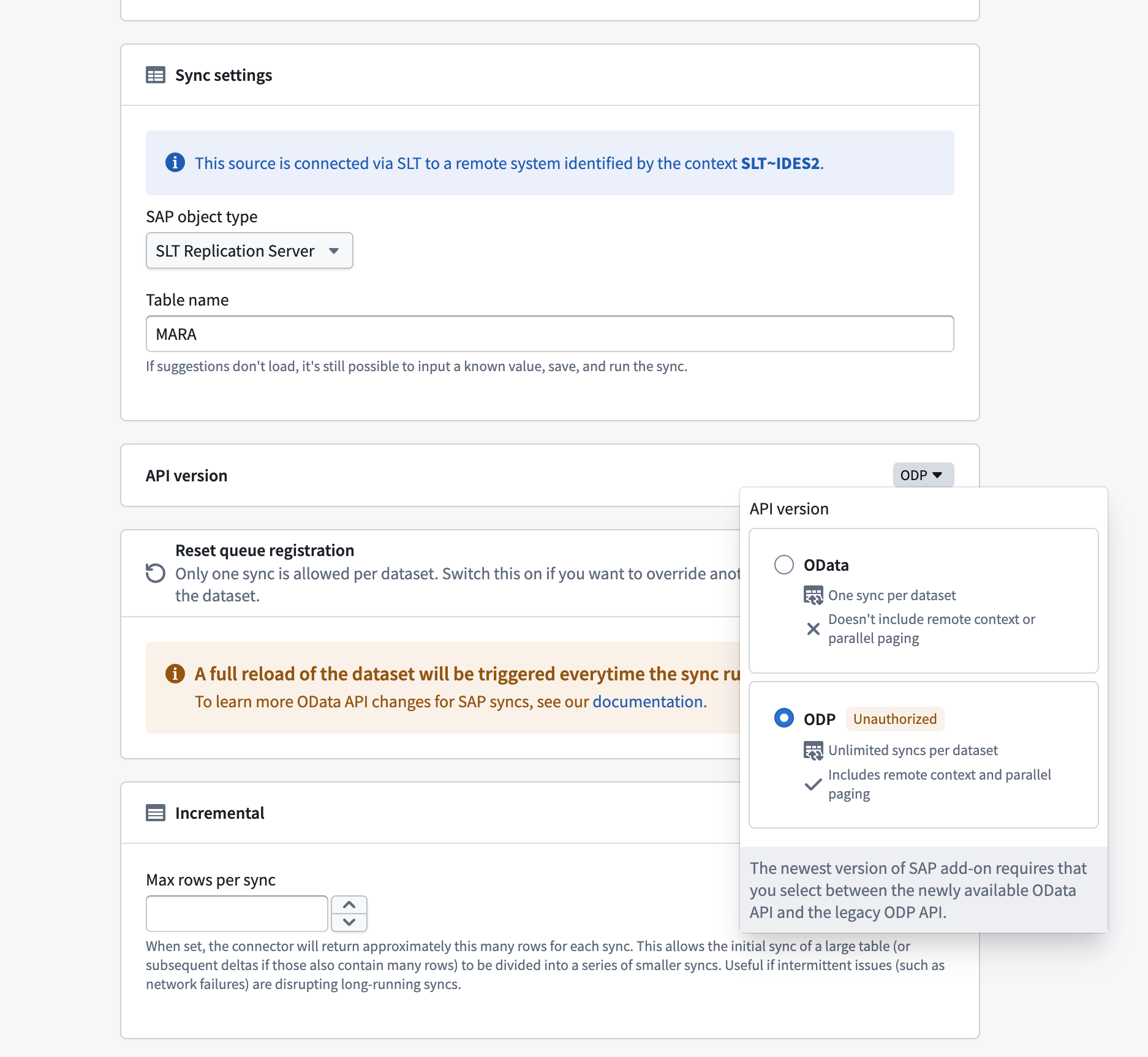
Per SAP Note 3255746 ↗ (Version 11, April 2026), use of the ODP Data Replication API via RFC (ODP-RFC) by non-SAP applications is prohibited in both on-premises and private cloud environments. An SAP security patch released in June 2026 technically blocks unauthorized ODP-RFC calls. Migrate any syncs still using the legacy ODP API to the OData API before applying the patch.
With add-on version 2.34 (SP34) or higher, SAP SLT syncs can use the OData API. This is based on ODP-based data extraction via OData ↗, as recommended by SAP. The legacy ODP API is no longer permitted by SAP.
Using the OData API requires:
- The
PALODATAadd-on component to be installed on the SLT system. - SAP_BASIS version 7.50 SP09 or higher. Learn more about the prerequisites and configuration.
| API | Description |
|---|---|
| OData | Only one active subscription per table is allowed. If a sync already exists for a table, any new sync targeting the same table will fail unless the existing subscription is released first. Does not include remote context or parallel paging. |
| ODP (legacy) | Allows multiple subscriptions per table, enabling different syncs to ingest the same table independently. Includes remote context and parallel paging. No longer permitted by SAP. |
Reset queue registration
When using the OData API, the first sync configured for a table claims the active subscription. If you need to replace that sync with a different configuration, enable Reset queue registration to release the existing subscription and assign it to the current sync.
Enabling reset queue registration triggers a full reload of the dataset every time the sync runs. Disable this setting after the subscription has been reassigned to avoid repeated full reloads.