注: 以下の翻訳の正確性は検証されていません。AIPを利用して英語版の原文から機械的に翻訳されたものです。
パフォーマンスを最適化する
このページでは、関数のパフォーマンスとリソース使用量を最適化するためのベストプラクティスを説明します。これらのガイドラインに従うことで、コンピュート消費量を最小限に抑え、関数を効率的に実行できます。コンピュートコストと関数の使用量の計測方法については、オントロジークエリによるコンピュート使用量を参照してください。
関数のコンピュートコストを理解する
関数のコストは、次の要素で構成されます。
- オーバーヘッド: 関数の実行には、処理内容にかかわらず、毎回4コンピュート秒の固定オーバーヘッドが発生します。
- コンピュート時間: 関数の実行に必要な vCPU 時間です。
- 外部呼び出し: プラットフォームのほかの部分への呼び出し(オントロジークエリ、モデル推論、LLM 呼び出し)には、それぞれ独自のコストが発生します。
プラットフォームでのコンピュート秒の計算方法と計測方法については、使用量の種類を参照してください。
パフォーマンスタブを使用する
パフォーマンスタブには、関数のパフォーマンスの問題を分析し、特定するためのツールが用意されています。
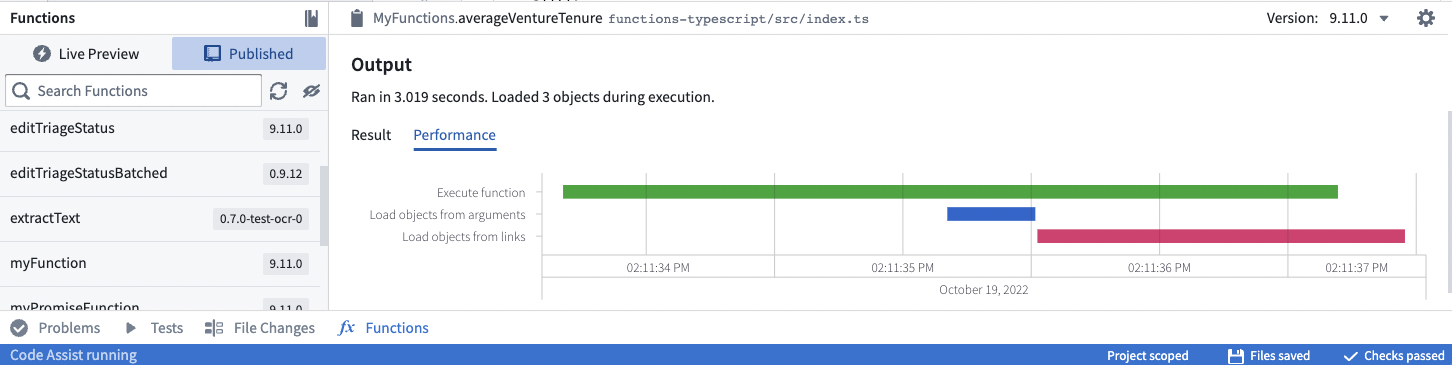
ウォーターフォールグラフでは、操作を横棒で表し、X 軸の時間に沿って表示します。各操作には、時間がどのように使われたかを示すマーカーがあります。
- 関数を実行するは、関数コードの実行に費やした CPU 時間を示します。
- 引数からオブジェクトを読み込むとリンクからオブジェクトを読み込むは、基盤となるオントロジーのバックエンドデータベースサービス(OSS)の呼び出しに費やした時間を示します。
関数のパフォーマンスを改善するには、次の方法を使用します。
- Objects API を使用すると、関数のコンテキスト内で処理するよりも、集計やリンクの走査を高速に行えます(可能な場合は Objects API を優先して使用するで説明しています)。
- オントロジーのバックエンドサービスの呼び出しを並列で行い、順次読み込むことを避けてください。
async/awaitの呼び出しが複数ある場合は、Promise.allを使用してすべての呼び出しを並列で待機します。- たとえば、よく使われるパターンとして、リストに対して
.map()を使用して Promise を作成し、生成されたリストに対してPromise.allを使用する方法があります。 - 重要:
Promise.all()を使用すると実行速度は向上しますが、リソース消費量やコストは削減されません。操作の回数は変わらず、それらが並列で実行されるだけです。一括操作は、より高速でコスト効率も優れています。
- たとえば、よく使われるパターンとして、リストに対して
- 実行時間が長くなる可能性があるため、不要なネストされたループは避けます。
効率的な入力データ型を選択する
関数を設計する際、入力パラメーターに選ぶデータ型は、パフォーマンスに大きく影響します。要件を満たす中で最も効率的な入力データ型を使用します。
ベストプラクティス: 効率とスケーラビリティを最大限に高めるため、可能な場合はオブジェクトセットを使用します。 許容される方法: メモリー内のオブジェクトを扱う必要がある場合は、オブジェクト配列を使用します。 アンチパターン: 単一オブジェクトのパラメーターは、オブジェクトタイプにインスタンスが1個しかない場合、または特定のビジネスロジックでオブジェクトごとの処理が本当に必要な場合にのみ使用してください。
| 入力データ型 | 効率 | ユースケース |
|---|---|---|
| オブジェクトセット | 最良 | クエリ可能なオブジェクトセット。集計のみが必要な場合は、事前の読み込みコストが発生しません |
| オブジェクト配列 | 良好 | 特定のオブジェクトを反復処理する必要がある場合 |
| 単一オブジェクト | 最も低い | ビジネスロジックでオブジェクトを1個ずつ処理する必要がある場合 |
ベストプラクティス:オブジェクトセット
パラメーターとして渡されたオブジェクトは、オブジェクトデータを読み込むためのオントロジークエリを発生させます。単一オブジェクトの入力であっても、そのオブジェクトをメモリーに読み込むための呼び出しが発生します。
オブジェクトセットは、実際にデータが必要になるまで読み込みを遅らせるため、より適しています。集計(件数や合計など)のみが必要な場合、オントロジーのバックエンドは個々のオブジェクトを読み込まずに計算します。
Copied!1 2 3 4 5 6 7 8 9 10 11 12 13 14 15 16 17 18 19 20 21 22from functions.api import function, Float from ontology_sdk.ontology.objects import ExampleDataAircraft from ontology_sdk.ontology.object_sets import ExampleDataAircraftObjectSet # 効率が低い:単一のオブジェクトでは事前に読み込みが発生します @function() def get_aircraft_name(aircraft: ExampleDataAircraft) -> str: return aircraft.display_name # 効率が中程度:オブジェクトの配列では事前に読み込みが発生します @function() def get_aircrafts_names(aircraft_array: list[ExampleDataAircraft]) -> list[str]: return [aircraft.display_name for aircraft in aircraft_array] # 最も効率的:オブジェクトセットでは必要になるまで読み込みを遅延します # ここでは、集計値のみが関数のメモリーに読み込まれます @function() def count_aircrafts(aircraft_set: ExampleDataAircraftObjectSet) -> Float: return aircraft_set.count().compute()
Copied!1 2 3 4 5 6 7 8 9 10 11 12 13 14 15 16 17 18 19 20 21 22 23 24 25 26 27 28// getAircraftName.ts - 効率が低い:単一のオブジェクトでは事前に読み込みが発生します import { Osdk } from "@osdk/client"; import { ExampleDataAircraft } from "@ontology/sdk"; export default function getAircraftName(aircraft: Osdk.Instance<ExampleDataAircraft>): string { return aircraft.displayName!; } // getAircraftsNames.ts - 効率が中程度:オブジェクトの配列では事前に読み込みが発生します import { Osdk } from "@osdk/client"; import { ExampleDataAircraft } from "@ontology/sdk"; export default function getAircraftsNames(aircraftArray: Osdk.Instance<ExampleDataAircraft>[]): string[] { return aircraftArray.map(e => e.displayName!); } // countAircrafts.ts - 最も効率的:オブジェクトセットでは必要になるまで読み込みを遅延します // ここでは、集計値のみが関数のメモリーに読み込まれます import { ObjectSet } from "@osdk/client"; import { Integer } from "@osdk/functions"; import { ExampleDataAircraft } from "@ontology/sdk"; export default async function countAircrafts(aircraftSet: ObjectSet<ExampleDataAircraft>): Promise<Integer> { const result = await aircraftSet.aggregate({ $select: { $count: "unordered" } }); return result.$count; }
Copied!1 2 3 4 5 6 7 8 9 10 11 12 13 14 15 16 17 18 19 20 21 22 23 24import { Function, Integer } from "@foundry/functions-api"; import { ObjectSet, ExampleDataAircraft } from "@foundry/ontology-api"; export class MyFunctions { // 効率が低い:単一のオブジェクトでは事前に読み込みが発生します @Function() public getAircraftName(aircraft: ExampleDataAircraft): string { return aircraft.displayName!; } // 効率が中程度:オブジェクトの配列では事前に読み込みが発生します @Function() public getAircraftsNames(aircraftArray: ExampleDataAircraft[]): string[] { return aircraftArray.map(e => e.displayName!); } // 最も効率的:オブジェクトセットでは必要になるまで読み込みを遅延します // ここでは、集計値のみが関数のメモリーに読み込まれます @Function() public async countAircrafts(aircraftSet: ObjectSet<ExampleDataAircraft>): Promise<Integer> { const count = await aircraftSet.count(); return count!; } }
オブジェクトを効率的に読み込む
関数のパフォーマンスの問題は、多くの場合、オブジェクトの非効率な読み込みによって発生します。ループ内でオブジェクトを1個ずつ読み込むと、反復のたびにオントロジーとの往復通信が発生します。
アンチパターン:オブジェクトを1個ずつ読み込む
ループ内でオブジェクトを読み込むことは、パフォーマンスに大きな影響を及ぼすアンチパターンです。反復のたびに、オントロジーに対して個別のクエリが実行されます。
Copied!1 2 3 4 5 6 7 8 9 10 11 12 13 14 15 16 17 18 19 20 21 22 23 24 25 26 27 28 29 30 31 32 33 34 35 36 37 38 39 40 41 42 43 44 45 46 47from functions.api import function from ontology_sdk import FoundryClient from ontology_sdk.ontology.objects import ExampleDataAircraft # アンチパターン:ループ内でオブジェクトを1個ずつ読み込みます @function() def for_loop_worst(pks_list: list[str]) -> int: client = FoundryClient() seats_count = 0 for current_pk in pks_list: aircrafts = client.ontology.objects.ExampleDataAircraft.where( ExampleDataAircraft.object_type.tail_number == current_pk ).page() aircraft = aircrafts.data[0] seats_count += aircraft.number_of_seats or 0 return seats_count # より良い方法:1回の呼び出しですべてのオブジェクトを読み込み、その後に反復処理を行います @function() def for_loop_better(pks_list: list[str]) -> int: client = FoundryClient() seats_count = 0 aircrafts = client.ontology.objects.ExampleDataAircraft.where( ExampleDataAircraft.object_type.tail_number.in_(pks_list) ) for aircraft in aircrafts: seats_count += aircraft.number_of_seats or 0 return seats_count # 最良の方法:バックエンドで集計を実行します @function() def for_loop_best(pks_list: list[str]) -> int: client = FoundryClient() result = client.ontology.objects.ExampleDataAircraft.where( ExampleDataAircraft.object_type.tail_number.in_(pks_list) ).sum(ExampleDataAircraft.object_type.number_of_seats).compute() return int(result or 0)
Copied!1 2 3 4 5 6 7 8 9 10 11 12 13 14 15 16 17 18 19 20 21 22 23 24 25 26 27 28 29 30 31 32 33 34 35 36 37 38 39 40 41 42 43 44 45 46 47 48 49 50 51 52// forLoopWorst.ts - アンチパターン:ループ内でオブジェクトを1個ずつ読み込みます import { Client, Osdk } from "@osdk/client"; import { ExampleDataAircraft } from "@ontology/sdk"; import { Integer } from "@osdk/functions"; export default async function forLoopWorst(client: Client, pks_list: string[]): Promise<Integer> { let seatsCount = 0; for (const currentPk of pks_list) { const fetchedPage = await client(ExampleDataAircraft).where({ tailNumber: { $eq: currentPk } }).fetchPage(); const aircraft = fetchedPage.data[0]; seatsCount += aircraft?.numberOfSeats ?? 0; } return seatsCount; } // forLoopBetter.ts - より良い方法:1回の呼び出しですべてのオブジェクトを読み込み、その後に反復処理を行います import { Client, Osdk } from "@osdk/client"; import { ExampleDataAircraft } from "@ontology/sdk"; import { Integer } from "@osdk/functions"; export default async function forLoopBetter(client: Client, pks_list: string[]): Promise<Integer> { let seatsCount = 0; const allObjects = client(ExampleDataAircraft).where({ tailNumber: { $in: pks_list } }); for await (const currentObject of allObjects.asyncIter()) { seatsCount += currentObject?.numberOfSeats ?? 0; } return seatsCount; } // forLoopBest.ts - 最良の方法:バックエンドで集計を実行します import { Client } from "@osdk/client"; import { ExampleDataAircraft } from "@ontology/sdk"; import { Integer } from "@osdk/functions"; export default async function forLoopBest(client: Client, pks_list: string[]): Promise<Integer> { const result = await client(ExampleDataAircraft).where({ tailNumber: { $in: pks_list } }).aggregate({ $select: { "numberOfSeats:sum": "unordered" } }); return result.numberOfSeats.sum!; }
Copied!1 2 3 4 5 6 7 8 9 10 11 12 13 14 15 16 17 18 19 20 21 22 23 24 25 26 27 28 29 30 31 32 33 34 35 36 37 38 39 40 41 42 43 44 45 46 47import { Function, Integer } from "@foundry/functions-api"; import { Objects, ExampleDataAircraft } from "@foundry/ontology-api"; export class MyFunctions { // アンチパターン:ループ内でオブジェクトを1個ずつ読み込みます @Function() public forLoopWorst(pks_list: string[]): Integer { let seatsCount = 0; for (const currentPk of pks_list) { const aircraft = Objects.search() .exampleDataAircraft() .filter(o => o.tailNumber.exactMatch(currentPk)) .all()[0]; seatsCount += aircraft.numberOfSeats ?? 0; } return seatsCount; } // より良い方法:オブジェクトを一括で読み込み、その後に反復処理を行います @Function() public forLoopBetter(pks_list: string[]): Integer { const allObjects = Objects.search() .exampleDataAircraft() .filter(o => o.tailNumber.exactMatch(...pks_list)) .all(); let seatsCount = 0; for (const currentObject of allObjects) { seatsCount += currentObject.numberOfSeats ?? 0; } return seatsCount; } // 最良の方法:バックエンドで集計を実行します @Function() public async forLoopBest(pks_list: string[]): Promise<Integer> { const seatsCount = await Objects.search() .exampleDataAircraft() .filter(o => o.tailNumber.exactMatch(...pks_list)) .sum(o => o.numberOfSeats); return seatsCount!; } }
ベストプラクティス:バックエンドでの集計
件数、合計、平均などを集計する必要がある場合は、オブジェクトを読み込んで関数内で計算するのではなく、オントロジーのバックエンドの集計機能を使用します。
可能な場合は Objects API を優先して使用する
Workshop の関数ベースの列では、関連するオブジェクトの件数を数えるなど、各オブジェクトのリンクを集計して値を計算することがよくあります。関数ベースの列は、コードを書かずに Workshop で直接設定する派生プロパティとは異なります。
以下のコードは動作しますが、関数自体がリンクされたオブジェクトをすべて取得してから、集計(この場合は長さの計算)を実行する必要があります。
Copied!1 2 3 4 5 6 7 8 9 10 11 12 13 14 15import { Function, FunctionsMap, Integer } from "@foundry/functions-api"; import { Employee } from "@foundry/ontology-api"; export class MyFunctions { @Function() public async getEmployeeProjectCount(employees: Employee[]): Promise<FunctionsMap<Employee, Integer>> { const promises = employees.map(employee => employee.workHistory.allAsync()); const allEmployeeProjects = await Promise.all(promises); let functionsMap = new FunctionsMap(); for (let i = 0; i < employees.length; i++) { functionsMap.set(employees[i], allEmployeeProjects[i].length); } return functionsMap; } }
Copied!1 2 3 4 5 6 7 8 9 10 11 12 13 14 15 16 17 18 19 20 21 22 23 24import { ObjectSpecifier, Osdk } from "@osdk/client"; import { Employee } from "@ontology/sdk"; import { Integer } from "@osdk/functions"; export default async function getEmployeeProjectCount( employees: Osdk.Instance<Employee>[] ): Promise<Record<ObjectSpecifier<Employee>, Integer>> { const allEmployeeProjectCounts = await Promise.all( employees.map(async employee => { let count = 0; for await (const project of employee.$link.workHistory.asyncIter()) { count++; } return count; }) ); const result: Record<ObjectSpecifier<Employee>, Integer> = {}; employees.forEach((employee, i) => { result[employee.$objectSpecifier] = allEmployeeProjectCounts[i]; }); return result; }
上記のコードは async API と非同期関数を活用していますが(リンクの走査を最適化するを参照)、多くの場合、Objects API の集計メソッドを使用する方が有効です。
Copied!1 2 3 4 5 6 7 8 9 10 11 12 13 14 15 16 17 18 19 20 21 22 23 24 25 26 27 28 29import { Function, FunctionsMap, Integer } from "@foundry/functions-api"; import { Employee, Objects } from "@foundry/ontology-api"; export class MyFunctions { @Function() public async getEmployeeProjectCount(employees: Employee[]): Promise<FunctionsMap<Employee, Integer>> { const result: FunctionsMap<Employee, Integer> = new FunctionsMap(); // employees パラメーター内の値と employeeId が一致するすべてのプロジェクトを取得し、各 employeeId に対応付けられたプロジェクトの件数を数えます const aggregation = await Objects.search().project() .filter(project => project.employeeId.exactMatch(...employees.map(employee => employee.id))) .groupBy(project => project.employeeId.byFixedWidths(1)) .count(); const map = new Map(); aggregation.buckets.forEach(bucket => { // 各バケットのサイズが1なので、bucket.key.min は employeeId を表します。 map.set(bucket.key.min, bucket.value); }); employees.forEach(employee => { const value = map.get(employee.primaryKey); if (value === undefined) { return; } result.set(employee, value); }); return result; } }
Copied!1 2 3 4 5 6 7 8 9 10 11 12 13 14 15 16 17 18 19 20 21 22 23import { ObjectSpecifier, Osdk } from "@osdk/client"; import { Employee } from "@ontology/sdk"; import { Integer } from "@osdk/functions"; export default async function getEmployeeProjectCount( employees: Osdk.Instance<Employee>[] ): Promise<Record<ObjectSpecifier<Employee>, Integer>> { const result: Record<ObjectSpecifier<Employee>, Integer> = {}; // プロジェクトオブジェクト自体を読み込むのではなく、バックエンドの集計を使って各従業員にリンクされたプロジェクトの件数を数えます const counts = await Promise.all( employees.map(async employee => ({ employee, count: await employee.$link.workHistory.aggregate({ $select: { $count: "unordered" } }), })) ); counts.forEach(({ employee, count }) => { result[employee.$objectSpecifier] = count.$count; }); return result; }
この方法なら、リンクされたプロジェクトを最初にすべて取り込むことなく、集計を実行できます。
集計の通常の制限は引き続き適用されます。特に、文字列の ID に対する .topValues() は、上位1000件の値のみを返します。現在、集計は最大10K バケットに制限されているため、必要な結果を取得するには複数回の集計が必要になる場合があります。詳細については、集計を計算する(TSv1)を参照してください。
リンクの走査を最適化する
関数のパフォーマンスの問題は、非効率なリンクの走査によって発生することが最も多くあります。これは、多数のオブジェクトをループで処理し、ループの反復ごとに API を呼び出して関連するオブジェクトを読み込むコードでよく発生します。
Copied!1 2 3for (const employee of employees) { const pastProjects = employee.workHistory.all(); }
Copied!1 2 3for (const employee of employees) { const pastProjects = await employee.$link.workHistory.fetchPage(); }
この例では、ループの反復ごとに従業員1人の過去のプロジェクトを読み込むため、データベースとの往復通信が発生します。この速度低下を避けるため、多数のリンクを一度に走査する際は、非同期リンク走査 API を使用できます。以下は、リンクを非同期で読み込むように記述した関数の例です。
Copied!1 2 3 4 5 6 7 8 9 10 11 12 13 14 15 16 17 18 19 20 21 22 23 24 25 26import { Function } from "@foundry/functions-api"; import { Employee } from "@foundry/ontology-api"; export class MyFunctions { @Function() public async findEmployeeWithMostProjects(employees: Employee[]): Promise<Employee> { // 各従業員のプロジェクトを読み込む Promise を作成します const promises = employees.map(employee => employee.workHistory.allAsync()); // すべての Promise を実行すると、すべてのリンクが並列で読み込まれます const allEmployeeProjects = await Promise.all(promises); // 結果を反復処理して、プロジェクト数が最も多い従業員を見つけます let result; let maxProjectsLength; for (let i = 0; i < employees.length; i++) { const employee = employees[i]; const projects = allEmployeeProjects[i]; if (!result || projects.length > maxProjectsLength) { result = employee; maxProjectsLength = projects.length; } } return result; } }
Copied!1 2 3 4 5 6 7 8 9 10 11 12 13 14 15 16 17 18 19 20 21 22 23 24 25 26 27 28 29import { Osdk } from "@osdk/client"; import { Employee, Project } from "@ontology/sdk"; async function getProjects(employee: Osdk.Instance<Employee>): Promise<Osdk.Instance<Project>[]> { const projects: Osdk.Instance<Project>[] = []; for await (const project of employee.$link.workHistory.asyncIter()) { projects.push(project); } return projects; } export default async function findEmployeeWithMostProjects( employees: Osdk.Instance<Employee>[] ): Promise<Osdk.Instance<Employee>> { // 各従業員のプロジェクトを読み込むリクエストを送信すると、すべてのリンクが並列で読み込まれます const allEmployeeProjects = await Promise.all(employees.map(employee => getProjects(employee))); // 結果を反復処理して、プロジェクト数が最も多い従業員を見つけます let result = employees[0]; let maxProjectsLength = allEmployeeProjects[0].length; for (let i = 1; i < employees.length; i++) { if (allEmployeeProjects[i].length > maxProjectsLength) { result = employees[i]; maxProjectsLength = allEmployeeProjects[i].length; } } return result; }
TypeScript v1 の例では、ES6 の async 関数 ↗を使用しており、.getAsync() メソッドと .allAsync() メソッドから返される Promise 戻り値を扱いやすくしています。TypeScript v2 の例では、Promise.all() を $link および asyncIter() と組み合わせて使用し、各従業員にリンクされたプロジェクトを並列で読み込みます。
非同期操作とリソース使用量を理解する
非同期操作は関数の実行を高速化できますが、リソース使用量を削減できるとは限りません。この違いを理解することは、コストの最適化に重要です。
Copied!1 2 3 4 5 6 7 8 9from functions.api import function, Float from ontology_sdk.ontology.object_sets import ExampleDataAircraftObjectSet # 最良の方法:関連検索を使った一括操作 @function def bulk_processing(aircraft_set: ExampleDataAircraftObjectSet) -> Float: all_maintenance_events = aircraft_set.search_around_example_data_aircraft_maintenance_event() return all_maintenance_events.count().compute()
Copied!1 2 3 4 5 6 7 8 9 10 11 12 13 14 15 16 17 18 19 20 21 22 23 24 25 26 27 28 29 30 31 32 33 34 35 36 37 38 39 40 41 42 43 44 45 46 47 48// forLoopAsync.ts - 実行はより高速ですが、オントロジーの呼び出しは依然として複数回発生します import { Client, ObjectSet, Osdk } from "@osdk/client"; import { ExampleDataAircraft } from "@ontology/sdk"; import { Integer } from "@osdk/functions"; async function getMaintenanceEventCount( client: Client, aircraft: Osdk.Instance<ExampleDataAircraft> ): Promise<Integer> { const aircraftSet = client(ExampleDataAircraft).where({ tailNumber: { $eq: aircraft.tailNumber } }); const maintenanceEvents = aircraftSet.pivotTo("exampleDataAircraftMaintenanceEvent"); const result = await maintenanceEvents.aggregate({ $select: { $count: "unordered" } }); return result.$count ?? 0; } export default async function forLoopAsync( client: Client, aircraftSet: ObjectSet<ExampleDataAircraft> ): Promise<Integer> { const allObjects: Osdk.Instance<ExampleDataAircraft>[] = []; for await (const obj of aircraftSet.asyncIter()) { allObjects.push(obj); } const futures = allObjects.map(obj => getMaintenanceEventCount(client, obj)); const results = await Promise.all(futures); return results.reduce((sum, count) => sum + count, 0); } // bulkProcessing.ts - 最良の方法:1回のオントロジー操作 import { ObjectSet } from "@osdk/client"; import { ExampleDataAircraft } from "@ontology/sdk"; import { Integer } from "@osdk/functions"; export default async function bulkProcessing( aircraftSet: ObjectSet<ExampleDataAircraft> ): Promise<Integer> { const allMaintenanceEvents = aircraftSet.pivotTo("exampleDataAircraftMaintenanceEvent"); const result = await allMaintenanceEvents.aggregate({ $select: { $count: "unordered" } }); return result.$count ?? 0; }
Copied!1 2 3 4 5 6 7 8 9 10 11 12 13 14 15 16 17 18 19 20 21 22 23 24 25 26 27import { Function, Integer } from "@foundry/functions-api"; import { ObjectSet, ExampleDataAircraft } from "@foundry/ontology-api"; import { Objects } from "@foundry/ontology-api"; export class MyFunctions { private async getMaintenanceEventCount(aircraft: ExampleDataAircraft): Promise<Integer> { const aircraftSet = Objects.search().exampleDataAircraft([aircraft]); const maintenanceEvents = aircraftSet.searchAroundExampleDataAircraftMaintenanceEvent(); return await maintenanceEvents.count() ?? 0; } // 実行はより高速ですが、オントロジーの呼び出しは依然として複数回発生します @Function() public async forLoopAsync(aircraftSet: ObjectSet<ExampleDataAircraft>): Promise<Integer> { const allObjects = aircraftSet.all(); const futures = allObjects.map(obj => this.getMaintenanceEventCount(obj)); const results = await Promise.all(futures); return results.reduce((sum, count) => sum + count, 0); } // 最良の方法:1回のオントロジー操作 @Function() public async bulkProcessing(aircraftSet: ObjectSet<ExampleDataAircraft>): Promise<Integer> { const allMaintenanceEvents = aircraftSet.searchAroundExampleDataAircraftMaintenanceEvent(); return await allMaintenanceEvents.count() ?? 0; } }
Promise.all() などの非同期操作を使用すると、操作を並列で実行することで実行速度を向上させられます。ただし、非同期操作はリソース消費量やコストを削減するものではなく、処理を高速化するだけであることを理解しておくことが重要です。
たとえば、個別のクエリを実行するループを並列化すると、順次実行するよりも高速になりますが、クエリの実行回数は変わりません。計算をバックエンドに任せる一括操作は、どちらの方法よりも高速で、リソース効率も優れています。
効率的なオントロジー編集を記述する
オブジェクトを編集する関数を記述するときも、同じ一括読み込みの原則を適用します。オブジェクトを1個ずつ読み込むのではなく、すべてのオブジェクトを最初に読み込みます。
大量のオブジェクトを編集する
大量のオブジェクトを編集するときは、ページネーション(明示的なページネーション、または iterate や asyncIter による暗黙的なページネーション)を使用して、すべてを一度にメモリーに読み込まず、扱いやすい単位に分けて処理します。
Copied!1 2 3 4 5 6 7 8 9 10 11 12 13 14 15 16 17 18 19 20 21 22 23 24 25 26 27 28 29 30 31 32 33 34 35 36 37 38 39 40 41 42 43 44 45from functions.api import function, OntologyEdit from ontology_sdk.ontology.objects import ExampleDataAircraft from ontology_sdk.ontology.object_sets import ExampleDataAircraftObjectSet from ontology_sdk import FoundryClient # 単一のオブジェクトの編集 @function(edits=[ExampleDataAircraft]) def edit_aircraft_name(aircraft: ExampleDataAircraft) -> list[OntologyEdit]: ontology_edits = FoundryClient().ontology.edits() editable = ontology_edits.objects.ExampleDataAircraft.edit(aircraft) editable.display_name = "new display name" return ontology_edits.get_edits() # オブジェクトセットの反復処理を使った一括編集 @function(edits=[ExampleDataAircraft]) def edit_all_aircrafts(aircraft_set: ExampleDataAircraftObjectSet) -> list[OntologyEdit]: ontology_edits = FoundryClient().ontology.edits() for aircraft in aircraft_set.iterate(): editable = ontology_edits.objects.ExampleDataAircraft.edit(aircraft) editable.display_name = "new display name" return ontology_edits.get_edits() # 代替方法:ページネーション # これはオブジェクトをチャンク単位で処理します。上記の iterate() メソッドは、この処理を内部で行います。 @function(edits=[ExampleDataAircraft]) def edit_all_with_pagination(aircraft_set: ExampleDataAircraftObjectSet) -> list[OntologyEdit]: edits = FoundryClient().ontology.edits() next_token = None while True: page = aircraft_set.page(1000, next_token) for aircraft in page.data: editable = edits.objects.ExampleDataAircraft.edit(aircraft) editable.status = "reviewed" next_token = page.next_page_token if not next_token: break return edits.get_edits()
Copied!1 2 3 4 5 6 7 8 9 10 11 12 13 14 15 16 17 18 19 20 21 22 23 24 25 26 27 28 29 30 31 32 33 34 35// editAircraftName.ts - 単一のオブジェクトの編集 import { Osdk, Client } from "@osdk/client"; import { ExampleDataAircraft } from "@ontology/sdk"; import { Edits, createEditBatch } from "@osdk/functions"; type OntologyEdit = Edits.Object<ExampleDataAircraft>; export default async function editAircraftName( client: Client, aircraft: Osdk.Instance<ExampleDataAircraft> ): Promise<OntologyEdit[]> { const batch = createEditBatch<OntologyEdit>(client); batch.update(aircraft, { displayName: "new display name" }); return batch.getEdits(); } // editAllAircrafts.ts - オブジェクトセットを使った一括編集 import { Client, ObjectSet } from "@osdk/client"; import { ExampleDataAircraft } from "@ontology/sdk"; import { Edits, createEditBatch } from "@osdk/functions"; type OntologyEdit = Edits.Object<ExampleDataAircraft>; export default async function editAllAircrafts( client: Client, aircraftSet: ObjectSet<ExampleDataAircraft> ): Promise<OntologyEdit[]> { const batch = createEditBatch<OntologyEdit>(client); for await (const aircraft of aircraftSet.asyncIter()) { batch.update(aircraft, { displayName: "new display name" }); } return batch.getEdits(); }
Copied!1 2 3 4 5 6 7 8 9 10 11 12 13 14 15 16 17 18 19 20 21 22 23 24 25 26 27 28 29import { Function, OntologyEditFunction, Edits } from "@foundry/functions-api"; import { ObjectSet, ExampleDataAircraft } from "@foundry/ontology-api"; export class MyFunctions { // 単一のオブジェクトの編集 @Edits(ExampleDataAircraft) @OntologyEditFunction() public editAircraftName(aircraft: ExampleDataAircraft): void { aircraft.displayName = "new display name"; } // 配列の編集 @Edits(ExampleDataAircraft) @OntologyEditFunction() public editAircraftsNames(aircraftArray: ExampleDataAircraft[]): void { aircraftArray.forEach(aircraft => { aircraft.displayName = "new display name"; }); } // オブジェクトセットの編集 - 多数のオブジェクトを編集する必要がある場合に最も効率的です @Edits(ExampleDataAircraft) @OntologyEditFunction() public editAllAircrafts(aircraftSet: ObjectSet<ExampleDataAircraft>): void { aircraftSet.all().forEach(aircraft => { aircraft.displayName = "new display name"; }); } }
派生列の生成を最適化する
Workshop は、オブジェクトに対する関数(FOO)を使用した関数ベースの列の計算をサポートしています。Workshop アプリケーションは通常、オブジェクトテーブルの数十行の内容を渡してこれらの関数を呼び出します。関数は、各オブジェクトを派生列の表示値にマッピングしたマップを返します。
最適化していない基本実装
以下は、基本ケースとなる、最適化していない実装です。
Copied!1 2 3 4 5 6 7 8 9 10 11 12 13 14 15 16 17 18 19 20 21 22 23 24 25 26 27 28 29 30 31 32 33 34 35 36 37 38 39 40 41import { Function, FunctionsMap, Double } from "@foundry/functions-api"; import { Objects, ObjectSet, objectTypeA } from "@foundry/ontology-api"; export class MyFunctions { /** * この関数は ObjectSet を入力として受け取り、派生列を出力として生成します。 * この派生列は、各オブジェクトのインスタンスを、列に設定する数値に対応付けます。 * この実装は、オブジェクトのプロパティに固定値を乗算する単純な for ループです。 * これを基本ケースとして、以下で改善します。 */ @Function() public getDerivedColumn_noOptimization(objects: ObjectSet<objectTypeA>, scalar: Double): FunctionsMap<objectTypeA, Double> { // 返す結果マップを定義します const resultMap = new FunctionsMap<objectTypeA, Double>(); /* メモリーに読み込めるオブジェクト数には制限があります。 * 現在のオブジェクトセットの読み込み制限については、適用される制限のドキュメントを参照してください。 */ const allObjs: objectTypeA[] = objects.all(); // 読み込んだ各オブジェクトについて計算を実行します。結果が定義されている場合は、結果マップに格納します。 allObjs.forEach(o => { const result = this.computeForThisObject(o, scalar); if (result) { resultMap.set(o, result); } }); return resultMap; } // 指定されたオブジェクトについて、必要な値を計算する関数の例です。 private computeForThisObject(obj: objectTypeA, scalar: Double): Double | undefined { if (scalar === 0) { // ゼロ除算エラー return undefined; } // exampleProperty が定義されているかを確認し、定義されている場合は除算します。定義されていない場合は undefined を返します。 return obj.exampleProperty ? obj.exampleProperty / scalar : undefined; } }
Copied!1 2 3 4 5 6 7 8 9 10 11 12 13 14 15 16 17 18 19 20 21 22 23 24 25 26 27 28 29 30 31 32 33 34 35 36 37 38 39 40import { ObjectSet, ObjectSpecifier, Osdk } from "@osdk/client"; import { ObjectTypeA } from "@ontology/sdk"; import { Double } from "@osdk/functions"; // 指定されたオブジェクトについて、必要な値を計算する関数の例です。 function computeForThisObject(obj: Osdk.Instance<ObjectTypeA, never, "exampleProperty">, scalar: Double): Double | undefined { if (scalar === 0) { // ゼロ除算エラー return undefined; } // exampleProperty が定義されているかを確認し、定義されている場合は除算します。定義されていない場合は undefined を返します。 return obj.exampleProperty ? obj.exampleProperty / scalar : undefined; } /** * この関数は ObjectSet を入力として受け取り、派生列を出力として生成します。 * この派生列は、各オブジェクトのインスタンスを、列に設定する数値に対応付けます。 * この実装は、オブジェクトのプロパティに固定値を乗算する単純な for ループです。 * これを基本ケースとして、以下で改善します。 */ export default async function getDerivedColumnNoOptimization( objects: ObjectSet<ObjectTypeA>, scalar: Double ): Promise<Record<ObjectSpecifier<ObjectTypeA>, Double>> { // 返す結果マップを定義します const resultMap: Record<ObjectSpecifier<ObjectTypeA>, Double> = {}; /* メモリーに読み込めるオブジェクト数には制限があります。 * 現在のオブジェクトセットの読み込み制限については、適用される制限のドキュメントを参照してください。 */ for await (const obj of objects.asyncIter({ $select: ["exampleProperty"] })) { // 読み込んだ各オブジェクトについて計算を実行します。結果が定義されている場合は、結果マップに格納します。 const result = computeForThisObject(obj, scalar); if (result !== undefined) { resultMap[obj.$objectSpecifier] = result; } } return resultMap; }
並列実行による最適化
計算が複雑な場合は、非同期実行を使用して計算時間を短縮できます。この方法では、各オブジェクトの計算が並列で実行されます。
Copied!1 2 3 4 5 6 7 8 9 10 11 12 13 14 15 16 17 18 19 20 21 22 23 24 25 26 27 28 29 30 31 32 33 34 35 36 37 38 39 40import { Function, FunctionsMap, Double } from "@foundry/functions-api"; import { Objects, ObjectSet, objectTypeA, objectTypeB } from "@foundry/ontology-api"; /** * この関数はオブジェクトの primaryKeys である文字列のリストを入力として受け取り、派生列を出力として生成します。 */ @Function() public async getDerivedColumn_parallel(objects: ObjectSet<objectTypeA>, scalar: Double): Promise<FunctionsMap<objectTypeA, Double>> { // 結果マップを定義します const resultMap = new FunctionsMap<objectTypeA, Double>(); /* メモリーに読み込めるオブジェクト数には制限があります。 * 現在のオブジェクトセットの読み込み制限については、適用される制限のドキュメントを参照してください。 * Workshop はユーザーのスクロールに応じて遅延読み込みできるため、これは問題にならないはずです。 */ const allObjs: objectTypeA[] = objects.all(); // 配列内の各オブジェクトの計算を並列で開始します const promises = allObjs.map(currObject => this.computeForThisObject(currObject, scalar)); // Promise.all を使ってヘルパー関数の非同期実行を並列化します const allResolvedPromises = await Promise.all(promises); // resultMap に結果を設定します for (let i = 0; i < allObjs.length; i++) { resultMap.set(allObjs[i], allResolvedPromises[i]); } return resultMap; } // 指定されたオブジェクトについて、必要な値を計算する関数の例です。 private async computeForThisObject(obj: objectTypeA, scalar: Double): Promise<Double | undefined> { if (scalar === 0) { // ゼロ除算エラー return undefined; } // exampleProperty が定義されているかを確認し、定義されている場合は除算します。定義されていない場合は undefined を返します。 return obj.exampleProperty ? obj.exampleProperty / scalar : undefined; }
Copied!1 2 3 4 5 6 7 8 9 10 11 12 13 14 15 16 17 18 19 20 21 22 23 24 25 26 27 28 29 30 31 32 33 34 35 36 37 38 39 40 41 42 43 44 45 46 47 48 49import { ObjectSet, ObjectSpecifier, Osdk } from "@osdk/client"; import { ObjectTypeA } from "@ontology/sdk"; import { Double } from "@osdk/functions"; // 指定されたオブジェクトについて、必要な値を計算する関数の例です。 async function computeForThisObject(obj: Osdk.Instance<ObjectTypeA, never, "exampleProperty">, scalar: Double): Promise<Double | undefined> { if (scalar === 0) { // ゼロ除算エラー return undefined; } // exampleProperty が定義されているかを確認し、定義されている場合は除算します。定義されていない場合は undefined を返します。 return obj.exampleProperty ? obj.exampleProperty / scalar : undefined; } /** * この関数は ObjectSet を入力として受け取り、派生列を出力として生成します。 */ export default async function getDerivedColumnParallel( objects: ObjectSet<ObjectTypeA>, scalar: Double ): Promise<Record<ObjectSpecifier<ObjectTypeA>, Double>> { // 結果マップを定義します const resultMap: Record<ObjectSpecifier<ObjectTypeA>, Double> = {}; /* メモリーに読み込めるオブジェクト数には制限があります。 * 現在のオブジェクトセットの読み込み制限については、適用される制限のドキュメントを参照してください。 * Workshop はユーザーのスクロールに応じて遅延読み込みできるため、これは問題にならないはずです。 */ const allObjs: Osdk.Instance<ObjectTypeA, never, "exampleProperty">[] = []; for await (const obj of objects.asyncIter({ $select: ["exampleProperty"] })) { allObjs.push(obj); } // 配列内の各オブジェクトの計算を並列で開始します const promises = allObjs.map(currObject => computeForThisObject(currObject, scalar)); // Promise.all を使ってヘルパー関数の非同期実行を並列化します const allResolvedPromises = await Promise.all(promises); // resultMap に結果を設定します allObjs.forEach((obj, i) => { const result = allResolvedPromises[i]; if (result !== undefined) { resultMap[obj.$objectSpecifier] = result; } }); return resultMap; }
高度な手法:計算内でオントロジーを絞り込む
各オブジェクトについてオントロジーへのクエリが必要となる、より複雑なケースについては、以下の例を参照してください。
注記: Workshop の Chart XY ウィジェットにデータを設定する TwoDimensionalAggregation にも同じことが当てはまります。オブジェクトのインスタンスのリストの代わりに、計算対象のカテゴリー文字列(バケット)のリストを渡すことができます。以下に例を示します。
Copied!1 2 3 4 5 6 7 8 9 10 11 12 13 14 15 16 17 18 19 20 21 22 23 24 25 26 27 28 29 30 31 32 33 34 35 36 37 38 39 40 41 42 43 44 45 46/** * 指定されたオブジェクトについて、必要な値を計算する関数の例です。 * 指定されたオブジェクトについて、オントロジーをクエリします(ほかのオブジェクトへの絞り込み、別のオブジェクトセットへの関連検索など)。 */ @Function() private async computeForThisObject_filterOntology(obj: objectTypeA): Promise<Double> { // いくつかのプロパティで絞り込み、オブジェクトセットを作成します const currObjectSet = await Objects.search().objectTypeB().filter(o => o.property.exactMatch(obj.exampleProperty)); // 注:オブジェクトタイプ間に既存のリンクがある場合は、次の代替方法を使えます。 // const currObjectSet = await Objects.search().objectTypeA([obj]).searchAroundObjectTypeB(); // このオブジェクトセットの集計を計算します return await this.computeMetric_B(currObjectSet); } @Function() public async computeMetric_B(objs: ObjectSet<objectTypeB>): Promise<Double> { // 式の各部分の呼び出しを準備します const promises = [this.sumValue(objs), this.sumValueIfPresent(objs)]; // すべての Promise を実行します const allResolvedPromises = await Promise.all(promises); // Promise から値を取得します const sum = allResolvedPromises[0]; const sumIfPresent = allResolvedPromises[1]; // 計算を実行します return sum / sumIfPresent; } @Function() public async sumValue(objs: ObjectSet<objectTypeB>): Promise<Double> { // オブジェクトの値を合計します const aggregation = await objs.sum(o => o.propertyToAggregateB); const firstBucketValue = aggregation.primaryKeys[0].value; return firstBucketValue; } @Function() public async sumValueIfPresent(objs: ObjectSet<objectTypeB>): Promise<Double> { // null でないオブジェクトの値を合計します const aggregation = await objs.filter(o => o.metric.hasProperty()).sum(o => o.propertyToAggregateA); const firstBucketValue = aggregation.primaryKeys[0].value; return firstBucketValue; }
Copied!1 2 3 4 5 6 7 8 9 10 11 12 13 14 15 16 17 18 19 20 21 22 23 24 25 26 27 28 29 30 31 32 33 34 35 36 37 38 39 40 41 42 43 44 45 46 47 48 49 50 51 52 53 54 55 56 57 58 59 60 61 62 63 64 65 66import { Client, ObjectSet, ObjectSpecifier, Osdk } from "@osdk/client"; import { ObjectTypeA, ObjectTypeB } from "@ontology/sdk"; import { Double } from "@osdk/functions"; // オブジェクトの値を合計します async function sumValue(objs: ObjectSet<ObjectTypeB>): Promise<Double> { const aggregation = await objs.aggregate({ $select: { "propertyToAggregateB:sum": "unordered" }, }); return aggregation.propertyToAggregateB.sum ?? 0; } // null でないオブジェクトの値を合計します async function sumValueIfPresent(objs: ObjectSet<ObjectTypeB>): Promise<Double> { const aggregation = await objs .where({ metric: { $isNull: false } }) .aggregate({ $select: { "propertyToAggregateA:sum": "unordered" } }); return aggregation.propertyToAggregateA.sum ?? 0; } async function computeMetricB(objs: ObjectSet<ObjectTypeB>): Promise<Double> { // 式の各部分の呼び出しを準備し、並列で実行します const [sum, sumIfPresent] = await Promise.all([sumValue(objs), sumValueIfPresent(objs)]); // 計算を実行します return sum / sumIfPresent; } /** * 指定されたオブジェクトについて、必要な値を計算する関数の例です。 * 指定されたオブジェクトについて、オントロジーをクエリします(ほかのオブジェクトへの絞り込み、別のオブジェクトセットへのピボットなど)。 */ async function computeForThisObjectFilterOntology(client: Client, obj: Osdk.Instance<ObjectTypeA, never, "exampleProperty">): Promise<Double> { // いくつかのプロパティで絞り込み、オブジェクトセットを作成します const currObjectSet = client(ObjectTypeB).where({ property: { $eq: obj.exampleProperty } }); // 注:オブジェクトタイプ間に既存のリンクがある場合は、次の代替方法を使えます。 // const currObjectSet = obj.$link.objectTypeB; // このオブジェクトセットの集計を計算します return await computeMetricB(currObjectSet); } /** * ObjectSet を入力として受け取り、派生列を生成します。 * 各オブジェクトについて computeForThisObjectFilterOntology を並列で呼び出します。 */ export default async function getDerivedColumnFilterOntology( client: Client, objects: ObjectSet<ObjectTypeA> ): Promise<Record<ObjectSpecifier<ObjectTypeA>, Double>> { const resultMap: Record<ObjectSpecifier<ObjectTypeA>, Double> = {}; const allObjs: Osdk.Instance<ObjectTypeA, never, "exampleProperty">[] = []; for await (const obj of objects.asyncIter({ $select: ["exampleProperty"] })) { allObjs.push(obj); } const results = await Promise.all( allObjs.map(obj => computeForThisObjectFilterOntology(client, obj)) ); allObjs.forEach((obj, i) => { resultMap[obj.$objectSpecifier] = results[i]; }); return resultMap; }
TwoDimensionalAggregation に変換する
Workshop の Chart XY ウィジェットで使用するために、計算結果から TwoDimensionalAggregation を生成できます。
Copied!1 2 3 4 5 6 7 8 9 10 11 12 13 14 15@Function() public async getDerivedColumn_parallel_asTwoDimensional(objects: ObjectSet<objectTypeA>, scalar: Double): Promise<TwoDimensionalAggregation<string>> { const resultMap: FunctionsMap<objectTypeA, Double> = await this.getDerivedColumn_parallel(objects, scalar); // resultMap から TwoDimensionalAggregation を作成します const aggregation: TwoDimensionalAggregation<string> = { // resultMap のエントリー (object -> Double) を (string -> Double) にマッピングします buckets: Array.from(resultMap.entries()).map(([key, value]) => ({ key: key.pkProperty, // 主キープロパティを使います value })), }; return aggregation; }
Copied!1 2 3 4 5 6 7 8 9 10 11 12 13 14 15 16 17 18 19 20 21import { ObjectSet, Osdk } from "@osdk/client"; import { ObjectTypeA } from "@ontology/sdk"; import { Double, TwoDimensionalAggregation } from "@osdk/functions"; export default async function getDerivedColumnParallelAsTwoDimensional( objects: ObjectSet<ObjectTypeA>, scalar: Double ): Promise<TwoDimensionalAggregation<string, Double>> { const allObjs: Osdk.Instance<ObjectTypeA, never, "exampleProperty">[] = []; for await (const obj of objects.asyncIter({ $select: ["exampleProperty"] })) { allObjs.push(obj); } // 上記の並列実行の例にある computeForThisObject を再利用します const allResolvedPromises = await Promise.all(allObjs.map(currObject => computeForThisObject(currObject, scalar))); // 計算した値から、主キープロパティをキーとする TwoDimensionalAggregation を作成します return allObjs .map((obj, i) => ({ key: String(obj.$primaryKey), value: allResolvedPromises[i] })) .filter((bucket): bucket is { key: string; value: Double } => bucket.value !== undefined); }