注: 以下の翻訳の正確性は検証されていません。AIPを利用して英語版の原文から機械的に翻訳されたものです。
レガシー REST API プラグイン(magritte-rest-v2)
ここで説明するカスタム magritte-rest-v2 ソースタイプを使用したレガシー REST API オプションは、過去の仕様を参照するためのものです。この機能は積極的な開発の対象ではなくなりました。使用しないでください。
代わりに、次の機能をサポートする REST API ソースタイプを使用してください。
- Webhook
- 外部トランスフォームによる同期とエクスポート
REST API ソースタイプは、Agent プロキシエグレスポリシーを使用して、オンプレミスの REST API に接続するためにも使用できます。
アーキテクチャ
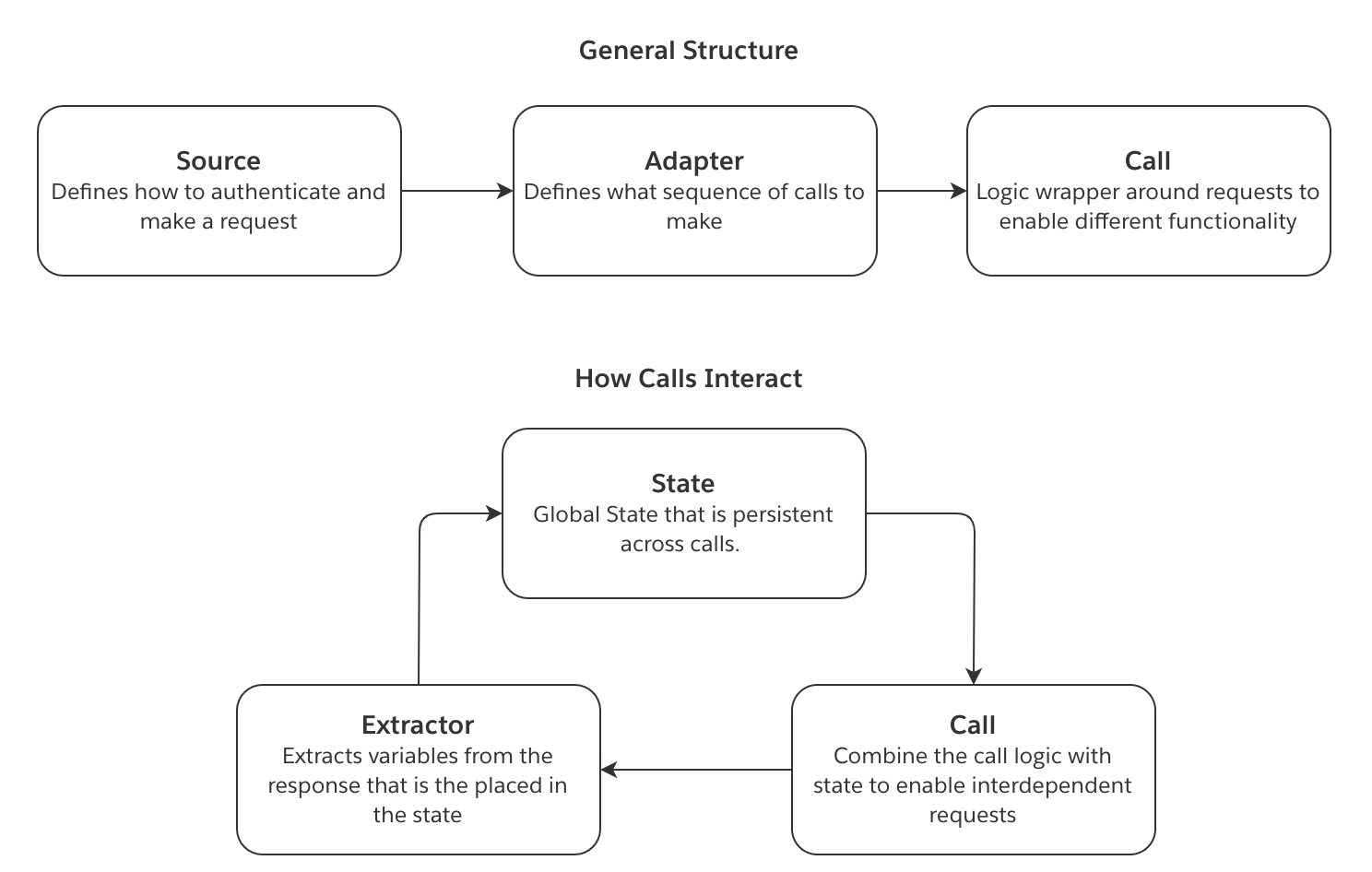
以下の概念は、magritte-rest-v2 ソースを使用する際の情報の流れを示しています。
- ソースは、接続を確立する方法を定義します。これには、リクエストの認証方法が含まれます。
- 同期は、呼び出しのリストで構成されます。各呼び出しは、送信するリクエストの種類を定義し、そのリクエストに必要なロジックを実装します。呼び出しは、単一の GET リクエストのような単純なものから、ページネーション用のリクエストのループのような複雑なものまであります。
- エクストラクターは、認証呼び出しと同期呼び出しの両方に対するレスポンスをパースする方法を定義します。同期呼び出しでは、レスポンスのフィールドを状態に保存できます。
- 生成された状態は、次の呼び出しに渡されます。この
state内の変数は、後続の呼び出しに注入できます。これにより、相互に依存するリクエストを実行できます。
この図は、上記の概念がどのように連携するかを示しています。
カスタム magritte-rest-v2 ソースを作成する
magritte-rest-v2 ソースを作成するには、Data Connection アプリケーションのソースタブから新規ソースを選択します。次に、カスタムソースを追加の選択肢を選択します。magritte-rest-v2 プラグインは、主に YAML エディターで設定します。
以下の例では、さまざまな認証の種類を設定するために必要な YAML コードスニペットを示します。
このドキュメントでは、次のトピックに関する追加のガイダンスも記載しています。
認証
ヘッダー
Copied!1 2 3 4 5 6 7type: magritte-rest-v2 sourceMap: my_api: type: magritte-rest headers: Authorization: 'Bearer {{token}}' url: "https://some-api.com/"
ユーザー名とパスワード
Basic 認証とも呼ばれます。
Copied!1 2 3 4 5 6type: magritte-rest-v2 sourceMap: my_api: type: magritte-rest usernamePassword: '{{username}}:{{password}}' url: "https://some-api.com/"
本文
Copied!1 2 3 4 5 6 7 8type: magritte-rest-v2 sourceMap: my_api: type: magritte-rest-auth-call-source url: "https://some-api.com/" requestMimeType: application/json body: '{"username": "{{username}}", "password": "{{password}}"}' authCalls: []
URL パラメーター
Copied!1 2 3 4 5 6 7 8 9type: magritte-rest-v2 sourceMap: my_api: type: magritte-rest-auth-call-source url: "https://some-api.com/" parameters: username: "{{username}}" password: "{{password}}" authCalls: []
呼び出し
次の設定では、URL エンコードされたフォーム本文を /auth エンドポイントに送信し、返されたトークンを同期で使用できます。エンドポイントがフォーム形式の場合にのみ formBody を使用してください。それ以外の場合は body を使用します。
Copied!1 2 3 4 5 6 7 8 9 10 11 12 13 14 15 16 17 18type: magritte-rest-v2 sourceMap: my_api: type: magritte-rest-auth-call-source url: "https://some-api.com/" headers: Authorization: 'Bearer {%token%}' authCalls: - type: magritte-rest-call path: /auth method: POST formBody: username: '{{username}}' password: '{{password}}' extractor: - type: magritte-rest-json-extractor assign: token: /token
同期が完了する前に返されたトークンの有効期限が頻繁に切れる場合は、authExpiration パラメーターを使用して、authCalls に含まれる呼び出しを再試行する頻度を指定します。authExpiration の値は、/auth エンドポイントから返されるトークンの有効期間以下に設定してください。
Copied!1 2 3 4 5 6 7 8 9 10 11 12 13 14 15 16 17 18 19type: magritte-rest-v2 sourceMap: my_api: type: magritte-rest-auth-call-source url: "https://some-api.com/" authExpiration: 30m headers: Authorization: 'Bearer {%token%}' authCalls: - type: magritte-rest-call path: /auth method: POST formBody: username: '{{username}}' password: '{{password}}' extractor: - type: magritte-rest-json-extractor assign: token: /token
API がログインの成功にサブスクリプションキーなどのセキュリティヘッダーを必要とする場合は、authCalls の下にヘッダーセクションを追加する必要があります。この2つ目のヘッダーセクションは認証呼び出し専用であり、最初のヘッダーセクションとは完全に独立しています。認証呼び出し以外のすべての API 呼び出しは、最初のヘッダーセクションを使用します。これらのヘッダーセクションが適切に設定されていないと、401 認証エラーが発生する可能性があります。以下に例を示します。
Copied!1 2 3 4 5 6 7 8 9 10 11 12 13 14 15 16 17 18 19 20 21 22 23type: magritte-rest-v2 sourceMap: my_api: type: magritte-rest-auth-call-source url: "https://some-api.com/" headers: X-service-identifier: SWN Authorization: 'Bearer {%token%}' Ocp-Apim-Subscription-Key: '{{subscriptionKey}}' authCalls: - type: magritte-rest-call path: /auth method: POST headers: X-service-identifier: SWN Ocp-Apim-Subscription-Key: '{{subscriptionKey}}' body: username: '{{username}}' password: '{{password}}' extractor: - type: magritte-rest-json-extractor assign: token: /token
別のドメインへの呼び出し
これにより、あるドメインで認証し、そのトークンを別のドメインで使用できます。
Copied!1 2 3 4 5 6 7 8 9 10 11 12 13 14 15 16 17 18 19 20 21 22type: magritte-rest-v2 sourceMap: auth_api: type: magritte-rest url: "https://auth.api.com" data_api: type: magritte-rest-auth-call-source url: "https://data-api.com/" headers: Authorization: 'Bearer {%token%}' authCalls: - type: magritte-rest-call source: auth_api path: /auth method: POST formBody: username: '{{username}}' password: '{{password}}' extractor: - type: magritte-rest-json-extractor assign: token: /token
クライアント証明書
ソースでは、認証用に Java KeyStore(JKS)ファイルを指定できます。
Copied!1 2 3 4 5 6 7type: magritte-rest-v2 sourceMap: my_api: type: magritte-rest url: "https://some-api.com/" keystorePath: "/my/keystore/keystore.jks" keystorePassword: "{{password}}"
NTLM
次の curl コマンド curl -v http://example.com/do.asmx --ntlm -u DOMAIN\\username:password は、以下のように表せます。
Copied!1 2 3 4 5 6type: magritte-rest-ntlm-source url: http://example.com user: "{{username}}" password: "{{password}}" domain: DOMAIN (optional) workstation: (optional) the name of your machine as given by $(hostname)
プロキシ
Copied!1 2 3 4 5 6type: magritte-rest-v2 sourceMap: my_api: type: magritte-rest url: http://example.com proxy: 'http://my-proxy:8888/' # IP アドレスも指定できます
設定でプロキシの資格情報を渡すこともできます。
Copied!1 2 3 4 5 6 7 8 9type: magritte-rest-v2 sourceMap: my_api: type: magritte-rest url: http://example.com proxy: url: 'http://my-proxy:8888/' # IP アドレスも指定できます username: 'my-proxy-username' password: 'my-proxy-password'
サーバー証明書の問題
javax.net.ssl.SSLHandshakeException のようなエラーが表示される場合は、このガイドに従って、Agent のトラストストアにサーバーの証明書を追加する必要がある可能性があります。
デバッグ目的に限り、証明書のチェックを無効にすることもできます。これは、安全性を保証しない -k フラグを付けて curl を実行すること(curl -k https://some-domain)に相当します。
Copied!1 2 3 4 5 6type: magritte-rest-v2 sourceMap: my_api: type: magritte-rest url: https://example.com insecure: true
TLS バージョン
デフォルトでは、プラグインは新しい TLS バージョン(TLSv1.2 および TLSv1.3)でのみ接続します。
古いバージョンを使用するには、設定で TLS バージョンを指定します。
Copied!1 2 3 4 5 6type: magritte-rest-v2 sourceMap: my_api: type: magritte-rest url: https://example.com tlsVersion: 'TLSv1.1'
サポートされているバージョン: TLSv1.3、TLSv1.2、TLSv1.1、TLSv1、SSLv3。
同期を作成する
同期を作成するには、magritte-rest-v2 ソースの上部にある「同期を作成」ボタンをクリックします。基本表示では、データを取得するための1回以上の呼び出しを作成する手順が案内されます。詳細表示では、YAML 設定を直接編集できます。ページの右上で、これらの表示を切り替えられます。
同期には1つ以上の呼び出しが必要です。基本表示では、「呼び出しを順番に実行」見出しの下にある「追加」ボタンをクリックして、新しい呼び出しを作成できます。
次に、「単一呼び出し」を選択して1回だけ呼び出すか、ループ、時間範囲、日付範囲、リスト、または結果のページングに基づいて複数回呼び出すかを指定できます。
各呼び出しにはパスが必要で、クエリ時にソース URL に追加されます。たとえば、ソースの URL が https://my-ap-source.com の場合、パスに /api/v1/get-documents を使用すると、呼び出しは https://my-ap-source.com/api/v1/get-documents にクエリを実行します。
このセクションでは、一般的なシナリオに対応する YAML 設定の一覧を示します。
このドキュメントでは、次のトピックに関する追加のガイダンスも提供します。
一般的なシナリオ
DateTime ベースの API
各日付の CSV レポートを /daily_data?date=2020-01-01 で提供する API を想定します。この例では、レポートが利用可能になった時点で取り込みたいとします。これを実現するには、レポートを同期した最後の日付を記憶する日次同期をスケジュールし、今日までの未同期の日付のレポートを自動的に取得できます。
Copied!1 2 3 4 5 6 7 8 9 10 11 12 13 14 15 16 17 18 19 20 21 22 23 24 25 26type: rest-source-adapter2 outputFileType: csv incrementalStateVars: incremental_date_to_query: '2020-01-01' initialStateVars: yesterday: type: magritte-rest-datetime-expression offset: '-P1D' timezone: UTC formatString: 'yyyy-MM-dd' restCalls: - type: magritte-increasing-date-param-call checkConditionFirst: true paramToIncrease: date_to_query increaseBy: P1D initValue: '{%incremental_date_to_query%}' stopValue: '{%yesterday%}' format: 'yyyy-MM-dd' method: GET path: '/daily_data' parameters: date: '{%date_to_query%}' extractor: - type: magritte-rest-string-extractor fromStateVar: 'date_to_query' var: 'incremental_date_to_query'
上記の設定を、同等の Python スニペットと比較すると役立つ場合があります。
Copied!1 2 3 4 5 6 7 8 9 10 11 12 13 14 15 16 17 18 19 20import requests from datetime import datetime, timedelta incremental_state = load_incremental_state() if incremental_state is None: incremental_state = {'incremental_date_to_query': '2020-01-01'} yesterday = datetime.utcnow() - timedelta(days=1) date_to_query = incremental_state['incremental_date_to_query'] date_to_query = datetime.strptime(date_to_query, '%Y-%m-%d') while yesterday >= date_to_query: response = requests.get(source.url + '/daily_data', params={ 'date': date_to_query.strftime('%Y-%m-%d') }) upload(response) date_to_query += timedelta(days=1) incremental_date_to_query = date_to_query save_incremental_state({'incremental_date_to_query': incremental_date_to_query})
ページベースの API
Copied!1 2 3 4 5 6 7 8 9 10 11 12 13 14 15 16 17 18 19type: rest-source-adapter2 outputFileType: json restCalls: - type: magritte-paging-inc-param-call paramToIncrease: page initValue: 0 increaseBy: 1 method: GET path: '/data' parameters: page: '{%page%}' entries_per_page: 1000 extractor: - type: magritte-rest-json-extractor assign: page_items: '/items' condition: type: magritte-rest-non-empty-condition var: page_items
開発者の方は、上記の設定を同等の Python スニペットと比較すると、理解しやすくなる場合があります。
Copied!1 2 3 4 5 6 7 8 9 10 11 12 13 14import requests page = 0 while True: response = requests.get(source.url + '/data', params={ 'page': page, 'entries_per_page': 1000 }) upload(response) page += 1 page_items = response.json().get('items') if not page_items: break
オフセットベースの API
次に、ElasticSearch の基本検索 API の例を示します。
Copied!1 2 3 4 5 6 7 8 9 10 11 12 13 14 15 16 17 18 19 20 21type: rest-source-adapter2 outputFileType: json restCalls: - type: magritte-paging-inc-param-call paramToIncrease: offset initValue: 0 increaseBy: 100 method: POST path: '/_search' body: |- { "from": {%offset%}, "size": 100 } extractor: - type: magritte-rest-json-extractor assign: hits: '/hits' condition: type: magritte-rest-non-empty-condition var: hits
次のページへのリンクベースの API
次のページのトークンは、カーソルトークン、継続トークン、またはページネーショントークンともよく呼ばれます。
次に、ElasticSearch の検索およびスクロール API の例を示します。
Copied!1 2 3 4 5 6 7 8 9 10 11 12 13 14 15 16 17 18 19 20 21 22 23 24 25 26 27 28type: rest-source-adapter2 outputFileType: json restCalls: - type: magritte-rest-call method: GET path: /my-es-index/_search?scroll=1m parameters: scroll: 1m extractor: - type: json assign: scroll_id: /_scroll_id - type: magritte-do-while-call method: GET checkConditionFirst: true path: /_search/scroll parameters: scroll: 1m scroll_id: '{%scroll_id%}' extractor: - type: json assign: scroll_id: /_scroll_id hits: /hits timeBetweenCalls: 0s condition: type: magritte-rest-non-empty-condition var: hits
次に、AWS の nextToken を使用したページネーション API の例を示します。
Copied!1 2 3 4 5 6 7 8 9 10 11 12 13 14 15 16 17 18 19 20 21 22 23 24 25 26 27 28 29 30 31type: rest-source-adapter2 outputFileType: json restCalls: - type: magritte-rest-call method: POST path: /findings/list extractor: - type: json assign: nextToken: /nextToken allowNull: false allowMissingField: true requestMimeType: application/json body: '{}' - type: magritte-do-while-call method: POST checkConditionFirst: true path: /findings/list extractor: - type: json assign: findings: /findings nextToken: /nextToken allowNull: false allowMissingField: true condition: type: magritte-rest-available-condition var: nextToken timeBetweenCalls: 0s requestMimeType: application/json body: '{"nextToken":"{%nextToken%}"}'
レポートの生成を開始してダウンロードする
次の sync は、相互に依存する3つのステップを必要とする API 用です。
- ID を含むレスポンスを返すエンドポイントに本文を POST します。
- レポートを取得するには、次のエンドポイントでこの ID を使用する必要があります。ただし、レポートはすぐには準備できないため、レスポンスにはレポートが完成したかどうかを示す
statusというフィールドが含まれます。 - レポートが完成したら、3つ目のエンドポイントからレポートを取得できます。
Copied!1 2 3 4 5 6 7 8 9 10 11 12 13 14 15 16 17 18 19 20 21 22 23 24 25 26 27 28 29 30 31 32 33type: rest-source-adapter2 outputFileType: json restCalls: - type: magritte-rest-call path: '/findRelevantId' method: POST requestMimeType: application/json extractor: - type: json assign: id: /id body: > body saveResponse: false - type: magritte-do-while-call path: '/reportReady' method: GET parameters: id: '{%id%}' extractor: - type: magritte-rest-json-extractor assign: status: /status condition: type: "magritte-rest-regex-condition" var: status matches: "(processing|queued)" timeBetweenCalls: 8s saveResponse: false - type: magritte-rest-call path: '/getReport/{%id%}' method: GET requestMimeType: application/json
エクストラクターは、状態に保存するフィールドを定義します。これらの変数は、それ以降のすべての REST 呼び出しで利用可能です。保存した変数を挿入するには、変数名を {%%} で囲みます。2つ目の do-while 呼び出しは、ステータス変数がキュー待機中でも処理中でもなくなるまでリクエストを送信するループを実装します。
一部の API には status エンドポイントがなく、代わりに getReport エンドポイントをポーリングする必要があります。このエンドポイントは、レポートの準備ができるまで空のレスポンスを返します。次の設定は、このようなシナリオに対応する方法を示します。
Copied!1 2 3 4 5 6 7 8 9 10 11 12 13 14 15type: rest-source-adapter2 outputFileType: json restCalls: - type: magritte-do-while-call path: '/getReport/{%id%}' method: GET extractor: - type: magritte-rest-string-extractor var: response condition: type: magritte-rest-not-condition condition: type: magritte-rest-non-empty-condition var: response timeBetweenCalls: 8s
また、レポートの準備ができるまで getReport エンドポイントが 204 ステータスコードを返す場合は、次のように対応できます。
Copied!1 2 3 4 5 6 7 8 9 10 11 12 13 14type: rest-source-adapter2 outputFileType: json restCalls: - type: magritte-do-while-call path: '/getReport/{%id%}' method: GET extractor: - type: magritte-rest-http-status-code-extractor assign: responseCode condition: type: magritte-rest-regex-condition var: responseCode matches: 204 timeBetweenCalls: 8s
インクリメンタル同期
このプラグインは、インクリメンタル同期をサポートしています。インクリメンタル同期を行うには、incrementalStateVars を指定して、同期のインクリメンタル state として保存する変数を state から選択します。
Copied!1 2 3type: rest-source-adapter2 incrementalStateVars: var_name: initial_value # インクリメンタルメタデータが見つからない場合に使用する初期値
Copied!1 2 3type: rest-source-adapter2 incrementalStateVars: lastModifiedDate: 20190101
保存されたインクリメンタル state は、同期の実行時に初期 state として使用されます。
より詳細な例:
Copied!1 2 3 4 5 6 7 8 9 10 11 12 13 14 15 16 17 18 19 20 21 22 23type: rest-source-adapter2 outputFileType: json incrementalStateVars: lastModifiedTime: 'Some initial start time' initialStateVars: # 現在の時刻を取得します currentTime: type: magritte-rest-datetime-expression timezone: 'Some timezone, e.g. Europe/Paris' formatString: 'Some format string https://docs.oracle.com/javase/8/docs/api/ \ java/time/format/DateTimeFormatter.html' restCalls: - type: magritte-rest-call path: /my/values method: GET parameters: from: '{%lastModifiedTime%}' until: '{%currentTime%}' extractor: # 最終更新時刻を現在の時刻に更新します - type: magritte-rest-string-extractor var: lastModifiedTime fromStateVar: currentTime
詳細ドキュメント
API ソースを2つ以上追加する場合は、各 REST 呼び出しで source 属性を使用して、使用するソースを指定する必要があります。
同期
同期設定には、次のフィールドが含まれます。
Copied!1 2 3 4 5 6 7 8 9type: rest-source-adapter2 restCalls: [calls] # 以下の Calls のドキュメントを参照してください initialStateVars: {variableName}: {variableValue} incrementalStateVars: {variableName}: {variableValue} outputFileType: json # oneFilePerResponse に必須です cacheToDisk: defaults to True oneFilePerResponse: defaults to True; when set to True "outputFileType" is required
outputFileType で出力ファイル形式を設定するには、oneFilePerResponse が true である必要があります。そうでない場合、レスポンスはデータセットの行として保存されます。レスポンスの種類に応じた推奨オプションについては、以下のレスポンスの保存を参照してください。
レスポンスの保存
バイナリレスポンス、またはレスポンスサイズの合計が 100 MB を超える場合に推奨します。
Copied!1 2 3cacheToDisk: true outputFileType: [any file format, e.g. txt, json, jpg] oneFilePerResponse: true # デフォルトのため、指定する必要はありません
数 MB までの非バイナリレスポンスで、レスポンスサイズの合計が 100 MB 未満の場合は、次を推奨します。
Copied!1 2cacheToDisk: false oneFilePerResponse: false
レスポンスがディスクに収まらないものの、同期の合計時間が短い(3分未満)場合は、次を推奨します。
Copied!1 2 3cacheToDisk: false oneFilePerResponse: true outputFileType: [any file format, e.g. txt, json, jpg]
呼び出し
基本の呼び出しフィールド
すべての呼び出しは、次のフィールドを含む基本 RestCall オブジェクトを継承します。
Copied!1 2 3 4 5 6 7 8 9 10 11 12 13 14 15 16 17 18 19 20 21 22 23 24 25 26 27 28type: Rest call type path: Endpoint method: GET | POST | PUT | PATCH # 以下はすべて任意です source: The API source to use for this call. # API ソースが複数ある場合は必須です。 parameters: Map of parameters to pass with request # デフォルトは空のマップです saveResponse: Should the response be saved in foundry # デフォルトは True です body: Body to post formBody: # x-www-form-urlencoded の POST で使用するパラメーターのマップです。 # 任意です。x-www-form-urlencoded エンドポイントを呼び出す場合にのみ、body の代わりに使用します。 param1: value1 requestMimeType: application/json headers: Request headers, these append to the source headers, but replace matching headers # validResponseCodes: 任意です。API 呼び出し元が処理を終了しない HTTP レスポンスコードの集合です。 # 設定しない場合、有効な HTTP レスポンスコードは 200、201、204 です。 validResponseCodes: - 200 - 201 - 204 # retries: デフォルトは0です。リクエストは、キャンセル、接続の問題、タイムアウトにより失敗する場合があります。 # この呼び出しによるリクエストごとに、必要な再試行回数を設定できます。 retries: 0 extractor: A list of extractor object, see Extractors # ファイル名のテンプレートです。例: 'data_{%page%}', # それ以外の場合、ファイル名は '[sourceName][path][parameters]' になります filename: '<dont override if not necessary>' addTimestampToFilename: Defaults to true, whether timestamp should be appended to filename
継承する呼び出しは、上記のフィールドに加えてフィールドを追加できます。
REST 呼び出し
Copied!1type: magritte-rest-call
1回のリクエストを実行します。基本の呼び出しと同じ YAML 設定を使用します。
インクリメンタルページング呼び出し
条件が満たされている間、パラメーターを増やしながら同じリクエストを実行します。ページングによく使用されます。増やすパラメーターをパスまたは parameters: セクションに含める場合、その値は {%paramToIncrease%} にする必要があります。
Copied!1 2 3 4 5 6 7 8 9 10 11type: magritte-paging-inc-param-call paramToIncrease: state key to param to increase. checkConditionFirst: when set to "true", equivalent to a while loop. When "false" (default) equivalent to do-while loop. initValue: Initial value of increasing parameter. increaseBy: How much to increase the parameter by in each iteration. onEach: List of calls to run in each iteration. Optional and used to do nested calls. condition: Condition object that keeps requests going. As long as the condition is true, a new request is created. The condition is checked only after the first request, so this acts similarly to a do-while loop. maxIterationsAllowed: How many iterations to run before throwing an error. timeBetweenCalls: (optional) time to wait between requests
インクリメンタル日付呼び出し
条件が満たされるまで、日付パラメーターを増やしながら同じリクエストを実行します。日付を順に処理するために使用します。LocalDate 型と Period 型を使用するため、利用可能な最小の増分は1日です。日付のみの照合でしか機能しません。より細かい単位で増やす必要がある場合は、`magritte-increasing-time-param-call`` を参照してください。
Copied!1 2 3 4 5 6 7 8 9type: magritte-increasing-date-param-call paramToIncrease: state key to param to increase. checkConditionFirst: when set to "true", equivalent to a while loop. When "false" (default) equivalent to do-while loop. initValue: Initial value of increasing parameter. increaseBy: How much to increase the parameter by in each iteration, parseable as a java.time.Period stopValue: The last date which will be used, including this value if applicable. format: The format (java.time.format.DateTimeFormatter) for the DateTime parameter in each call, the same as initValue and stopValue. timeBetweenCalls: (optional) time to wait between requests
インクリメンタル時間呼び出し
条件が満たされるまで、DateTime パラメーターを増やしながら同じリクエストを実行します。DateTime を順に処理するために使用します。 magritte-incrementing-date-param-call とは異なり、OffsetDateTime 型と Duration 型を使用する点に注意してください。 OffsetDateTime は、夏時間による変更を考慮しません。API による DateTime の処理で、これが予期しない欠落を引き起こさないことを確認してください。
Copied!1 2 3 4 5 6 7 8 9 10type: magritte-increasing-time-param-call paramToIncrease: state key to param to increase. checkConditionFirst: when set to "true", equivalent to a while loop. When "false" (default) equivalent to do-while loop. initValue: Initial value of increasing parameter. increaseBy: How much to increase the parameter by in each iteration, parseable as a java.time.Duration stopValue: The last DateTime which will be used, including this value if applicable. format: The format (java.time.format.DateTimeFormatter) for the DateTime parameter in each call, the same as initValue and stopValue. timeBetweenCalls: (optional) time to wait between requests
Do while
指定した条件が満たされなくなるまでリクエストを実行します。 基本の呼び出しフィールドに加えて、2つのフィールドを指定する必要があります。
Copied!1 2 3 4 5 6type: magritte-do-while-call timeBetweenCalls: time to wait between requests checkConditionFirst: when set to "true", equivalent to a while loop. When "false" (default) equivalent to do-while loop. condition: Condition object that keeps requests going. As long as the condition is true, a new request is created. maxIterationsAllowed: How many iterations to run before throwing an error. Defaults to 50.
必要に応じて、初期 state を指定し、最初の呼び出しをセットアップできます。
例:
Copied!1 2initialState: nextPage: ""
初期 state とインクリメンタル state が競合する場合、インクリメンタル state が初期状態を上書きします。
反復可能な状態の呼び出し
反復可能な state 要素内の各要素に対してリクエストを実行します。
Copied!1 2 3 4 5 6 7 8 9type: magritte-iterable-state-call timeBetweenCalls: 5s # 各呼び出しの間隔を制限します iterableField: The state key to iterate over. This variable must be iterable. iteratorExtractor: List of extractors to run on each element in the iterable. onEach: List of calls to run in each iteration. Optional and used to do nested calls. maxIterationsAllowed: How many iterations to run before throwing an error. Defaults to 50. parallelism: Integer number of threads to use for the sync. Assumptions/limitations include no side effect in request, no guarantee as to order that calls are made or their responses update state, no time between calls. This field is optional and defaults to 1.
エクストラクター
エクストラクターは、レスポンスまたは state 変数から状態に変数を保存する方法を定義します。URL、URL パラメーター、またはリクエスト本文で、state の変数を {%var_name_1%} として参照できます。
エクストラクターは、デフォルトではレスポンスから値を抽出します。必要に応じて fromStateVar 設定を追加すると、状態から抽出できます。これにより、たとえば次のように、異なるエクストラクターを順番に実行できます。
Copied!1 2 3 4 5 6 7 8 9 10 11 12 13 14 15type: rest-source-adapter2 outputFileType: csv restCalls: - type: magritte-rest-call path: /my/path/index.html source: mysource method: GET extractor: - type: magritte-rest-json-extractor assign: full_name: /my/field/full_name - type: magritte-rest-regexp-extractor fromStateVar: full_name assign: names: '\w+'
すべてのエクストラクターには、使用可能な条件チェックが組み込まれています。
Copied!1condition: Check whether the input state meets the given condition. If not, do not run the extractor.
JSON エクストラクター
すべての JSON エクストラクターは Jackson JsonNode ↗ を使用し、同じ表記法に従います。
フィールドを参照するための簡単なガイド:
JSON が {"id":1} の場合:
"/id"を使用すると、1が返されます。"/"を使用すると、{"id":1}が返されます。
[1,2,3] または [{"id":1},{"id":2}] のようなリストの場合:
""を使用すると、リストが返されます。
ワイルドカードを使用すると、リスト内のすべての項目の下位インデックスやフィールドを参照できます。たとえば、次のようになります。
{ "result": [[1], [2, 3, 4]] } のようなネストされたリストを含むフィールドの場合:
"/result/*/0"を使用すると、[1,2]が返されます。
{ "result": [{ "foo": 1}, {"foo": 2}]} のようなオブジェクトのリストを含むフィールドの場合:
"/result/*/foo"を使用すると、[1,2]が返されます。
JSON 代入エクストラクター
レスポンス内のフィールドをそのまま状態に格納するエクストラクターです。YAML の設定は、保存する変数のマップです。 左側の文字列は状態内の変数名で、右側の文字列は変数へのパスです。
JSON エクストラクターはワイルドカードをサポートします。JSON が [{"id":1}, {"id":2}] の場合、/*/id を使用すると [1,2] が返され、""(空の文字列)を使用するとリスト全体が返されます。
Copied!1 2 3 4type: json assign: var_name_1: /field-name1 var_name_2: /field_name2
デフォルトでは、抽出したフィールドの値が null の場合、またはフィールドが存在しない場合、呼び出しは失敗します。
これらの状況で呼び出しが失敗しないようにするために、次のフラグを利用できます。
allowMissingField:フィールドが存在しない場合、またはフィールドの値が null の場合でも失敗しないようにします。allowNull:存在するフィールドの値が null の場合でも失敗しないようにします。allowUnescapedControlChars:JSON レスポンスに
Copied!1 2 3 4 5type: json allowMissingField: true assign: var_name_1: /field-name1 var_name_2: /field_name2
JSON 追加エクストラクター
Copied!1 2 3 4type: magritte-rest-append-json-extractor appendFrom: /field in response that contains an array to append from appendFromItem: /field per array element to extract # 任意 appendTo: variable name in state to append elements to.
レスポンスが次のような場合:
Copied!1 2 3 4{ "things": [{"name": "dummy", "id": "1"}, {"name": "dummy2", "id": "2"}] }
次の YAML を使用すると:
Copied!1 2 3 4type: magritte-rest-append-json-extractor appendFrom: /things appendFromItem: /id appendTo: var
[1,2] が var に追加されます。
または、次のように指定できます。
Copied!1 2 3type: magritte-rest-append-json-extractor appendFrom: /things appendTo: var
この場合、[{"name": "dummy", "id": "1"}, {"name": "dummy", "id": "2"}] が state 変数に追加されます。
JSON 最大値エクストラクター
Copied!1 2 3 4 5type: magritte-rest-max-json-extractor list: /field in response that contains an array to max over. item: /field per array element to extract var: state variable to save the max value to. previousVal: state variable to get the current max value from# Optional
レスポンスが次のような場合:
Copied!1 2 3 4{ "things": [{"name": "dummy", "value": "1"}, {"name": "dummy2", "value": "2"}] }
次の YAML を使用すると:
Copied!1 2 3 4type: magritte-rest-max-json-extractor list: /things item: /id var: max_value
2 が max_value に保存されます。
一方、max_value にすでに値 5 が格納されている場合、次のように指定すると:
Copied!1 2 3 4 5type: magritte-rest-max-json-extractor list: /things item: /id var: max_value previousVal: max_value
max_value は 5 のままになります。
ストリーミング JSON 最終行エクストラクター
レスポンスの各行に JSON ファイルが含まれるストリーミング JSON(NDJSON)形式用のエクストラクターです。この形式は通常、データセットを返すために使用されるため、各行の JSON は同じ形式である必要があります。
このエクストラクターは、NDJSON ファイルの最終行にあるパスからの変数の抽出をサポートします。
Copied!1 2 3 4type: magritte-rest-last-streaming-json-extractor nodePath: /id # JSON が {'value':'somevalue', 'id':1} のような場合、1が抽出されます varName: id # 値を保存する状態変数の名前 saveNulls: false # null を変数に保存するか、スキップするかを指定します(デフォルト: false)
ストリーミング JSON 追加エクストラクター
このエクストラクターは、NDJSON ファイルの各行から変数を抽出して配列に格納することに加え、最後に出現した変数の抽出もサポートします。エクストラクターが null に遭遇すると(行がない場合、キーがない場合、またはキーの値が null の場合)、ループを停止します。
Copied!1 2 3 4 5 6type: magritte-rest-last-streaming-json-extractor nodePath: /id # JSON が {'value':'somevalue', 'id':1} のような場合、1が抽出されます arrayVarName: ids # 配列を保存する状態変数の名前 optional<lastVarName>: lastId # 配列の最後の値を保存する状態変数の名前 optional<limit>: 10 # パースする行数を制限します。lastVarName に加えてこれを使用し、 # iterableStateCall と組み合わせると、抽出の実行ごとの呼び出し回数を制限できます
XML エクストラクター
XML 代入エクストラクター
レスポンス内のフィールドをそのまま状態に格納するエクストラクターです。YAML の設定は、保存する変数のマップです。左側の文字列は状態内の変数名で、右側の文字列は XPath 表記法を使用した変数へのパスです。
Copied!1 2 3 4type: magritte-rest-xml-extractor assign: var_name_1: /top_level_tag/second_level_tag/text() var_name_2: /top_level_tag/text()
HTML エクストラクター
CSS セレクターを使用して HTML から抽出します(サポートされているセレクター構文 ↗)。抽出する属性を指定できます。空欄のままにすると、選択された要素のテキストが返されます。first が true の場合、エクストラクターは最初の要素を文字列または数値として返そうとします。このエクストラクターは、整形式でない XML にも使用できます。
Copied!1 2 3 4 5type: magritte-rest-html-extractor var: 'links' selector: "a[href$='pdf']" attribute: href # 任意 first: false # 任意。デフォルトは false です
この例では、.pdf で終わるアンカータグのハイパーメディア参照をすべて、文字列の配列として links 変数に保存します。
文字列エクストラクター
文字列エクストラクター
文字列を抽出し、定義された変数にその文字列を代入した新しい state を返します。
Copied!1 2type: magritte-rest-string-extractor var: 'variable_name'
部分文字列エクストラクター
state 内の変数から部分文字列を抽出し、別の状態に保存します。
Copied!1 2 3 4 5 6type: magritte-rest-substr-extractor start: 2 # 開始インデックス length: 5 # 任意。部分文字列の長さ(開始インデックスを含みます)。 # 設定しない場合、部分文字列は開始インデックス以降の文字列全体になります。 assign: var_to_save_substring_to # var: state_variable_to_substring - DEPRECATED, use fromStateVar instead!
正規表現エクストラクター
文字列から1つ以上の正規表現の一致部分を抽出するエクストラクターです。YAML の設定は、保存する変数のマップです。左側の文字列は状態内の変数名で、右側の文字列は照合する正規表現です。
Copied!1 2 3 4type: magritte-rest-regexp-extractor assign: var_name_1: (1(.*)3|a(.*)c) var_name_2: (NotInString)
入力の文字列が次のような場合:
abcHelloWorld123
レスポンスは次のようになります。
Copied!1 2 3 4{ "var_name_1": ["abc", "123"], "var_name_2": [] }
HTML から CSV リンクを抽出し、その CSV を取得する使用例全体を次に示します。
Copied!1 2 3 4 5 6 7 8 9 10 11 12 13 14 15 16 17 18 19 20 21 22type: rest-source-adapter2 outputFileType: csv restCalls: - type: magritte-rest-call path: /my/path/index.html source: mysource method: GET extractor: - type: magritte-rest-regexp-extractor assign: file_paths: '(?<=https://www\.mysite\.com)(.*filename.*csv)(?=\")' saveResponse: false - type: magritte-iterable-state-call source: mysource timeBetweenCalls: 1s iterableField: file_paths method: GET path: '{%path%}' saveResponse: true iteratorExtractor: - type: magritte-rest-string-extractor var: 'path'
正規表現置換エクストラクター
PySpark 関数 pyspark.sql.functions.regexp_replace と同様に、文字列内の1つの正規表現の一致部分を置換するエクストラクターです。
Copied!1 2 3 4type: magritte-rest-regexp-replace-extractor var: result # 結果の文字列で作成または上書きされる `state` 変数 pattern: "[a]" # 検索する正規表現 replacement: "A" # 正規表現に一致した部分を置き換える新しい文字列
配列操作
配列に追加する、または配列を拡張する
配列追加エクストラクターは、state 変数を受け取り、配列の末尾に追加します。このエクストラクターは、反復可能な state 呼び出しに渡すパスを収集する場合に便利です。
Copied!1 2 3type: magritte-rest-append-array-extractor appendTo: target # 対象が初期化されていない場合、エクストラクターが空の配列を初期化します。 fromStateVar: args # 単一の引数(append)またはコレクション(extend)を受け付けます
例全体を次に示します。
Copied!1 2 3 4 5 6 7 8 9 10 11 12 13 14 15 16 17 18 19 20 21 22 23 24 25 26 27 28 29 30type: rest-source-adapter2 restCalls: - type: magritte-paging-inc-param-call method: GET path: category paramToIncrease: page initValue: 0 increaseBy: 100 parameters: start_element: '{%page%}' num_elements: 100 extractor: - type: magritte-rest-json-extractor assign: res: /response/categories - type: magritte-rest-append-array-extractor fromStateVar: res appendTo: categories until: type: magritte-rest-non-empty-condition var: res - type: magritte-iterable-state-call method: GET path: 'category/{%category%}' timeBetweenCalls: 5s iterableField: categories iteratorExtractor: - type: magritte-rest-string-extractor var: category outputFileType: json
その他のエクストラクター
HTTP ステータスコードエクストラクター
レスポンスから HTTP ステータスコードを抽出します。
Copied!1 2type: magritte-rest-http-status-code-extractor assign: 'variable_name'
Set-Cookie レスポンスヘッダーエクストラクター
レスポンスの Set-Cookie ヘッダーから Cookie を抽出します。
Copied!1 2 3type: magritte-rest-set-cookie-header-extractor assign: var_name_1: cookie_name_in_set_cookie_header
配列要素エクストラクター
指定された配列から要素を抽出します。
Copied!1 2 3 4type: magritte-rest-array-element-extractor fromStateVar: Array var to extract an element from. index: The index of the element in the input array to extract. toStateVar: Name of the variable to extract the element to.
指定するインデックスパラメーターには負の値を使用して、配列の末尾を起点にできます。たとえば、-1 を指定すると最後の要素を抽出します。
型キャストエクストラクター
変数を受け取り、事前定義されたキャストロジックを使用して変数の型をキャストし、 結果を宛先変数に保存するエクストラクターです。
Copied!1 2 3 4type: magritte-rest-typecast-extractor fromStateVar: Input variable to the extractor. toStateVar: Output variable of the extractor. toType: Type of the output variable after casting.
toType パラメーターは、'java.lang.' パッケージ内の有効な Java データ型でなければなりません。
有効なデータ型には 'String' や 'Integer' があり、'java.lang.Double' のように 'java.lang' パッケージと名前を完全に指定することもできます。
型キャストを行うには、入力変数のデータ型を出力タイプにキャストするための事前定義されたメソッドが必要です。 つまり、設定されたデータ型との間で変数を変換するコードが、プラグイン内に存在する必要があります。
注:2つの文字列 a と b を含む java.util.Arrays を String にキャストすると [a, b] になります。一方、2つの文字列 a と b を含む com.fasterxml.jackson.databind.node.ArrayNode を String にキャストすると、JSON 配列の文字列表現である ["a","b"] になります。
条件
条件は ElasticSearch の条件と同様に動作します。現在サポートされている条件は次のとおりです。
正規表現
Copied!1 2 3type: magritte-rest-regex-condition var: a state variable key matches: a valid regular expression
例:
Copied!1 2 3type: "magritte-rest-regex-condition" var: my_state_variable matches: '^\d+$'
利用可能条件
指定された変数が利用可能かどうか(null 以外の値が代入されているかどうか)を確認します。
Copied!1 2type: magritte-rest-available-condition var: a state variable key
例:
Copied!1 2type: magritte-rest-available-condition var: my_state_variable
非空条件
指定された変数が利用可能で、空でないかどうかを確認します。
Copied!1 2type: magritte-rest-non-empty-condition var: a state variable key
例:
Copied!1 2type: magritte-rest-non-empty-condition var: my_array_state_variable
Not 条件
指定されたサブ条件を否定します。
Copied!1 2type: magritte-rest-not-condition condition: A condition to negate.
例:
Copied!1 2 3 4type: magritte-rest-not-condition condition: type: magritte-rest-available-condition var: my_state_variable
And 条件
指定されたサブ条件がすべて true であることを要求します。
Copied!1 2type: magritte-rest-and-condition conditions: A list of conditions to AND over.
例:
Copied!1 2 3 4 5 6type: magritte-rest-and-condition conditions: - type: magritte-rest-available-condition var: my_state_variable - type: magritte-rest-non-empty-condition var: my_array-state_variable
二項条件
Copied!1 2 3 4 5type: magritte-rest-binary-condition toCompare: left: `state` key to compare on the left side of condition right: `state` key to compare on the right side of condition op: One of the following "=", "<", ">", "<=", ">="
例:
Copied!1 2 3 4 5type: magritte-rest-binary-condition toCompare: left: a_state_variable right: another_state_variable op: <
式
式を使用すると、Magritte REST 同期中の任意の時点で特定の値を計算できます。エクストラクターとは異なり、式の結果は同期の state に依存しません。
DateTime 式
特定の日付や時刻を返す式です。まず現在の日付と時刻を取得し、指定されたオフセットを加算します。
この初期 state 変数のその他のパラメーター(たとえば、最上位の initialStateVars: ブロックに配置する必要があります):
Copied!1 2 3 4 5type: magritte-rest-datetime-expression offset: Optional. Time to add or subtract from the current date/time. Can be negative. timezone: Optional. Which timezone to calculate the date/time for. Defaults to UTC. formatString: Optional. Output format of the calculated date and time. Defaults to ISO 8601 datetime with offset.
有効なオフセットについては、Java 8 Duration ドキュメント ↗を参照してください。
有効なタイムゾーンについては、Java 8 ZoneId ドキュメント ↗を参照してください。
有効な出力形式の文字列については、Java 8 DateTimeFormatter ↗ を参照してください。
リテラル式
リテラル値を返す式です。
リテラルのデータ型は自動的に推論され、リテラル式のログで確認できます。現在サポートされているデータ型は、文字列、数値、およびリストです。
Copied!1 2type: magritte-rest-literal-expression literalValue: Required.
例:
Copied!1 2type: magritte-rest-literal-expression literalValue: 270
リストの例:
Copied!1 2type: magritte-rest-literal-expression literalValue: ["it's", "a", "kind", "of", "magic"]
Foundry で JSON を処理する
JSON データを取り込む場合:
Copied!1 2 3 4 5 6 7 8 9 10{ "response": { "size": 1000, "items": [ { "item id": 1, "status": { "modifiedAt": "2020-02-11" }, "com.palantir.metadata": { ... } }, { "item id": 2, "status": { "modifiedAt": "2020-02-12" }, "com.palantir.metadata": { ... } }, { "item id": 3, "status": { "modifiedAt": "2020-02-13" }, "com.palantir.metadata": { ... } } ] } }
magritte-rest-v2 プラグインでは、各 JSON レスポンスがデータセット内の個別のファイルとして保存されます。
このデータを簡単に処理するには、生データセットにスキーマを設定します。
{
  "fieldSchemaList": [
    {
      "type": "STRING",
      "name": "row",
      "nullable": null,
      "userDefinedTypeClass": null,
      "customMetadata": {},
      "arraySubtype": null,
      "precision": null,
      "scale": null,
      "mapKeyType": null,
      "mapValueType": null,
      "subSchemas": null
    }
  ],
  "dataFrameReaderClass": "com.palantir.foundry.spark.input.DataSourceDataFrameReader",
  "customMetadata": {
    "format": "text",
    "options": {}
  }
}
このデータセットをクレンジングし、各 item をデータセット内の個別の行、item のフィールドを列にするには、Python トランスフォームのリポジトリを作成します。
新しい utils/read_json.py ファイルに次のスニペットを追加します。
Copied!1 2 3 4 5 6 7 8 9 10 11 12 13 14 15 16 17 18 19 20 21 22 23 24 25 26 27 28 29 30 31 32 33 34 35 36 37 38 39 40 41 42 43from pyspark.sql import functions as F import json import re def flattenSchema(df, dontFlattenCols=[], jsonCols=[]): new_cols = [] for col in df.schema: _flattenSchema(col, [], new_cols, dontFlattenCols + jsonCols, jsonCols) print(new_cols) return df.select(new_cols) def _flattenSchema(field, path, cols, dontFlattenCols, jsonCols): curentPath = path + [field.name] currentPathStr = '.'.join(curentPath) if field.dataType.typeName() == 'struct' and currentPathStr not in dontFlattenCols: for field2 in field.dataType.fields: _flattenSchema(field2, curentPath, cols, dontFlattenCols, jsonCols) else: fullPath = '.'.join(['`{0}`'.format(col) for col in curentPath]) newName = '_'.join(curentPath) sanitized = re.sub('[ ,;{}()\n\t\\.]', '_', newName) if currentPathStr in jsonCols: cols.append(F.to_json(fullPath).alias(sanitized)) else: cols.append(F.col(fullPath).alias(sanitized)) def parse_json(df, node_path, spark): rdd = df.dataframe().rdd.flatMap(get_json_rows(node_path)) df = spark.read.json(rdd) return df def get_json_rows(node_path): def _get_json_object(row): parsed_json = json.loads(row[0]) node = parsed_json for segment in node_path: node = node[segment] return [json.dumps(x) for x in node] return _get_json_object
その後、次のようなコードで Python トランスフォームを作成できます。
Copied!1 2 3 4 5 6 7 8 9 10 11from transforms.api import transform, Input, Output from utils import read_json @transform( output=Output("/output"), json_raw=Input("/raw/json_files"), ) def my_compute_function(json_raw, output, ctx): df = read_json.parse_json(json_raw, ['response', 'items'], ctx.spark_session) df = read_json.flattenSchema(df, jsonCols=['com.palantir.metadata']) output.write_dataframe(df)
次のデータセットが作成されます。
item_id | status_modifiedAt | com_palantir_metadata
      1 |      "2020-02-11" | "{ ... }"
      2 |      "2020-02-12" | "{ ... }"
      3 |      "2020-02-13" | "{ ... }"