注: 以下の翻訳の正確性は検証されていません。AIPを利用して英語版の原文から機械的に翻訳されたものです。
Microsoft OneDrive
Microsoft OneDrive コネクターは、Microsoft OneDrive 用の Palantir 提供ドライバーです。
新しい Microsoft OneDrive ソースを作成するには、Palantir 提供ドライバーの標準セットアップフローに沿って進め、以下のセクションで Microsoft OneDrive 固有の設定とネットワーク設定を行います。プロパティの完全なリファレンスについては、Microsoft OneDrive ドライバーの公式ドキュメント ↗を参照してください。
Microsoft OneDrive コネクターは開発のベータ版段階にあり、お使いのエンロールメントでは利用できない場合があります。開発が活発に進められている間は、機能が変更される場合があります。
サポートされている機能
| 機能 | ステータス |
|---|---|
| 探索 | 🟡 ベータ版 |
| バッチ同期 | 🟡 ベータ版 |
| インクリメンタル(差分連携) | 🟡 ベータ版 |
| OAuth 2.0 認証 | 🟡 ベータ版 |
はじめに
Microsoft OneDrive コネクターは、Microsoft Graph を通じてファイル、フォルダー、ドライブ、アクセス許可、共有のメタデータを読み取ります。スケジュールに従って読み取るには、バッチ同期を使用して、選択したテーブルをデータセットに書き込みます。
ファイルをダウンロードするには、バッチ同期で DownloadFile ストアドプロシージャを呼び出します。または、OneDrive ソースをコード内で使用して、ファイルのダウンロード、アップロード、置き換えを行います。
認証
委任認証を通じてユーザーとして Microsoft OneDrive にアクセスするには、AuthScheme=AzureAD を設定します。
委任されたユーザー認証(AzureAD)
AuthScheme=AzureAD を設定すると、ソースは接続に権限を付与したユーザーとして Microsoft OneDrive にアクセスします。
- Microsoft Entra 管理センター ↗でアプリケーションを登録します。クライアントIDを記録し、クライアントシークレットを生成して、テナントIDまたはドメインを控えます。
- 必要なアクセスに応じて、
Files.Read.Allなどの委任された Microsoft Graph のファイルアクセス許可をアプリケーションに付与します。ユーザーがファイルを書き込む必要がある場合は、Files.ReadWrite.Allを追加します。テナントの同意ポリシーによっては、管理者による同意が必要になる場合があります。 - ソースを作成し、
AuthScheme=AzureAD、AzureTenant、OAuthClientId、OAuthClientSecret、InitiateOAuth=REFRESHを設定します。 - ソースが生成した
CallbackURLを、アプリケーションの Web リダイレクト URI としてコピーします。ソースを保存し、権限付与を選択して、ソースからアクセスする OneDrive のユーザーとしてサインインします。
データを読み取る
ソースエクスプローラーで利用可能なテーブルには、ファイルの内容ではなく、OneDrive のファイル、フォルダー、ドライブ、アクセス許可、共有に関するメタデータが含まれています。このメタデータをデータセットに読み込むには、テーブルを選択してバッチ同期を設定します。
ファイルをダウンロードする
ファイルをダウンロードするには、バッチ同期で DownloadFile ストアドプロシージャ ↗を使用するか、OneDrive ソースをコード内で使用します。
バッチ同期の場合は、次のクエリを同期定義に追加します。
Copied!1EXECUTE DownloadFile ResourceId = '1234'
出力データセットには、ファイルの内容が Base64 エンコードされた文字列として保存されます。下流のトランスフォームで、この文字列をバイナリにデコードします。
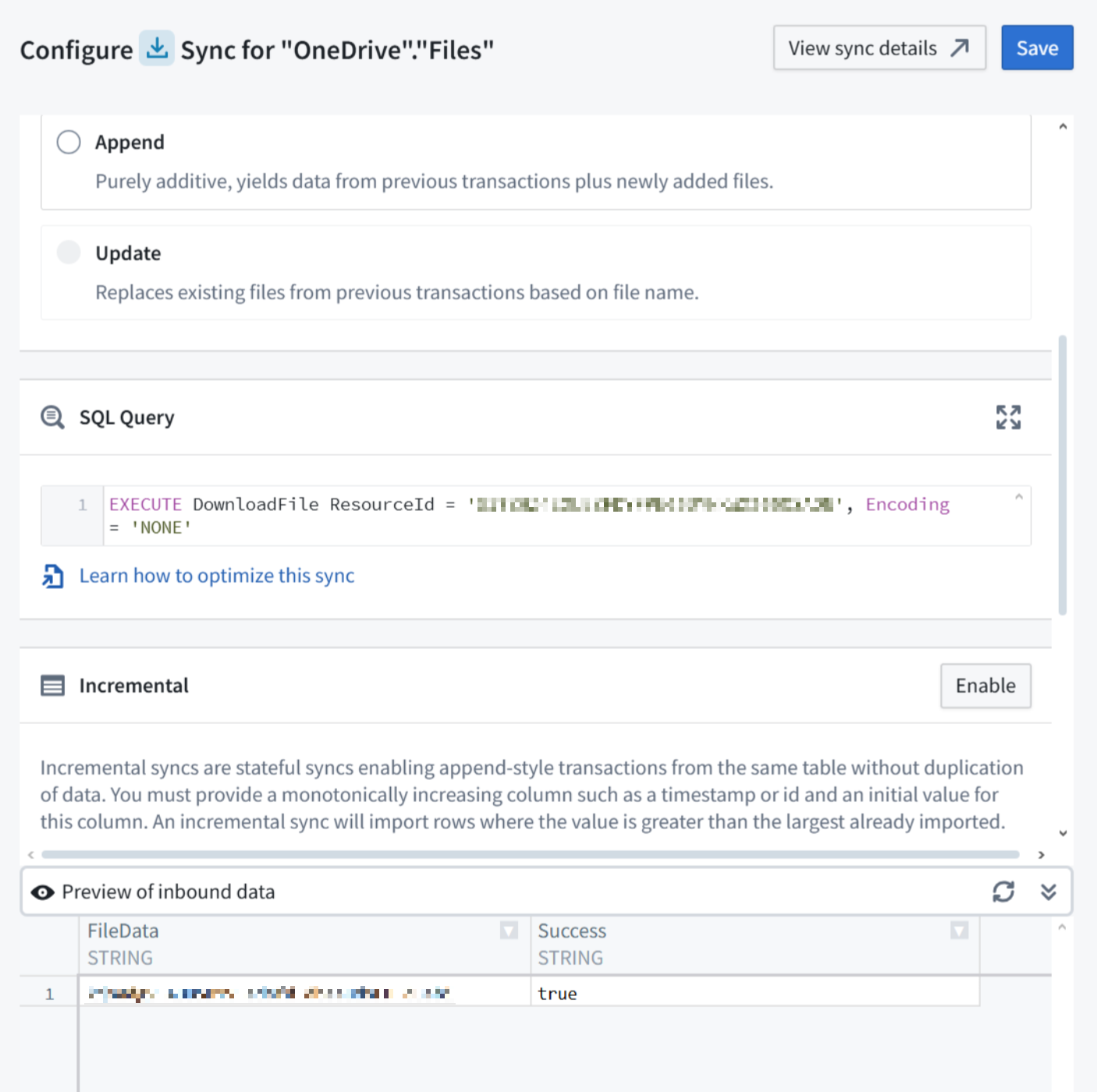
スクリーンショットでは Encoding='NONE' が設定されています。Base64 エンコードされたファイルの内容を受け取るには、上記のクエリと同様に Encoding を未設定のままにします。
設定
以下のプロパティは必須または推奨です。
| プロパティ | 必須かどうか | 説明 | デフォルト |
|---|---|---|---|
AuthScheme ↗ | 推奨 | Microsoft OneDrive への接続時に使用する認証の種類を指定します。このプロパティを空白のままにすると、デフォルトの認証が使用されます。 | AzureServicePrincipal |
AzureTenant ↗ | 推奨 | データへのアクセスに使用する Microsoft OneDrive テナントを、名前(例:contoso.onmicrosoft.com)または ID で識別します。(条件付き)。 | — |
InitiateOAuth ↗ | 推奨 | OAuth アクセストークンを取得または更新するプロセスを指定します。このトークンは、認証済みかつ権限付与済みのユーザーが作業している間、ユーザーのアクセスを維持します。 | GETANDREFRESH |
OAuthClientId ↗ | 推奨 | カスタム OAuth アプリケーションの作成時に割り当てられたクライアントIDを指定します。(コンシューマー鍵とも呼ばれます。)この ID によって、カスタムアプリケーションが OAuth 認可サーバーに登録されます。 | — |
OAuthClientSecret ↗ | 推奨 | カスタム OAuth アプリケーションの作成時に割り当てられたクライアントシークレットを指定します。(コンシューマーシークレットとも呼ばれます)。このシークレットによって、カスタムアプリケーションが OAuth 認可サーバーに登録されます。 | — |
ネットワーク
以下のテーブルは、ソースの実行にあたってアクセス可能である必要があるドメインの一覧です。
各ドメインに対応するエグレスポリシーを追加します。ソースがオンプレミスでホストされており、Foundry から直接アクセスできない場合は、代わりに Agent プロキシエグレスポリシーを使用します。Agent ホスト自体も、一覧にあるドメインにアクセスできる必要があります。詳細については、Agent をプロキシとして使用するを参照してください。
| ドメイン | 必須条件 |
|---|---|
| graph.microsoft.com | AzureEnvironment=GLOBAL(デフォルト)の場合 |
| login.microsoftonline.com | AuthScheme=AzureAD(デフォルト)、AzureServicePrincipal、AzureServicePrincipalCert のいずれかで、かつ AzureEnvironment=GLOBAL の場合 |
| microsoftgraph.chinacloudapi.cn | AzureEnvironment=CHINA の場合 |
| login.chinacloudapi.cn | AuthScheme=AzureAD(デフォルト)、AzureServicePrincipal、AzureServicePrincipalCert のいずれかで、かつ AzureEnvironment=CHINA の場合 |
| graph.microsoft.us | AzureEnvironment=USGOVT の場合 |
| login.microsoftonline.us | AuthScheme=AzureAD(デフォルト)、AzureServicePrincipal、AzureServicePrincipalCert のいずれかで、かつ AzureEnvironment=USGOVT または USGOVTDOD の場合 |
| dod-graph.microsoft.us | AzureEnvironment=USGOVTDOD の場合 |
OAuth 2.0 認証
このコネクターは OAuth 2.0 認証をサポートしています。Palantir 提供ドライバーの OAuth 2.0 ガイダンスに沿って、接続を設定し、権限を付与します。
データを書き込む
OneDrive のファイルをアップロードまたは置き換えるには、ソースを外部トランスフォームまたは外部関数にインポートします。次に、Microsoft OneDrive ソースをコード内で使用するに示すように Microsoft Graph を呼び出します。
書き込む前に、外部トランスフォームのエクスポート設定、または関数の外部 API アクセスのセットアップを完了してください。関数の場合は、マーキング検証なしでこのソースへのエクスポートを有効化も必要です。アプリケーションに書き込みに必要な Microsoft Graph のアクセス許可を付与します。
コードで Microsoft OneDrive ソースを使用する
以下の例では、OAuth クライアントシークレットを OAuthClientSecret に保存する OneDrive ソースが必要です。これらの例では、そのシークレットとソースの管理されたエグレスを再利用して、OAuth 2.0 クライアント資格情報フローを通じて有効期間の短いアプリケーショントークンをリクエストします。このコードパスは、コネクターのバッチ同期に使用される AuthScheme とは別です。
ワークフローに必要な Microsoft Graph のアプリケーション権限をアプリケーションに付与します。
- ファイルのダウンロード:
Files.Read.All。 - ファイルのアップロードまたは置換:
Files.ReadWrite.All。
選択した権限について、管理者が同意を付与する必要があります。
これらのコード例では、グローバル環境の Microsoft ID および Graph エンドポイントがハードコードされているため、AzureEnvironment=GLOBAL として設定されたソースでのみ使用してください。ソブリンクラウド環境に必要なエンドポイントはパラメーター化されていません。
ソースをコードリポジトリにインポートします。各プレースホルダーを、プロジェクトで使用するソース、テナント、アプリケーション、ドライブ、項目、宛先、出力ファイル、出力データセット、および想定されるダウンロードホストの値に置き換えます。ドライブIDと項目IDは、コネクターのファイル表示または Microsoft Graph から取得できます。
Graph およびサインインのホストに加えて、Microsoft Graph のダウンロードリダイレクト ↗で返されるテナント固有のホストを許可するように、ソースのエグレスポリシーを設定します。各読み取り例では、<expected_download_host> をその許可されたホスト名に設定します。TypeScript v1 の例では、OneDriveSource をソースのAPI名から生成された識別子に置き換えます。
Python の例では、requests ↗ パッケージを使用します。選択した Python の例を使用するために、このパッケージをリポジトリの依存関係に追加します。
データを読み取る
パイプラインは、ダウンロードしたバイトを非構造化データセットに追加します。Python 関数はバイトを直接返します。TypeScript 関数は同じバイトを Base64 として返します。
関数の例を実行する前に、ソースのエクスポートの有効化を含め、外部 API アクセスの設定を完了してください。この Foundry の要件は、OneDrive からファイルをダウンロードするだけの関数にも適用されます。
Copied!1 2 3 4 5 6 7 8 9 10 11 12 13 14 15 16 17 18 19 20 21 22 23 24 25 26 27 28 29 30 31 32 33 34 35 36 37 38 39 40 41 42 43 44 45 46 47 48 49 50 51 52 53 54 55 56 57 58 59 60 61 62 63 64from urllib.parse import quote, urlparse import requests from transforms.api import LightweightOutput, Output, transform from transforms.external.systems import ResolvedSource, Source, external_systems SOURCE_RID = "<source_rid>" TENANT_ID = "<tenant_id>" CLIENT_ID = "<client_id>" DRIVE_ID = "<drive_id>" ITEM_ID = "<item_id>" EXPECTED_DOWNLOAD_HOST = "<expected_download_host>" OUTPUT_FILE_NAME = "<output_file_name>" @external_systems(onedrive=Source(SOURCE_RID)) @transform.using(output=Output("<output_dataset_rid>")) def download_onedrive_file( onedrive: ResolvedSource, output: LightweightOutput, ) -> None: session = requests.Session() proxy = onedrive.get_https_proxy_uri() if proxy: session.proxies.update({"http": proxy, "https": proxy}) token_response = session.post( f"https://login.microsoftonline.com/{TENANT_ID}/oauth2/v2.0/token", data={ "client_id": CLIENT_ID, "client_secret": onedrive.get_secret("OAuthClientSecret"), "scope": "https://graph.microsoft.com/.default", "grant_type": "client_credentials", }, allow_redirects=False, ) token_response.raise_for_status() access_token = token_response.json()["access_token"] item_url = ( f"https://graph.microsoft.com/v1.0/drives/{quote(DRIVE_ID, safe='')}" f"/items/{quote(ITEM_ID, safe='')}/content" ) graph_response = session.get( item_url, headers={"Authorization": f"Bearer {access_token}"}, allow_redirects=False, ) if graph_response.is_redirect: location = graph_response.headers["Location"] download_url = urlparse(location) if ( download_url.scheme != "https" or (download_url.hostname or "").lower() != EXPECTED_DOWNLOAD_HOST.lower() ): raise RuntimeError("Microsoft Graph returned an unexpected download host.") file_response = session.get(location, allow_redirects=False) else: file_response = graph_response file_response.raise_for_status() with output.filesystem().open(OUTPUT_FILE_NAME, "wb") as output_file: output_file.write(file_response.content)
Copied!1 2 3 4 5 6 7 8 9 10 11 12 13 14 15 16 17 18 19 20 21 22 23 24 25 26 27 28 29 30 31 32 33 34 35 36 37 38 39 40 41 42 43 44 45 46 47 48 49 50 51 52 53 54from urllib.parse import quote, urlparse import requests from functions.api import function from functions.sources import get_source SOURCE_RID = "<source_rid>" TENANT_ID = "<tenant_id>" CLIENT_ID = "<client_id>" DRIVE_ID = "<drive_id>" EXPECTED_DOWNLOAD_HOST = "<expected_download_host>" @function(sources=[SOURCE_RID]) def download_onedrive_file(item_id: str) -> bytes: source = get_source(rid=SOURCE_RID) session = requests.Session() proxy = source.get_https_proxy_uri() if proxy: session.proxies.update({"http": proxy, "https": proxy}) token_response = session.post( f"https://login.microsoftonline.com/{TENANT_ID}/oauth2/v2.0/token", data={ "client_id": CLIENT_ID, "client_secret": source.get_secret("OAuthClientSecret"), "scope": "https://graph.microsoft.com/.default", "grant_type": "client_credentials", }, allow_redirects=False, ) token_response.raise_for_status() access_token = token_response.json()["access_token"] graph_response = session.get( f"https://graph.microsoft.com/v1.0/drives/{quote(DRIVE_ID, safe='')}" f"/items/{quote(item_id, safe='')}/content", headers={"Authorization": f"Bearer {access_token}"}, allow_redirects=False, ) if graph_response.is_redirect: location = graph_response.headers["Location"] download_url = urlparse(location) if ( download_url.scheme != "https" or (download_url.hostname or "").lower() != EXPECTED_DOWNLOAD_HOST.lower() ): raise RuntimeError("Microsoft Graph returned an unexpected download host.") file_response = session.get(location, allow_redirects=False) else: file_response = graph_response file_response.raise_for_status() return file_response.content
Copied!1 2 3 4 5 6 7 8 9 10 11 12 13 14 15 16 17 18 19 20 21 22 23 24 25 26 27 28 29 30 31 32 33 34 35 36 37 38 39 40 41 42 43 44 45 46 47 48 49 50 51 52 53 54 55 56 57 58 59 60 61 62 63 64 65 66 67 68import { ExternalSystems, Function, UserFacingError } from "@foundry/functions-api"; import { OneDriveSource } from "@foundry/external-systems/sources"; import { Buffer } from "buffer"; const TENANT_ID = "<tenant_id>"; const CLIENT_ID = "<client_id>"; const DRIVE_ID = "<drive_id>"; const EXPECTED_DOWNLOAD_HOST = "<expected_download_host>"; interface TokenResponse { access_token: string; } export class OneDriveReadFunctions { @ExternalSystems({ sources: [OneDriveSource] }) @Function() public async downloadOneDriveFile(itemId: string): Promise<string> { const tokenResponse = await OneDriveSource.fetch( `https://login.microsoftonline.com/${TENANT_ID}/oauth2/v2.0/token`, { method: "POST", headers: { "Content-Type": "application/x-www-form-urlencoded" }, body: new URLSearchParams({ client_id: CLIENT_ID, client_secret: OneDriveSource.getSecret("OAuthClientSecret"), scope: "https://graph.microsoft.com/.default", grant_type: "client_credentials", }).toString(), redirect: "manual", }, ); if (!tokenResponse.ok) { throw new UserFacingError(`Token request returned HTTP ${tokenResponse.status}.`); } const token = await tokenResponse.json() as TokenResponse; const graphResponse = await OneDriveSource.fetch( `https://graph.microsoft.com/v1.0/drives/${encodeURIComponent(DRIVE_ID)}` + `/items/${encodeURIComponent(itemId)}/content`, { method: "GET", headers: { Authorization: `Bearer ${token.access_token}` }, redirect: "manual", }, ); let fileResponse = graphResponse; if ([301, 302, 303, 307, 308].includes(graphResponse.status)) { const location = graphResponse.headers.get("location"); if (!location) { throw new UserFacingError("Microsoft Graph returned no download location."); } const downloadUrl = new URL(location); if (downloadUrl.protocol !== "https:" || downloadUrl.hostname.toLowerCase() !== EXPECTED_DOWNLOAD_HOST.toLowerCase()) { throw new UserFacingError("Microsoft Graph returned an unexpected download host."); } fileResponse = await OneDriveSource.fetch(location, { method: "GET", redirect: "manual", }); } if (!fileResponse.ok) { throw new UserFacingError(`Download returned HTTP ${fileResponse.status}.`); } return Buffer.from(await fileResponse.arrayBuffer()).toString("base64"); } }
Copied!1 2 3 4 5 6 7 8 9 10 11 12 13 14 15 16 17 18 19 20 21 22 23 24 25 26 27 28 29 30 31 32 33 34 35 36 37 38 39 40 41 42 43 44 45 46 47 48 49 50 51 52 53 54 55 56 57 58 59 60 61 62 63 64 65 66 67 68 69 70 71 72 73 74import { Buffer } from "node:buffer"; import { UserFacingError } from "@osdk/functions"; import { getFetch, getSource } from "@palantir/functions-sources"; const SOURCE_RID = "<source_rid>"; const TENANT_ID = "<tenant_id>"; const CLIENT_ID = "<client_id>"; const DRIVE_ID = "<drive_id>"; const EXPECTED_DOWNLOAD_HOST = "<expected_download_host>"; interface TokenResponse { access_token: string; } export const config = { apiName: "downloadOneDriveFileTsV2", sources: [SOURCE_RID], }; export default async function downloadOneDriveFile(itemId: string): Promise<string> { const source = await getSource(SOURCE_RID); const sourceFetch = await getFetch(source); const clientSecret = source.secrets["OAuthClientSecret"]; if (!clientSecret) { throw new UserFacingError("The OneDrive source has no OAuth client secret."); } const tokenResponse = await sourceFetch( `https://login.microsoftonline.com/${TENANT_ID}/oauth2/v2.0/token`, { method: "POST", headers: { "Content-Type": "application/x-www-form-urlencoded" }, body: new URLSearchParams({ client_id: CLIENT_ID, client_secret: clientSecret, scope: "https://graph.microsoft.com/.default", grant_type: "client_credentials", }).toString(), redirect: "manual", }, ); if (!tokenResponse.ok) { throw new UserFacingError(`Token request returned HTTP ${tokenResponse.status}.`); } const token = await tokenResponse.json() as TokenResponse; const graphResponse = await sourceFetch( `https://graph.microsoft.com/v1.0/drives/${encodeURIComponent(DRIVE_ID)}` + `/items/${encodeURIComponent(itemId)}/content`, { method: "GET", headers: { Authorization: `Bearer ${token.access_token}` }, redirect: "manual", }, ); let fileResponse = graphResponse; if ([301, 302, 303, 307, 308].includes(graphResponse.status)) { const location = graphResponse.headers.get("location"); if (!location) { throw new UserFacingError("Microsoft Graph returned no download location."); } const downloadUrl = new URL(location); if (downloadUrl.protocol !== "https:" || downloadUrl.hostname.toLowerCase() !== EXPECTED_DOWNLOAD_HOST.toLowerCase()) { throw new UserFacingError("Microsoft Graph returned an unexpected download host."); } fileResponse = await sourceFetch(location, { method: "GET", redirect: "manual" }); } if (!fileResponse.ok) { throw new UserFacingError(`Download returned HTTP ${fileResponse.status}.`); } return Buffer.from(await fileResponse.arrayBuffer()).toString("base64"); }
データを書き込む
各例では、PUT を使用して Microsoft Graph のシンプルアップロードを実行し、アップロードした項目の ID を返します。
これらの例は、宛先パスに既存のファイルがある場合、その内容を上書きします。宛先は慎重に選択し、新しいファイルを作成するには未使用のパスを使用してください。結果が不明な場合、再試行する前にアップロードに成功したかどうかを確認してください。
アプリケーション認証では、秘密度ラベルが付いたファイルを置換できません。その場合は、委任されたユーザーのワークフローを使用してください。
Copied!1 2 3 4 5 6 7 8 9 10 11 12 13 14 15 16 17 18 19 20 21 22 23 24 25 26 27 28 29 30 31 32 33 34 35 36 37 38 39 40 41 42 43 44 45 46 47 48 49 50 51 52 53 54 55 56 57import json from urllib.parse import quote import requests from transforms.api import LightweightOutput, Output, transform from transforms.external.systems import ResolvedSource, Source, external_systems SOURCE_RID = "<source_rid>" TENANT_ID = "<tenant_id>" CLIENT_ID = "<client_id>" DRIVE_ID = "<drive_id>" DESTINATION_PATH = "<new_destination_path>" UPLOAD_CONTENT = b"OneDrive upload from a Foundry Python transform.\n" @external_systems(onedrive=Source(SOURCE_RID)) @transform.using(output=Output("<output_dataset_rid>")) def upload_onedrive_file( onedrive: ResolvedSource, output: LightweightOutput, ) -> None: session = requests.Session() proxy = onedrive.get_https_proxy_uri() if proxy: session.proxies.update({"http": proxy, "https": proxy}) token_response = session.post( f"https://login.microsoftonline.com/{TENANT_ID}/oauth2/v2.0/token", data={ "client_id": CLIENT_ID, "client_secret": onedrive.get_secret("OAuthClientSecret"), "scope": "https://graph.microsoft.com/.default", "grant_type": "client_credentials", }, allow_redirects=False, ) token_response.raise_for_status() access_token = token_response.json()["access_token"] encoded_path = "/".join(quote(segment, safe="") for segment in DESTINATION_PATH.split("/")) response = session.put( f"https://graph.microsoft.com/v1.0/drives/{quote(DRIVE_ID, safe='')}" f"/root:/{encoded_path}:/content", headers={ "Authorization": f"Bearer {access_token}", "Content-Type": "text/plain; charset=utf-8", }, data=UPLOAD_CONTENT, allow_redirects=False, ) response.raise_for_status() result = response.json() with output.filesystem().open("upload-result.json", "wb") as output_file: output_file.write( json.dumps({"itemId": result["id"], "fileName": result["name"]}).encode() )
Copied!1 2 3 4 5 6 7 8 9 10 11 12 13 14 15 16 17 18 19 20 21 22 23 24 25 26 27 28 29 30 31 32 33 34 35 36 37 38 39 40 41 42 43 44 45 46 47 48from urllib.parse import quote import requests from functions.api import function from functions.sources import get_source SOURCE_RID = "<source_rid>" TENANT_ID = "<tenant_id>" CLIENT_ID = "<client_id>" DRIVE_ID = "<drive_id>" UPLOAD_CONTENT = b"OneDrive upload from a Foundry Python Function.\n" @function(sources=[SOURCE_RID]) def upload_onedrive_file(destination_path: str) -> str: source = get_source(rid=SOURCE_RID) session = requests.Session() proxy = source.get_https_proxy_uri() if proxy: session.proxies.update({"http": proxy, "https": proxy}) token_response = session.post( f"https://login.microsoftonline.com/{TENANT_ID}/oauth2/v2.0/token", data={ "client_id": CLIENT_ID, "client_secret": source.get_secret("OAuthClientSecret"), "scope": "https://graph.microsoft.com/.default", "grant_type": "client_credentials", }, allow_redirects=False, ) token_response.raise_for_status() access_token = token_response.json()["access_token"] encoded_path = "/".join(quote(segment, safe="") for segment in destination_path.split("/")) response = session.put( f"https://graph.microsoft.com/v1.0/drives/{quote(DRIVE_ID, safe='')}" f"/root:/{encoded_path}:/content", headers={ "Authorization": f"Bearer {access_token}", "Content-Type": "text/plain; charset=utf-8", }, data=UPLOAD_CONTENT, allow_redirects=False, ) response.raise_for_status() return response.json()["id"]
Copied!1 2 3 4 5 6 7 8 9 10 11 12 13 14 15 16 17 18 19 20 21 22 23 24 25 26 27 28 29 30 31 32 33 34 35 36 37 38 39 40 41 42 43 44 45 46 47 48 49 50 51 52 53 54 55 56 57 58 59 60 61 62 63import { ExternalSystems, Function, UserFacingError } from "@foundry/functions-api"; import { OneDriveSource } from "@foundry/external-systems/sources"; import { Buffer } from "buffer"; const TENANT_ID = "<tenant_id>"; const CLIENT_ID = "<client_id>"; const DRIVE_ID = "<drive_id>"; const UPLOAD_CONTENT = Buffer.from( "OneDrive upload from a Foundry TypeScript v1 Function.\n", "utf8", ); interface TokenResponse { access_token: string; } interface UploadResult { id: string; } export class OneDriveWriteFunctions { @ExternalSystems({ sources: [OneDriveSource] }) @Function() public async uploadOneDriveFile(destinationPath: string): Promise<string> { const tokenResponse = await OneDriveSource.fetch( `https://login.microsoftonline.com/${TENANT_ID}/oauth2/v2.0/token`, { method: "POST", headers: { "Content-Type": "application/x-www-form-urlencoded" }, body: new URLSearchParams({ client_id: CLIENT_ID, client_secret: OneDriveSource.getSecret("OAuthClientSecret"), scope: "https://graph.microsoft.com/.default", grant_type: "client_credentials", }).toString(), redirect: "manual", }, ); if (!tokenResponse.ok) { throw new UserFacingError(`Token request returned HTTP ${tokenResponse.status}.`); } const token = await tokenResponse.json() as TokenResponse; const encodedPath = destinationPath.split("/").map(encodeURIComponent).join("/"); const response = await OneDriveSource.fetch( `https://graph.microsoft.com/v1.0/drives/${encodeURIComponent(DRIVE_ID)}` + `/root:/${encodedPath}:/content`, { method: "PUT", headers: { Authorization: `Bearer ${token.access_token}`, "Content-Type": "text/plain; charset=utf-8", }, body: UPLOAD_CONTENT, redirect: "manual", }, ); if (!response.ok) { throw new UserFacingError(`Upload returned HTTP ${response.status}.`); } return (await response.json() as UploadResult).id; } }
Copied!1 2 3 4 5 6 7 8 9 10 11 12 13 14 15 16 17 18 19 20 21 22 23 24 25 26 27 28 29 30 31 32 33 34 35 36 37 38 39 40 41 42 43 44 45 46 47 48 49 50 51 52 53 54 55 56 57 58 59 60 61 62 63 64 65 66 67 68 69 70 71 72import { Buffer } from "node:buffer"; import { UserFacingError } from "@osdk/functions"; import { getFetch, getSource } from "@palantir/functions-sources"; const SOURCE_RID = "<source_rid>"; const TENANT_ID = "<tenant_id>"; const CLIENT_ID = "<client_id>"; const DRIVE_ID = "<drive_id>"; const UPLOAD_CONTENT = Buffer.from( "OneDrive upload from a Foundry TypeScript v2 Function.\n", "utf8", ); interface TokenResponse { access_token: string; } interface UploadResult { id: string; } export const config = { apiName: "uploadOneDriveFileTsV2", sources: [SOURCE_RID], }; export default async function uploadOneDriveFile(destinationPath: string): Promise<string> { const source = await getSource(SOURCE_RID); const sourceFetch = await getFetch(source); const clientSecret = source.secrets["OAuthClientSecret"]; if (!clientSecret) { throw new UserFacingError("The OneDrive source has no OAuth client secret."); } const tokenResponse = await sourceFetch( `https://login.microsoftonline.com/${TENANT_ID}/oauth2/v2.0/token`, { method: "POST", headers: { "Content-Type": "application/x-www-form-urlencoded" }, body: new URLSearchParams({ client_id: CLIENT_ID, client_secret: clientSecret, scope: "https://graph.microsoft.com/.default", grant_type: "client_credentials", }).toString(), redirect: "manual", }, ); if (!tokenResponse.ok) { throw new UserFacingError(`Token request returned HTTP ${tokenResponse.status}.`); } const token = await tokenResponse.json() as TokenResponse; const encodedPath = destinationPath.split("/").map(encodeURIComponent).join("/"); const response = await sourceFetch( `https://graph.microsoft.com/v1.0/drives/${encodeURIComponent(DRIVE_ID)}` + `/root:/${encodedPath}:/content`, { method: "PUT", headers: { Authorization: `Bearer ${token.access_token}`, "Content-Type": "text/plain; charset=utf-8", }, body: UPLOAD_CONTENT, redirect: "manual", }, ); if (!response.ok) { throw new UserFacingError(`Upload returned HTTP ${response.status}.`); } return (await response.json() as UploadResult).id; }