注: 以下の翻訳の正確性は検証されていません。AIPを利用して英語版の原文から機械的に翻訳されたものです。
Spark サイドカートランスフォーム
Spark サイドカートランスフォームを使用すると、Spark とトランスフォームが提供する既存のインフラストラクチャを活用しながら、コンテナ化したコードをデプロイできます。
コードをコンテナ化すると、任意のコードと依存関係をパッケージ化して Foundry で実行できます。コンテナ化のワークフローはトランスフォームと統合されているため、スケジュール、ブランチ、データヘルスのすべてがシームレスに統合されます。コンテナ化したロジックは Spark エグゼキューターと並行して実行されるため、入力データに合わせてスケールできます。
つまり、コンテナ内で実行できるロジックであれば、Foundry でデータの処理、生成、利用に使用できます。
コンテナ化の概念に詳しい場合は、以下のセクションで Spark サイドカートランスフォームの使用方法を確認できます。
前提条件
このページは、以下について実務で使用できる知識があることを前提としています。
アーキテクチャ
Foundry のトランスフォームでは、以下の図のように Spark ドライバーを使用して複数のエグゼキューターに処理を分散し、データセットとの間でデータを送受信できます。
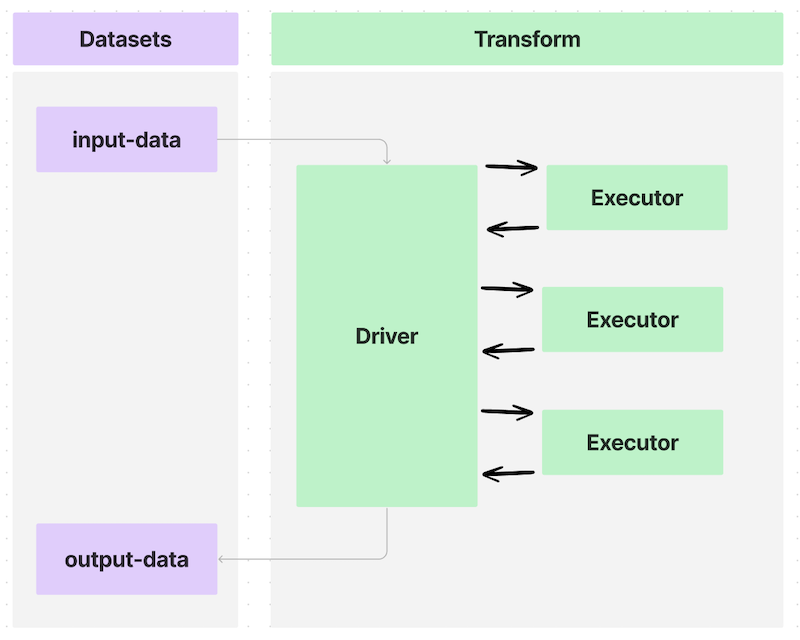
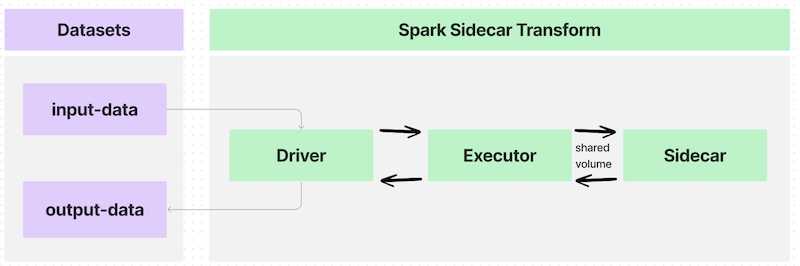
@sidecar デコレーター(transforms-sidecar ライブラリで提供)でトランスフォームにアノテーションを付けると、PySpark トランスフォームの各エグゼキューターと並行して起動するコンテナを、ちょうど1個指定できます。カスタムロジックを組み込んでユーザーが用意し、各エグゼキューターとともに実行されるこのコンテナを、サイドカーコンテナと呼びます。
エグゼキューターが1個の単純なユースケースでは、データフローは次のようになります。
入力データセットを多数のエグゼキューターにパーティション分割するトランスフォームを記述した場合、データフローは次のようになります。
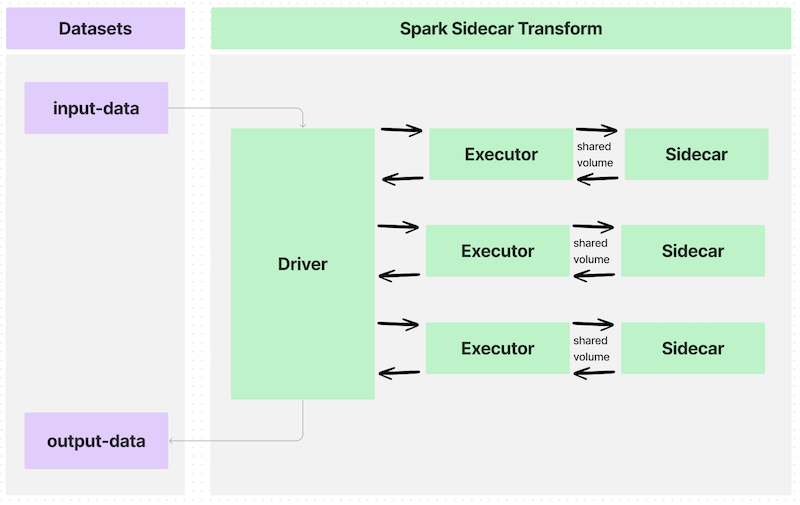
各エグゼキューターとサイドカーコンテナ間のインターフェースは共有ボリューム、つまりディレクトリで、次のような情報をやり取りします。
- コンテナ化したロジックの実行を開始するタイミング
- コンテナ内で処理する入力データ
- コンテナから取り出す出力データ
- コンテナ化したロジックの実行を終了するタイミング
これらの共有ボリュームは、@sidecar デコレーターの Volume 引数を使用して指定し、パス /opt/palantir/sidecars/shared-volumes/ 内のサブフォルダーになります。
以降のセクションでは、Spark サイドカートランスフォームの準備と記述の手順を説明します。
イメージをビルドする
Spark サイドカートランスフォームに対応するイメージをビルドするには、イメージがイメージの要件を満たしている必要があります。また、以下で説明し、サンプルの Docker イメージにも含まれている重要なコンポーネントを、イメージに含める必要があります。このサンプルイメージをビルドするには、Python スクリプト entrypoint.py が必要です。
ローカルコンピューターに Docker がインストールされており、docker CLI コマンドを使用できる必要があります(公式ドキュメント ↗)。
イメージをプッシュする
イメージをプッシュするには、新しいアーティファクトリポジトリを作成し、手順に従ってイメージにタグを付け、該当する Docker リポジトリにプッシュします。
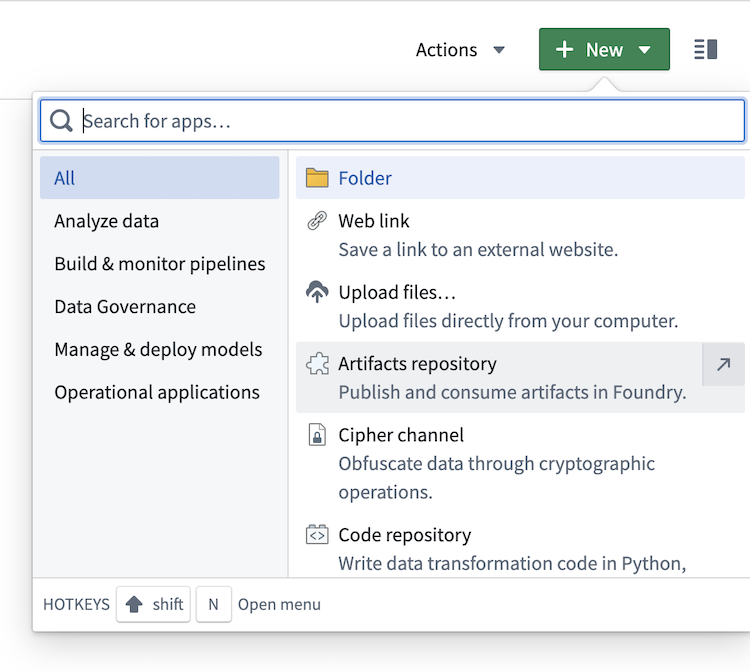
- 種類を
Dockerに変更します。
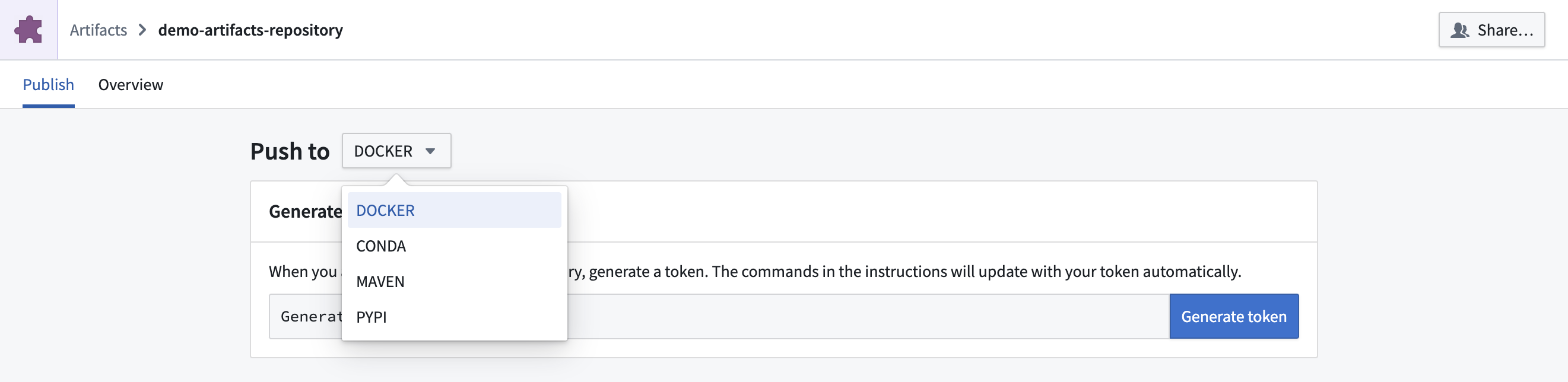
- 画面の指示に従ってトークンを生成します。
- 次のコマンド形式でサンプルイメージをビルドします:
docker build . --tag <container_registry>/<image_name>:<image_tag> --platform linux/amd64。各値は次のとおりです。container_registryは Foundry インスタンスのコンテナレジストリのアドレスを表します。このアドレスは、Docker イメージをアーティファクトリポジトリにプッシュする手順の最後のコマンド内で確認できます。image_nameとimage_tagは任意に設定できます。この例ではsimple_example:0.0.1を使用します。
- アーティファクトリポジトリの手順をコピーして貼り付け、ローカルでビルドしたイメージをプッシュします。最後のコマンドの
<image_name>:<image_version>を、上記のイメージのビルド手順で使用したimage_nameとimage_versionに置き換えてください。
Spark サイドカートランスフォームを記述する
- Code Repositories アプリケーションで、Python データトランスフォームリポジトリを作成します。
- 左側のライブラリタブで、
transforms-sidecarを追加し、変更をコミットします。 - 設定 > ライブラリで、アーティファクトリポジトリを追加します。
- トランスフォームを記述します。
例1:サーバーとして実行されるサイドカー
Dockerfile
ローカルコンピューター上のフォルダーで、Dockerfile という名前のファイルに以下の内容を追加します。
Copied!1 2 3 4 5 6 7 8 9 10 11 12 13 14 15 16 17 18 19 20 21 22# Docker Hub の公式 Python イメージを使用します FROM python:3.8-slim # 作業ディレクトリを設定します WORKDIR /usr/src/app # アプリケーションの依存関係マニフェストをコピーします COPY requirements.txt ./ # アプリケーションの依存関係をインストールします RUN pip install --no-cache-dir -r requirements.txt # アプリケーションコードをコピーします COPY . . # アプリが実行されるポートを公開します EXPOSE 1234 # アプリケーションを実行します CMD ["python", "app.py"] USER 1234
同じフォルダーに requirements.txt という名前の新しいファイルを追加し、必要な Python の依存関係を記載します。
flask
サーバーロジック
Dockerfile と同じローカルフォルダーで、以下のコードスニペットを app.py という名前のファイルにコピーします。
Copied!1 2 3 4 5 6 7 8 9 10from flask import Flask app = Flask(__name__) @app.route('/hello') def hello(): return 'Hello World' if __name__ == '__main__': app.run(host='0.0.0.0', port=1234)
サーバーロジック
Foundry の Python コードリポジトリで、以下のサンプルトランスフォームを記述し、サイドカーの /hello エンドポイントを呼び出してレスポンスを出力に保存します。
Copied!1 2 3 4 5 6 7 8 9 10 11 12 13 14 15 16 17import requests from transforms.api import Output, transform_df from transforms.sidecar import sidecar @sidecar(image='simple-example', tag='0.0.1') @transform_df( Output("<output dataset rid>"), ) def compute(ctx): response = requests.get('http://localhost:1234/hello') data = [(response.text,)] columns = ["response_text"] return ctx.spark_session.createDataFrame(data, columns)
例2:CLI をラップするサイドカー
Dockerfile
ローカルコンピューター上のフォルダーで、Dockerfile という名前のファイルに次の内容を追加します。
Copied!1 2 3 4 5 6 7 8 9 10 11 12FROM fedora:38 ADD entrypoint.py /usr/bin/entrypoint RUN chmod +x /usr/bin/entrypoint RUN mkdir -p /opt/palantir/sidecars/shared-volumes/shared/ RUN chown 5001 /opt/palantir/sidecars/shared-volumes/shared/ ENV SHARED_DIR=/opt/palantir/sidecars/shared-volumes/shared USER 5001 ENTRYPOINT entrypoint -c "dd if=$SHARED_DIR/infile.csv of=$SHARED_DIR/outfile.csv"
カスタマイズした Dockerfile
上記のように独自の Dockerfile を作成できますが、必ず次の点に対応してください。
-
10行目で数値の非 root ユーザーを指定します。これはイメージ要件の1つであり、コンテナに特権実行を許可しない適切なセキュリティ態勢を維持するのに役立ちます。
-
6~8行目に共有ボリュームの作成処理を配置します。上記のアーキテクチャのセクションで説明したように、
/opt/palantir/sidecars/shared-volumes/内のサブディレクトリである共有ボリュームは、PySpark トランスフォームからサイドカーコンテナに入力データと出力データを共有する主要な方法です。- 6行目でディレクトリを作成します。
- 7行目で、作成したユーザーにディレクトリへのアクセス権限を付与します。
- 8行目で、この共有ディレクトリへのパスを環境変数として保存し、ほかの場所から参照できるようにします。
-
3行目でシンプルな
entrypointスクリプトをコンテナに追加し、12行目でENTRYPOINTとして設定します。Spark サイドカートランスフォームには、コンテナの起動前に入力データが利用可能になるまで待機するようサイドカーコンテナに指示する機能が標準ではないため、この手順は重要です。また、サイドカートランスフォームは、出力データがコピーされるまで実行状態を維持して待機するようコンテナに指示することもありません。ここで示すentrypointスクリプトは Python を使用し、指定されたロジックを実行する前に、共有ボリュームにstart_flagファイルが書き込まれるまで待機するようコンテナに指示します。指定されたロジックが完了すると、同じディレクトリにdone_flagを書き込みます。コンテナは、共有ボリュームにclose_flagが書き込まれるまで待機してから、自身を停止し、自動的にクリーンアップされます。
上記の例に示すように、コンテナ化されたロジックは POSIX Disk Dump(dd)ユーティリティを使用して、共有ディレクトリ内の入力 CSV ファイルを、同じディレクトリに保存される出力ファイルにコピーします。entrypoint スクリプトに渡されるこの「コマンド」には、コンテナ内で実行できる任意のロジックを使用できます。
エントリーポイント
Dockerfile と同じローカルフォルダーで、次のコードスニペットを entrypoint.py という名前のファイルにコピーします。
Copied!1 2 3 4 5 6 7 8 9 10 11 12 13 14 15 16 17 18 19 20 21 22 23 24 25 26 27 28 29 30 31 32 33 34 35 36 37 38 39 40 41 42 43 44 45 46 47 48#!/usr/bin/env python3 import os import time import subprocess from datetime import datetime import argparse parser = argparse.ArgumentParser() parser.add_argument("-c", "--command", type=str, help="model command to execute") args = parser.parse_args() the_command = args.command.split(" ") def run_process(exe): "Define a function for running commands and capturing stdout line by line" p = subprocess.Popen(exe, stdout=subprocess.PIPE, stderr=subprocess.STDOUT) return iter(p.stdout.readline, b"") start_flag_fname = "/opt/palantir/sidecars/shared-volumes/shared/start_flag" done_flag_fname = "/opt/palantir/sidecars/shared-volumes/shared/done_flag" close_flag_fname = "/opt/palantir/sidecars/shared-volumes/shared/close_flag" # Wait for start flag print(f"{datetime.utcnow().isoformat()}: waiting for start flag") while not os.path.exists(start_flag_fname): time.sleep(1) print(f"{datetime.utcnow().isoformat()}: start flag detected") # Execute model, logging output to file with open("/opt/palantir/sidecars/shared-volumes/shared/logfile", "w") as logfile: for item in run_process(the_command): my_string = f"{datetime.utcnow().isoformat()}: {item}" print(my_string) logfile.write(my_string) logfile.flush() print(f"{datetime.utcnow().isoformat()}: execution finished writing output file") # Write out the done flag open(done_flag_fname, "w") print(f"{datetime.utcnow().isoformat()}: done flag file written") # Wait for close flag before allowing the script to finish while not os.path.exists(close_flag_fname): time.sleep(1) print(f"{datetime.utcnow().isoformat()}: close flag detected. shutting down")
以下の例では、サイドカートランスフォームをはじめるために必要な主要な情報を確認します。どちらの例も、こちらにある同じユーティリティファイルを使用します。このファイルをコードリポジトリに追加し、以下に示すようにインポートできます。
例1:単一実行
以下のトランスフォームは、transforms-sidecar ライブラリから @sidecar デコレーターと Volume プリミティブをインポートします。
トランスフォームは両方の項目を注釈に使用し、各エグゼキューターとともに simple-example:0.0.1 コンテナのインスタンスが1つ起動するようにします。各エグゼキューターとサイドカーのペアには、/opt/palantir/sidecars/shared-volumes/shared に共有ボリュームが用意されます。
この最初の例では、1つのエグゼキューターとともにコンテナのインスタンスを1つ起動し、下の画像に示すアーキテクチャに従います。
次に、トランスフォームはユーティリティ関数 lanch_udf_once を使用して、user_defined_function のインスタンスを1つ起動します。このユーザー定義関数は1つのエグゼキューター上で実行され、サイドカーコンテナの1つのインスタンスと通信します。ユーザー定義関数は、インポートしたユーティリティ関数を呼び出して、次の処理を行います。
- 入力ファイルを共有ディレクトリにコピーし、サイドカーコンテナからアクセスできるようにします。
- 開始フラグをコピーし、サイドカーコンテナが実行を開始すべきことを認識できるようにします。
- コンテナ化されたロジックの完了を待機します。
- コンテナ化されたロジックが作成したファイルをコピーして取り出します。
- 終了フラグをコピーし、コンテナを停止してクリーンアップできるようにします。
Copied!1 2 3 4 5 6 7 8 9 10 11 12 13 14 15 16 17 18 19 20 21 22 23 24 25 26 27 28 29 30 31 32 33from transforms.api import transform, Input, Output from transforms.sidecar import sidecar, Volume from myproject.datasets.utils import copy_files_to_shared_directory, copy_start_flag, wait_for_done_flag from myproject.datasets.utils import copy_output_files, copy_close_flag, launch_udf_once @sidecar(image='simple-example', tag='0.0.1', volumes=[Volume("shared")]) @transform( output=Output("<output dataset rid>"), source=Input("<input dataset rid>"), ) def compute(output, source, ctx): def user_defined_function(row): # ソースから共有ディレクトリにファイルをコピーします。 copy_files_to_shared_directory(source) # すべての入力ファイルが揃ったことをコンテナに知らせるため、開始フラグを送信します copy_start_flag() # 停止フラグが書き込まれるか、最大制限時間に達するまで繰り返します wait_for_done_flag() # コンテナから出力データセットに出力ファイルをコピーします output_fnames = [ "start_flag", "outfile.csv", "logfile", "done_flag", ] copy_output_files(output, output_fnames) # データを抽出したことをコンテナに知らせるため、終了フラグを書き込みます copy_close_flag() # ユーザー定義関数は何らかの値を返す必要があります return (row.ExecutionID, "success") # これにより、1個のエグゼキューターに対応する1個のタスクが生成され、1個の「サイドカーコンテナ」が起動します launch_udf_once(ctx, user_defined_function)
例2:並列実行
この例ではサイドカーコンテナのインスタンスを多数起動し、それぞれが入力データの一部を処理します。その後、情報を収集し、出力データセットに保存します。この例は、以下に示すアーキテクチャにより近いものです。
次のトランスフォームは、別のユーティリティ関数を使用して入力データをパーティション分割し、個々のファイルを各コンテナに送信して、入力データの異なる部分に対して同じ処理を実行します。これらのユーティリティ関数は、出力ファイルを個別のファイルとして保存するとともに、表形式の出力データセットとしても保存するように記述されています。
@sidecar デコレーターと Volume の指定には、例1と同じパラメーターが設定されています。
@configure フラグを設定し、エグゼキューターごとに1つのタスクのみが起動し、合計でちょうど4つのエグゼキューターが起動できるようにします。この設定に加え、入力データセットにちょうど4行のデータがあり、入力の再パーティション数が 4 に設定されているため、ユーザー定義関数の4つのインスタンスが4つのエグゼキューター上で起動します。したがって、サイドカーコンテナのインスタンスがちょうど4つ起動し、それぞれに割り当てられた入力データの部分を処理します。
リポジトリの設定 > Spark で、2つの Spark プロファイルがインポートされていることを確認してください。
Copied!1 2 3 4 5 6 7 8 9 10 11 12 13 14 15 16 17 18 19 20 21 22 23 24 25 26 27 28 29 30 31 32 33 34 35 36 37 38 39 40 41 42 43 44 45 46 47 48 49from transforms.api import transform, Input, Output, configure from transforms.sidecar import sidecar, Volume import uuid from myproject.datasets.utils import copy_start_flag, wait_for_done_flag, copy_close_flag from myproject.datasets.utils import write_this_row_as_a_csv_with_one_row from myproject.datasets.utils import copy_output_files_with_prefix, copy_out_a_row_from_the_output_csv @configure(["EXECUTOR_CORES_EXTRA_SMALL", "NUM_EXECUTORS_4"]) @sidecar(image='simple-example', tag='0.0.1', volumes=[Volume("shared")]) @transform( output=Output("<first output dataset rid>"), output_rows=Output("<second output dataset rid>"), source=Input("<input dataset rid>"), ) def compute(output, output_rows, source, ctx): def user_defined_function(row): # ソースから共有ディレクトリにファイルをコピーします write_this_row_as_a_csv_with_one_row(row) # すべての入力ファイルが揃ったことをコンテナに知らせるため、開始フラグを送信します。 copy_start_flag() # 停止フラグが書き込まれるか、最大制限時間に達するまで繰り返します。 wait_for_done_flag() # コンテナから出力データセットに出力ファイルをコピーします output_fnames = [ "start_flag", "infile.csv", "outfile.csv", "logfile", "done_flag", ] random_unique_prefix = f'{uuid.uuid4()}'[:8] copy_output_files_with_prefix(output, output_fnames, random_unique_prefix) outdata1, outdata2, outdata3 = copy_out_a_row_from_the_output_csv() # データを抽出したことをコンテナに知らせるため、終了フラグを書き込みます。 copy_close_flag() # ユーザー定義関数は何らかの値を返す必要があります。 return (row.data1, row.data2, row.data3, "success", outdata1, outdata2, outdata3) results = source.dataframe().repartition(4).rdd.map(user_defined_function) columns = ["data1", "data2", "data3", "success", "outdata1", "outdata2", "outdata3"] output_rows.write_dataframe(results.toDF(columns))
例のユーティリティ
utils.py
Copied!1 2 3 4 5 6 7 8 9 10 11 12 13 14 15 16 17 18 19 20 21 22 23 24 25 26 27 28 29 30 31 32 33 34 35 36 37 38 39 40 41 42 43 44 45 46 47 48 49 50 51 52 53 54 55 56 57 58 59 60 61 62 63 64 65 66 67 68 69 70 71 72 73 74 75 76 77 78 79 80 81 82 83import os import shutil import time import csv import pyspark.sql.types as T VOLUME_PATH = "/opt/palantir/sidecars/shared-volumes/shared" MAX_RUN_MINUTES = 10 def write_this_row_as_a_csv_with_one_row(row): in_path = "/opt/palantir/sidecars/shared-volumes/shared/infile.csv" with open(in_path, 'w', newline='') as csvfile: writer = csv.writer(csvfile, delimiter=',') writer.writerow(['data1', 'data2', 'data3']) writer.writerow([row.data1, row.data2, row.data3]) def copy_out_a_row_from_the_output_csv(): out_path = "/opt/palantir/sidecars/shared-volumes/shared/outfile.csv" with open(out_path, newline='') as csvfile: reader = csv.reader(csvfile, delimiter=',', quotechar='|') values = "", "", "" for myrow in reader: values = myrow[0], myrow[1], myrow[2] return values def copy_output_files_with_prefix(output, output_fnames, prefix): for file_path in output_fnames: output_fs = output.filesystem() out_path = os.path.join(VOLUME_PATH, file_path) try: with open(out_path, "rb") as shared_file: with output_fs.open(f'{prefix}_{file_path}', "wb") as output_file: shutil.copyfileobj(shared_file, output_file) except FileNotFoundError as err: print(err) def copy_files_to_shared_directory(source): source_fs = source.filesystem() for item in source_fs.ls(): file_path = item.path with source_fs.open(file_path, "rb") as source_file: dest_path = os.path.join(VOLUME_PATH, file_path) with open(dest_path, "wb") as shared_file: shutil.copyfileobj(source_file, shared_file) def copy_start_flag(): open(os.path.join(VOLUME_PATH, 'start_flag'), 'w') time.sleep(1) def wait_for_done_flag(): i = 0 while i < 60 * MAX_RUN_MINUTES and not os.path.exists(os.path.join(VOLUME_PATH, 'done_flag')): i += 1 time.sleep(1) def copy_output_files(output, output_fnames): for file_path in output_fnames: output_fs = output.filesystem() out_path = os.path.join(VOLUME_PATH, file_path) try: with open(out_path, "rb") as shared_file: with output_fs.open(file_path, "wb") as output_file: shutil.copyfileobj(shared_file, output_file) except FileNotFoundError as err: print(err) def copy_close_flag(): time.sleep(5) open(os.path.join(VOLUME_PATH, 'close_flag'), 'w') # 終了フラグを送信します def launch_udf_once(ctx, user_defined_function): # 1行のデータフレームを使用して、その行に対して user_defined_function を1回実行します schema = T.StructType([T.StructField("ExecutionID", T.IntegerType())]) ctx.spark_session.createDataFrame([{"ExecutionID": 1}], schema=schema).rdd.foreach(user_defined_function)
リソースプロファイル
@sidecar デコレーターは resource_profile パラメーターをサポートしており、各サイドカーコンテナに割り当てる計算リソースを指定できます。このパラメーターは、コンテナ化されたワークロードで利用可能な CPU、メモリー、GPU リソースを制御します。
利用可能なリソースプロファイル
次のリソースプロファイルが利用可能です。
| プロファイル | CPU コア数 | メモリー | GPU | 共有メモリー |
|---|---|---|---|---|
SMALL_CPU_SMALL_MEMORY | 1 | 3 GB | なし | なし |
MEDIUM_CPU_MEDIUM_MEMORY | 2 | 6 GB | なし | なし |
MEDIUM_CPU_MEDIUM_MEMORY_SMALL_SHARED_MEMORY | 2 | 6 GB | なし | 2 GB |
LARGE_CPU_LARGE_MEMORY | 4 | 13 GB | なし | なし |
LARGE_CPU_LARGE_MEMORY_GPU_ENABLED | 4 | 13 GB | NVIDIA 1基 | なし |
X_LARGE_CPU_X_LARGE_MEMORY | 8 | 27 GB | なし | なし |
X_LARGE_CPU_X_LARGE_MEMORY_GPU_ENABLED | 8 | 27 GB | NVIDIA 1基 | なし |
XX_LARGE_CPU_XX_LARGE_MEMORY | 16 | 54 GB | なし | なし |